Introduzzjoni
This instruction manual provides essential information for the setup, operation, and maintenance of your Superior Electronics Universal Remote Control, model SUPTRB016. This remote is designed as a direct replacement for Telefunken televisions, including Smart TV models, and requires no programming for immediate use. Its ergonomic design and durable construction ensure comfortable and reliable control of your TV.
Setup
1. Daħħal Batteriji
The remote control requires two (2) AAA batteries (not included). Follow these steps to insert them:
- Sib l-għatu tal-kompartiment tal-batterija fuq wara tal-kontroll remot.
- Żerżaq l-għatu 'l isfel jew agħfas il-lukkett biex tiftaħu.
- Daħħal żewġ batteriji AAA, waqt li tiżgura li t-terminali pożittivi (+) u negattivi (-) ikunu allinjati sew mal-marki ġewwa l-kompartiment.
- Erġa' poġġi l-għatu tal-kompartiment tal-batterija, billi żżerżaqha lura f'postha sakemm tikklikkja sew.

Figura 1: Id-daħħil ta' batteriji AAA fil-kontroll remot.
2. Użu Inizjali
Once batteries are inserted, the remote control is ready for immediate use. No additional programming or code entry is required. Simply point the remote at your Telefunken TV and begin operating it.
Istruzzjonijiet Operattivi
The Superior Electronics SUPTRB016 remote control replicates the functions of your original Telefunken TV remote. Ensure a clear line of sight between the remote control and your TV's infrared receiver for optimal performance.

Figure 2: Remote control layout with streaming service buttons.
Funzjonijiet ewlenin:
- Buttuna tal-Qawwa: Ixgħel jew jitfi t-TV.
- Buttuni tan-Numri (0-9): Għall-għażla diretta tal-kanal.
- Volum 'il fuq/Niżżel: Jaġġusta l-volum tat-TV.
- Kanal 'l fuq/'l isfel: Jibdel il-kanali tat-TV.
- Buttuna Mute: Iċċekkja jew jaqleb is-sordina l-awdjo tat-TV.
- Navigation Pad (OK, Up, Down, Left, Right): Użat għan-navigazzjoni u l-għażla tal-menù.
- Lura/Ħruġ: Jirritorna għall-iskrin preċedenti jew joħroġ minn menu.
- Buttuni tat-TV Intelliġenti: Dedicated buttons provide quick access to popular streaming applications such as Netflix, YouTube, and Prime Video (functionality depends on your TV model and internet connection).
- Sors/Input: Jagħżel is-sors tad-dħul (HDMI, AV, eċċ.).
- Menu/Informazzjoni: Accesses TV menus and displays information.
The remote operates effectively within a maximum range of 10 meters, provided there are no obstructions between the remote and the TV's infrared sensor.
Manutenzjoni
Biex tiżgura l-lonġevità u l-prestazzjoni ottimali tal-kontroll remot tiegħek, segwi dawn il-linji gwida sempliċi ta' manutenzjoni:
- Tindif: Wipe the remote control with a soft, dry cloth. Avoid using liquid cleaners or abrasive materials, as these can damage the surface or internal components.
- Sostituzzjoni tal-batterija: Ibdel il-batteriji meta r-rispons tar-remote isir kajman jew jieqaf jaħdem. Dejjem ibdel iż-żewġ batteriji fl-istess ħin b'batteriji AAA ġodda. Tħallatx batteriji qodma u ġodda, jew tipi differenti ta' batteriji.
- Ħażna: Aħżen il-kontroll remot f'post frisk u niexef 'il bogħod mix-xemx diretta u minn temperaturi estremi.
- Evita Qtar: While constructed with durable materials, excessive drops or impacts can cause damage.
Issolvi l-problemi
Jekk tesperjenza problemi bil-kontroll remot tiegħek, jekk jogħġbok irreferi għas-soluzzjonijiet komuni li ġejjin:
| Problema | Kawża Possibbli | Soluzzjoni |
|---|---|---|
| Ir-remote ma jaħdimx xejn. | Batteriji mejta jew imdaħħla ħażin. | Check battery orientation. Replace with fresh AAA batteries. |
| Ir-remote jaħdem b'mod intermittenti. | Batteriji dgħajfa, ostruzzjoni, jew ir-remote huwa 'l bogħod wisq mit-TV. | Replace batteries. Ensure clear line of sight to TV. Move closer to the TV (within 10 meters). |
| Buttuni speċifiċi ma jirrispondux. | Button malfunction or TV not supporting the function. | Ensure your TV model supports the specific function (e.g., Smart TV apps). If other buttons work, the specific button might be faulty. |
| TV does not respond to remote. | TV's IR sensor blocked or TV is not a Telefunken model. | Clear any obstructions in front of the TV's IR sensor. Verify that your TV is a Telefunken brand. |
Speċifikazzjonijiet
- Mudell: SUPTRB016
- Ditta: Elettronika Superjuri
- Dimensjonijiet: 5 x 1.5 x 19 ċm
- Piż: 90 gramma
- Batteriji Meħtieġa: 2 x AAA (1.5V)
- Batteriji Inklużi: Nru
- Teknoloġija tal-Konnettività: Infra-aħmar
- Medda massima: 10-il metru
- Apparati Kompatibbli: Telefunken Televisions (LED, LCD, OLED, Smart TV models)
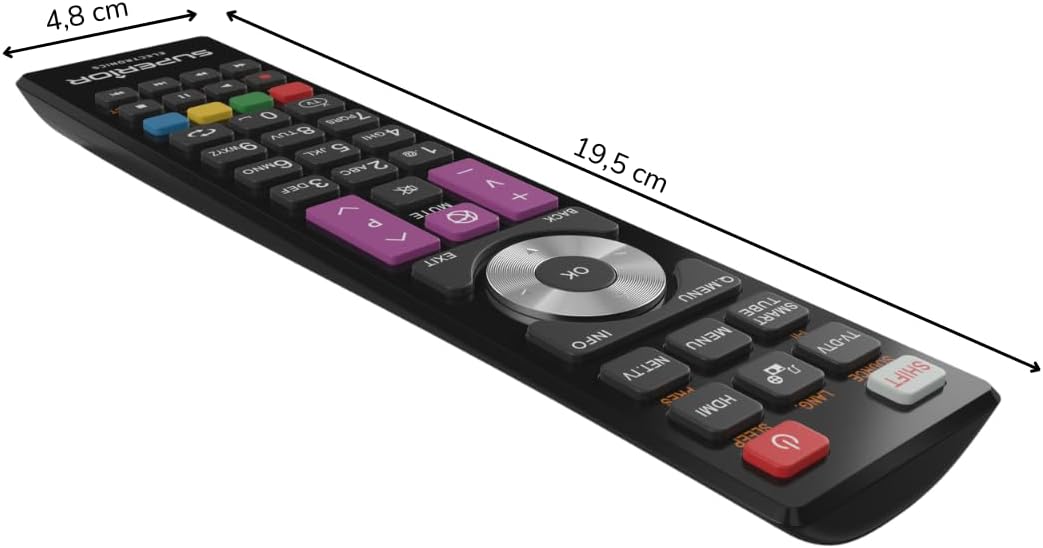
Figura 3: Dimensjonijiet tal-kontroll remot.
Garanzija u Appoġġ
For warranty information, please refer to the terms and conditions provided by your retailer at the time of purchase or contact Superior Electronics directly. For additional support or inquiries, you may visit the official Superior Electronics store on Amazon:


