Epson Home Cinema 5050UB - Take a Tour
This video provides a brief tour of the Epson Home Cinema 5050UB projector, showcasing its design and features. It offers a visual overview of the product for potential users.
Mudell: 5050UB | Marka: Epson
The Epson Home Cinema 5050UB 4K PRO-UHD projector is designed to deliver a high-quality 4K home theater experience. It features advanced processing for resolution enhancement, color, and image processing, producing exceptional brightness, color accuracy, and image detail. This manual provides essential information for setting up, operating, and maintaining your projector to ensure optimal performance.
Iċċekkja li l-oġġetti kollha huma inklużi fil-pakkett tiegħek:

The image above displays the projector and its accompanying accessories, ensuring you have everything needed for initial setup.
The Epson Home Cinema 5050UB is engineered for superior visual performance. Key features include:

The projector is capable of projecting images up to 120 inches or larger, providing a cinematic experience in your home. The diagram below illustrates various projection sizes based on distance.

Follow these steps to set up your Epson Home Cinema 5050UB projector:
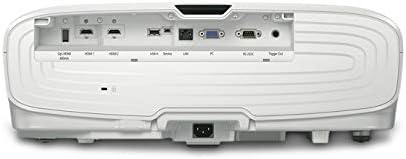
The rear panel provides multiple connectivity options for your home theater devices. Ensure all cables are securely connected.

This diagram illustrates the wide range of devices compatible with your projector and lists the available ports for connection.
Once the projector is set up, follow these steps for daily operation:
Regular maintenance ensures the longevity and optimal performance of your projector:
Jekk tiltaqa' ma' problemi bil-proġettazzjoni tiegħek, ipprova l-passi komuni li ġejjin għas-soluzzjoni tal-problemi:
For more detailed troubleshooting, refer to the comprehensive user manual or contact Epson customer support.
| Dimensjonijiet tal-Prodott | 17.7 x 20.4 x 7.5 pulzieri |
| Piż tal-oġġett | 24.7 liri |
| Numru tal-Mudell tal-Oġġett | V11H930020 |
| Brand | Epson |
| Teknoloġija tal-Konnettività | HDMI |
| Riżoluzzjoni tal-Wiri | 4096 x 2160 |
| Manifattur | Epson |
Epson offers a Garanzija Limitata ta' 1 Snin with full unit replacement for the Home Cinema 5050UB projector. Additionally, appoġġ tekniku bla ħlas tul il-ħajja is provided. For detailed warranty terms and to access support, please visit the official Epson webis-sit jew irreferi għad-dokumentazzjoni inkluża mal-prodott tiegħek.
This video provides a brief tour of the Epson Home Cinema 5050UB projector, showcasing its design and features. It offers a visual overview of the product for potential users.
 |
Epson Pro Cinema LS12000: Settings u Aġġustamenti Sempliċi Suġġeriti Tgħallem kif tottimizza l-proġettazzjoni Epson Pro Cinema LS12000 tiegħek b'dawn is-settings sempliċi suġġeriti għal-luminożità, il-kuntrast, iċ-ċarezza, u d-dettall. Jinkludi pariri ġenerali dwar is-setup. |
 |
Gwida għall-Aġġornament tal-Firmware tal-Proġettur Epson Istruzzjonijiet komprensivi għall-aġġornament tal-firmware fuq il-proġetturi Epson PowerLite Home Cinema 5030UB/5030UBe u PowerLite Pro Cinema 4030/6030UB, li jiżguraw prestazzjoni u karatteristiċi ottimali. |
 |
Gwida għall-Aġġornament tal-Firmware tal-Proġettur Epson għall-Mudelli PowerLite u Pro Cinema Istruzzjonijiet għall-aġġornament tal-firmware fuq il-proġetturi Epson PowerLite Home Cinema 5030UB/5030UBe u PowerLite Pro Cinema 4030/6030UB. Jinkludi passi biex tiċċekkja l-verżjoni attwali u tinstalla l-aġġornament. |
 |
Garanzija u Avviżi Limitati tal-Proġettur Epson Dan id-dokument jiddeskrivi l-avviżi tal-FCC tal-Istati Uniti u tal-Innovazzjoni, Xjenza u Żvilupp Ekonomiku tal-Kanada (ISED), flimkien mal-Garanzija Limitata ta' Tliet Snin tal-Proġettur ta' Epson America, Inc. Jiddeskrivi x'inhu kopert, x'se tagħmel Epson biex tikkoreġi l-problemi, u x'ma tkoprix il-garanzija limitata, inklużi proċeduri ta' riżoluzzjoni ta' tilwim u arbitraġġ. |
 |
Proġettur Epson Home Cinema 2200/2250: Gwida għall-Installazzjoni Mgħaġġla u l-Garanzija Gwida komprensiva għat-twaqqif tal-proġettazzjoni Epson Home Cinema 2200 jew 2250 tiegħek. Tinkludi struzzjonijiet pass pass għas-setup inizjali, il-konnessjoni ta' apparati, l-aġġustament tal-kwalità tal-immaġni, viewl-użu ta' kontenut 3D, l-użu tal-kontroll remot, is-soluzzjoni ta' problemi komuni, u l-fehim tal-garanzija tal-prodott. |
 |
Gwida għall-Utent tal-Proġettur tal-Laser Epson LS800BATV/LS800WATV 4K Gwida komprensiva għall-utent għall-proġetturi tal-lejżer Epson LS800BATV u LS800WATV 4K PRO-UHD, li tkopri s-setup, il-karatteristiċi, it-tħaddim, il-manutenzjoni, u s-soluzzjoni tal-problemi. |