1. Introduzzjoni
This manual provides essential information for the safe and efficient operation of your Vonyx CDJ450 DJ Workstation. Please read it thoroughly before using the device and retain it for future reference. The Vonyx CDJ450 is a versatile DJ workstation featuring dual CD/MP3 players, Bluetooth connectivity, two USB ports, and a 2-channel mixer, designed for comprehensive audio control.
2. Istruzzjonijiet tas-Sigurtà
- Żgura li l-provvista tal-enerġija taqbel mal-voltage speċifikat fuq l-unità.
- Tesponix l-unità għax-xita jew għall-umdità biex tevita xokk elettriku.
- Evita li tpoġġi l-unità ħdejn sorsi ta’ sħana jew fid-dawl tax-xemx dirett.
- Tiftaħx is-casing; irreferi s-servizz kollu lil persunal kwalifikat.
- Żomm il-fetħiet tal-ventilazzjoni ċari biex tevita sħana żejda.
- Skonnettja l-korda tal-enerġija waqt maltempati bis-sajjetti jew meta ma tużax għal perjodi twal.
3. Prodott Aktarview
The Vonyx CDJ450 integrates two media players and a central mixer into a single unit, offering a compact and powerful solution for DJs.

Figura 3.1: Minn fuq għal isfel view of the Vonyx CDJ450 DJ Workstation, showing the dual players and central mixer controls.

Figura 3.2: Angolat view of the workstation, highlighting its compact design and accessible controls.

Figura 3.3: Close-up of the central mixer and player controls, including jog wheels, pitch faders, and display screens.

Figura 3.4: USB ports located on the top panel, demonstrating USB drive connectivity for MP3 playback.

Figura 3.5: Quddiem view with both CD trays open, ready for disc insertion.

Figura 3.6: Dettaljati view of a player's display, showing track information, and associated playback controls.
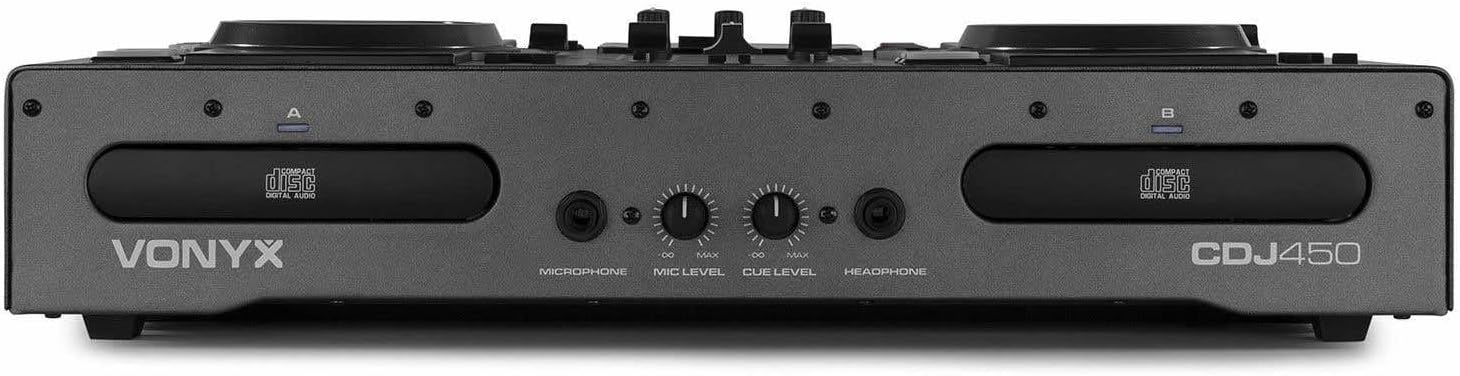
Figura 3.7: Front panel featuring microphone input, microphone level control, cue level, and headphone output.

Figura 3.8: Rear panel showing power input, main outputs (XLR, RCA), record output, USB Type-B port, and switchable Phono/Line inputs.
4. Setup
- Pjazzament: Place the CDJ450 on a stable, flat surface with adequate ventilation.
- Konnessjoni tal-Enerġija: Connect the included power cable to the unit's power input and then to a suitable wall outlet. Ensure the power switch is in the OFF position before connecting.
- Output Awdjo: Connect the main outputs (XLR or RCA) to your amplifier, powered speakers, or PA system.
- Apparati Esterni (Mhux obbligatorji): Connect external audio sources (e.g., turntables, additional CD players) to the Phono/Line inputs on the rear panel. Use the switches to select the correct input type.
- Microphone/Headphones: Connect your microphone to the XLR-DJ input or the 6.3mm jack on the front. Plug your headphones into the 3.5mm jack on the front.
- Konnessjoni USB (Mhux obbligatorja): For computer control or recording, connect a USB Type-B cable from the unit to your computer.
5. Istruzzjonijiet Operattivi
5.1. Power On/Off
Flip the power switch on the rear panel to the 'ON' position. The displays will illuminate. To power off, flip the switch back to 'OFF'.
5.2. Media Playback (CD/USB)
- Daqq tas-CD: Insert an audio CD or MP3 CD into one of the CD trays. The unit will automatically read the disc.
- Daqq USB: Daħħal USB flash drive li jkun fih MP3 files into one of the USB ports on the top panel.
- Għażla tas-Sors: Use the 'SOURCE' button above each player to switch between CD and USB input.
- Għażla tal-binarji: Use the navigation buttons or the numeric keypad to select tracks. The integrated folder search function allows quick access to files on USB drives.
- Kontroll tal-daqq: Use the 'PLAY/PAUSE' and 'CUE' buttons for standard playback control.
5.3. Konnettività Bluetooth
- Activate Bluetooth on your smartphone, tablet, or laptop.
- Select 'Bluetooth' as the source on the desired player.
- Fittex għal available devices on your external device and select 'Vonyx CDJ450'.
- Once paired, you can stream audio wirelessly to the workstation.
5.4. Mixer Functions
- Faders tal-Kanal: Adjust the volume level for each player (Channel A and B).
- Kontrolli EQ: Use the HIGH, MID, and LOW knobs for each channel to adjust the frequency response.
- Gain/Level: Adjust the input gain for each channel to match levels.
- Crossfader: Blend between Channel A and Channel B.
- Output Master: Control the overall volume of the mix.
- Mikrofonu: Adjust microphone volume using the 'MIC LEVEL' knob on the front panel.
- Headphones: Use the 'CUE LEVEL' knob to adjust headphone volume and the 'CUE' buttons on each channel to monitor specific sources.
5.5. Karatteristiċi Speċjali
- Scratch: Use the jog wheels for scratching effects.
- Reverse: Play audio in reverse.
- Waqfa: Create a brake effect on playback.
- Żift: Adjust the playback speed and pitch using the pitch faders.
- Loop: Use 'LOOP IN', 'LOOP OUT', and 'RELOOP' buttons to create and manage seamless loops.
6. Konnessjonijiet
The CDJ450 offers a variety of input and output options:
- Outputs:
- 2 x XLR Speaker Outputs
- 1 x RCA Master Output
- 1 x RCA Recorder Output
- Inputs:
- 2 x Switchable Phono/Line RCA Inputs (for external devices)
- 1 x XLR-DJ Microphone Input
- 1 x 6.3mm Jack Microphone Input (front)
- Digital/Control:
- 2 x USB Ports (Type-A, top panel, for media playback)
- 1 x USB Type-B Port (rear, for computer connection)
- Konnettività Bluetooth
- Monitoraġġ:
- 1 x 3.5mm Jack Headphone Output (front)
7. Manutenzjoni
- Tindif: Uża drapp artab u niexef biex tnaddaf il-barra tal-unità. Tużax prodotti tat-tindif jew solventi li joborxu.
- CD Trays: Keep CD trays free of dust and debris. Avoid touching the lens inside the CD player.
- Ħażna: When not in use, store the unit in a cool, dry place, away from direct sunlight and extreme temperatures.
8 Issolvi l-problemi
| Problema | Kawża Possibbli | Soluzzjoni |
|---|---|---|
| Ebda qawwa | Power cable disconnected; power switch off; faulty outlet. | Check power cable connection; ensure power switch is ON; try a different outlet. |
| Ebda output tal-ħoss | Volume levels too low; incorrect input/output connections; external ampisbaħ. | Increase master/channel volumes; verify all audio connections; ensure external amplifier huwa mixgħul. |
| CD not playing/reading | Disc dirty or scratched; incorrect disc format; source not selected. | Clean or replace disc; ensure disc is audio CD or MP3 CD; select 'CD' source. |
| USB mhux qed jilgħab | USB drive not formatted correctly; unsupported file type; source not selected. | Ensure USB is FAT32 formatted; only MP3 files supported; select 'USB' source. |
| Il-Bluetooth mhux qed jgħaqqad | Bluetooth not enabled on external device; unit not in pairing mode; interference. | Enable Bluetooth on your device; select 'Bluetooth' source on CDJ450; try re-pairing. |
9. Speċifikazzjonijiet
- Isem tal-Mudell: CDJ450
- Teknoloġija tal-Konnettività: Bluetooth, USB
- Numru ta' Diski: 2
- Formati Awdjo Appoġġjati: CD, MP3, USB, AAC (Bluetooth)
- Tip ta' Konnettur: Bluetooth, Jack 6.35 mm, RCA, USB, XLR 3-pin
- Numru ta' kanali: 2
- Piż tal-oġġett: 7.8 Kilogrammi
- Apparati Kompatibbli: Headphones, Kelliema
- Manifattur: Vonyx
10. Garanzija u Appoġġ
For warranty information, please refer to the documentation provided at the time of purchase or contact your retailer. For technical support, please visit the official Vonyx websit jew ikkuntattja lid-dipartiment tas-servizz tal-konsumatur tagħhom.


