Introduzzjoni
Welcome to the Ipega PG-9033 Bluetooth Gamepad user manual. This guide provides detailed instructions for setting up, operating, maintaining, and troubleshooting your new wireless controller. Please read this manual carefully before use to ensure optimal performance and longevity of your device.
Prodott Overview
The Ipega PG-9033 is a versatile Bluetooth gamepad designed for an enhanced gaming experience across multiple platforms, including Android, iOS, and PC. It features an adjustable phone holder, dual analog sticks, a D-pad, and action buttons.

Figure 1: The Ipega PG-9033 Bluetooth Gamepad with a smartphone securely mounted in its adjustable holder, actively displaying a racing game. This illustrates the controller's primary use for mobile gaming.
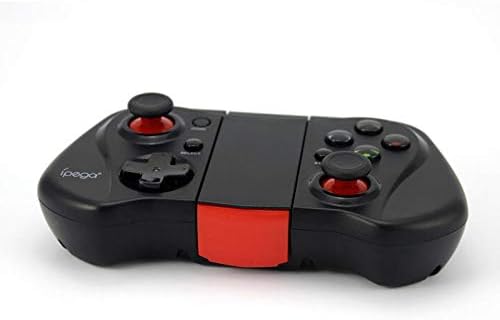
Figura 2: Naħa A view of the Ipega PG-9033 Bluetooth Gamepad, showcasing its ergonomic design and compact form factor when not in use. The red accent on the central hinge is visible.
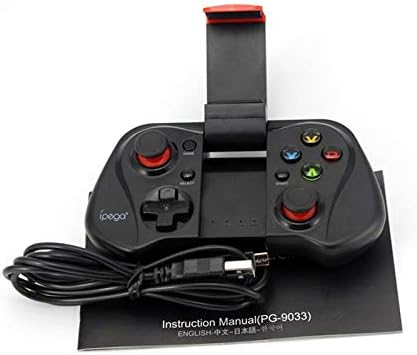
Figure 3: The Ipega PG-9033 Bluetooth Gamepad displayed alongside its USB charging cable and the included instruction manual, which clearly indicates the model number PG-9033.

Figura 4: In-naħa ta' wara view of the Ipega PG-9033 Bluetooth Gamepad, featuring a label with technical details such as "BLUETOOTH CONTROLLER," working voltage, working current, and input specifications.
Setup
Iċċarġjar tal-Gamepad
Before first use, fully charge the gamepad using the provided USB cable.
- Connect the micro-USB end of the charging cable to the gamepad's charging port.
- Connect the USB-A end to a USB power source (e.g., computer, USB wall adapter).
- The charging indicator light will illuminate. It will typically turn off or change color when fully charged.
Tqabbil ma' Apparat
The PG-9033 supports different pairing modes for various operating systems.
Tqabbil Android
- Ensure the gamepad is off.
- Agħfas u żomm il- HOME buttuna u l- X button simultaneously until the indicator light flashes rapidly. This puts the gamepad into Android pairing mode.
- Fuq it-tagħmir Android tiegħek, mur fis-settings tal-Bluetooth u fittex apparati disponibbli.
- Select "PG-9033" from the list to pair. The indicator light will become solid when connected.
iOS Pairing (iCade Mode)
- Ensure the gamepad is off.
- Agħfas u żomm il- HOME buttuna u l- B button simultaneously until the indicator light flashes rapidly. This puts the gamepad into iOS iCade pairing mode.
- On your iOS device, go to Bluetooth settings and search for available devices.
- Select "PG-9033" from the list to pair. The indicator light will become solid when connected.
Note: iCade mode has limited game compatibility. For broader iOS compatibility, check specific game requirements.
Tqabbil tal-PC
- Ensure the gamepad is off.
- Agħfas u żomm il- HOME buttuna u l- A button simultaneously until the indicator light flashes rapidly. This puts the gamepad into PC pairing mode.
- On your PC, go to Bluetooth settings and search for available devices.
- Select "PG-9033" from the list to pair. The indicator light will become solid when connected.
Note: A Bluetooth adapter may be required for PCs without built-in Bluetooth.
Istruzzjonijiet Operattivi
Twaħħal l-Ismartphone Tiegħek
- Gently extend the adjustable phone holder located on the top of the gamepad.
- Carefully place your smartphone into the holder, ensuring it is securely gripped and centered.
- Aġġusta l-angolu għall-aħjar viewing.
Game Mode Selection
The gamepad automatically enters the last used mode upon reconnection. To switch modes, disconnect the gamepad and re-pair using the desired mode's button combination (HOME + X for Android, HOME + B for iOS, HOME + A for PC).
Qawwa mixgħul/mitfi
Biex tixgħel, agħfas il- HOME buttuna. Biex titfi, agħfas u żomm il- HOME button for approximately 5 seconds until the indicator light turns off. The gamepad will automatically power off after a period of inactivity.
Manutenzjoni
To ensure the longevity and proper functioning of your Ipega PG-9033 gamepad, follow these maintenance guidelines:
- Żomm l-apparat niexef. Evita l-espożizzjoni għall-umdità jew likwidi.
- Clean the gamepad with a soft, dry cloth. Do not use harsh chemicals or abrasive cleaners.
- Aħżen il-gamepad f'post frisk u niexef 'il bogħod mix-xemx diretta u minn temperaturi estremi.
- Avoid dropping or subjecting the gamepad to strong impacts.
- Iċċarġja l-batterija regolarment, anke jekk ma tkunx qed tintuża, biex iżżommha f'saħħitha.
Do not attempt to disassemble the gamepad. This will void the warranty and may cause damage.
Issolvi l-problemi
Gamepad not connecting or pairing:
- Kun żgur li l-gamepad huwa ċċarġjat kompletament.
- Ivverifika li l-Bluetooth huwa attivat fuq it-tagħmir tiegħek.
- Make sure the gamepad is in the correct pairing mode for your device (Android, iOS, or PC).
- Ipprova tinsa l-apparat fis-settings tal-Bluetooth tiegħek u erġa' waħħalh.
- Erġa' ibda kemm il-gamepad kif ukoll l-apparat tiegħek.
Buttuni jew joysticks ma jirrispondux:
- Check if the gamepad is properly connected.
- Kun żgur li l-logħba li qed tilgħab tappoġġja kontrolluri esterni.
- Some games may require specific controller mapping or settings adjustments within the game.
- If the issue persists, try resetting the gamepad (if a reset button is available, typically a small pinhole).
Dewmien jew dewmien fl-input:
- Ensure your device is not too far from the gamepad. Maintain a clear line of sight.
- Naqqas l-interferenza minn apparati oħra mingħajr fili.
- Agħlaq l-applikazzjonijiet fl-isfond li mhumiex meħtieġa fuq it-tagħmir tiegħek.
Phone not fitting in holder:
- The holder is designed for most smartphones. Ensure your phone's dimensions are within the supported range.
- Remove any bulky phone cases that might prevent a secure fit.
Speċifikazzjonijiet
| Karatteristika | Dettall |
|---|---|
| Mudell | PG-9033 |
| Brand | Ipega |
| Konnettività | Bluetooth |
| Kompatibilità | Android, iOS (iCade), PC |
| Ħidma Voltage | DC 3.7V |
| Kurrent tax-Xogħol | 30mA |
| Input Voltage | DC 5V 500mA |
| ASIN | B07P52YH7M |
Garanzija u Appoġġ
For warranty information and technical support, please refer to the official Ipega webis-sit jew ikkuntattja lill-bejjiegħ tiegħek. Żomm l-irċevuta tax-xiri tiegħek bħala prova tax-xiri.
Dan il-manwal huwa għal skopijiet informattivi biss. L-ispeċifikazzjonijiet jistgħu jinbidlu mingħajr avviż.


