1. Introduzzjoni
The Donner Dark Mouse Distortion Pedal is an effect unit designed for electric guitar, providing a range of distortion tones. It features two distinct distortion modes and a true bypass design to maintain signal integrity when the effect is disengaged. This manual provides essential information for setting up, operating, and maintaining your pedal.

Figure 1: The Donner Dark Mouse Distortion Pedal, designed to deliver classic distortion sounds.
2. Prodott Aktarview
The Dark Mouse pedal features intuitive controls for shaping your sound. Understanding these controls is key to utilizing the pedal's full potential.

Figure 2: Control layout of the Dark Mouse Distortion Pedal.
Kontrolli:
- 1. DC 9V Jack: Power input for a 9V DC adapter (center negative).
- 2. Mode Switch (CLASSIC/HYPER): Toggles between two distinct distortion characteristics.
- 3. LEVEL Knob: Jaġġusta l-volum ġenerali tal-ħruġ tal-effett.
- 4. FILTER Knob: Controls the tone or brightness of the distortion. Turning clockwise increases treble.
- 5. DIST Knob: Adjusts the amount of distortion or gain.
- 6. Input Jack: Connect your guitar or previous effect pedal here.
- 7. Output Jack: Qabbad ma tiegħek amplifier jew il-pedala tal-effett li jmiss.
- 8. Indikatur LED: Jixgħel meta l-effett ikun attiv.
- 9. Swiċċ tas-saqajn: Jattiva jew jiddiżattiva l-effett.
3. Setup
Follow these steps to connect your Donner Dark Mouse Distortion Pedal:
- Tiżgura tiegħek ampL-alimentatur jintefa qabel ma jsiru xi konnessjonijiet.
- Qabbad il-kitarra elettrika tiegħek mal- Input Jack (6) of the pedal using a standard 1/4-inch instrument cable.
- Qabbad il- Output Jack (7) of the pedal to your ampL-input tal-lifer bl-użu ta' kejbil ieħor tal-istrument standard ta' 1/4 pulzier.
- Connect a 9V DC power adapter (center negative, 500mA minimum) to the DC 9V Jack (1). Note: The power supply is not included. Using an incorrect power supply may damage the pedal.
- Ladarba l-konnessjonijiet kollha jkunu siguri, tista' tixgħel tiegħek ampaktar ħaj.

Figure 3: Proper connection of the pedal to power and instrument cables.
4. Istruzzjonijiet Operattivi
The Dark Mouse pedal offers two distinct distortion modes and flexible controls to tailor your sound.
Involvu l-Effett:
Agħfas il- Swiċċ tas-saqajn (9) to toggle the effect on or off. The Indikatur LED (8) will illuminate when the effect is active.
Selecting Distortion Modes:
Uża l- Swiċċ tal-Mod (2) to select between the two distortion modes:
- KLASSIKU: Jipproduċi sħun, vintage distortion sound with a subtle fuzz characteristic.
- HYPER: Offers a more powerful and aggressive sound with enhanced edges and low-end response.

Figure 4: The mode switch allows selection between Classic and Hyper distortion.
Adjusting Tone and Gain:
Utilize the three control knobs to fine-tune your distortion sound:
- LEVEL Knob (3): Adjust this to set the overall output volume of the pedal. Start with it at a moderate level and adjust to match your bypassed signal volume.
- DIST Knob (5): Turn this knob clockwise to increase the amount of distortion, from subtle crunch to heavy saturation.
- FILTER Knob (4): This control acts as a tone shaping filter. Turning it clockwise will increase the brightness and treble content of the distortion, while turning it counter-clockwise will result in a darker tone.
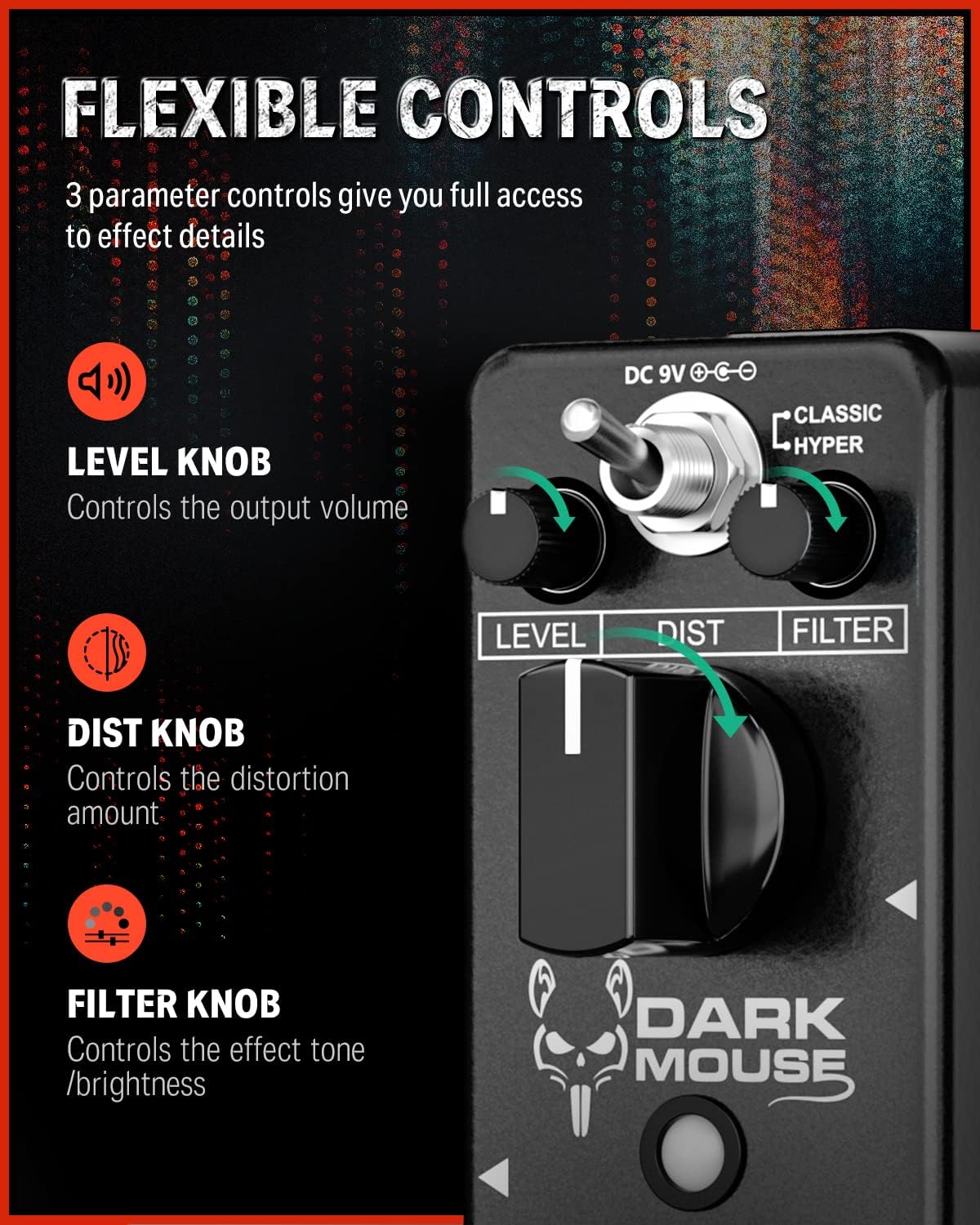
Figure 5: The Level, Dist, and Filter knobs provide flexible control over the effect.
Bypass Veru:
The pedal features true bypass circuitry. This means that when the effect is disengaged, your guitar signal passes directly through the pedal without any electronic interference, preserving your original tone. The LED indicator will be off when in true bypass mode.

Figure 6: True bypass ensures a clean signal when the effect is off.
5. Manutenzjoni
- Tindif: Uża drapp artab u niexef biex tnaddaf il-barra tal-pedala. Evita li tuża prodotti tat-tindif jew solventi li joborxu.
- Ħażna: Aħżen il-pedala f'ambjent niexef, 'il bogħod minn temperaturi estremi u dawl tax-xemx dirett.
- Provvista tal-Enerġija: Always use a 9V DC center-negative power adapter with a minimum of 500mA current. Disconnect the power supply when the pedal is not in use for extended periods.
- Kura Fiżika: The pedal features a durable aluminum alloy casing. Avoid dropping the pedal or subjecting it to excessive force.
6 Issolvi l-problemi
- Ebda Ħsejjes:
- Iċċekkja l-konnessjonijiet kollha tal-kejbil (il-kitarra għall-input, l-output għall- amp).
- Ensure the power adapter is correctly connected and providing power.
- Ivverifika li l-kitarra tiegħek u amplifier are functioning correctly.
- If the LED is off, press the footswitch to engage the effect.
- Weak or Distorted Sound (when bypassed):
- This pedal features true bypass, so a weak or distorted bypassed signal usually indicates an issue with cables or other equipment in your signal chain, not the pedal itself.
- Ħoss/Ħoss mhux mixtieq:
- Ensure you are using a regulated 9V DC center-negative power supply. Unregulated power supplies can introduce noise.
- Iċċekkja għal kejbils difettużi.
- Move the pedal away from power transformers or other electronic devices that may cause interference.
7. Speċifikazzjonijiet
| Karatteristika | Speċifikazzjoni |
|---|---|
| Numru tal-Mudell | EC1178-FBA-US |
| Piż tal-oġġett | 8.8 uqija (0.25 Kilogrammi) |
| Dimensjonijiet tal-Prodott | 3.7 x 1.69 x 2.01 pulzieri (3.7"T x 1.7"W x 2"Għ) |
| Materjal tal-Korp | Liga tal-aluminju |
| Sors tal-Enerġija | Adapter, Elettriku |
| Voltage | 9 Volts DC (Center Negative) |
| Tip ta' Konnettur | 1/4" (6.35mm) mono jack |
| Format tas-Sinjal | Analogu |
8. X'hemm fil-Kaxxa
- 1 x Donner Dark Mouse pedal
9. Garanzija u Appoġġ
For warranty information or technical support, please refer to the official Donner website or contact Donner customer service directly. Keep your purchase receipt for warranty claims.


