1. Introduzzjoni
Grazzi tax-xiriasing the Pioneer VSX-534 5.1 Channel Surround AM/FM AV Receiver. This receiver is designed to deliver an immersive audio-visual experience with its 5.1 channel surround sound, 3D compatibility, and various connectivity options. This manual will guide you through the setup, operation, and maintenance of your new AV receiver to ensure optimal performance and longevity.
2. Informazzjoni dwar is-Sigurtà
Jekk jogħġbok aqra l-istruzzjonijiet kollha tas-sigurtà bir-reqqa qabel ma tħaddem l-unità. Żomm dan il-manwal għal referenza futura.
- Sors tal-Enerġija: Connect the unit only to an AC 220-240V, 50/60Hz power supply.
- Ventilazzjoni: Ensure adequate ventilation. Do not block ventilation openings. Maintain a minimum distance of 10 cm (4 inches) around the unit for proper airflow.
- Ilma u Umdità: Tesponix l-unità għax-xita, umdità, taqtir, jew titjir tal-ilma. Tpoġġix oġġetti mimlija b'likwidi, bħal vażuni, fuq l-unità.
- Sħana: Tpoġġix l-unità ħdejn sorsi tas-sħana bħal radjaturi, reġistri tas-sħana, stufi, jew apparat ieħor (inkluż amplifiers) li jipproduċu sħana.
- Tindif: Skonnettja l-unità mill-plagg tal-ħajt qabel ma tnaddafha. Uża drapp niexef għat-tindif.
- Servizzi: Tippruvax isservi dan il-prodott int stess. Irreferi l-manutenzjoni kollha lil persunal tas-servizz kwalifikat.
- Impedenza tal-Ispeaker: Ensure connected speakers have an impedance between 6 and 16 ohms.
3. Kontenut tal-Pakkett
Ivverifika li l-oġġetti kollha huma preżenti fil-pakkett:
- Pioneer VSX-534 AV Receiver
- Kontroll mill-bogħod
- Korda tal-Enerġija
- Setup Microphone for Auto Calibration
- AM Loop Antenna
- Antenna tal-Wajer FM
- Gwida Quick Start
- Fuljett dwar is-Sikurezza
4. Setup
4.1. Żpakkjar u Tqegħid
Carefully remove the receiver from its packaging. Place the receiver on a stable, flat surface with adequate ventilation. Avoid placing it in direct sunlight or near heat sources.
4.2. Front Panel Overview
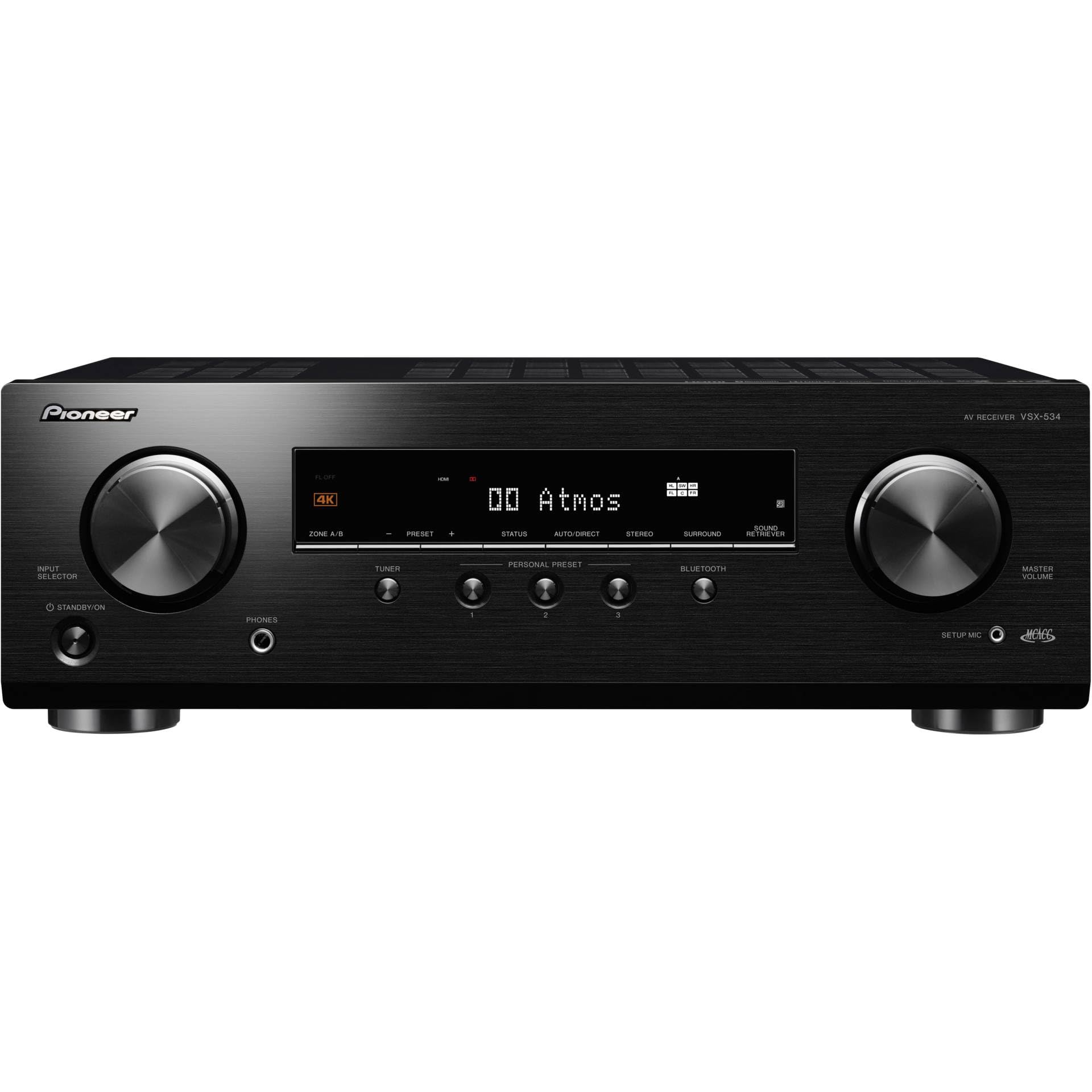
Immaġni: Quddiem view of the Pioneer VSX-534 AV Receiver, showing the input selector, standby/on button, phones jack, setup mic jack, master volume knob, and display.
4.3. Konnessjonijiet tal-Panew ta 'wara
Connect your audio and video devices to the appropriate inputs on the rear panel. Ensure all connections are secure.

Immaġni: Wara view of the Pioneer VSX-534 AV Receiver, highlighting various input and output ports including HDMI, optical, coaxial, analog audio, speaker terminals, and antenna connections.
- Konnessjonijiet HDMI: Connect your video sources (Blu-ray player, game console, TV box) to the HDMI IN ports (1-4). Connect your TV to the HDMI OUT (ARC) port.
- Konnessjonijiet Awdjo: Use optical or coaxial digital audio inputs for devices without HDMI. Analog audio inputs (CD, SAT/CBL) are also available.
- Konnessjonijiet tal-Ispeaker: Connect your 5.1 channel speakers to the corresponding terminals (FRONT L/R, CENTER, SURROUND L/R, SUBWOOFER PRE OUT). Ensure correct polarity (+ to + and - to -).
- Konnessjonijiet tal-antenna: Connect the supplied AM loop antenna and FM wire antenna for radio reception.
- Netwerk: Connect an Ethernet cable to the NETWORK port for wired network connectivity (if applicable to your model variant).
- Qawwa: After all connections are made, connect the power cord to the AC IN socket and then to a wall outlet.
4.4. Speaker Setup and Calibration
The VSX-534 features automatic calibration to optimize sound settings for your listening environment.
- Place the supplied setup microphone at your primary listening position.
- Connect the setup microphone to the SETUP MIC jack on the front panel.
- Follow the on-screen instructions (if connected to a TV) or the display panel instructions to initiate the auto-calibration process. The system will emit test tones to measure speaker distances, levels, and frequency response.
- Once calibration is complete, disconnect the setup microphone.
5. Istruzzjonijiet Operattivi
5.1. Operazzjoni Bażika
- Power On/Off: Press the STANDBY/ON button on the front panel or the remote control to turn the receiver on or off.
- Għażla tal-Input: Use the INPUT SELECTOR knob on the front panel or the corresponding input buttons on the remote control (e.g., BD/DVD, CBL/SAT) to switch between connected devices.
- Kontroll tal-Volum: Adjust the MASTER VOLUME knob on the front panel or the VOLUME +/- buttons on the remote control.
- Modi tal-Ħsejjes: Use the SURROUND button on the front panel or remote to cycle through various sound modes (e.g., Stereo, Direct, Surround).
5.2. Konnettività Bluetooth
The VSX-534 features built-in Bluetooth for wireless audio streaming from compatible devices.
- Select "Bluetooth" as the input source using the INPUT SELECTOR or remote.
- Fuq it-tagħmir mobbli tiegħek, ippermetti l-Bluetooth u fittex tagħmir disponibbli.
- Select "Pioneer VSX-534" (or similar name) from the list of devices to pair.
- Once paired, you can stream audio from your device to the receiver.
5.3. Tħaddim tar-Radju AM/FM
To listen to AM or FM radio:
- Select "TUNER" as the input source.
- Use the TUNER buttons on the remote or front panel to select AM or FM band.
- Tune to your desired station using the tuning controls.
- You can save favorite stations as presets for quick access.
6. Manutenzjoni
- Tindif: Imsaħ l-unità b'ċarruta ratba u niexfa. Tużax prodotti tat-tindif, xama', jew solventi li joborxu.
- Ventilazzjoni: Iċċekkja regolarment li l-fetħiet tal-ventilazzjoni mhumiex imblukkati bit-trab jew bil-fdalijiet.
- Korda tal-Enerġija: Spezzjona perjodikament il-korda tad-dawl għal kwalunkwe ħsara.
7 Issolvi l-problemi
If you experience issues with your receiver, refer to the following common solutions:
| Problema | Kawża / Soluzzjoni Possibbli |
|---|---|
| Ebda qawwa | Check if the power cord is securely connected. Ensure the wall outlet is functioning. |
| L-ebda ħoss | Verify speaker connections. Check volume level. Ensure correct input source is selected. Check mute function. |
| L-ebda stampa | Check HDMI connections between source, receiver, and TV. Ensure correct input source is selected on both receiver and TV. |
| Il-Bluetooth mhux qed jgħaqqad | Ensure Bluetooth is enabled on your device and the receiver is in pairing mode. Move devices closer. Clear previous pairings. |
| Il-kontroll mill-bogħod ma jaħdimx | Check batteries. Ensure no obstacles between remote and receiver. |
For more detailed troubleshooting, please refer to the full user manual available on the Pioneer support websit.
8. Speċifikazzjonijiet
| Karatteristika | Dettall |
|---|---|
| Numru tal-Mudell | VSX534BMMP |
| Dimensjonijiet tal-Prodott | 43.5 x 32.1 x 14.8 ċm |
| Piż tal-oġġett | 8 Kilogrammi |
| Kulur | Iswed |
| Apparati Kompatibbli | TV, Speaker, Blu-ray Player, Game Console |
| Teknoloġija tal-Konnettività | Bluetooth, HDMI, USB |
| Tip ta' Konnettur | Bluetooth, USB Type A |
| Qawwa tal-Ħruġ (Watts) | 150 Watts |
| Voltage | 220 Volts |
| Kodifikazzjoni Awdjo | DTS |
| Modalità tal-Ħruġ tal-Awdjo | Jdawru |
| Surround Sound Channel Konfigurazzjoni | 5.1 |
| Portijiet HDMI totali | 4 |
| Karatteristika Speċjali | Built-in Bluetooth, Auto Calibration |
9. Garanzija u Appoġġ
Pioneer offers a limited warranty for this product. For specific warranty terms and conditions, please refer to the warranty card included in your package or visit the official Pioneer websit.
For technical support, product registration, or to download the full user manual, please visit the official PIONEER support websit jew ikkuntattja lis-servizz tal-konsumatur tagħhom.


