Introduzzjoni
This manual provides essential information for the setup, operation, and maintenance of your PowerA Wired Controller for Xbox One. Designed for comfort and precision, this officially licensed controller enhances your gaming experience on Xbox One, Xbox One S, Xbox One X, and Windows 10. It features a soft-touch rubberized finish, dual rumble motors, and a 3.5mm stereo headset jack.
Setup
Follow these steps to connect your PowerA Wired Controller to your console or PC.
- Iftaħ il-Kontrollur mill-pakkett: Carefully remove the controller and its detachable 8ft micro-USB to standard USB cable from the packaging.
- Connect the Cable to Controller: Insert the micro-USB end of the cable into the port on the top of the controller.
- Qabbad mal-Console/PC: Insert the standard USB end of the cable into an available USB port on your Xbox One console or Windows 10 PC.
- Indikatur tal-Enerġija: The LED power indicator on the controller will illuminate, indicating a successful connection and that the controller is ready for use.

Figura 1: Quddiem view of the PowerA Wired Controller, showcasinid-disinn ergonomiku u t-tqassim tal-buttuni tiegħu.
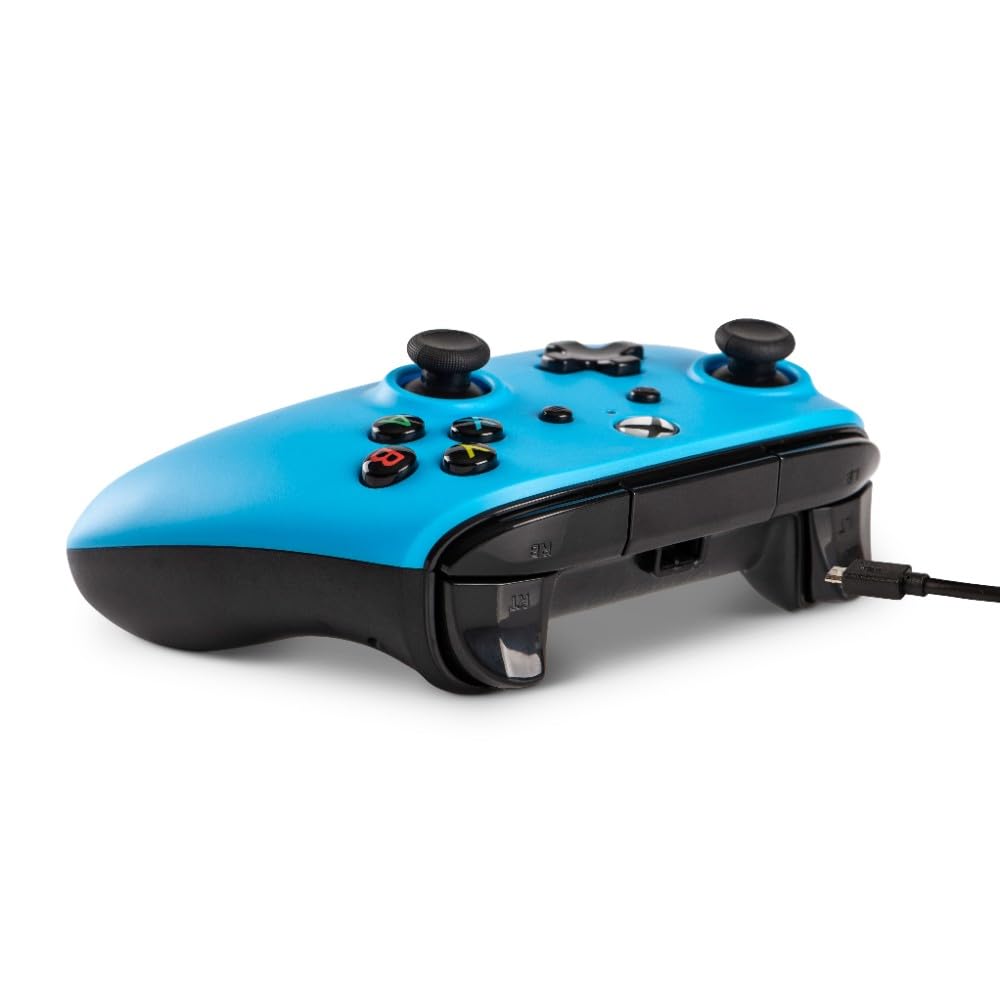
Figura 2: Ġenb view illustrating the detachable micro-USB cable connection point on the controller.
Istruzzjonijiet Operattivi
The PowerA Wired Controller is designed for intuitive gameplay. Familiarize yourself with its key components:
- Sticks Analogiċi: Two precision-tuned analog sticks for smooth, accurate movement and camera control.
- D-Pad: An 8-way plus-shaped directional pad for precise directional input.
- Buttuni ABXY: Standard button placement for action commands.
- Bumpers and Triggers: Left/right bumpers and triggers for quick actions and nuanced control.
- Muturi Doppji tar-Rumble: Provides immersive force feedback during gameplay.
- 3.5mm Stereo Headset Jack: Connect your compatible gaming headset for in-game audio and chat.
Simply launch your game after connecting the controller. The system will automatically recognize the controller, allowing you to navigate menus and play games.
Manutenzjoni
Biex tiżgura l-lonġevità u l-prestazzjoni ottimali tal-kontrollur tiegħek, segwi dawn il-linji gwida tal-manutenzjoni:
- Tindif: Uża drapp artab u niexef biex timsaħ il-kontrollur. Għal ħmieġ iebes, nixxef ftit.ampLaħlaħ id-drapp bl-ilma. Evita kimiċi ħarxa jew prodotti tat-tindif li joborxu.
- Ħażna: When not in use, store the controller in a cool, dry place. The detachable cable allows for easy storage and reduces clutter, preventing cable damage.
- Immaniġġjar: Avoid dropping the controller or exposing it to extreme temperatures or direct sunlight. Do not pull the cable forcefully from the controller or console.
Issolvi l-problemi
If you encounter issues with your PowerA Wired Controller, try the following solutions:
- Il-Kontrollur Mhux Jirrispondi:
- Kun żgur li l-kejbil tal-USB huwa konness sew kemm mal-kontrollur kif ukoll mal-console/PC.
- Try connecting the controller to a different USB port on your console/PC.
- Erġa' ibda l-console jew il-PC tiegħek.
- Headset Audio Issues:
- Iċċekkja li l-headset tiegħek huwa mdaħħal kompletament fil-jack ta' 3.5mm fuq il-kontrollur.
- Check your console's audio settings to ensure the headset is recognized and volume levels are appropriate.
- Ittestja l-headset b'apparat ieħor biex tikkonferma li qed jaħdem sew.
- Buttons/Sticks Not Working Correctly:
- Ensure no debris is lodged around the buttons or sticks.
- Skonnettja u erġa' qabbad il-kontrollur.
- If issues persist, contact PowerA customer support.
Speċifikazzjonijiet
| Karatteristika | Dettall |
|---|---|
| Numru tal-Mudell | 1508493-01 |
| Kompatibilità | Xbox One, Xbox One S, Xbox One X, Windows 10 |
| Konnettività | Wired (Detachable 8ft Micro-USB to Standard USB Cable) |
| Dimensjonijiet (L x W x H) | 3.9 x 4.02 x 7.91 pulzieri |
| Piż | 10.9 uqija |
| Karatteristiċi | Dual rumble motors, 3.5mm stereo headset jack, precision-tuned analog sticks, 8-way D-pad, standard ABXY buttons, left/right bumpers and triggers |
| Manifattur | QawwaA |
| L-ewwel Disponibbli | 13 ta’ Frar, 2019 |
Garanzija u Appoġġ
For information regarding product warranty, returns, or technical support, please refer to the documentation included with your product or visit the official PowerA websit.
Tista 'wkoll iżżur il- PowerA Store on Amazon għal aktar informazzjoni dwar il-prodott u riżorsi ta' appoġġ.


