1. Introduzzjoni
The Edifier S3000Pro Audiophile Active Speakers are designed to deliver high-fidelity audio with versatile connectivity options. Featuring Bluetooth 5.0 with aptX HD, USB audio, planar diaphragm tweeters, and 6.5-inch woofers, these speakers offer a premium listening experience. The innovative KleerNet wireless technology allows for a wire-free connection between the left and right speakers, providing flexible placement without compromising sound quality.
2. Kontenut tal-Pakkett
Jekk jogħġbok kun żgur li l-oġġetti kollha huma preżenti fil-pakkett:
- Edifier S3000Pro Speakers (1 pair)
- Kontroll mill-bogħod
- Kejbil tal-Enerġija
- Cable USB
- Kejbil ottiku
- Kejbil tal-Awdjo RCA għal RCA
- 3.5mm sa RCA Audio Cable
- Manwal għall-Utent
3. Konfigurazzjoni u Konnessjonijiet
The Edifier S3000Pro speakers are designed for easy setup. The left and right speakers connect wirelessly to each other, eliminating the need for a speaker cable between them. Each speaker requires its own power connection.
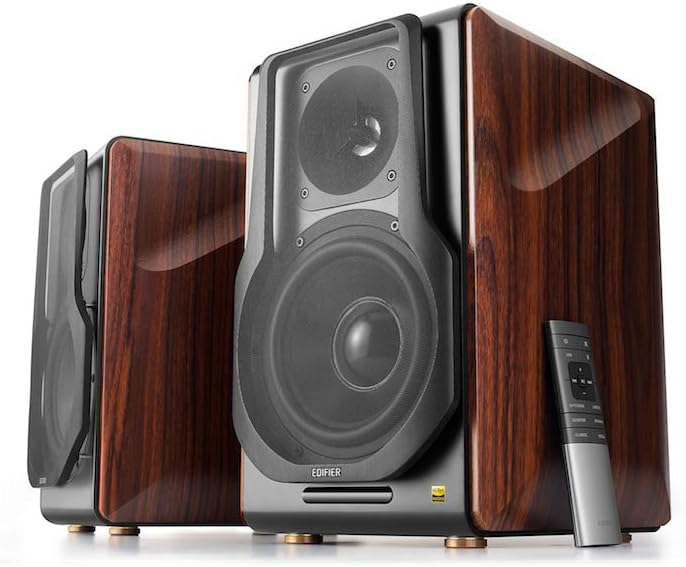
Figure 3.1: Edifier S3000Pro Speakers and Remote Control.
3.1 Poġġiment ta' Speaker
Place the speakers in your desired listening area. Due to their wireless inter-speaker connection, you have flexibility in positioning them. Ensure each speaker is near a power outlet.

Figura 3.2: Eżample placement of Edifier S3000Pro speakers in a room.
3.2 Konnessjoni tal-Enerġija
Connect the included power cables to each speaker and then to a wall outlet. The speakers will automatically attempt to pair with each other upon power-on.
3.3 Konnessjonijiet tal-Input tal-Awdjo
The active (right) speaker features a variety of input ports:
- Bluetooth 5.0 with aptX HD: Għal streaming awdjo mingħajr fili minn apparati kompatibbli.
- Awdjo USB: Connect directly to a computer for high-resolution audio playback.
- Ottiċi: For digital audio connection from TVs, game consoles, etc.
- Koassjali: Another digital audio input option.
- Line In (RCA): Standard analog input for various audio sources.
- Ibbilanċjat (XLR): Professional-grade input for balanced audio signals.

Figure 3.3: Rear panel of the active speaker with various input options.
3.4 Wireless Inter-Speaker Connection
The S3000Pro utilizes KleerNet wireless technology for lossless audio transmission between the left and right speakers. This connection is established automatically. If re-pairing is ever needed, refer to the troubleshooting section.
Video 3.1: Official Edifier S3000Pro Audiophile Active Speakers overview, demonstrating key features and connectivity.
4. Istruzzjonijiet Operattivi
Control your S3000Pro speakers using the included wireless remote or the controls located on the active (right) speaker.
4.1 Funzjonijiet ta' Kontroll mill-bogħod

Figure 4.1: The wireless remote control for Edifier S3000Pro speakers.
- Buttuna tal-Qawwa: Turns the speakers on or off.
- Kontroll tal-Volum: Jaġġusta l-livell tal-volum ġenerali.
- Siekta: Issikket jew jaqleb il-mugħ tal-output tal-awdjo.
- Għażla tal-Input: Dedicated buttons for USB, Bluetooth, Optical/Coaxial, and Line/Balanced inputs.
- Kontrolli tal-daqq: Play/Pause, Skip Forward, Skip Backward (for Bluetooth and USB modes).
- Modi tal-Ħsejjes: Buttons for Monitor, Dynamic, Classic, and Vocal sound profiles.
4.2 On-Speaker Controls
The active speaker features rotary knobs for direct control:
- Volume/Input Selection: Rotate to adjust volume; press to cycle through inputs.
- Kontroll tat-Triple: Jaġġusta l-ħruġ ta' frekwenza għolja.
- Kontroll tal-bass: Jaġġusta l-ħruġ ta' frekwenza baxxa.
5. Features and Design
The S3000Pro speakers are crafted with both acoustic performance and aesthetic appeal in mind.
5.1 Acoustic Design
- Planar Diaphragm Tweeters: Deliver clear, detailed high frequencies.
- 6.5-inch Aluminum Alloy Woofers: Provide powerful and accurate bass response.
- Mibnija fil- Ampaktar ħaj: Each speaker features a 78 watts amplifier, eliminating the need for external amplifikazzjoni.
- Awdjo Hi-Res: Supports higher bit depth and sample rates (96 kHz or higher) for superior sound quality.
5.2 Construction and Aesthetics
The speaker cabinets are constructed from high-quality MDF (Medium-Density Fiberboard) with a brown wood finish, offering both durability and a classic aesthetic. The front features a matt black finish with removable cloth grilles.

Figura 5.1: Quddiem view highlighting the drivers and finish.

Figura 5.2: Ġenb view wirjaasing the wood finish.
6. Manutenzjoni
To ensure the longevity and optimal performance of your Edifier S3000Pro speakers, follow these maintenance guidelines:
- Tindif: Use a soft, dry cloth to wipe down the speaker cabinets. Avoid using abrasive cleaners, waxes, or solvents.
- It-tfarfir: Regularly dust the speaker grilles and drivers with a soft brush or vacuum cleaner with a brush attachment.
- Pjazzament: Evita li tpoġġi l-ispikers fid-dawl tax-xemx dirett, ħdejn sorsi ta’ sħana, jew f’żoni b’umdità għolja. Kun żgur li jkun hemm ventilazzjoni adegwata madwar l-ispikers.
- Immaniġġjar: Handle the speakers with care. Avoid pressing on the speaker cones or tweeters.
7 Issolvi l-problemi
If you encounter issues with your S3000Pro speakers, refer to the following common solutions:
- Ebda Ħsejjes:
- Ensure both speakers are powered on and connected to an electrical outlet.
- Verify the correct input source is selected on the active speaker or remote.
- Iċċekkja l-kejbils tal-awdjo kollha għal konnessjonijiet sikuri.
- Increase the volume on both the speakers and the audio source.
- Speakers Not Pairing Wirelessly:
- Ensure both speakers are powered on. The wireless connection between them is factory-paired and should resume automatically.
- If the wireless connection fails, locate the small "Pair" button on the back panel of both the active (R) and passive (L) speakers. Press and hold the "Pair" button on the active speaker first, then on the passive speaker. The LED indicator on the passive speaker will blink rapidly during pairing.
- Kwistjonijiet ta' Konnettività Bluetooth:
- Ensure the speakers are in Bluetooth input mode.
- Delete the "Edifier S3000Pro" from your device's Bluetooth list and attempt to re-pair.
- Move your Bluetooth device closer to the speakers to reduce interference.
- Ħoss Mgħawġ:
- Naqqas il-volum kemm fuq l-ispikers kif ukoll fuq is-sors tal-awdjo.
- Iċċekkja l-kejbils tal-awdjo għal ħsara jew konnessjonijiet maħlula.
- Ensure the audio source is not overdriving the input.
8. Speċifikazzjonijiet
| Karatteristika | Speċifikazzjoni |
|---|---|
| Brand | Edifikatur |
| Isem tal-Mudell | S3000PRO |
| Tip ta' Kelliem | Librerija |
| Materjal | MDF |
| Teknoloġija tal-Konnettività | Bluetooth, USB |
| Teknoloġija tal-Komunikazzjoni mingħajr Fili | Bluetooth |
| Verżjoni Bluetooth | 5.0 b'aptX HD |
| Dijametru tal-Woofer | 6.5 Pulzier |
| Tip ta 'Tweeter | Planar Diaphragm |
| Qawwa tal-Ħruġ Massimu tal-Ispeaker | 256 Watts |
| Sinjal-mal-ħoss Ratio | 85 dB |
| Dimensjonijiet tal-Prodott | 21.6"D x 13.4"W x 17.3"H |
| Piż tal-oġġett | 3.3 libbra (1.5 Kilogrammi) |
| Komponenti Inklużi | prodott, manwal |
9. Garanzija u Appoġġ
The Edifier S3000Pro speakers come with a full warranty. For detailed warranty information, product registration, or technical support, please visit the official Edifier webis-sit jew ikkuntattja s-servizz tal-konsumatur tagħhom. Żomm l-irċevuta tax-xiri tiegħek għal talbiet ta’ garanzija.
Għal aktar għajnuna, tista' żżur il- Ħanut Edifier fuq Amazon.


