Introduzzjoni
This manual provides comprehensive instructions for the Hoco ES20 Original Series Wireless V5.0 Earphones. Please read this manual carefully before using the product to ensure proper operation and to maximize your user experience. Keep this manual for future reference.
Prodott Overview
The Hoco ES20 earphones are designed for wireless audio playback and hands-free communication. The package includes two wireless earphones and a portable charging case.

Stampa 1: Hoco ES20 Wireless Earphones. This image displays both the left and right earphones, highlighting their in-ear design and compact form factor.
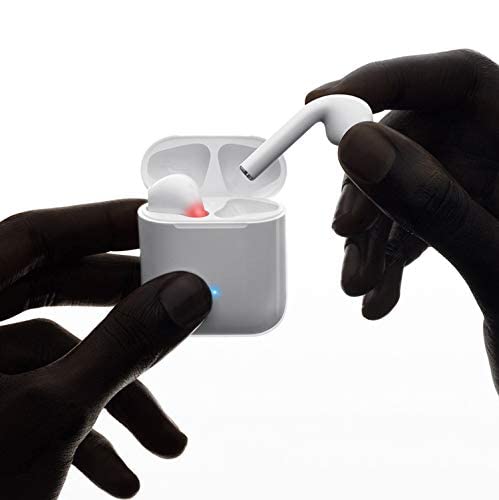
Stampa 2: Hoco ES20 Earphones in Charging Case. The earphones are shown placed inside their charging case, indicating the charging status with an illuminated LED.
Speċifikazzjonijiet
| Karatteristika | Dettall |
|---|---|
| Verżjoni bla fili | V5.0 |
| Protokolli Appoġġjati | Headset, Hands-free, A2DP, Avrcp |
| Frekwenza tat-Trażmissjoni | 2.4GHz |
| Firxa tat-Trażmissjoni | 10-il metru |
| Iċċarġjar Voltage | DC5V |
| Ħin tal-Iċċarġjar (Earphones) | Madwar 1 siegħa |
| Ħin tat-Tkellem | 2 sigħat |
| Ħin ta 'Daqq tal-Mużika | 2 sigħat |
| Kawża tal-Iċċarġjar Kapaċità tal-Batterija | 400mAh |
| Earphone Battery Capacity (Each) | 40mAh |
| Ħin ta' Standby | 200 sigħat |
| Total Weight (with case) | 44.8g |
| Piż Uniku tal-Earphone | 3.8g |
| Komponenti Inklużi | Bluetooth Headphones, 1 Charging Cable |
Setup
1. Iċċarġjar tal-Earphones u l-Kaxxa
- Poġġi ż-żewġ earphones fil-kaxxa tal-iċċarġjar. Kun żgur li huma mqiegħda sew.
- Connect the charging cable to the charging port on the case and to a DC5V power source (e.g., USB wall adapter, computer USB port).
- The indicator light on the charging case will show charging status. A full charge for the earphones takes approximately 1 hour. The charging case itself has a 400mAh battery capacity.
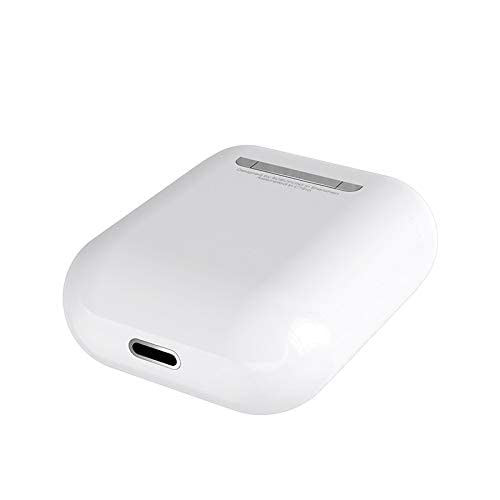
Stampa 3: Hoco ES20 Charging Case Port. This image shows the charging port located at the bottom of the charging case, where the charging cable is connected.
2. Tqabbil ma' Apparat
- Kun żgur li l-earphones huma ċċarġjati.
- Iftaħ il-kaxxa tal-iċċarġjar. Il-earphones jidħlu awtomatikament fil-modalità ta' tqabbil.
- Fuq l-ismartphone tiegħek jew apparat ieħor li jaħdem bil-Bluetooth, mur fis-settings tal-Bluetooth.
- Fittex għal available devices and select "Hoco ES20" (or similar name) from the list.
- Ladarba jkunu konnessi, il-earphones jindikaw li t-tqabbil b'suċċess sar (eż., sinjal awdjo jew bidla fl-LED).
- For Apple phones and some Android phones, the battery level of the earphones may be displayed on your device.
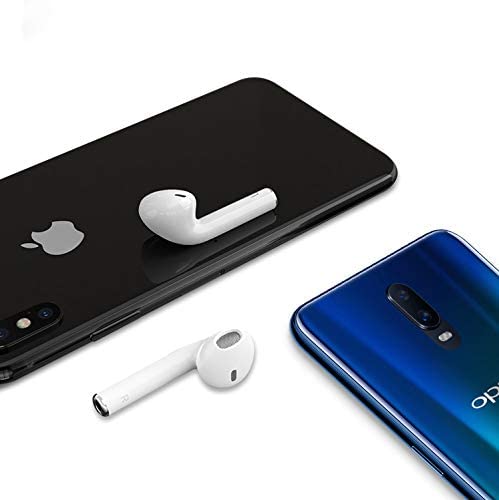
Stampa 4: Hoco ES20 Earphones with Smartphones. This image illustrates the earphones positioned near two different smartphones, demonstrating their compatibility with various mobile devices.
Istruzzjonijiet Operattivi
Basic Functions (Touch Control)
- Qawwa Mixgħul: Earphones power on automatically when removed from the charging case.
- Itfi: Earphones power off automatically when placed back into the charging case.
- Play/Pawsa: Tap the touch area on either earphone once.
- Tweġiba/Tmiem Sejħa: Tap the touch area on either earphone once during an incoming call or an active call.
- Irrifjuta Sejħa: Press and hold the touch area on either earphone for approximately 2 seconds during an incoming call.
- Track li jmiss: Tektek darbtejn iż-żona touch fuq il-widna tal-lemin.
- Track preċedenti: Tektek darbtejn iż-żona tal-mess fuq il-widna tax-xellug.
- Attiva l-Assistent tal-Vuċi: Triple-tap the touch area on either earphone.
Manutenzjoni
- Żomm il-earphones u l-kaxxa tal-iċċarġjar nodfa u niexfa.
- Avoid exposing the product to extreme temperatures, humidity, or corrosive substances.
- Do not attempt to disassemble or modify the earphones or charging case, as this will void the warranty and may cause damage.
- Use a soft, dry cloth to clean the earphones and charging contacts.
- Aħżen il-earphones fil-kaxxa tal-iċċarġjar tagħhom meta ma tkunx qed tużahom biex tipproteġihom u żżommhom iċċarġjati.
Issolvi l-problemi
Kwistjonijiet Komuni u Soluzzjonijiet
- Il-earphones mhux qed jitqabbdu:
- Kun żgur li ż-żewġ earphones huma ċċarġjati.
- Place earphones back in the case, close it, then open it again.
- Itfi u ixgħel il-Bluetooth fuq l-apparat tiegħek.
- Delete "Hoco ES20" from your device's Bluetooth list and try pairing again.
- Earphone wieħed biss jaħdem:
- Kun żgur li ż-żewġ earphones huma ċċarġjati.
- Place both earphones back in the charging case, close the lid, wait a few seconds, then open the lid and remove them together.
- If the issue persists, try resetting the earphones (refer to manufacturer's website if a specific reset procedure is not in this manual).
- L-ebda ħoss jew volum baxx:
- Iċċekkja l-livell tal-volum kemm fuq l-apparat tiegħek kif ukoll fuq il-earphones.
- Kun żgur li l-earphones huma konnessi sew mat-tagħmir tiegħek.
- Ipprova daqq l-awdjo minn applikazzjoni jew sors differenti.
- Kwistjonijiet tal-iċċarġjar:
- Kun żgur li l-kejbil tal-iċċarġjar huwa konness sew kemm mal-kaxxa kif ukoll mas-sors tal-enerġija.
- Iċċekkja jekk il-port tal-iċċarġjar fuq il-kaxxa huwiex nadif u ħieles minn debris.
- Ipprova uża kejbil għall-iċċarġjar jew adapter tal-enerġija differenti.
- Poor connection/intermittent audio:
- Ensure your device is within the 10-meter transmission range.
- Evita ostakli bejn l-apparat tiegħek u l-earphones.
- Imminimizza l-interferenza minn apparati oħra mingħajr fili.
Garanzija u Appoġġ
The Hoco ES20 Wireless Earphones come with a 6-il xahar garanzija mid-data tax-xiri. Din il-garanzija tkopri difetti fil-manifattura. Jekk jogħġbok żomm il-prova tax-xiri tiegħek għal talbiet ta' garanzija.
For technical support or warranty inquiries, please contact your retailer or the official Hoco support channels. Refer to the product packaging or Hoco's official websit għal informazzjoni ta' kuntatt.


