1. Introduzzjoni
This manual provides essential information for the proper use and maintenance of your JVC RM-C3184 original remote control. Please read these instructions carefully before use to ensure optimal performance and longevity of your device.
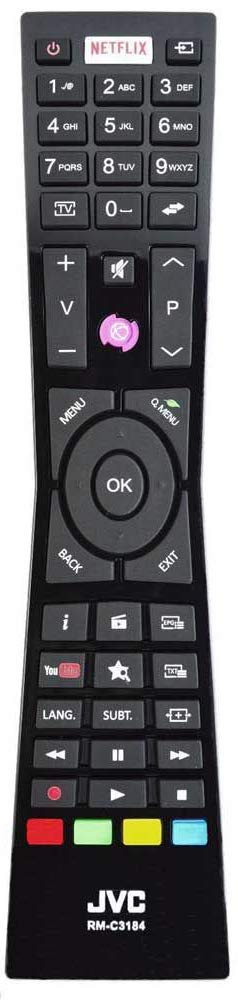
Figura 1: JVC RM-C3184 Original Remote Control. This image displays the full layout of the remote control, including all buttons and their respective functions.
2. Konfigurazzjoni u Installazzjoni tal-Batterija
The JVC RM-C3184 remote control is designed for immediate use with compatible JVC televisions without requiring any programming. Simply install the batteries to begin operation.
2.1 Rekwiżiti tal-Batterija
- Requires: 2 x AAA Alkaline batteries (not included).
2.2 Passi tal-Installazzjoni tal-Batterija
- Sib l-għatu tal-kompartiment tal-batterija fuq wara tal-kontroll remot.
- Slide the cover downwards or press the latch (if present) and lift to open the compartment.
- Daħħal żewġ batteriji AAA, waqt li tiżgura li t-terminali pożittivi (+) u negattivi (-) ikunu allinjati sew mal-marki ġewwa l-kompartiment.
- Erġa’ poġġi l-għatu tal-kompartiment tal-batterija billi tiżżerżaqha lura f’postu sakemm tikklikkja sew.
Importanti: Always use new batteries and replace both batteries at the same time. Do not mix old and new batteries or different types of batteries. Remove batteries if the remote control will not be used for an extended period.
3. Istruzzjonijiet Operattivi
The JVC RM-C3184 remote control provides full functionality for your compatible JVC television. Below is a guide to the main buttons and their functions.
3.1 Funzjonijiet tal-Buttuni 'l Fuqview
- Buttuna tal-Enerġija (⏻): Ixgħel jew jitfi t-televixin.
- Buttuna Netflix: Aċċess dirett għall-applikazzjoni Netflix.
- Buttuni tan-Numri (0-9): Select channels directly or input numbers for menu options.
- Buttuna tat-TV: Switches the input source to TV mode.
- Volum 'il fuq/Niżżel (+/-): Jaġġusta l-volum tal-ħoss.
- Mute Button (🔇): Mutes or unmutes the television sound.
- Channel Up/Down (⌃/⌄): Jibdel il-kanali sekwenzjalment.
- Buttuna tal-menu: Opens the main menu of the television.
- Q. Menu Button: Accesses the Quick Menu for common settings.
- Buttuni tan-Navigazzjoni ('il fuq, 'l isfel, Xellug, Lemin): Jinnaviga permezz tal-menus u l-għażliet.
- Buttuna OK: Jikkonferma l-għażliet fil-menus.
- Buttuna Lura: Terġa' lura għall-iskrin jew il-menu preċedenti.
- Buttuna tal-Ħruġ: Joħroġ mill-menù jew mill-applikazzjoni kurrenti.
- Buttuna tal-Informazzjoni (i): Juri informazzjoni dwar il-programm jew l-input kurrenti.
- Source Button (📺): Jagħżel is-sors tad-dħul (HDMI, AV, eċċ.).
- Buttuna EPG: Jiftaħ il-Gwida tal-Programm Elettroniku.
- Buttuna tal-YouTube: Aċċess dirett għall-applikazzjoni ta' YouTube.
- Star/Favorite Button: Jaċċessa kanali jew kontenut favorit.
- Text/Teletext Button: Jattiva jew jiddiżattiva t-Teletext.
- LANG. Button: Tibdel il-lingwa tal-awdjo jew il-lingwa tas-sottotitli.
- SUBT. Button: Jixgħel jew jitfi s-sottotitli.
- Media Control Buttons (Rewind, Play/Pause, Fast Forward, Stop, Record): Jikkontrolla l-plejbek tal-midja.
- Buttuni kkuluriti (Aħmar, Aħdar, Isfar, Blu): Functions vary depending on the current menu or application.
4. Manutenzjoni u Kura
Biex tiżgura l-lonġevità u l-funzjonament xieraq tal-kontroll remot tiegħek, segwi dawn il-linji gwida ta' manutenzjoni:
- Tindif: Uża drapp artab u niexef biex tnaddaf il-kontroll remot. Tużax prodotti tat-tindif likwidi jew materjali li joborxu, għax jistgħu jagħmlu ħsara lill-wiċċ jew lill-komponenti interni.
- Sostituzzjoni tal-batterija: Replace batteries promptly when the remote control's response becomes sluggish or stops working. Refer to Section 2 for battery installation instructions.
- Ħażna: Aħżen il-kontroll remot f'post frisk u niexef 'il bogħod mix-xemx diretta, temperaturi estremi, u umdità għolja.
- Evita Qtar: Protect the remote control from physical impact, as drops can damage internal circuitry.
5 Issolvi l-problemi
If you experience issues with your JVC RM-C3184 remote control, please refer to the following common troubleshooting steps:
- Il-Kontroll mill-bogħod ma Jirrispondix:
- Check if the batteries are correctly inserted with the correct polarity (+/-).
- Ibdel il-batteriji b'oħrajn ġodda.
- Ensure there are no obstructions between the remote control and the television's infrared sensor.
- Make sure you are within the effective operating range (approximately 10 meters) and pointing the remote directly at the TV.
- Buttuni Speċifiċi Mhux Jaħdmu:
- Clean the remote control surface, especially around the problematic buttons, to remove any dirt or debris that might be interfering.
- If only a few buttons are unresponsive after checking batteries, the remote control might be damaged and may require replacement.
- Ebda Programmazzjoni Meħtieġa: Remember that this remote control does not require any programming. If it's not working, it's likely a battery or line-of-sight issue, or the remote itself is faulty.
6. Speċifikazzjonijiet
| Isem tal-Mudell: | RM-C3184 |
| Ditta: | JVC |
| Tip ta' Prodott: | Kontroll mill-bogħod oriġinali |
| Teknoloġija tal-Konnettività: | Infra-aħmar |
| Apparati Kompatibbli: | Televiżjoni |
| Sors tal-Enerġija: | 2 x Batteriji AAA (mhux inklużi) |
| Karatteristika Speċjali: | L-ebda programmazzjoni meħtieġa |
| Medda massima: | 10-il metru |
| Dimensjonijiet (L x W x H): | Madwar 24 x 9.6 x 2.5 ċm |
| Piż tal-oġġett: | Madwar 70 gramma |
7. Garanzija u Appoġġ
For information regarding warranty coverage, please refer to the documentation provided at the time of purchase or contact your retailer. For further technical assistance or support, please visit the official JVC website or contact JVC customer service directly.
Uffiċjal tal-JVC Websit: www.jvc.com


