1. Prodott Aktarview
The uxcell LXW5-11M is a Panel Mount Snap Button Type Micro Limit Switch designed for various industrial and electrical applications. It functions to monitor the position of moving parts in machinery and equipment, and can be integrated into control and auxiliary circuits for terminal limit protection.
Il-karatteristiċi ewlenin jinkludu:
- Contact Type: 1 Normally Open (NO), 1 Normally Closed (NC)
- Actuator Type: Push Button Action
- Termination Style: Screw Terminal (3 terminals)
- Rating: 15A 125/250/380VAC; 1/8HP 125VAC, 1/4HP 250VAC; 1/2A 125VDC, 1/4A 250VDC
- Protection Degree: IP62 (Total dust ingress protection and water spray < 15 degrees from vertical)

Figura 1: Quddiem view of the uxcell LXW5-11M Micro Limit Switch. This image shows the main body of the switch with the push button actuator and visible model number and electrical ratings.
2. Speċifikazzjonijiet
| Karatteristika | Dettall |
|---|---|
| Isem tal-Prodott | Mikro Swiċċ |
| Mudell Nru. | LXW5-11M |
| Tip ta' Kuntatt | 1NO, 1NC |
| Tip ta 'Immuntar | Immonta fuq il-Panew |
| Tip ta' Attwatur | Push Button Action |
| Stil ta' Terminazzjoni | Terminal tal-kamin |
| Numru tat-Terminal | 3 |
| Klassifikazzjoni | 15A 125/250/380VAC; 1/8HP 125VAC, 1/4HP 250VAC; 1/2A 125VDC, 1/4A 250VDC |
| Grad ta' Protezzjoni | IP62 |
| Overall Size (L*W*H) | 50mm x 50mm x 18mm (1.97in x 1.97in x 0.71in) |
| Dijametru tal-ħajt | 12mm (0.47in) |
| Piż Nett | 43g |

Figura 2: Dimensions of the uxcell LXW5-11M Micro Limit Switch. This image illustrates the length (50mm) and width (18mm) of the switch body, and indicates the 1NO + 1NC + 1COM contact configuration.
3. Setup u Installazzjoni
The LXW5-11M Micro Limit Switch is designed for panel mounting. Follow these general guidelines for installation:
- Post tal-Immuntar: Select a suitable panel location that allows for proper actuation of the push button and access for wiring. Ensure the mounting surface is clean and stable.
- Tħaffir: Drill a hole with a diameter appropriate for the 12mm (0.47 inch) threaded portion of the switch.
- L-iżgurar tas-Swiċċ: Insert the threaded portion of the switch through the drilled hole. Secure it in place using the provided nut on the opposite side of the panel. Tighten securely but do not overtighten to avoid damage.
- Wiring: The switch features 3 screw terminals. Identify the Common (COM), Normally Open (NO), and Normally Closed (NC) terminals. Connect your circuit wires to the appropriate terminals.
- COM: Common terminal.
- LE: Normally Open terminal. This contact closes when the actuator is pressed.
- NC: Normally Closed terminal. This contact opens when the actuator is pressed.
- Sigurtà Elettrika: Ensure all power is disconnected before wiring. Consult a qualified electrician if you are unsure about wiring procedures.
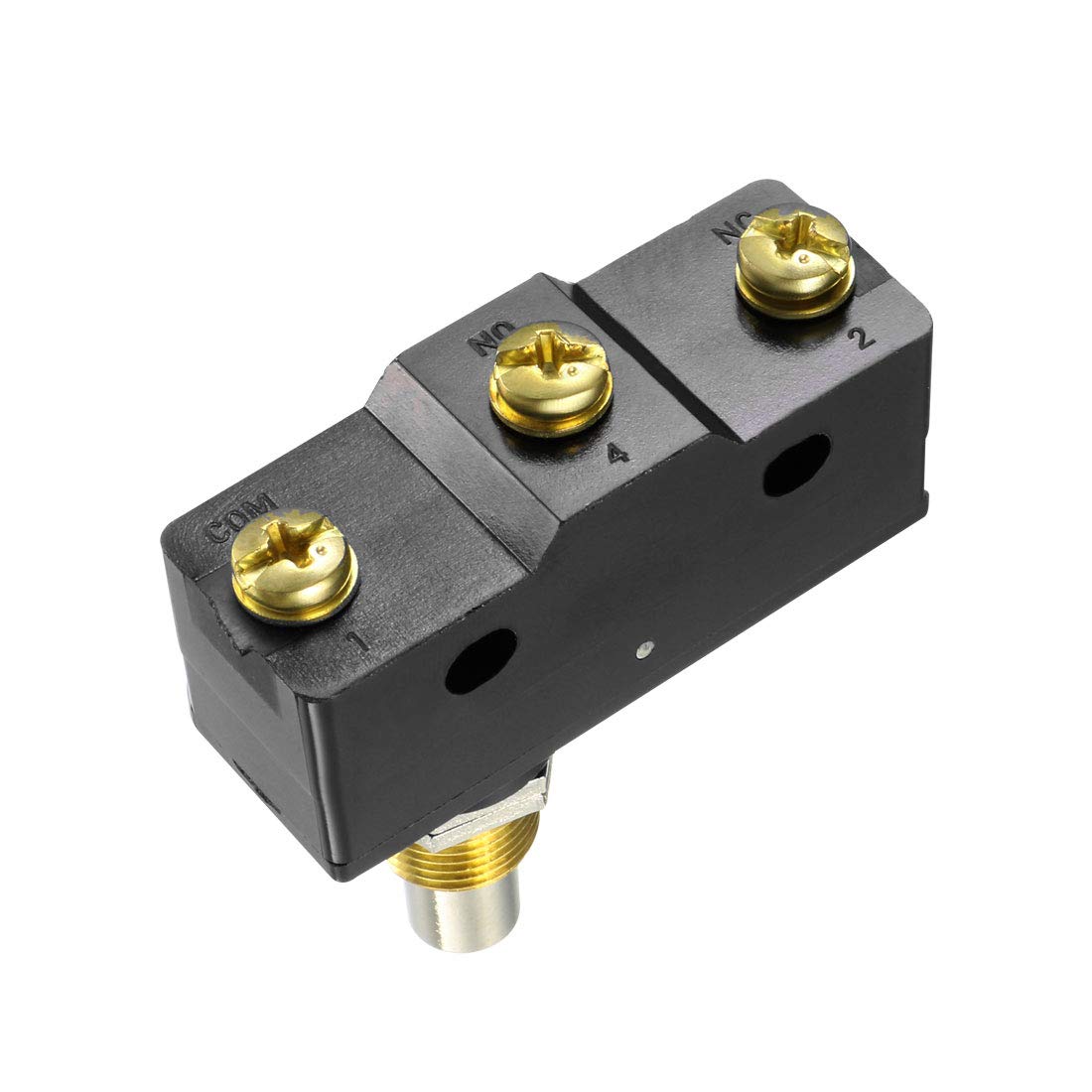
Figura 3: Wara view of the uxcell LXW5-11M Micro Limit Switch showing the screw terminals. The terminals are labeled COM, NO, and NC for easy identification during wiring.
4. Operazzjoni
The uxcell LXW5-11M Micro Limit Switch operates based on the physical depression of its push button actuator. When the actuator is pressed, the internal contacts change state:
- The Normally Open (NO) contact closes, completing the circuit.
- The Normally Closed (NC) contact opens, breaking the circuit.
This action is typically used to detect the presence or absence of an object, or to indicate the end of travel for a mechanical component. The switch is designed for high precision and reliable operation within its specified electrical ratings.

Figura 4: Ġenb view of the uxcell LXW5-11M Micro Limit Switch, highlighting the push button actuator. The button's movement triggers the internal contact changes.
Importanti: Do not exceed the maximum electrical ratings (15A 125/250/380VAC; 1/8HP 125VAC, 1/4HP 250VAC; 1/2A 125VDC, 1/4A 250VDC) to prevent damage to the switch or connected equipment.
5. Manutenzjoni
The LXW5-11M Micro Limit Switch is designed for durability and requires minimal maintenance. However, periodic checks can ensure optimal performance and longevity:
- Tindif: The switch has an IP62 protection rating, meaning it is protected against dust ingress and water spray from angles up to 15 degrees from vertical. For cleaning, use a dry, soft cloth. Avoid using harsh chemicals or excessive moisture.
- Kontroll tal-Konnessjoni: Periodically inspect the screw terminals to ensure all wire connections are secure and free from corrosion. Loose connections can lead to intermittent operation or overheating.
- Actuator Inspection: Verify that the push button actuator moves freely and returns to its original position without sticking. Ensure no foreign objects are obstructing its movement.
- Kundizzjonijiet Ambjentali: Operate the switch within its specified temperature and humidity ranges. While IP62 rated, avoid prolonged exposure to extreme conditions or direct water jets.
6 Issolvi l-problemi
If the uxcell LXW5-11M Micro Limit Switch is not functioning as expected, consider the following troubleshooting steps:
- Ebda Tweġiba:
- Check all electrical connections at the screw terminals for tightness and proper wiring (COM, NO, NC).
- Verify that power is supplied to the circuit.
- Ensure the actuator is being fully depressed and released.
- Test the switch continuity with a multimeter if possible, to confirm internal contact operation.
- Operazzjoni intermittenti:
- Spezzjona għal wajers maħlula jew insulazzjoni bil-ħsara.
- Check for debris or obstructions around the actuator that might prevent consistent movement.
- Ensure the switch is securely mounted and not vibrating excessively.
- Ħsara Fiżika:
- Visually inspect the switch for any cracks, deformities, or signs of overheating.
- If the actuator is bent or stuck, the switch may need replacement.
If issues persist after these steps, consider replacing the switch or consulting a qualified technician.
7. Informazzjoni dwar is-Sigurtà
Please observe the following safety precautions when installing, operating, or maintaining the uxcell LXW5-11M Micro Limit Switch:
- Dejjem skonnettja l-enerġija miċ-ċirkwit qabel ma twettaq kwalunkwe installazzjoni, wajers, jew manutenzjoni.
- Ensure that the switch's electrical ratings (voltage, current, horsepower) are compatible with your application. Exceeding these ratings can cause damage or create a fire hazard.
- Install the switch in an environment that complies with its IP62 protection rating.
- This product may contain chemicals known to the State of California to cause cancer and birth defects or other reproductive harm (Proposition 65 Warning). Handle with care and wash hands after handling.
- If you are not experienced with electrical installations, seek assistance from a qualified electrician.
8. Garanzija u Appoġġ
Specific warranty details for the uxcell LXW5-11M Micro Limit Switch are not provided in this manual. For information regarding warranty coverage, technical support, or replacement parts, please refer to the official uxcell webis-sit jew ikkuntattja lis-servizz tal-klijenti tagħhom direttament.
Tista 'żżur il- uxcell Store on Amazon għal aktar informazzjoni dwar il-prodott.


