Introduzzjoni
This manual provides essential instructions for the safe and efficient use of your Smart Kingfisher Rechargeable Lithium Battery and USB Charger. Please read this manual thoroughly before use and retain it for future reference.
Informazzjoni dwar is-Sigurtà
- Twissija: Tippruvax tiċċarġja batteriji mhux rikarikabbli.
- Twissija: Do not charge batteries from other suppliers unless explicitly stated as compatible.
- Keep the charger and batteries away from water and moisture.
- Do not disassemble, crush, or puncture the batteries or charger.
- Evita li tesponi l-batteriji għal temperaturi estremi jew dawl tax-xemx dirett.
- Armi l-batteriji b'mod responsabbli skont ir-regolamenti lokali.
Kontenut tal-Pakkett
Ivverifika li l-oġġetti kollha huma preżenti fil-pakkett tiegħek:
- 2 x 425 Rechargeable Lithium Batteries
- 1 x Dual-Port USB Charger
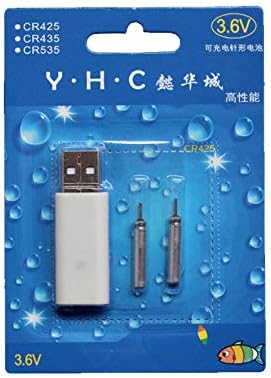
Image: Retail packaging showing the USB charger and two 425 rechargeable batteries.

Image: A pair of Smart Kingfisher 425 rechargeable lithium batteries.
Setup
The Smart Kingfisher USB charger is designed for ease of use. No complex setup is required.
- Identify the USB charger and the 425 rechargeable batteries.
- Connect the USB charger to a compatible power source (see "Operating Instructions" for options).

Image: The USB charger unit with its two charging pins visible.
Istruzzjonijiet Operattivi
Iċċarġjar tal-batteriji
The charger features two ports, allowing for simultaneous charging of two batteries.
- Insert the 425 rechargeable batteries into the charging ports of the USB charger. Ensure a secure connection.
- Connect the USB charger to a power source. Compatible power sources include:
- USB power adapter (wall charger)
- Bank tal-enerġija
- Ċarġer tal-karozza
- Laptop or PC USB port
- Observe the LED indicator on the charger:
- A LED aħdar indicates that the batteries are currently charging.
- A LED aħmar indicates that the batteries are fully charged.
- L-iċċarġjar tipikament jieħu madwar 3 sigħat għal iċċarġjar sħiħ.
- Once fully charged, disconnect the charger from the power source and remove the batteries.
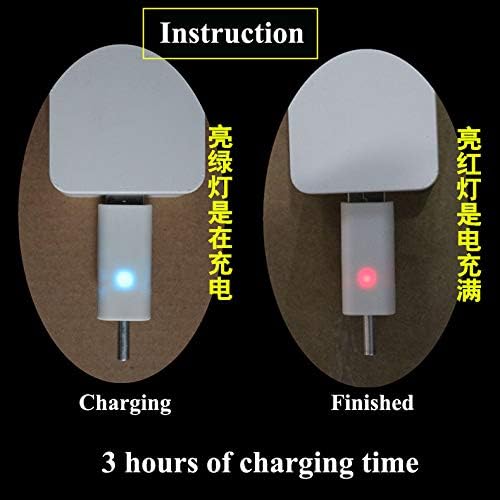
Image: Visual guide for charging status: green light for charging, red light for fully charged. Indicates a 3-hour charging time.

Image: Diagram illustrating multiple methods for charging the device, including car chargers, wall adapters, power banks, and laptops.
Manutenzjoni
- Clean the charger and batteries with a dry, soft cloth. Do not use liquids or abrasive cleaners.
- Store the batteries and charger in a cool, dry place when not in use.
- Avoid storing fully discharged batteries for extended periods to prolong their lifespan.
Issolvi l-problemi
| Problema | Kawża Possibbli | Soluzzjoni |
|---|---|---|
| Batteries not charging (no LED indication) |
|
|
| Charging takes longer than 3 hours |
|
|
| Red LED does not turn on after extended charging |
|
|
Speċifikazzjonijiet
- Materjal: Plastik
- Piż tal-Prodott: 20 g (total for charger and batteries)
- Tip ta 'batterija: 425 Rechargeable Lithium Battery (compatible with CR425, CR435, CR535)
- Tip ta' Ċarġer: Ċarġer tal-USB b'Port Doppju
- Input: USB (compatible with various USB power sources)
- Indikatur tal-Iċċarġjar: Green LED (charging), Red LED (fully charged)
- Ħin Approssimattiv tal-Iċċarġjar: 3 sigħat
Garanzija u Appoġġ
Għal informazzjoni dwar il-garanzija jew appoġġ tekniku, jekk jogħġbok irreferi għall-politika ta' ritorn tal-bejjiegħ bl-imnut jew ikkuntattja lill-manifattur direttament. Żomm l-irċevuta tax-xiri tiegħek bħala prova tax-xiri.
Għal aktar assistenza, tista' żżur il- product page on Amazon.com.mx.


