1. Introduzzjoni
Grazzi tax-xiriasing the Mistral Stand Fan MSF040. This manual provides essential information for the safe and efficient operation, assembly, maintenance, and troubleshooting of your new fan. Please read these instructions thoroughly before use and retain them for future reference.

Figure 1: Fully assembled Mistral Stand Fan MSF040. This image displays the fan's overall design, including the circular base, adjustable stand pole, and the fan head with its protective grille.
2. Istruzzjonijiet Importanti dwar is-Sigurtà
Biex tnaqqas ir-riskju ta’ nar, xokk elettriku, jew korriment, dejjem segwi dawn il-prekawzjonijiet bażiċi ta’ sigurtà:
- Aqra l-istruzzjonijiet kollha qabel tuża dan il-fann.
- Tiżgura l-provvista tal-enerġija voltage jaqbel mat-tikketta tal-klassifikazzjoni fuq il-fann.
- Tħaddimx fann b'korda jew plagg bil-ħsara. Jekk il-korda jew il-plagg ikunu bil-ħsara, ikkuntattja persunal tas-servizz kwalifikat għat-tiswija jew is-sostituzzjoni.
- Aqla’ l-fann mill-plagg tal-elettriku meta ma jkunx qed jintuża, qabel ma tnaddfu, jew qabel ma ċċaqlaqh.
- Tgħaddasx il-fann, il-plagg, jew il-korda fl-ilma jew f'likwidi oħra.
- Keep the fan out of reach of children and pets. Close supervision is necessary when the fan is used near children.
- Daħħalx subgħajk jew xi oġġetti oħra mill-gradilja meta l-fann ikun qed jaħdem.
- Poġġi l-fann fuq wiċċ stabbli u livellat biex tevita li jinqaleb.
- Tużax il-fann fl-imxarrab jew damp postijiet, bħal kmamar tal-banju jew żoni tal-ħasil tal-ħwejjeġ.
- Timblokkax il-fetħiet tal-arja jew toperax ħdejn purtieri jew materjali oħra li jistgħu jimblokkaw il-fluss tal-arja.
3. Kontenut tal-Pakkett
Malli tiftaħ il-pakkett, jekk jogħġbok kun żgur li l-komponenti kollha li ġejjin huma preżenti:
- Fan Motor Unit with Rear Grille
- Xafra tal-fann
- Gralja ta 'quddiem
- Grille Locking Nut
- Kap tax-xafra
- Stand Pole (Upper and Lower sections)
- Bażi Tonda
- Invita tat-twaħħil tal-bażi
- Korda tal-Enerġija (integrata)
- Manwal għall-Utent
4. Istruzzjonijiet tal-Assemblea
Follow these steps to assemble your Mistral Stand Fan MSF040:
- Arma l-Bażi: Place the stand pole onto the round base. Secure it from underneath the base using the provided base fixing screw. Ensure it is tightened firmly.
- Waħħal l-Unità tal-Mutur: Insert the fan motor unit onto the top of the stand pole. Secure it with the pole locking screw, if present, or by twisting until it clicks into place.
- Install the Rear Grille: Place the rear grille onto the motor unit, aligning the notches. Secure it with the grille locking nut, turning clockwise until tight.
- Mount the Fan Blade: Slide the fan blade onto the motor shaft, ensuring the pin on the shaft aligns with the groove on the blade. Secure it with the blade cap, turning counter-clockwise until tight.
- Attach the Front Grille: Position the front grille over the rear grille, aligning the clips. Secure the front grille by pressing the clips firmly around the edge until it is fully closed.
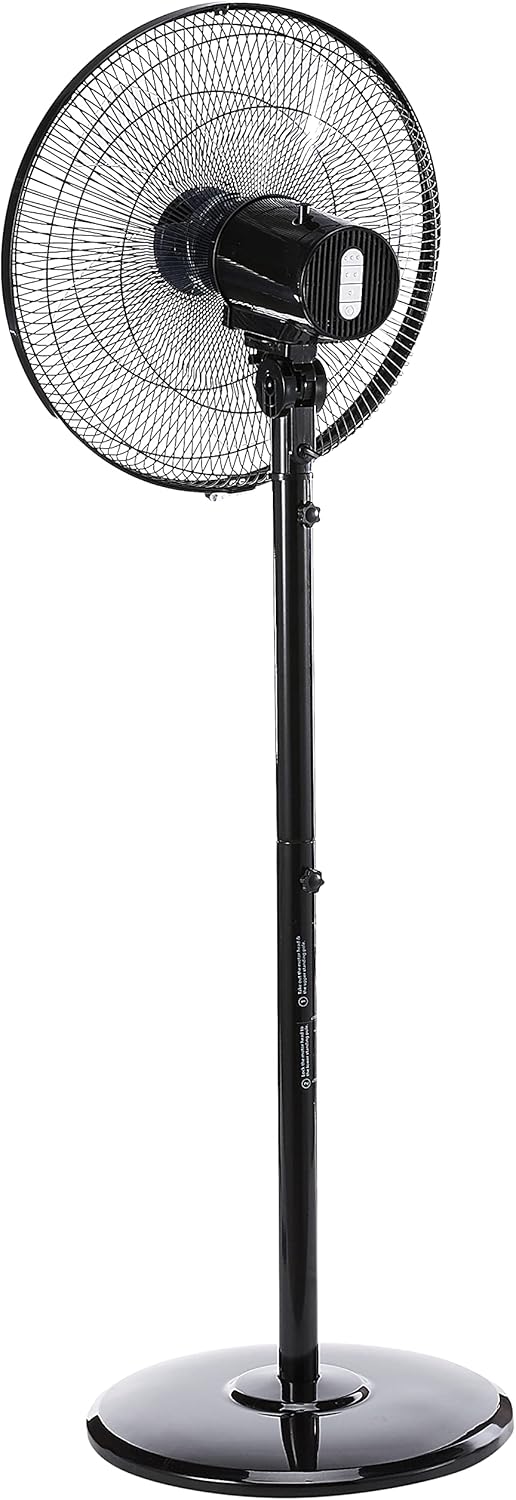
Figura 2: Ġenb view of the fan, illustrating the adjustable height feature of the stand pole. The pole can be extended or retracted to suit different user preferences.
5. Istruzzjonijiet Operattivi
Once assembled, your Mistral Stand Fan MSF040 is ready for operation:
- Konnessjoni tal-Enerġija: Daħħal il-plagg tal-enerġija f'sokit elettriku adattat.
- Power On/Off: Use the power button on the control panel to turn the fan on or off.
- Għażla tal-Veloċità: The fan offers 3 speed selections. Press the speed control buttons on the control panel to cycle through low, medium, and high settings.
- Oxxillazzjoni: To activate the left and right oscillation, press the oscillation button on the control panel. Press it again to stop oscillation.
- Aġġustament tal-inklinazzjoni: The fan head can be tilted 30° up or down. Gently adjust the fan head to your desired angle.
- Aġġustament Għoli: The stand pole features a convertible height mechanism. Loosen the height adjustment knob on the stand pole, adjust to the desired height, and then tighten the knob firmly.

Figura 3: Close-up view of the fan's control panel, featuring tactile buttons for power, speed selection, and oscillation.
6. Manutenzjoni u Tindif
Regular cleaning and maintenance will ensure optimal performance and extend the lifespan of your fan:
- Dejjem aqla’ l-fann mis-sokit tal-elettriku qabel it-tindif.
- Imsaħ l-uċuħ ta' barra tal-fann b'ċarruta ratba u damp drapp. Tużax tindif jew solventi li joborxu.
- For thorough cleaning of the fan blades, the front grille can be carefully removed. Refer to the assembly instructions in reverse order for safe disassembly and reassembly.
- Ensure all parts are completely dry before plugging the fan back in and operating it.
- Aħżen il-fann f'post frisk u niexef meta ma jkunx qed jintuża għal perjodi twal.
7 Issolvi l-problemi
Jekk tiltaqa' ma' xi problemi bil-fann tiegħek, jekk jogħġbok irreferi għall-problemi u s-soluzzjonijiet komuni li ġejjin:
- Il-fann ma jixgħelx:
- Iċċekkja jekk il-korda tal-enerġija hijiex imdaħħla sew f'sokit elettriku li jaħdem.
- Kun żgur li l-buttuna tal-qawwa fuq il-pannell tal-kontroll hija ppressata.
- Verify that the household circuit breaker or fuse has not tripped.
- Fan makes unusual noise:
- Unplug the fan and check for any obstructions (e.g., loose debris, wires) in the fan blades or grilles.
- Ensure all parts are securely assembled and tightened.
- Fan does not oscillate:
- Ensure the oscillation button on the control panel has been pressed.
Jekk il-problema tippersisti wara li tiċċekkja dawn il-punti, jekk jogħġbok ikkuntattja l-appoġġ għall-klijenti.
8. Speċifikazzjonijiet
| Karatteristika | Dettall |
|---|---|
| Brand | MISTRAL |
| Mudell | MSF040 |
| Disinn tal-Fann Elettriku | Fann tal-art / Fann tal-pedestall |
| Tip ta' Xafra | 5 ABS blade |
| Għażla tal-Veloċità | 3 veloċitajiet |
| Oscilazzjoni | Left & right oscillation |
| Aġġustament tal-Mejjel | 30° up & down |
| Aġġustament Għoli | Convertible height |
| Tip ta' Kontrollur | Button Control (Tactile) |
| Materjal | Plastik |
| Kulur | Iswed |
| Sors tal-Enerġija | Corded Elettriku |
| Piż tal-oġġett | 5.35 Kilogrammi |
| Komponenti Inklużi | Kurdun |

Figure 4: Close-up of the power plug, indicating the corded electric power source for the fan.
9. Garanzija u Appoġġ
Your Mistral Stand Fan MSF040 comes with a Garanzija Lokali (Singapor) ta' SenaJekk jogħġbok żomm il-prova tax-xiri tiegħek għal talbiet ta' garanzija.
For technical support, service, or warranty inquiries, please contact Mistral customer service through their official channels. Refer to the product packaging or the official Mistral websit għad-dettalji tal-kuntatt.


