1. Introduzzjoni
Thank you for choosing the Antec P101S Silent Performance Mid-Tower PC Case. This manual provides essential information for the proper installation, operation, and maintenance of your new computer case. Please read this manual thoroughly before beginning assembly to ensure optimal performance and longevity of your system.
The Antec P101S is engineered for quiet computing, featuring sound-dampening panels and efficient cooling solutions, making it ideal for users who prioritize a silent and high-performance computing environment.
2. Karatteristiċi ewlenin
- Operazzjoni Siekta: Equipped with sound-dampening top, front, and side panels for quiet computing.
- Extensive Drive Bays: Supports 11 drive bays, including 1 x 5.25" ODD bay, 8 x 3.5" HDD/2.5" SSD removable bays, and 2 x dedicated 2.5" SSD bays.
- Tkessiħ Avvanzat: Includes 4 pre-installed 120/140mm cooling fans (3 front, 1 rear). Supports up to 4 fan mounts with a maximum of 360mm radiator support for enhanced cooling.
- Convenient I/O Panel: Features power/reset buttons, a fan speed controller (High/Stop/Low), Audio/Mic ports, 2 x USB 2.0, and 2 x USB 3.0 ports with white LED lighting.
- Kompatibilità wiesgħa mal-motherboard: Supports E-ATX, ATX, Micro-ATX, and ITX motherboards.
- Generous Component Clearance: Accommodates CPU coolers up to 180mm, graphics cards up to 450mm, and PSUs up to 290mm in length.
3. Kontenut tal-Pakkett
Jekk jogħġbok ivverifika li l-oġġetti kollha huma preżenti fil-pakkett tiegħek:
- Antec P101S Mid-Tower PC Case
- 3 x 120mm Front Fans (Pre-installed)
- 1 x 140mm Rear Fan (Pre-installed)
- Accessory Box (screws, cable ties, user manual)
4. Komponent Aktarview
Familiarize yourself with the various parts of your Antec P101S case.

Figure 1: Front, Back, Left, and Right views of the Antec P101S case, illustrating its external design and panel layout.

Figura 2: Intern view of the Antec P101S, showing the spacious layout, drive bays, and fan mounts.

Figure 3: Close-up of the top I/O panel, highlighting the power, reset, fan speed controller, audio, USB 2.0, and USB 3.0 ports.
5. Setup u Installazzjoni
Follow these steps to install your components into the Antec P101S case.
5.1 Tħejjija tal-Każ
- Neħħi l-Panewijiet tal-Ġnub: Unscrew the thumbscrews on the rear of the side panels and slide them backward to remove.
- Aċċess Intern: The interior is now accessible for component installation.
5.2 Installazzjoni tal-Motherboard
- Installa Standoffs: Ensure the correct motherboard standoffs are installed for your motherboard form factor (ATX, Micro-ATX, ITX, E-ATX).
- Poġġi l-Motherboard: Allinja bir-reqqa l-motherboard tiegħek mal-istandoffs u l-ftuħ tal-I/O shield.
- Motherboard Sikura: Fasten the motherboard with the provided screws.
5.3 Installazzjoni tad-Drajv
The P101S offers versatile drive mounting options.
5.3.1 3.5" HDD / 2.5" SSD Removable Bays

Figure 4: Illustration of the various drive bay locations within the Antec P101S case.
- Remove Drive Tray: Pull out an empty 3.5" drive tray from the drive cage.
- Install Drive: For a 3.5" HDD, flex the tray and insert the drive. For a 2.5" SSD, secure it to the bottom of the tray with screws.
- Erġa' daħħal it-Trej: Slide the loaded tray back into the drive cage until it clicks into place.
5.3.2 Dedicated 2.5" SSD Bays
Two dedicated 2.5" SSD mounts are located behind the motherboard tray.
- SSD Sikur: Attach your 2.5" SSD to the dedicated mounting bracket using screws.
- Bracket tal-Immuntar: Secure the bracket with the SSD to the chassis behind the motherboard tray.
5.3.3 5.25" ODD Bay
- Remove Front Bezel: Gently remove the 5.25" bay cover from the front bezel.
- Insert ODD: Slide your optical disc drive into the bay from the front until it aligns with the screw holes.
- Secure ODD: Fasten the ODD with screws.
5.4 Installazzjoni tal-Karta tal-Grafika u l-Karta tal-Espansjoni
- Remove PCIe Slot Covers: Unscrew and remove the necessary PCIe slot covers from the rear of the case.
- Daħħal il-Karta: Carefully insert your graphics card or other expansion card into the appropriate PCIe slot on the motherboard.
- Karta Sikura: Fasten the card with screws.
5.5 Installazzjoni tal-Unità tal-Provvista tal-Enerġija (PSU).
- Pożizzjoni tal-PSU: Żerżaq il-PSU fil-kompartiment apposta għalih fil-qiegħ ta' wara tal-kaxxa.
- PSU Sikura: Fasten the PSU to the rear of the chassis with screws.
5.6 Ġestjoni tal-Cable
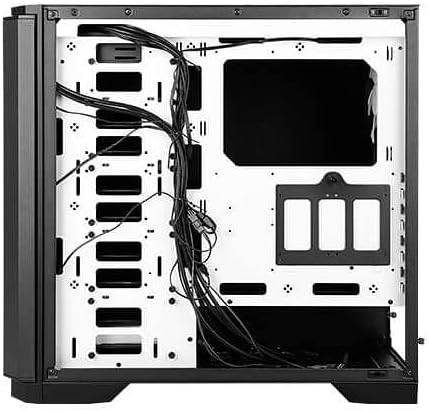
Figura 5: Wara view of the motherboard tray, showing cable routing channels and tie-down points for organized cable management.
Utilize the cable routing holes and tie-down points behind the motherboard tray to organize cables for improved airflow and aesthetics.
6. Kif Tħaddem il-Kaxxa tal-PC Tiegħek
6.1 Power On/Off
Press the large power button on the top I/O panel to turn your system on or off.
6.2 Kontroll tal-Veloċità tal-Fann
Use the fan speed controller switch on the top I/O panel to adjust the speed of the pre-installed fans:
- Għoli: Maximum fan speed for optimal cooling.
- Baxx: Reduced fan speed for quieter operation.
- Waqqaf: Fans are turned off.
7. Manutenzjoni
7.1 Tindif tal-Filtri tat-Trab
Regularly clean the dust filters located at the front, top, and bottom of the case to maintain optimal airflow and prevent dust buildup. The front filter is easily removable for cleaning.
7.2 Tindif Ġenerali
Use a soft, dry cloth to clean the exterior of the case. For stubborn marks, a slightly damp Jista' jintuża drapp, imbagħad tnixxif. Evita prodotti tat-tindif jew solventi li joborxu.
8 Issolvi l-problemi
- Is-Sistema Mhux Tixgħel: Double-check all power connections, including the 24-pin ATX, 8-pin CPU, and GPU power cables. Ensure the PSU switch is in the 'On' position.
- Fannijiet Mhux Iduru: Verify that the fan speed controller on the I/O panel is not set to 'Stop'. Check fan connections to the motherboard or fan hub.
- Is-sħana żejda: Ensure all fans are spinning correctly and dust filters are clean. Verify proper component installation and thermal paste application.
- Portijiet USB ma Jaħdmux: Check the internal USB header connections from the I/O panel to the motherboard.
9. Speċifikazzjonijiet
| Karatteristika | Dettall |
|---|---|
| Isem tal-Mudell | P101S Silent |
| Tip ta' Każ | Nofs it-Torri |
| Kompatibbiltà tal-motherboard | E-ATX, ATX, Mikro-ATX, ITX |
| Dimensjonijiet (LxWxH) | 20.74 x 9.13 x 19.92 pulzieri |
| Piż tal-oġġett | 26.1 liri |
| Materjal | Azzar Liga |
| Drive Bays | 1 x 5.25" ODD, 8 x 3.5" HDD/2.5" SSD, 2 x 2.5" SSD |
| Fannijiet installati minn qabel | 3 x 120mm Quddiem, 1 x 140mm Wara |
| Appoġġ tar-radjatur | Front: Up to 360mm, Rear: Up to 140mm |
| Max CPU Cooler Għoli | 180mm |
| Max GPU Tul | 450mm |
| Max PSU Tul | 290mm |
| Portijiet I / O ta 'quddiem | 2 x USB 2.0, 2 x USB 3.0, Audio/Mic, Power, Reset, Fan Speed Controller |
10. Garanzija u Appoġġ
Għal informazzjoni dwar il-garanzija u appoġġ tekniku, jekk jogħġbok irreferi għall-websajt uffiċjali ta' Antec. website or contact your local Antec distributor. Keep your proof of purchase for warranty claims.
Uffiċjali tal-Antec Websit: www.antec.com.


