1. Introduzzjoni
This user manual provides comprehensive instructions for the setup, operation, and maintenance of your SHARP LC-32HI5012E HD Ready Smart LED TV. Please read this manual thoroughly before using your television to ensure proper functionality and safety.
The SHARP LC-32HI5012E is an 81 cm (32-inch) HD Ready Smart LED TV featuring Active Motion 200 technology for enhanced picture quality and a Triple Tuner for versatile reception options. It includes integrated Wi-Fi and a Harman/Kardon sound system for a complete entertainment experience.
2. Kontenut tal-Pakkett
Malli tiftaħ il-pakkett, jekk jogħġbok ivverifika li l-oġġetti kollha li ġejjin huma inklużi:
- SHARP LC-32HI5012E Main Unit
- Kontroll mill-bogħod (bil-batteriji)
- Manwal għall-Utent (dan id-dokument)

Immaġni: Quddiem view of the SHARP LC-32HI5012E television, displaying a vibrant city skyline on its screen. This image shows the slim bezel design and the central SHARP logo.
3. Setup
3.1 Armar tal-Istand
Carefully place the TV screen-down on a soft, flat surface to prevent damage. Attach the two stand feet to the designated slots at the bottom of the TV, securing them with the provided screws. Ensure the stand is firmly attached before proceeding.
3.2 Konnessjoni tal-Periferali
It-TV tiegħek joffri diversi għażliet ta’ konnessjoni għal apparati esterni:
- Portijiet HDMI (x3): Qabbad plejers tal-Blu-ray, consoles tal-logħob, jew set-top boxes.
- Portijiet USB (x2): Għall-daqq tal-midja minn drives USB.
- Antenna In (RF): Connect your terrestrial antenna for DVB-T/T2HD reception.
- Sat In: Qabbad id-dixx tas-satellita tiegħek għar-riċeviment tad-DVB-S/S2.
- RJ45 (LAN): Għal konnessjoni tal-internet bil-fili.
- Port tas-CI+: For conditional access modules (CAM) to view kanali encrypted.
- Mini Component/YPbPr, Mini AV Composite: Għal apparati analogi eqdem.
- Output Awdjo Ottiku Diġitali: Għall-konnessjoni ma' sistemi awdjo esterni.
- Audio out / Headphone: Għal headphones jew kelliema esterni.

Immaġni: Wara view of the SHARP LC-32HI5012E television, highlighting the arrangement of various input and output ports for connecting external devices.
3.3 L-Ewwel Tixgħil u l-Ewwel Setup
After connecting all necessary cables, plug the power cord into an electrical outlet. Press the power button on the remote control or the TV. The first-time setup wizard will guide you through:
- Għażla tal-lingwa.
- Konnessjoni tan-netwerk (Wi-Fi jew LAN bil-fili).
- Channel scanning for DVB-C, DVB-S/S2, or DVB-T/T2HD.
- Time zone and other basic settings.
4. Istruzzjonijiet Operattivi
4.1 Funzjonijiet Bażiċi tat-TV
- Power On/Off: Uża l-buttuna tal-qawwa fuq ir-remote jew it-TV.
- Kontroll tal-Volum: Use the VOL +/- buttons.
- Għażla tal-Kanal: Use CH +/- or number buttons.
- Sors tad-dħul: Press the SOURCE button to switch between HDMI, AV, TV, etc.
- Navigazzjoni fil-menu: Use arrow keys and OK button to navigate menus.
4.2 Karatteristiċi tat-TV Intelliġenti
Your SHARP LC-32HI5012E is equipped with integrated Wi-Fi and offers access to various smart features:
- Apps installati minn qabel: Access popular streaming services like Netflix and YouTube directly.
- Web Browser: Fittex l-internet direttament mit-TV tiegħek.
- Aquos Net+: Access additional online content and services provided by Sharp.
Ensure your TV is connected to the internet for full Smart TV functionality.
4.3 Sistema Awdjo
The integrated Harman/Kardon sound system provides a high-quality audio experience with excellent dynamics and clarity. Adjust audio settings in the TV menu to customize your sound preferences.
5. Manutenzjoni
5.1 Tindif tal-Iskrin
Biex tnaddaf l-iskrin, imsaħ bil-mod b'ċarruta ratba u mingħajr suf. Għal marki persistenti, imsaħ ftit.ampNaddaf id-drapp bl-ilma jew b'prodott speċjalizzat għat-tindif tal-iskrin. M'għandekx roxx il-likwidu direttament fuq l-iskrin.
5.2 Kura Ġenerali
- Żomm it-TV 'il bogħod mix-xemx diretta u minn sorsi ta' sħana.
- Aċċerta ruħek li jkun hemm ventilazzjoni adegwata madwar it-TV.
- Skonnettja t-TV mill-plagg tal-elettriku waqt maltempati bis-sajjetti jew meta jitħalla waħdu għal perjodi twal.
6 Issolvi l-problemi
If you encounter any issues with your TV, please refer to the following common problems and solutions before contacting support.
| Problema | Kawża Possibbli | Soluzzjoni |
|---|---|---|
| Ebda Qawwa | Power cord unplugged, power outlet issue. | Check power cord connection. Try a different outlet. |
| L-ebda Stampa, iżda l-Ħoss huwa Preżenti | Incorrect input source, faulty cable. | Verify correct input source. Check HDMI/AV cable connections. |
| Ebda Ħoss | Volume muted or too low, external audio system issue. | Unmute volume, increase volume. Check external audio connections. |
| Ma nistax nikkonnettja mal-Wi-Fi | Password mhux korretta, problema bir-router, it-TV wisq 'il bogħod mir-router. | Re-enter password. Restart router. Move TV closer or use wired connection. |
7. Speċifikazzjonijiet
| Karatteristika | Dettall |
|---|---|
| Brand | SHARP |
| Numru tal-Mudell | LC-32HI5012E |
| Teknoloġija tal-Iskrin | LED |
| Riżoluzzjoni | HD Ready (1366 x 768 pixels) |
| Djagonali tal-Iskrin | 81.3 ċm (32 pulzieri) |
| Riffriskar Rata | 60 Hz |
| Karatteristika Speċjali | Internet (Smart TV) |
| Servizzi tal-Internet Appoġġjati | Netflix, YouTube, Browser |
| Teknoloġija tal-Konnettività | USB, HDMI, LAN, Wi-Fi |
| Tuners | DVB-C, DVB-S/S2, DVB-T/T2HD |
| Sistema Awdjo | Harman/Kardon |
| Dimensjonijiet tal-Prodott (W x H x D) | 74 x 49.1 x 18 ċm (bl-istand) |
| Piż | 4.8 Kilogrammi |
| Tip ta 'Immuntar | Tabella Mount |
7.1 Effiċjenza fl-Enerġija
The SHARP LC-32HI5012E has an energy efficiency rating of F. For detailed energy consumption information, please refer to the energy label and product information sheet.

Image: Energy efficiency label for the SHARP LC-32HI5012E television, showing its energy class F and power consumption details.
Għal aktar dettalji, żur id-database uffiċjali tal-EPREL: https://eprel.ec.europa.eu/qr/402565
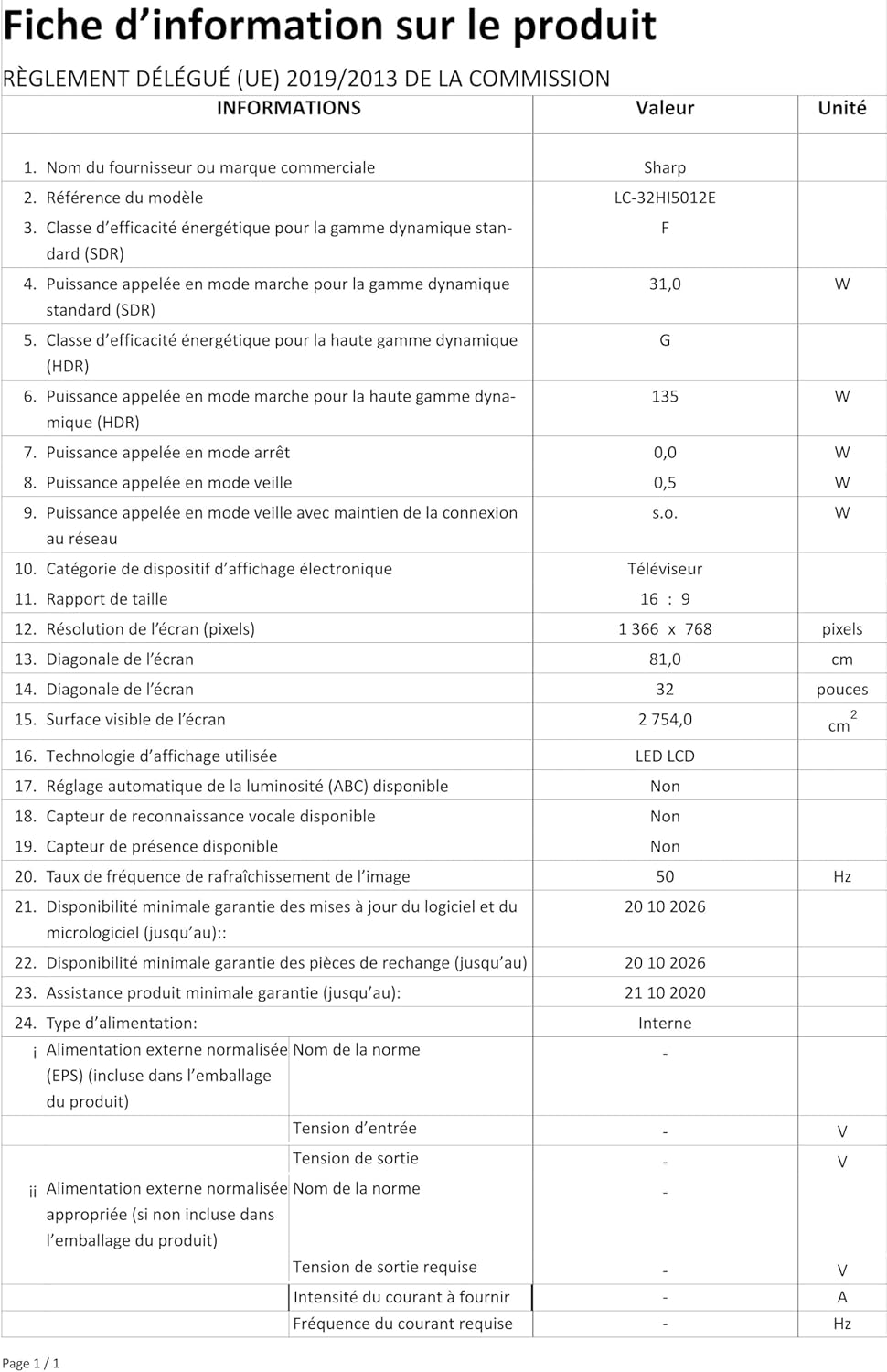
Image: Product information sheet detailing technical specifications and compliance information for the SHARP LC-32HI5012E television.
8. Garanzija u Appoġġ
For warranty information, please refer to the warranty card included with your product or visit the official SHARP websit. Żomm l-irċevuta tax-xiri tiegħek bħala prova tax-xiri għal kwalunkwe talba ta' garanzija.
For technical support or service inquiries, please contact SHARP customer service. Contact details can typically be found on the SHARP official websit jew fl-ippakkjar tal-prodott.


