Merħba
Thank you for choosing the iTek GGC 30-inch Curved Monitor. This manual provides essential information for setting up, operating, and maintaining your new monitor. Please read it thoroughly before use to ensure optimal performance and safety.
Istruzzjonijiet Importanti dwar is-Sigurtà
To prevent damage and ensure safe operation, please observe the following precautions:
- Tesponix il-monitor għax-xita, umdità, jew temperaturi estremi.
- Aċċerta ruħek li jkun hemm ventilazzjoni xierqa madwar il-monitor. Timblokkax il-fetħiet tal-ventilazzjoni.
- Uża biss l-adapter tal-enerġija li jiġi mal-monitor.
- Evita li tpoġġi oġġetti tqal fuq il-korda tad-dawl.
- Skonnettja l-plagg tal-enerġija mis-sokit jekk il-monitor ma se jintużax għal perjodu twil ta' żmien.
- Tippruvax tagħmel manutenzjoni tal-monitor int stess. Irreferi għal kull manutenzjoni f'idejn persunal kwalifikat.
- Naddaf l-iskrin tal-monitor u ċasinNaddaf b'ċarruta ratba u niexfa. Evita li tuża prodotti tat-tindif jew solventi li joborxu.
Kontenut tal-Pakkett
Jekk jogħġbok iċċekkja l-pakkett għall-oġġetti li ġejjin:
- iTek GGC 30-inch Curved Monitor
- Stand tal-Monitor (Bażi u Għonq)
- Adapter tal-Enerġija u Cable
- DisplayPort Cable
- Cable HDMI
- Manwal għall-Utent
- Viti għall-Assemblaġġ tal-Stand
Prodott Overview
The iTek GGC 30-inch Curved Monitor is designed for an immersive viewing experience, ideal for gaming and professional use. It features a WFHD (2560x1080) resolution, a high 200Hz refresh rate, and a rapid 1ms MPRT response time.

Key Performance Highlights
- 200Hz Refresh Rate & AMD FreeSync Technology: Experience ultra-smooth visuals and tear-free gaming with a high refresh rate and adaptive sync technology.

Figure 2: 200Hz Refresh Rate and AMD FreeSync Technology in action. - Flicker-Free & Low Blue Light: Designed to reduce eye strain during prolonged use, providing a more comfortable viewing esperjenza.

Figure 3: Flicker-Free and Low Blue Light features for eye comfort. - Ħin ta' Rispons MPRT 1ms: Minimizes motion blur and ghosting, crucial for fast-paced games and action sequences.

Figure 4: Rapid Refresh Rate and Response Time for smooth visuals. - Wiri Mgħawweġ 1800R: The immersive curvature brings the edges of the screen closer to your field of view, enhancing depth perception and reducing distortion.

Figure 5: 1800R Curved Display for an immersive experience.
Setup
Immuntar tal-Istand
- Oħroġ il-monitor u l-komponenti tal-istand mill-imballaġġ bir-reqqa.
- Attach the stand neck to the monitor panel using the provided screws. Ensure it clicks securely into place or is fastened tightly.
- Attach the stand base to the stand neck, securing it with the thumb screw or screws from underneath.
- Poġġi l-monitor immuntat fuq wiċċ stabbli u ċatt.
Qabbad il-Moniter Tiegħek
The iTek GGC monitor offers multiple connectivity options for various devices:
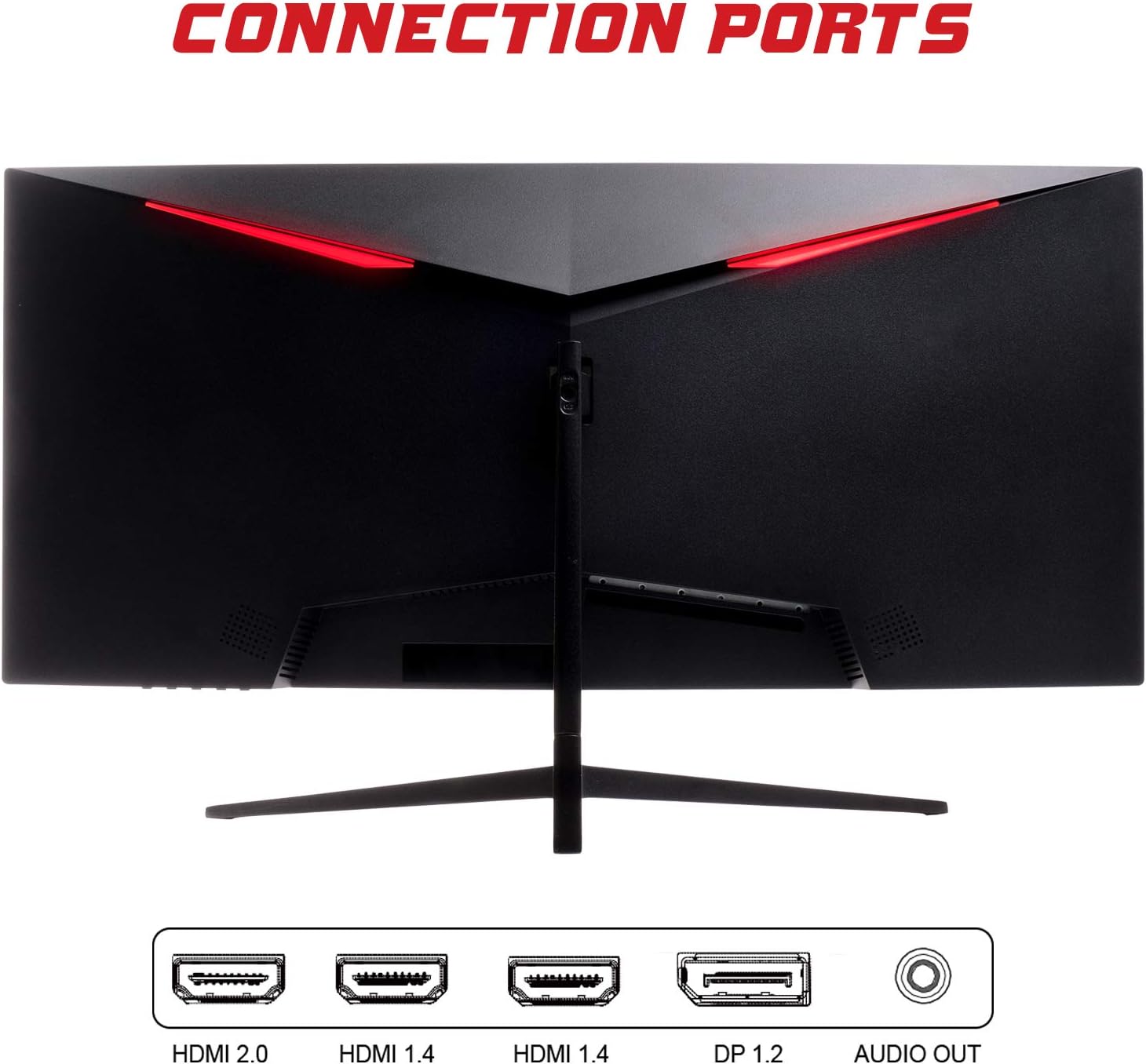
- DisplayPort (DP 1.2): For high-resolution and high-refresh-rate connections to your PC.
- HDMI (HDMI 2.0, HDMI 1.4 x2): Connect to PCs, gaming consoles, and other multimedia devices. HDMI 2.0 supports higher refresh rates at certain resolutions.
- Out tal-Awdjo: Qabbad kelliema jew headphones esterni.
Wara li tqabbad il-kejbil tal-vidjo, qabbad l-adapter tal-enerġija mal-monitor u mbagħad ma' sokit tal-enerġija.
It-tħaddim tal-Monitor
Qawwa mixgħul/mitfi
Agħfas il-buttuna tal-qawwa, li ġeneralment tinsab fil-qiegħ jew wara tal-monitor, biex tixgħelu jew titfih. Id-dawl indikatur tal-qawwa jixgħel meta l-monitor ikun mixgħul.
Menu tal-Wiri fuq l-Iskrin (OSD).
The OSD menu allows you to adjust various monitor settings. Use the buttons on the monitor (typically on the back or bottom right) to navigate the menu.
- Settings tal-Istampa: Aġġusta l-luminożità, il-kuntrast, in-nitidezza, u l-gamma.
- Settings tal-Kulur: Immodifika t-temperatura tal-kulur, il-lewn, u s-saturazzjoni.
- Agħżel l-Input: Ibdel manwalment bejn l-inputs DisplayPort u HDMI.
- Awdjo: Aġġusta l-volum għall-ħruġ tal-awdjo.
- Issettjar tas-Sistema: Access language, OSD timeout, and reset options.
- Karatteristiċi tal-Logħob: Enable/disable FreeSync, adjust response time overdrive, and activate crosshair overlays if available.
Manutenzjoni
Proper care ensures the longevity of your monitor:
- Dejjem itfi l-monitor u aqla’ l-korda tal-enerġija qabel ma tnaddaf.
- Uża drapp artab u mingħajr suf biex timsaħ l-iskrin bil-mod. Għal marki persistenti, nixxef ftit.ampLaħlaħ id-drapp bl-ilma jew b'tindif tal-iskrin ħafif u mhux abrażiv.
- Clean the monitor casinNaddaf b'ċarruta ratba u niexfa.
- Avoid spraying liquids directly onto the screen or casing.
- Do not use benzene, thinner, ammonia-based cleaners, or abrasive materials.
Issolvi l-problemi
If you encounter issues with your monitor, please refer to the following table for common problems and solutions:
| Problema | Soluzzjoni Possibbli |
|---|---|
| Ebda qawwa | Ensure the power cable is securely connected to the monitor and the power outlet. Check if the power outlet is working. |
| Ebda sinjal / Skrin vojt | Verify the video cable (DisplayPort or HDMI) is firmly connected to both the monitor and your computer. Select the correct input source via the OSD menu. Ensure your computer is powered on and not in sleep mode. |
| L-immaġni teptip jew instabbli | Check the video cable connection. Try a different cable or port. Ensure your graphics card drivers are up to date. Adjust the refresh rate in your computer's display settings. |
| Poor image quality (blurry, distorted colors) | Aġġusta s-settings tal-luminożità, il-kuntrast, u l-kulur fil-menù tal-OSD. Kun żgur li r-riżoluzzjoni tal-wiri fuq il-kompjuter tiegħek taqbel mar-riżoluzzjoni nattiva tal-monitor (2560x1080). |
| L-ebda ħoss mill-ħruġ tal-awdjo | Check the audio cable connection to your speakers/headphones. Verify the volume setting in the OSD menu and on your computer. Ensure the correct audio output device is selected in your computer's sound settings. |
Speċifikazzjonijiet Tekniċi
| Karatteristika | Speċifikazzjoni |
|---|---|
| Brand | Itek |
| Mudell | ITMC30V201FHD |
| Daqs tal-Iskrin | 30 Pulzier |
| Tip ta' Panel | VA |
| Kurvatura | R1800 |
| Riżoluzzjoni | 2560 x 1080 (WFHD) |
| Proporzjon ta' l-aspett | 21:9 |
| Riffriskar Rata | 200 Hz |
| Ħin ta' Rispons | 1ms MPRT |
| Luminożità | 350 cd/m² |
| Proporzjon ta' Kuntrast | 3000:1 |
| ViewIng Angolu | 178° (Orizzontali/Vertikali) |
| Konnettività | 1x DisplayPort 1.2, 1x HDMI 2.0, 2x HDMI 1.4, Audio Out |
| Karatteristiċi Speċjali | HDR Ready, FreeSync, Low Blue Light, Flicker Free, VESA Mountable |
| Dimensjonijiet tal-Prodott (bl-istand) | 70.68 x 40.89 x 18.48 ċm |
| Piż | 6.9 kg |
Effiċjenza tal-Enerġija

For detailed energy consumption information and product registration, please refer to the official EPREL database:
Garanzija u Appoġġ
Your iTek GGC monitor is backed by a manufacturer's warranty. Please retain your proof of purchase for warranty claims.
- Guaranteed Product Support: This product is guaranteed to have support available until at least January 1, 2031.
- For technical support, warranty inquiries, or service requests, please contact iTek customer service through their official websit jew l-informazzjoni ta’ kuntatt ipprovduta max-xiri tiegħek.


