1. Introduzzjoni
The SilverCrest Monsieur Cuisine Connect is a versatile kitchen appliance designed to simplify various cooking tasks. This multifunctional food processor combines cooking, frying, stewing, kneading, mixing, crushing, emulsifying, and more. It is suitable for preparing a wide range of dishes, from soups and sauces to pasta and desserts, offering convenience and efficiency in your kitchen.
This manual provides essential information for the safe and effective use of your appliance, including setup, operation, maintenance, and troubleshooting.
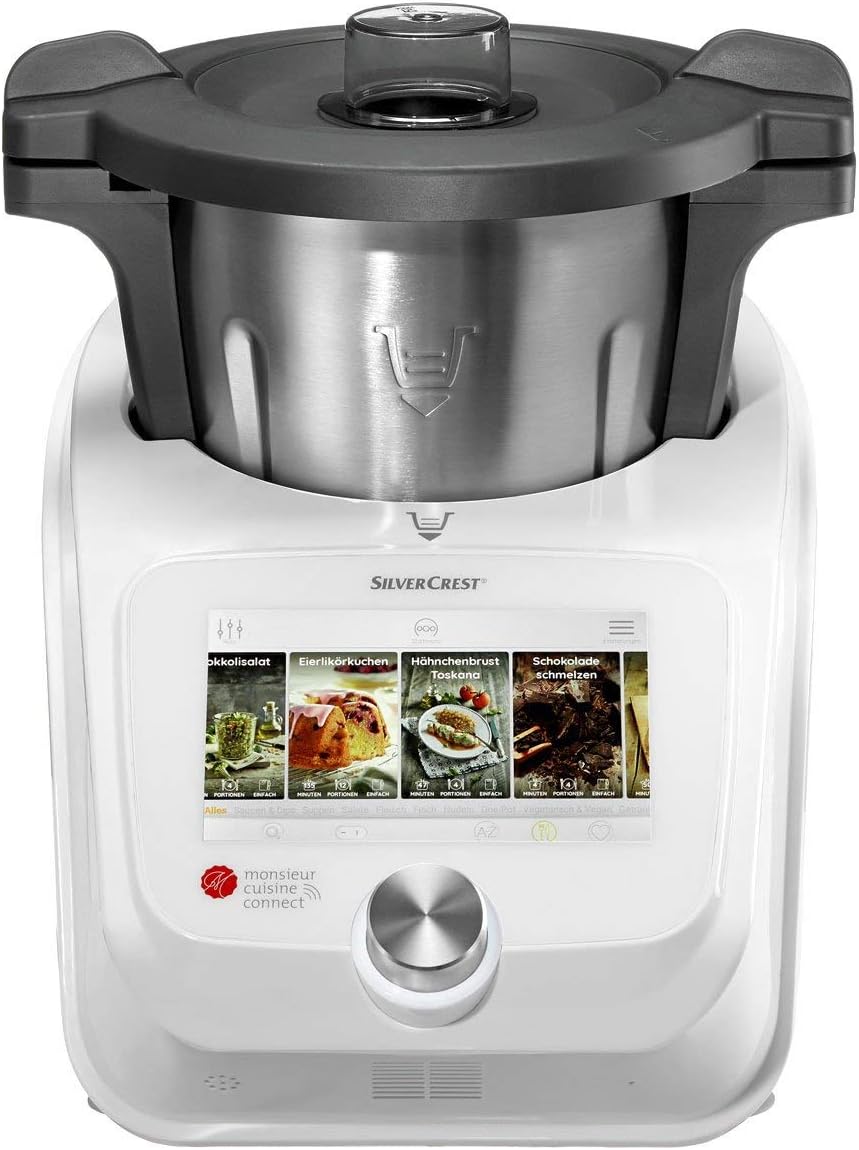
Stampa 1.1: Quddiem view of the SilverCrest Monsieur Cuisine Connect, highlighting its touchscreen interface and main cooking bowl.
2. Istruzzjonijiet tas-Sigurtà
Jekk jogħġbok aqra l-istruzzjonijiet kollha tas-sigurtà bir-reqqa qabel ma tuża l-apparat. Żomm dan il-manwal għal referenza futura.
- Dejjem poġġi l-apparat fuq wiċċ stabbli, livellat, u reżistenti għas-sħana.
- Kun żgur li l-korda tal-enerġija ma tkunx imħassra u li tinżamm 'il bogħod minn uċuħ sħan.
- Do not immerse the main unit in water or other liquids. Clean with a damp drapp biss.
- Keep hands and utensils away from moving parts during operation. Always use the provided spatula.
- Exercise caution when handling hot liquids or steam.
- Unplug the appliance from the power outlet before cleaning, assembling, or disassembling parts.
- Dan l-apparat mhuwiex maħsub għall-użu minn persuni b'kapaċitajiet fiżiċi, sensorji jew mentali mnaqqsa, jew b'nuqqas ta' esperjenza u għarfien, sakemm ma jkunux ingħataw superviżjoni jew istruzzjoni.
- It-tfal għandhom ikunu sorveljati biex jiżguraw li ma jilagħbux bl-apparat.
3. Prodott Aktarview
The SilverCrest Monsieur Cuisine Connect is equipped with several features designed for ease of use and versatility:
- 17.78 cm (7-inch) Color Touchscreen Display: For intuitive navigation and recipe guidance.
- Cooking Pilot Function: Access step-by-step recipes via WiFi for guided cooking.
- Integrated Kitchen Scales: Weigh ingredients directly in the cooking pot.
- Programmi Awtomatiċi: Dedicated settings for kneading, steaming, and frying.
- Livelli ta' Veloċità Aġġustabbli: 10 speed settings plus a turbo function for various mixing and processing needs.
- Kontroll tat-temperatura: Adjustable from 37°C to 130°C in 5°C increments for precise cooking.
- Large Stainless Steel Container: 4.5-liter capacity with a maximum working capacity of 3 liters, featuring a lid with a filling opening and measuring cup.
- Timer: Up to 99 minutes for controlled cooking durations.
- Aċċessorji inklużi: Steamer insert, slow-cooker insert, stirring insert, spatula, and a cookbook (German version).

Immaġni 3.1: Ġenb view of the appliance, illustrating the compact design and the cooking pot assembly.
4. Setup
- Spakkjar: Carefully remove all components from the packaging. Check for any damage during transit.
- Pjazzament: Position the main unit on a clean, dry, stable, and heat-resistant surface. Ensure there is adequate space around the appliance for ventilation. The suction cups on the base provide stability.
- Tindif Inizjali: Before first use, wash the stainless steel container, lid, measuring cup, and all accessories (steamer insert, stirring insert, spatula) in warm soapy water. Rinse thoroughly and dry completely. Wipe the main unit with a damp drapp.
- Konnessjoni tal-Enerġija: Connect the power cord to a suitable electrical outlet. The appliance has a separate on/off switch.
- WiFi Setup (Optional): To access the Cooking Pilot recipes and automatic updates, activate your user account and connect the appliance to your home WiFi network via the touchscreen settings.
5. Istruzzjonijiet Operattivi
5.1 Power On/Off
Use the separate on/off switch located on the appliance to power it on or off.
5.2 Navigazzjoni bit-Touchscreen
The 17.78 cm color touchscreen allows you to navigate through menus, select recipes, and adjust settings. Tap icons and swipe to browse options.

Image 5.1: The touchscreen display showing recipe selection, illustrating the user interface.
5.3 Cooking Pilot Recipes
With an activated user account and WiFi connection, you can access a library of recipes. Select a recipe from the touchscreen, and the Cooking Pilot will guide you through each step with on-screen instructions.
5.4 Operazzjoni manwali
- Aġġustament tal-veloċità: Use the controls on the touchscreen to select one of the 10 speed levels. The turbo function provides maximum speed for short bursts.
- L-issettjar tat-temperatura: Adjust the cooking temperature between 37°C and 130°C in 5°C increments for precise heating.
- Timer: Set the cooking duration using the timer function, up to a maximum of 99 minutes.
- Integrated Scales: Place the cooking pot on the main unit, then activate the scale function on the touchscreen to weigh ingredients directly into the pot.
5.5 L-Użu tal-Aċċessorji
- Daħħal tal-Fwar: Place the steamer insert into the cooking pot for steaming vegetables, fish, or other foods. Ensure the lid is properly closed.
- Stirring Insert: Use the stirring insert for gentle mixing, especially when cooking delicate ingredients or to prevent sticking.
- Spatula: Always use the provided spatula to scrape down the sides of the bowl or remove food, especially when the blades are in motion.

Image 5.2: The appliance demonstrating its versatility by being surrounded by a variety of dishes it can help prepare.
6. Manutenzjoni u Tindif
Regular cleaning ensures the longevity and optimal performance of your SilverCrest Monsieur Cuisine Connect.
- Unità Prinċipali: Imsaħ il-barra tal-unità prinċipali b'ċarruta ratba u damp drapp. Tużax prodotti tat-tindif li joborxu jew tgħaddasx l-unità fl-ilma.
- Cooking Pot and Accessories: The stainless steel cooking container, lid, measuring cup, and all inserts (steamer, stirring) are dishwasher-safe. Alternatively, they can be washed by hand with warm soapy water and a non-abrasive sponge.
- Xfafar: Handle the blades with extreme care as they are very sharp. Clean them thoroughly after each use.
- Ħażna: Ensure all parts are completely dry before storing the appliance. Store in a cool, dry place.
7 Issolvi l-problemi
If you encounter issues with your appliance, refer to the following common solutions:
- L-apparat ma jixgħelx: Ensure the power cord is securely plugged into a working outlet and the on/off switch is in the 'on' position.
- Touchscreen Unresponsive/Lagging: Try restarting the appliance. Ensure the software is up to date via the WiFi connection settings.
- Messaġġi ta' Żball: If an error code appears on the display, consult the specific error code section in the full user manual (if available) or contact customer support.
- Problemi ta' Konnettività tal-WiFi: Check your home WiFi network. Ensure the appliance is within range of your router. Re-enter WiFi credentials if necessary.
- Is-sħana żejda tal-mutur: If the appliance stops unexpectedly, it may be due to overheating. Unplug it and allow it to cool down for at least 30 minutes before attempting to use it again. Reduce the load or processing time for future tasks.
8. Speċifikazzjonijiet
| Karatteristika | Speċifikazzjoni |
|---|---|
| Brand | Silvercrest |
| Numru tal-Mudell | IAN-100353344 |
| Dimensjonijiet tal-Prodott | 40 x 40 x 40 ċm |
| Piż tal-oġġett | 12.6 kg |
| Konsum tal-Enerġija (Tisjir) | 1,200 W |
| Power Consumption (Mixing) | 1,000 W |
| Power Consumption (Kneading) | 800 W |
| Medda ta' Veloċità | Approx. 120 - 5,200 rpm |
| Kapaċità tal-Bowl | 4.5 Liters (3 Liters max working capacity) |
| Firxa tat-Temperatura | 37°C - 130°C (in 5°C increments) |
| Karatteristiċi Speċjali | Adjustable Speed Control, Programmable, WiFi, Integrated Scales |
| Material (Bowl) | Stainless Steel |

Image 8.1: Diagram illustrating the dimensions of the SilverCrest Monsieur Cuisine Connect.
9. Garanzija u Appoġġ
The SilverCrest Monsieur Cuisine Connect is covered by a manufacturer's warranty. For specific warranty terms, duration, and conditions, please refer to the warranty card included with your product or visit the official Silvercrest websit.
In case of a warranty claim or if you require technical assistance, please contact Silvercrest customer service directly. It is important to retain your proof of purchase (receipt or invoice) as it will be required for any warranty service.
Warranty terms may vary based on your region and the point of purchase. Always consult the official documentation for the most accurate and up-to-date information.


