Jabra Evolve 20 MS Stereo Headset Instruction Manual
Model: Evolve 20 (GSA4999-823-109)
1. Introduzzjoni
The Jabra Evolve 20 MS Stereo Headset is a professional wired headset designed for clear communication and music listening. It features a noise-canceling microphone to reduce background distractions and an intuitive control unit for easy call management. This manual provides essential information for setting up, operating, and maintaining your headset.
2. Kontenut tal-Pakkett
Jekk jogħġbok iċċekkja l-pakkett għall-oġġetti li ġejjin:
- Jabra Evolve 20 MS Stereo Headset with integrated control unit
3. Prodott Aktarview
3.1 Komponenti tal-Headset
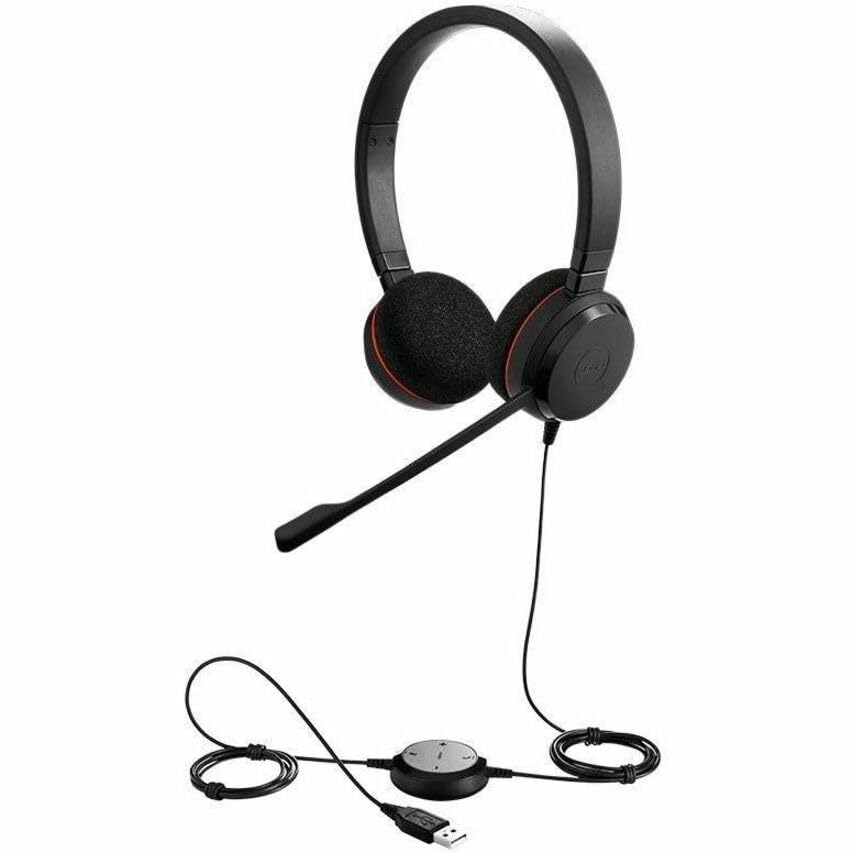
The Jabra Evolve 20 MS Stereo Headset features an adjustable headband, foam ear cushions for comfort, and a flexible microphone boom arm that can be positioned for optimal voice pickup.
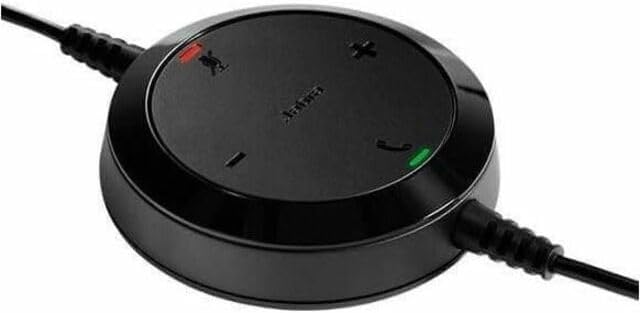
The inline control unit provides easy access to essential call management functions, including volume adjustment, microphone mute, and answer/end call buttons.
4. Setup
4.1 Konnessjoni mal-Kompjuter Tiegħek
- Sib port USB disponibbli fuq il-kompjuter tiegħek (desktop jew laptop).
- Plug the USB connector of the Jabra Evolve 20 headset into the USB port.
- Il-kompjuter tiegħek għandu jiskopri u jinstalla awtomatikament id-drajvers meħtieġa. Dan jista' jieħu ftit mumenti.
- Once installed, the headset will be ready for use. You may need to select the Jabra Evolve 20 as your default audio device (microphone and speaker) in your operating system's sound settings or your communication software (e.g., Microsoft Teams, Skype for Business).
5. Istruzzjonijiet Operattivi
5.1 L-Ilbies tal-Headset
- Aġġusta l-faxxa tar-ras biex tiżgura li toqgħod komda u sigura fuq rasek.
- Position the microphone boom arm so that the microphone is approximately 2-3 cm (1 inch) from your mouth.
5.2 Using the Control Unit
- Volum 'il fuq (+): Agħfas biex iżżid il-volum tas-smigħ.
- Volum 'l isfel (-): Agħfas biex tnaqqas il-volum tas-smigħ.
- Mikrofonu Mute: Press the microphone icon button to mute or unmute your microphone during a call. An indicator light on the control unit may show the mute status.
- Tweġiba/Tmiem Sejħa: Press the phone icon button to answer an incoming call or end an active call.
6. Manutenzjoni
Manutenzjoni xierqa tiżgura l-lonġevità u l-prestazzjoni tal-headset tiegħek.
- Tindif: Gently wipe the headset and control unit with a soft, dry cloth. For ear cushions, use a slightly damp cloth if necessary, but avoid excessive moisture. Do not use harsh chemicals or abrasive cleaners.
- Ħażna: When not in use, store the headset in a clean, dry place, away from extreme temperatures and direct sunlight. Avoid tangling the cable.
- Kura tal-Cable: Do not pull on the cable to disconnect the headset. Always grasp the USB connector.
7 Issolvi l-problemi
If you encounter issues with your Jabra Evolve 20 headset, refer to the table below for common problems and solutions.
| Problema | Soluzzjoni |
|---|---|
| L-ebda ħoss mill-headset |
|
| Mikrofonu mhux qed jaħdem |
|
| Il-buttuni tal-kontroll tas-sejħiet ma jirrispondux |
|
8. Speċifikazzjonijiet
Key technical specifications for the Jabra Evolve 20 MS Stereo Headset:
| Karatteristika | Deskrizzjoni |
|---|---|
| Isem tal-Mudell | Evolvi 20 |
| Teknoloġija tal-Konnettività | Bil-fili (USB) |
| Kontroll tal-Ħoss | Active Noise Cancellation, Passive Noise Cancellation |
| Mikrofonu | It-tħassir tal-istorbju |
| Tqegħid tal-widnejn | Fuq il-widnejn |
| Fattur tal-Formola | Fuq Widnejn |
| Material (Ear Cushions) | Fowm |
| Piż tal-oġġett | 4.6 uqija (0.29 Libbra) |
| Dimensjonijiet tal-Prodott | 8 x 7 x 1.5 pulzieri |
| Apparati Kompatibbli | Desktops, Laptops, Softphones, Web Clients, Desk Phones |
| Tip ta' Kontrollur | Answer/End, Mute, Volume |
9. Garanzija u Appoġġ
For detailed warranty information, please refer to the warranty card included with your product or visit the official Jabra websit. It-termini u l-kundizzjonijiet tal-garanzija jistgħu jvarjaw skont ir-reġjun u l-bejjiegħ bl-imnut.
For technical support, product registration, or to access additional resources, please visit the official Jabra support webis-sit jew ikkuntattja lis-servizz tal-konsumatur tagħhom direttament. Żomm il-prova tax-xiri tiegħek għal talbiet ta' garanzija.