1. Introduzzjoni
This manual provides essential instructions for the safe and efficient operation of your Singingwood 030BT CD Player Boombox. Please read this manual thoroughly before using the device and retain it for future reference. The Singingwood 030BT is a versatile audio system featuring a CD player, AM/FM radio, Bluetooth connectivity, USB playback, and auxiliary input, designed for both home and portable use.
2. Informazzjoni dwar is-Sigurtà
Biex tiżgura tħaddim sikur u tevita ħsara, jekk jogħġbok osserva l-prekawzjonijiet li ġejjin:
- Tesponix l-unità għax-xita, umdità, jew temperaturi estremi.
- Evita li tpoġġi l-unità ħdejn sorsi ta’ sħana jew fid-dawl tax-xemx dirett.
- Aċċerta ruħek li jkun hemm ventilazzjoni xierqa; timblokkax xi fetħiet tal-ventilazzjoni.
- Use only the specified power source (AC cord or 6 x C batteries).
- Tippruvax tiżżarma jew timmodifika l-unità. Irreferi kull servizz lil persunal kwalifikat.
- Żomm fejn ma jintlaħaqx mit-tfal.
3. Kontenut tal-Pakkett
Ivverifika li l-oġġetti kollha huma preżenti fil-pakkett:
- Singingwood 030BT CD Player Boombox
- Kurdun tal-Enerġija AC
- Manwal għall-Utent (dan id-dokument)
4. Prodott Aktarview
The Singingwood 030BT boombox features a user-friendly design with clearly labeled controls and ports. Familiarize yourself with the layout for optimal use.

Figura 4.1: Quddiem view of the Singingwood 030BT CD Player Boombox in Firemist Red.

Figure 4.2: Labeled diagram of the boombox controls and ports.
Karatteristiċi ewlenin:
- Sleek and User-Friendly Design: Easy-to-use buttons and an LED display for effortless operation.
- Ħoss Stereo Ċar: Equipped with dual premium 3" front-firing speakers (2W x 2 RMS).
- Versatile CD Player: Supports CD, CD-R/RW, MP3 CDs, and audiobook CDs with shuffle (RAND) and repeat (REP) functions.
- Radju AM u FM: Built-in tuner with a classic manual tuning knob.
- Streaming Bluetooth: Wirelessly connect your phone, tablet, or other Bluetooth-enabled devices.
- Daqq USB: Play MP3 jew WMA files from a USB flash drive (up to 128 GB, FAT32 format).
- Karatteristiċi konvenjenti: 3.5mm auxiliary (AUX) input and a headphone jack for private listening. The Function (FUNC) button allows easy mode switching.
- Għażliet ta' Enerġija Doppju: Operates with the included AC cord or 6 x C batteries (not included).
5. Setup
It-Tħaddim tal-Apparat
The Singingwood 030BT offers two power options:
- Qawwa AC: Connect the included AC power cord to the AC IN jack on the back of the unit and then to a standard wall outlet.
- Qawwa tal-batterija: For portable use, insert 6 x C-size batteries (not included) into the battery compartment located on the bottom of the unit. Ensure correct polarity. Alkaline batteries are recommended for longer life.

Figure 5.1: Illustration of AC power connection and battery compartment.
6. Istruzzjonijiet Operattivi
Use the Function (FUNC) button to switch between CD, USB, AUX, FM, AM, and Bluetooth modes.
6.1 Tħaddim tas-CD Player
- Press the FUNC button to select CD mode.
- Iftaħ l-għatu tal-kompartiment tas-CD billi erfgħu bil-mod.
- Place a CD (CD, CD-R/RW, MP3 CD, or audiobook CD) onto the spindle with the label side facing up.
- Close the CD compartment cover. The unit will begin reading the disc, and the track number will appear on the LED display.
- Uża l-buttuna PLAY/PAUSE biex tibda jew twaqqaf id-daqq.
- Use the B-SKIP (previous) and F-SKIP (next) buttons to navigate between tracks.
- Press the STOP/PROG button to stop playback.
- Press the REP/RAND button to activate repeat (single track or all tracks) or random playback.

Figure 6.1: Top-loading CD player with disc inserted.
6.2 Tħaddim tar-Radju AM/FM
- Press the FUNC button to select FM or AM mode.
- Extend the telescopic antenna for FM reception. For AM reception, the unit has a built-in antenna.
- Dawwar il-pum TUNING biex tisintonizza manwalment mal-istazzjon tar-radju mixtieq tiegħek.
- Adjust the VOLUME control knob to your preferred listening level.

Figure 6.2: Boombox displaying AM/FM radio functionality.
6.3 Tqabbil tal-Bluetooth
- Press the FUNC button to select Bluetooth mode. The LED display will show "BT" and flash, indicating it's in pairing mode.
- Ippermetti l-Bluetooth fuq l-ismartphone, it-tablet, jew apparat ieħor li jaħdem bil-Bluetooth tiegħek.
- Fittex għal available devices and select "SINGING WOOD" from the list.
- Once paired, the "BT" indicator on the LED display will stop flashing and remain solid. You can now stream audio wirelessly to the boombox.
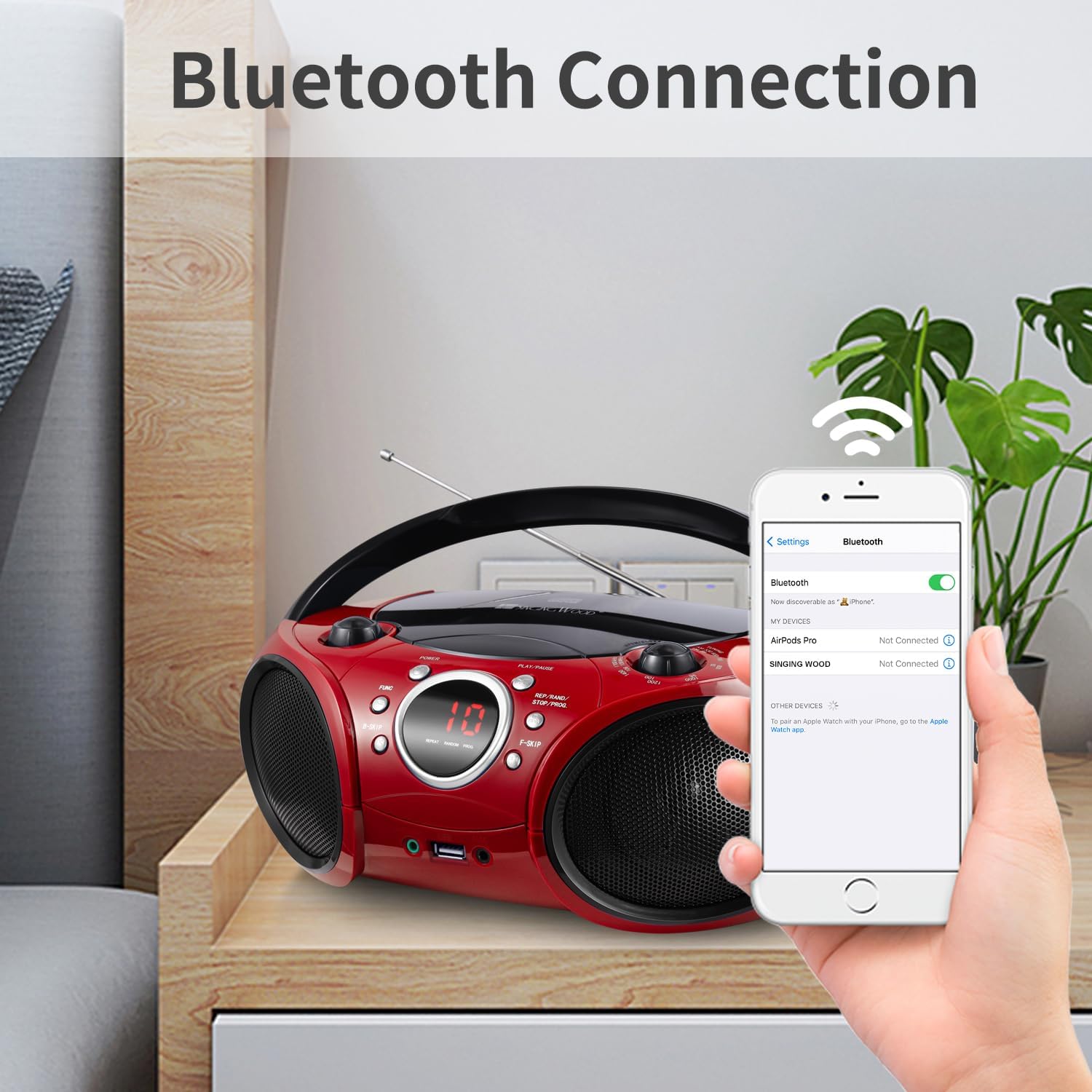
Figure 6.3: Bluetooth pairing with a mobile device.
6.4 Daqq tal-USB
- Insert a USB flash drive (FAT32 format, up to 128 GB) containing MP3 or WMA audio files fil-port USB.
- Press the FUNC button to select USB mode. The unit will automatically detect and begin playing audio files mill-USB drive.
- Use the PLAY/PAUSE, B-SKIP, F-SKIP, and REP/RAND buttons to control playback, similar to CD mode.

Figure 6.4: USB flash drive inserted for audio playback.
6.5 Input Awżiljarju
Connect an external audio device (e.g., smartphone, MP3 player) to the 3.5mm AUX IN jack using a standard audio cable (not included). Press the FUNC button to select AUX mode, and audio from your connected device will play through the boombox speakers.
6.6 Jack tal-headphones
For private listening, plug standard 3.5mm headphones into the HEADPHONE jack. The sound from the speakers will be muted automatically.
Vidjo 6.1: Overview video demonstrating the features and design of the Singingwood SBX030BT CD Player Boombox, including its compact size, speaker quality, and various playback options like CD, radio, and Bluetooth.
Vidjo 6.2: Wirja ta' vidjoasing the Singingwood SBX030 series boomboxes, highlighting features such as CD player, AM/FM radio, Bluetooth connectivity, USB playback, and auxiliary input across different models in the series.
7. Manutenzjoni
To maintain the performance and appearance of your boombox:
- Naddaf l-unità b'ċarruta ratba u niexfa. Tużax prodotti tat-tindif jew solventi li joborxu.
- Keep the CD compartment clean and free of dust.
- Meta ma tkunx qed tużaha għal perjodi twal, neħħi l-batteriji biex tevita t-tnixxija.
- Aħżen l-unità f'post frisk u niexef 'il bogħod mix-xemx diretta.
8 Issolvi l-problemi
If you encounter issues with your boombox, refer to the following common solutions:
| Problema | Kawża Possibbli | Soluzzjoni |
|---|---|---|
| Ebda qawwa | Il-korda tal-AC mhux imqabbda; Il-batteriji m'għadhomx jintużaw jew imdaħħla sew. | Iċċekkja l-konnessjoni tal-AC; Ibdel il-batteriji jew kun żgur li l-polarità hija korretta. |
| L-ebda ħoss | Volum baxx wisq; Modalità żbaljata magħżula; Headphones imqabbda. | Increase volume; Press FUNC to select correct mode; Disconnect headphones. |
| Is-CD jaqbeż jew ma jdoqqx | CD dirty or scratched; CD inserted incorrectly; Unsupported CD format. | Clean or replace CD; Reinsert CD correctly; Ensure CD is supported (CD, CD-R/RW, MP3 CD). |
| Riċeviment ħażin tar-radju | Antenna mhux estiża; Sinjal dgħajjef. | Fully extend FM antenna; Reposition the unit for better reception. |
| Il-Bluetooth mhux qed jgħaqqad | Boombox not in pairing mode; Device Bluetooth off; Device too far. | Ensure boombox is in BT mode and flashing; Turn on device Bluetooth; Move device closer (within 30 ft). |
| USB mhux qed jilgħab | USB drive not FAT32; Unsupported file ifformattja; id-drajv tal-USB korrott. | Format USB to FAT32; Ensure files are MP3/WMA; Try a different USB drive. |
9. Speċifikazzjonijiet
| Karatteristika | Dettall |
|---|---|
| Dimensjonijiet tal-Prodott | 11.8 x 9 x 4.8 pulzieri |
| Piż tal-oġġett | 3.79 liri |
| Numru tal-Mudell | SBX030BTR |
| Brand | INJAM KANT |
| Teknoloġija tal-Konnettività | Awżiljarju, Bluetooth, USB |
| Kulur | Firemist Red |
| Tip ta' Kelliem | Stereo |
| Manifattur | Leaderwave |
| Għażliet tal-Enerġija | AC cord or 6 x C batteries (6 VDC) |
| Appoġġ USB | Up to 128 GB, FAT32 format (exFAT/NTFS not supported) |
10. Garanzija u Appoġġ
For warranty information or technical support, please refer to the documentation included with your purchase or contact the manufacturer directly. Keep your proof of purchase for any warranty claims.


