Introduzzjoni
This manual provides detailed instructions for the installation, operation, and maintenance of your Defiant Electronic Deadbolt Door Lock. Please read this manual thoroughly before installation and use to ensure proper function and safety.
The Defiant Electronic Deadbolt offers convenient keyless access with a touch keypad, along with the security of a traditional mechanical key. It is designed for use on garage, entry, home office, computer room, or utility room doors.
Informazzjoni dwar is-Sigurtà
Always follow basic safety precautions when installing and operating this product to reduce the risk of injury or damage.
- Do not attempt to disassemble or modify the lock beyond the instructions provided in this manual.
- Uża biss it-tip ta' batterija speċifikat (mhux inkluża).
- Żomm iċ-ċwievet f'post sigur 'il bogħod mis-serratura.
- Ensure all components are securely fastened during installation.
Kontenut tal-Pakkett
Iċċekkja li l-partijiet kollha huma preżenti qabel tibda l-installazzjoni:
- Assemblaġġ tat-Tastiera Esterni
- Assemblea Interna b'Dawwar bil-Kbir
- Lukkett Deadbolt
- Strike Plate
- Viti tal-Immuntar
- Ċwievet (2)
- Mudell ta' Installazzjoni (jekk applikabbli)

Image: Included components such as keys, strike plate, and the cylinder housing.
Gwida għall-Installazzjoni
Għodod Meħtieġa: Philips screwdriver (included), measuring tape, pencil.
- Ipprepara l-Bieb: Ensure your door has the standard bore holes for a deadbolt. If not, use the provided template (if applicable) to drill necessary holes.
- Installa l-lukkett: Insert the deadbolt latch into the edge of the door. Ensure the "UP" arrow on the latch is pointing upwards. Secure with screws.
- Installa t-Tastiera Esterna: Feed the cable from the exterior keypad through the cross bore hole. Align the keypad with the latch and press it firmly against the door.
- Installa l-Assemblea Intern: Connect the cable from the exterior keypad to the interior assembly. Align the interior assembly with the mounting posts from the exterior keypad and secure with screws. Ensure the thumb turn operates smoothly.
- Installa l-Istrike Plate: Install the strike plate on the door frame, aligning it with the deadbolt latch. Secure with screws.
- Daħħal Batteriji: Iftaħ l-għatu tal-batterija fuq l-assemblaġġ intern u daħħal 4 batteriji AA (mhux inklużi), waqt li tosserva l-polarità.
- Operazzjoni tat-Test: Test the lock with the mechanical key and by entering a default code (if any) or a newly programmed code.
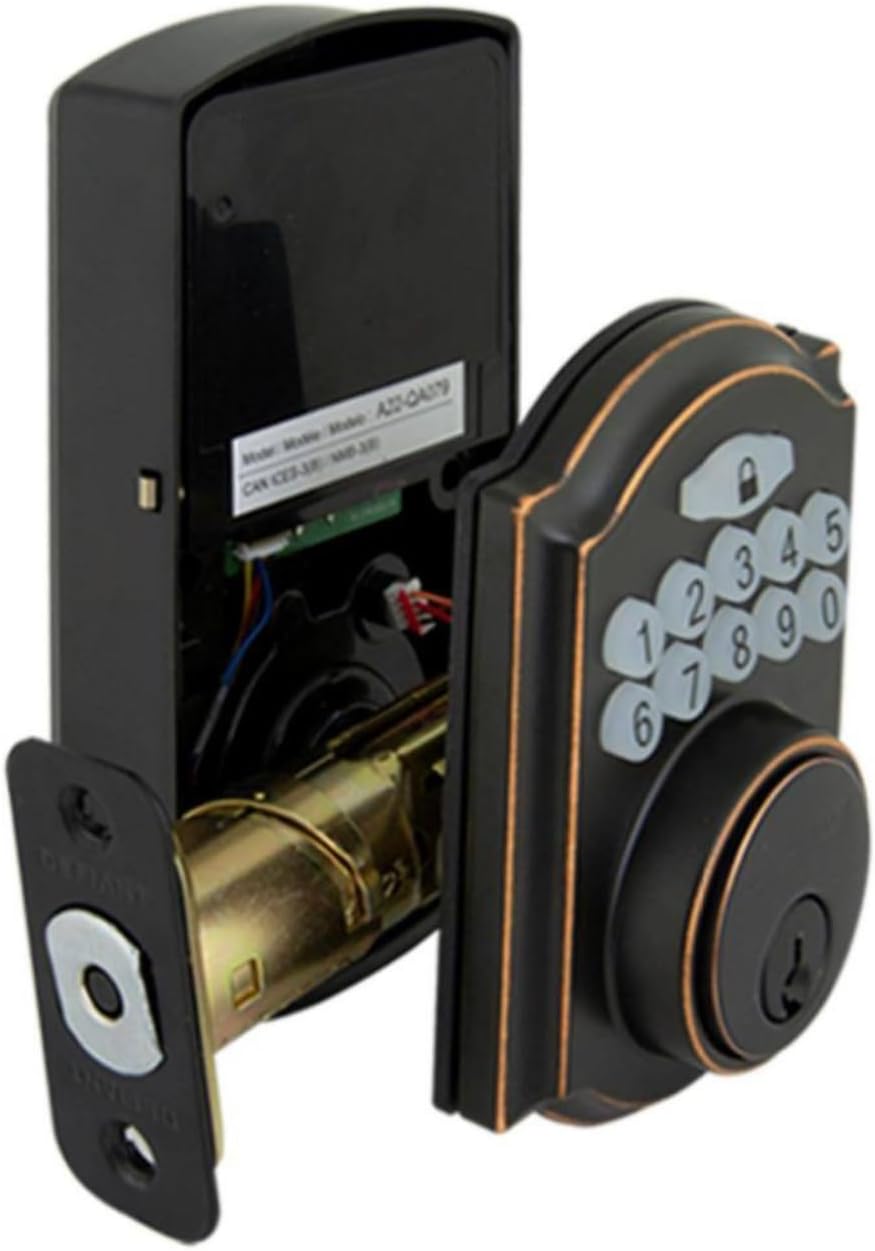
Image: The electronic deadbolt assembly, showing the interior mechanism and exterior keypad.

Immaġni: Esterna view of the electronic deadbolt installed on a door, showcasing the keypad.
Istruzzjonijiet Operattivi
Kodiċijiet tal-Utent tal-Ipprogrammar
The lock can hold up to 10 user codes and 5 single-entry codes.
- Daħħal il-Mod ta 'Programmar: Locate the program button on the interior assembly (usually on the battery cover or near the battery compartment). Press it once. The keypad will illuminate.
- Żid Kodiċi tal-Utent Ġdid: Enter your desired 4-digit user code. Press the Lock button (padlock icon) to confirm. The lock will beep to confirm successful programming.
- Ħassar il-Kodiċi tal-Utent: Enter programming mode. Enter the 4-digit user code you wish to delete. Press the Lock button. The lock will beep to confirm deletion.
Qfil u Nisfruttaw
- Biex Nisfruttaw: Enter your 4-digit user code on the keypad. The keypad will illuminate, and the deadbolt will retract after a few seconds.
- To Lock (from outside): Press the Lock button (padlock icon) on the keypad. The deadbolt will extend after a few seconds.
- Biex Tissakkar (minn ġewwa): Dawwar il-buttuna tas-saba' l-kbir fuq l-assemblaġġ intern għall-pożizzjoni msakkra.
Karatteristika Auto-Lock
The lock features an auto-lock function with an adjustable delay from 10 to 99 seconds. Refer to the full programming guide (usually a separate sheet or detailed section in the manual) for instructions on enabling and adjusting this feature.

Image: Close-up of the electronic keypad for code entry.
Manutenzjoni
- Tindif: Naddaf is-serratura b'drapp artab u damp drapp. Evita prodotti tat-tindif jew solventi li joborxu li jistgħu jagħmlu ħsara lill-finitura jew lill-komponenti elettroniċi.
- Sostituzzjoni tal-batterija: When the battery indicator light flashes or the lock makes a low battery warning sound, replace all four AA batteries. Use only new, high-quality alkaline batteries.
- Lubrikazzjoni: Periodically lubricate the deadbolt mechanism with a silicone-based lubricant to ensure smooth operation. Do not lubricate the keypad.
Issolvi l-problemi
| Problema | Kawża Possibbli | Soluzzjoni |
|---|---|---|
| It-tastiera ma tixgħel. | Batteriji mejta jew installazzjoni ħażina tal-batterija. | Ibdel il-batteriji, waqt li tiżgura l-polarità korretta. |
| Lock does not respond to code. | Incorrect code entered, code not programmed, or lock is jammed. | Verify code, reprogram code, check for obstructions in door frame or latch. |
| Id-deadbolt ma jestendix/jirtirax kompletament. | Misalignment of strike plate or latch, low battery. | Adjust strike plate, replace batteries. |
| Lock beeps kontinwament. | Twissija ta 'batterija baxxa. | Ibdel il-batteriji immedjatament. |
Speċifikazzjonijiet
- Ditta: Sfidanti
- Numru tal-Mudell: 9a843b7d-eaac-472e-b6d2-4b1006f6f6a5
- Tip ta' serratura: Deadbolt Elettroniku
- Materjal: Bronż
- Stil: Moderna
- Karatteristika Speċjali: Keyless Entry, Back-up Mechanical Key
- Kodiċi tal-Utent: Sa 10
- Single Entry Codes: Sa 5
- Dewmien Auto-Lock: 10-99 sekonda (aġġustabbli)
- Sors tal-Enerġija: 4 Batteriji AA (mhux inklużi)
- Piż tal-oġġett: 2.26 liri
- Dimensjonijiet tal-pakkett: 7.48 x 5.51 x 4.61 pulzieri
- UPC: 050134991163
Garanzija u Appoġġ
For warranty information or technical support, please refer to the official Defiant webis-sit jew ikkuntattja s-servizz tal-konsumatur tagħhom. Żomm l-irċevuta tax-xiri tiegħek għal talbiet ta’ garanzija.
Riżorsi onlajn: Visit the Defiant websit għal FAQs, gwidi addizzjonali, u reġistrazzjoni tal-prodott.
Servizz tal-Klijent: Contact Defiant customer support for assistance with installation, programming, or troubleshooting issues.


