1. Introduzzjoni
This manual provides detailed instructions for the installation, operation, and maintenance of your visiPower 7 Inch TFT/LCD Video Intercom Door Phone System. Please read this manual thoroughly before installation and use to ensure proper function and safety.

Figure 1: visiPower 7 Inch Video Intercom Door Phone System components.
2. Prodott Aktarview
2.1 Karatteristiċi ewlenin
- Monitor ta' ġewwa: Features a 7-inch TFT/LCD screen for clear video display and a modern design.
- Outdoor Camera: Constructed from durable aluminum alloy, offering resistance to rain and oxidation. Equipped with a 1/4" CMOS 700TVL camera.
- Enhanced Vision: Includes an IR-Cut filter for improved picture and color quality, especially in varying light conditions.
- Kontroll tal-Bieb: Supports electric lock control for convenient access management.
- Funzjoni ta' Monitoraġġ: Allows real-time monitoring of the area outside the door.
- Ringtones li jistgħu jiġu personalizzati: Offers 25 selectable doorbell ringtones.
- Installazzjoni faċli: Designed for straightforward installation with included adapter and cables.
2.2 Kontenut tal-Pakkett
Iċċekkja li l-oġġetti kollha elenkati hawn taħt huma inklużi fil-pakkett tiegħek:
- 1 x Outdoor Unit (Camera)
- 2 x Indoor Unit (Monitor)
- 1 x Adapter tal-Enerġija DC15V
- 1 x 5-meter 4-core Connection Cable
- 1 x 2-core Connection Cable
- 2 x Additional 4-core Connection Cables
- 1 x Package of Screws for mounting

Figura 2: Kontenut tal-pakkett.
3. Identifikazzjoni tal-Komponent
3.1 Outdoor Unit (Camera)
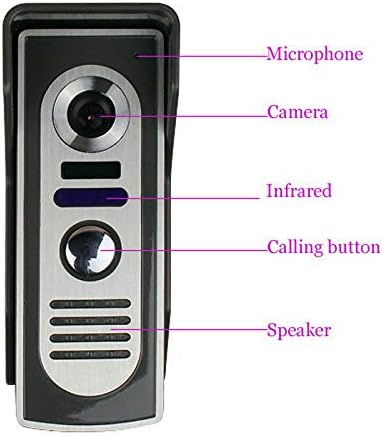
Figure 3: Outdoor Unit Components.
The outdoor unit includes:
- Mikrofonu: Għal komunikazzjoni awdjo bidirezzjonali.
- Kamera: Jaqbad il-feed tal-vidjow.
- Sensuri infra-aħmar: Għall-kapaċitajiet tal-viżjoni bil-lejl.
- Buttuna tas-Sejħa: Initiates a call to the indoor monitor(s).
- Kelliem: Għall-output tal-awdjo.
3.2 Indoor Unit (Monitor)

Figure 4: Indoor Monitor Back Panel and Controls.
The indoor monitor features:
- Skrin TFT ta' 7 pulzier: Displays video from the outdoor camera.
- Dawl tal-Qawwa: Jindika l-istatus tal-enerġija.
- Mikrofonu: Għal komunikazzjoni awdjo bidirezzjonali.
- Buttuni tal-Kontroll: Including Monitor, Interior Intercom, Volume, Unlock, and Intercom Button.
- Kelliema: Għall-output tal-awdjo.
- Portijiet ta' Konnessjoni: For power input, outdoor unit connection, and additional indoor units.
- Pjanċa mdendla: Għall-immuntar mal-ħajt.
4. Setup u Installazzjoni
4.1 Pre-Installation Test
Before permanent installation, it is recommended to test the door phone kit using the provided original cables. Connect all components temporarily and ensure they function correctly. During this test, keep the outdoor unit and indoor monitor(s) at a reasonable distance from each other to avoid audio feedback or noise interference.
4.2 Immuntar tal-Unitajiet
- Unità ta 'barra: Choose a suitable location near your door, ensuring it is at an appropriate height for visitors and protected from direct heavy rain if possible. Use the provided screws to securely mount the outdoor unit to the wall.
- Indoor Monitor(s): Select a convenient indoor location, such as a hallway or living area. Mount the hanging plate to the wall using screws, then attach the indoor monitor to the plate.

Figure 5: Outdoor Unit Dimensions.
4.3 Dijagramma tal-Wiring
Follow the wiring diagrams carefully. The system uses 4-core cables for connection between the outdoor unit and indoor monitor(s), and between multiple indoor monitors. A 2-core cable is typically used for electric lock connection.

Figure 6: System Wiring Diagram (Two Monitors and Electric Lock).

Figura 7: Eżample Installation and Electric Lock Wiring.
Important: Ensure all power is disconnected before performing any wiring to prevent electrical shock or damage to the system.
5. Istruzzjonijiet Operattivi
5.1 Tweġiba għal Sejħa
When a visitor presses the calling button on the outdoor unit, the indoor monitor(s) will ring. Press the 'Intercom Button' on the indoor monitor to establish two-way audio communication with the visitor.
5.2 Monitoring the Outdoor Area
Biex view the outdoor area without a visitor call, press the 'Monitor' button on the indoor unit. The screen will display the live video feed from the outdoor camera.
5.3 Niftħu l-Bieb
If an electric lock is connected to the system, you can unlock the door by pressing the 'Unlock' button on the indoor monitor during a call or while monitoring.
5.4 Aġġustament tas-Settings
Use the 'Volume' button to adjust the audio level of the indoor monitor. Other settings, such as ringtone selection, may be accessible through the monitor's interface (refer to specific model features if applicable).
6. Manutenzjoni
- Tindif: Use a soft, dry cloth to clean the screens and surfaces of both indoor and outdoor units. Avoid abrasive cleaners or solvents.
- Konnessjonijiet: Iċċekkja l-konnessjonijiet tal-wajers kollha perjodikament biex tiżgura li huma sikuri u ħielsa mill-korrużjoni.
- Unità ta 'barra: Ensure the camera lens and infrared sensors on the outdoor unit are clear of dirt, dust, or spiderwebs għall-aħjar prestazzjoni.
7 Issolvi l-problemi
| Problema | Kawża Possibbli | Soluzzjoni |
|---|---|---|
| L-ebda immaġni fuq il-monitor ta' ġewwa | Loose connection between outdoor unit and monitor; Power issue; Damaged cable. | Check all wiring connections. Ensure power adapter is correctly plugged in. Inspect cables for damage. |
| Ebda ħoss jew kwalità fqira tal-awdjo | Volume too low; Loose audio connection; Microphone/speaker obstruction. | Adjust volume on indoor monitor. Check audio wiring. Ensure microphone and speaker are not blocked. |
| Doorbell not ringing | Outdoor unit button not working; Wiring issue; Ringer volume off. | Test the outdoor unit button. Check wiring to the indoor monitor. Ensure ringer volume is not muted. |
| Electric lock not opening | Incorrect wiring to lock; Lock power issue; Faulty lock. | Verify electric lock wiring according to the diagram. Check power supply to the lock. Test the lock independently if possible. |
8. Speċifikazzjonijiet
8.1 Outdoor Camera Unit
- Sensor tal-Kamera: 1/4" CMOS 700TV Lines
- Illuminazzjoni minima: 0.5 Lux
- Output tal-vidjo: 1Vp-p/75Ω
- Input tal-Adapter: AC100 ~ 240V, 50 / 60Hz
- Output tal-Adapter: DC15V/1.2A
- Temperatura tax-Xogħol: -20℃ sa 50℃
- Installazzjoni: Immontati fuq il-ħajt
- Materjal: ABS plastic & aluminum alloy
- Dimensjonijiet: 120mm × 50mm × 43mm (Height × Width × Depth)
8.2 Indoor Monitor Unit
- Skrin: 7" TFT/LCD
- Sors tal-Enerġija: AC100V-240V / 50-60Hz
- Pixels effettivi: 480 * 234 * 30
- Konsum tal-Enerġija: ≤14W (operation), ≤2W (standby)
- Wiring: 4 wajers
- Dimensjonijiet: 195mm × 132mm × 20mm (Width × Height × Depth)
8.3 Ġenerali
- Numru tal-Mudell: SY818M12
- Manifattur: visiPower
9. Garanzija u Appoġġ
For warranty information and technical support, please refer to the documentation provided with your purchase or contact visiPower customer service. Keep your purchase receipt as proof of purchase.
