1. Introduzzjoni
This manual provides detailed instructions for the proper use and care of your Sigma 40mm f/1.4 DG HSM Art Lens for Sony E-mount cameras. Please read this manual thoroughly before using the lens to ensure optimal performance and longevity. This lens is designed to deliver high optical performance, suitable for various photographic applications.
2. Prodott Aktarview
Familiarize yourself with the various parts of your Sigma 40mm f/1.4 DG HSM Art Lens.

Figura 2.1: Quddiem view of the Sigma 40mm f/1.4 DG HSM Art Lens. This image displays the lens barrel, focus ring, and the front element.
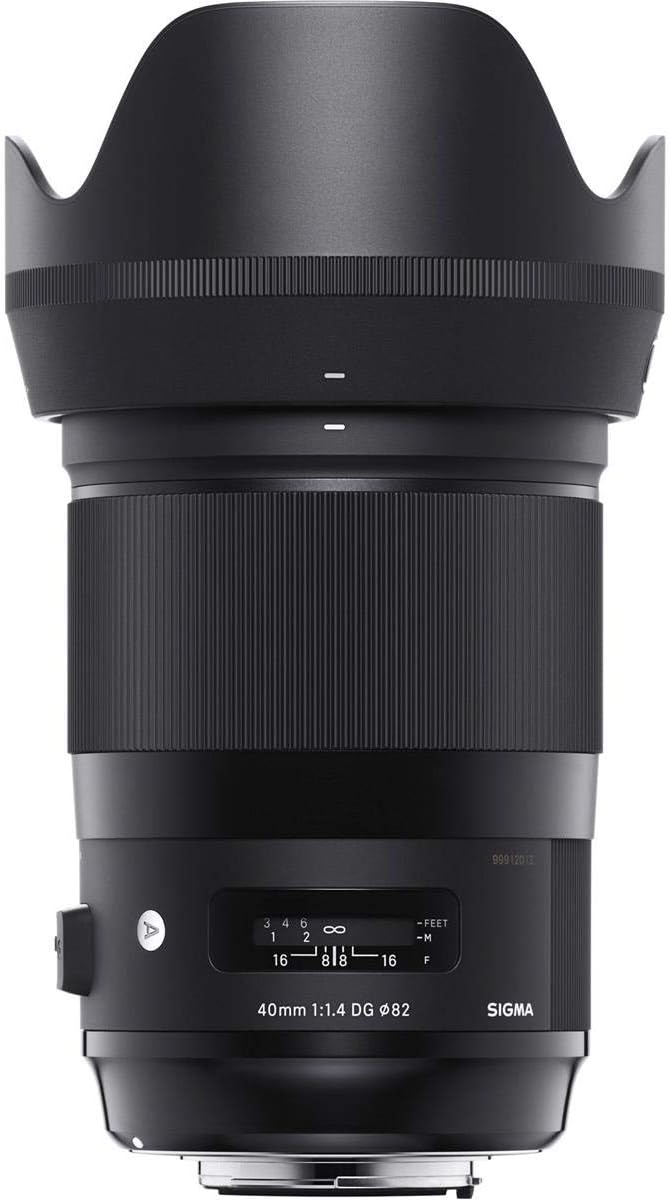
Figura 2.2: Ġenb view of the lens, highlighting the AF/MF switch and the distance scale window. The focus ring is prominently visible.

Figura 2.3: Close-up view of the front optical element of the lens, showing its large diameter.

Figura 2.4: Wara view of the lens, displaying the Sony E-mount interface and the rear optical element.
Lens Components:
- Ċirku tal-Fokus: Użat għall-iffukar manwali.
- Swiċċ AF/MF: Toggles between Autofocus and Manual Focus modes.
- Distance Scale Window: Displays the current focus distance.
- Muntatura tal-lenti: Connects the lens to the camera body.
- Lens Hood Attachment: Point for attaching the included lens hood.
3. Setup
3.1 Twaħħil tal-Lenti
- Kun żgur li kemm il-kamera kif ukoll il-lenti huma mitfija.
- Neħħi l-għatu tal-lenti ta' wara mil-lenti u l-għatu tal-body mill-kamera.
- Align the mounting index (white dot) on the lens with the mounting index on the camera body.
- Daħħal il-lenti fil-muntatura tal-kamera u dawwarha lejn l-arloġġ sakemm tikklikkja f'postha.
3.2 Twaħħil tal-Għatu tal-Lenti
The included lens hood helps to block extraneous light and protect the front of the lens. Align the red dot on the lens hood with the red dot on the front of the lens, then rotate the hood clockwise until it locks securely.
4. Istruzzjonijiet Operattivi
4.1 Focus Mode Selection
- Awtofokus (AF): Slide the AF/MF switch on the lens to the "AF" position. The camera will automatically focus when the shutter button is half-pressed.
- Fokus Manwali (MF): Slide the AF/MF switch to the "MF" position. Rotate the focus ring on the lens to adjust focus manually. The distance scale window will indicate the current focus distance.
4.2 Kontroll tal-Apertura
Aperture settings are controlled via the camera body. Refer to your camera's instruction manual for details on adjusting aperture.
4.3 Pariri Ġenerali dwar l-Użu
- Always hold the camera and lens securely.
- Avoid pointing the lens directly at the sun or other strong light sources for extended periods, as this can damage the camera's sensor.
- When not in use, attach the front and rear lens caps to protect the optical elements.
5. Manutenzjoni
5.1 Tindif tal-Lenti
- Uża pinzell tal-blower biex tneħħi t-trab u l-partiċelli maħlula mill-wiċċ tal-lenti.
- For smudges or fingerprints, use a clean, soft microfiber cloth specifically designed for optical lenses, along with a small amount of lens cleaning solution. Apply the solution to the cloth, not directly to the lens.
- Clean the lens barrel with a soft, dry cloth.
- Never use organic solvents like paint thinner or benzene to clean the lens.
5.2 Ħażna
- Store the lens in a cool, dry place, away from direct sunlight and high humidity.
- Attach both front and rear lens caps when storing.
- If storing for an extended period, consider using a desiccant to prevent mold growth.
6 Issolvi l-problemi
| Problema | Kawża Possibbli | Soluzzjoni |
|---|---|---|
| Lens does not attach securely. | Allinjament mhux korrett jew ostruzzjoni. | Ensure mounting indexes are aligned and no debris is present. Rotate until it clicks. |
| Autofocus is not working. | Lens set to MF, camera focus mode incorrect, or dirty contacts. | Set lens switch to "AF". Check camera focus settings. Clean lens and camera contacts with a dry cloth. |
| L-immaġini huma mċajpra. | Incorrect focus, camera shake, or dirty lens elements. | Verify focus. Use a faster shutter speed or tripod. Clean lens elements. |
| Dust inside the lens. | Normal accumulation over time. | Minor dust does not typically affect image quality. For significant dust, contact Sigma service. Do not attempt to disassemble. |
7. Speċifikazzjonijiet
| Numru tal-Mudell | 332965 |
| Tul Fokali | 40mm |
| Apertura massima | f/1.4 |
| Tip ta' Lenti | Fixed Prime |
| Muntaturi Kompatibbli | Sony E |
| Dimensjonijiet tal-Prodott | 3.5 x 5.1 x 5.2 pulzieri |
| Piż tal-oġġett | 2.65 liri |
| Aċċessorji Inklużi | Lens Hood and case |
8. Garanzija u Appoġġ
This Sigma lens is manufactured by Sigma Corporation of America. For warranty information, service, or technical support, please refer to the official Sigma webis-sit jew ikkuntattja lid-dipartiment tas-servizz tal-konsumatur tagħhom. Żomm il-prova tax-xiri tiegħek għal talbiet ta’ garanzija.
Manifattur: Korporazzjoni Sigma tal-Amerika


