1. Introduzzjoni
This manual provides essential information for the safe and effective operation and maintenance of your Honeywell Air Touch I5 Room Air Purifier. Please read this manual thoroughly before using the appliance and retain it for future reference.

Stampa 1: Quddiem view of the Honeywell Air Touch I5 Air Purifier.
2. Prodott Aktarview u Karatteristiċi
The Honeywell Air Touch I5 is designed to improve indoor air quality by filtering various airborne pollutants. Key features include:
- Rata ta' Kunsinna ta' Arja Nadifa (CADR): 250 cubic meters per hour, suitable for rooms up to 30 square meters with a 2.74m height.
- Disinn tal-Fluss tal-Arja 3D: Ensures optimized air circulation throughout the room.
- Sistema ta' Filtrazzjoni Avvanzata: A tliet-stage system for efficient pollutant removal.
- Prefiltru li jista' jinħasel: Removes larger particles like dust, pet hair, and dander, extending the life of subsequent filters.
- HEPA + HiSiv Filter: Combined filter for removing microscopic pollutants and allergens above 0.3 microns, including PM2.5 and pollen. Also removes formaldehyde, toxic gases, VOCs, and odors.
- Numeric PM2.5 Display: Provides real-time air quality level indication.
- Smart Filters: Unique design that notifies when filter replacement is required.
- Ħajja tal-Filtru: Approximately 3000 hours, which can last up to a year with 8 hours of daily use, depending on ambient pollution levels.
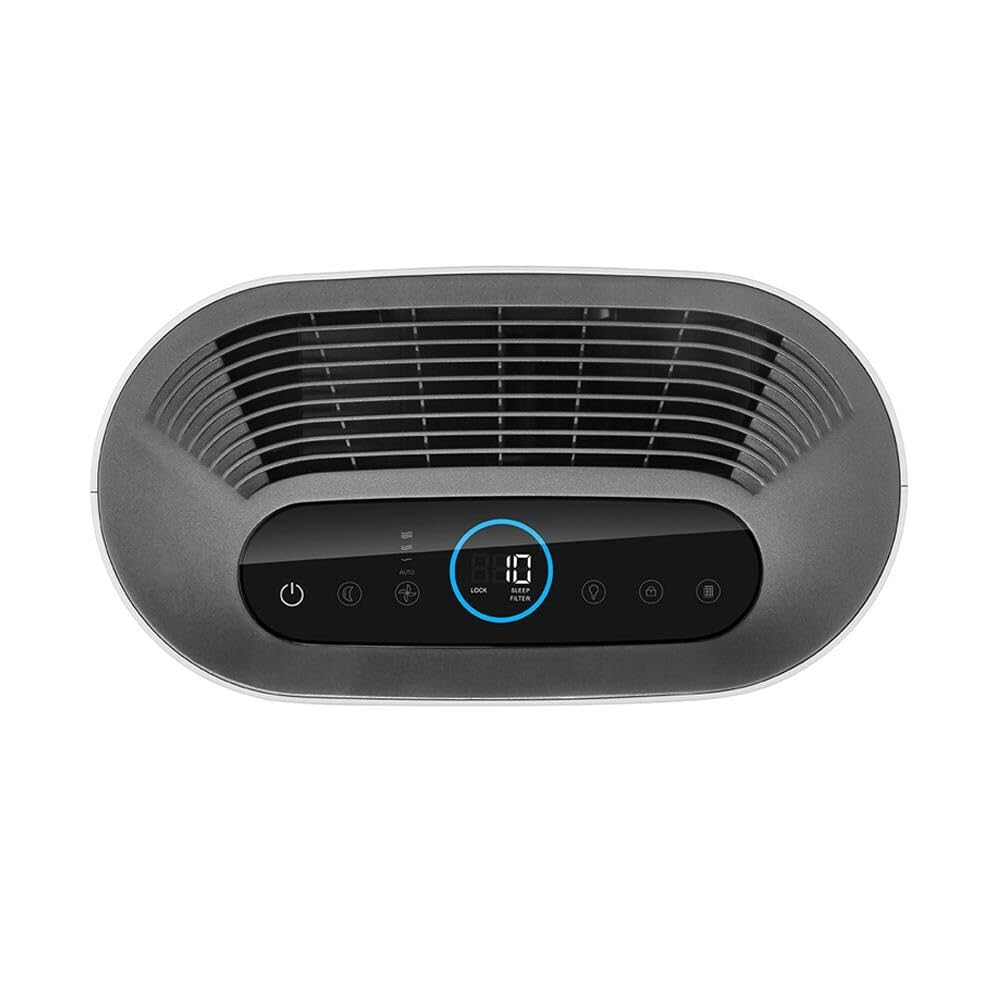
Immaġni 2: Fuq view showing the control panel with numeric display and filter indicators.
3. X'hemm fil-Kaxxa
Meta tiftaħ il-pakkett, jekk jogħġbok kun żgur li l-oġġetti kollha huma preżenti:
- 1 x Honeywell Air Touch I5 Air Purifier Unit
- 1 x Set of 2 Filters (Pre-filter, HEPA + HiSiv Filter)
- 1 x Manwal tal-Prodott (dan id-dokument)
4. Setup
Segwi dawn il-passi biex twaqqaf il-purifikatur tal-arja tiegħek:
- Spakkjar: Neħħi bir-reqqa l-purifikatur tal-arja u l-materjali kollha tal-ippakkjar mill-kaxxa.
- Installazzjoni tal-Filtru: The filters are typically pre-installed but may have protective packaging. Open the filter compartment (usually on the side or back) and remove any plastic wrapping from the filters before placing them back into the unit. Ensure they are securely seated.
- Pjazzament: Place the air purifier on a flat, stable surface in the room where you intend to use it. Ensure there is adequate space (at least 20 cm) around the air intake and outlet vents for optimal air circulation. Avoid placing it directly against walls or furniture.
- Konnessjoni tal-Enerġija: Ipplaggja l-korda tad-dawl fi żbokk elettriku adattat.

Immaġni 3: Ġenb view illustrating the filter compartment access.
5. Operazzjoni
Operating your Honeywell Air Touch I5 is straightforward:
- Power On/Off: Agħfas il-buttuna tal-qawwa fuq il-pannell tal-kontroll biex tixgħel jew titfi l-unità.
- Għażla tal-Modalità: Use the mode button to cycle through available operating modes, such as Auto Mode, Sleep Mode, or Manual Fan Speed.
- Modalità Awtomatika: In this mode, the purifier automatically adjusts fan speed based on the detected air quality (PM2.5 levels).
- Modalità Sleep: Inaqqas il-veloċità tal-fann u jbaxxi d-dwal tad-displej għal tħaddim kwiet waqt l-irqad.
- PM2.5 Display: The numeric display on the control panel shows the current PM2.5 concentration in the room. Lower numbers indicate better air quality.
- Lock tat-tfal: Attiva l-karatteristika tal-illokkjar tat-tfal biex tevita bidliet aċċidentali fis-settings.

Immaġni 4: Angolata view highlighting the air intake and overall design.
Understanding Indoor Air Quality
Indoor air can contain various pollutants from daily activities. The Honeywell Air Touch I5 helps mitigate these. For a visual understanding of indoor air pollution sources and effects, please refer to the video below:
Video 1: An informational video explaining common sources of indoor air pollution and their potential health impacts.
Karatteristiċi tal-Prodott Overview
Għal aktar malajrview of the Honeywell Air Touch I5's main features and benefits, watch the following video:
Vidjo 2: Ħarsa fil-qosorview highlighting the key functionalities and advantages of the Honeywell Air Touch I5 Air Purifier.
6. Manutenzjoni
Manutenzjoni regolari tiżgura prestazzjoni ottimali u testendi l-ħajja tal-purifikatur tal-arja tiegħek.
Tindif minn qabel tal-filtru
The washable pre-filter should be cleaned regularly to remove larger dust particles and maintain efficiency. The frequency depends on usage and ambient air quality. Refer to the filter replacement indicator for guidance.
- Itfi u aqla l-purifikatur tal-arja.
- Iftaħ il-kompartiment tal-filtru.
- Carefully remove the pre-filter.
- Wash the pre-filter under running water or use a vacuum cleaner to remove accumulated dust.
- Ensure the pre-filter is completely dry before reinstalling.
HEPA + HiSiv Filter Replacement
The combined HEPA + HiSiv filter cannot be washed and must be replaced when its lifespan is depleted. The unit's smart filter system will notify you when replacement is due (approximately 3000 hours of operation).
- Itfi u aqla l-purifikatur tal-arja.
- Iftaħ il-kompartiment tal-filtru.
- Remove the old HEPA + HiSiv filter.
- Insert the new filter, ensuring correct orientation.
- Agħlaq il-kompartiment tal-filtru.
- Reset the filter life indicator as per the instructions in the full product manual (if applicable).
7 Issolvi l-problemi
If you encounter issues with your air purifier, refer to the following common troubleshooting steps:
- Unità ma Tixgħel: Kun żgur li l-korda tal-enerġija hija mdaħħla sew f'sokit elettriku li jaħdem. Iċċekkja jekk il-buttuna tal-enerġija ġietx ippressata.
- Poor Air Quality Reading Persists: Verify that the filters are clean and correctly installed, and that any protective plastic has been removed. Ensure the unit is placed in an open area, not obstructed.
- Storbju mhux tas-soltu: Check for any foreign objects inside the unit or if filters are improperly seated.
- Filter Replacement Indicator On: Replace the indicated filter as soon as possible to maintain air purification efficiency.
For more detailed troubleshooting, consult the comprehensive product manual or contact customer support.
8. Speċifikazzjonijiet
| Speċifikazzjoni | Dettall |
|---|---|
| Numru tal-Mudell | HAC25M1301W |
| CADR (Rata ta 'Kunsinna ta' Arja Nadifa) | 250 metru kubu/siegħa |
| Żona ta' Kopertura | Up to 30 sq. m (for 2.74m height) |
| Piż tal-oġġett | 6 kg 500 g |
| Dimensjonijiet tal-oġġett (LxWxH) | 20.7 x 38.2 x 48.6 Ċentimetru |
| Tip ta 'filtru | Pre-filter, HEPA + HiSiv Filter |
| Iffiltra l-Ħajja | Appross. 3000 sigħat |
9. Garanzija u Appoġġ
Your Honeywell Air Touch I5 Air Purifier comes with a Garanzija tal-manifattur ta '12-il xahar mid-data tax-xiri. Jekk jogħġbok żomm il-prova tax-xiri tiegħek għal talbiet ta' garanzija.
For technical assistance, warranty claims, or to purchase replacement filters, please contact Honeywell customer support through their official channels. Contact information can typically be found on the product packaging or the official Honeywell websit.


