1. Introduzzjoni
Thank you for choosing the Cecotec Ready Warm 6670 Cristal Electric Radiator. This modern and elegant crystal convector is designed to provide efficient and rapid heating for your living spaces. Featuring an adjustable thermostat, timer function, and Wi-Fi connectivity, it offers convenient control and optimized energy consumption. This manual provides essential information for safe operation, installation, maintenance, and troubleshooting.
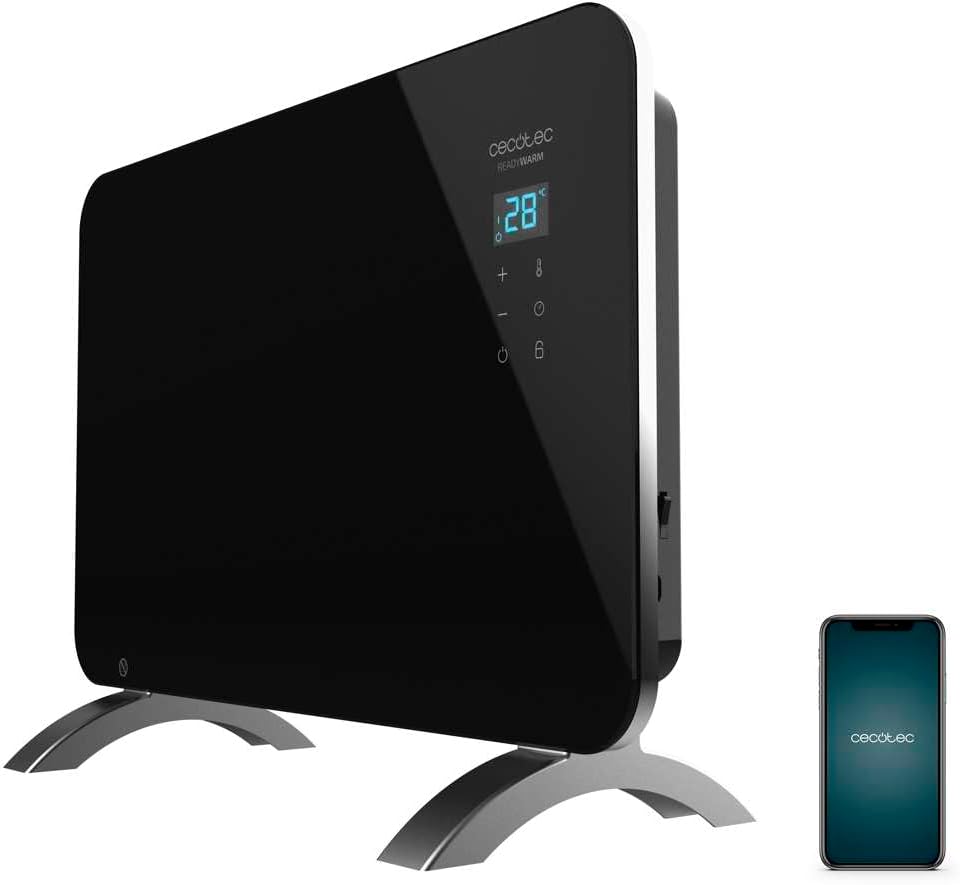
Figure 1: The Cecotec Ready Warm 6670 Cristal Electric Radiator, showcasing its sleek black design and digital display, alongside a smartphone indicating its Wi-Fi control capability.
2. Istruzzjonijiet Importanti dwar is-Sigurtà
Jekk jogħġbok aqra l-istruzzjonijiet kollha bir-reqqa qabel ma tuża l-apparat u żommhom għal referenza futura. Jekk ma ssegwix dawn l-istruzzjonijiet, dan jista' jirriżulta f'xokk elettriku, nar, jew korriment serju.
- Tiżgura l-voltagIl-volum indikat fuq it-tikketta tal-klassifikazzjoni jaqbel mal-volum tal-provvista tal-elettriku tiegħektage qabel ma tqabbad l-apparat.
- Do not use this appliance near water or in damp environments, such as bathrooms, due to its IP24 splash protection rating.
- Always place the radiator on a stable, flat surface. Ensure adequate clearance from walls and furniture for proper ventilation.
- Do not cover the radiator, as this can lead to overheating and fire hazards.
- Żomm it-tfal u l-annimali domestiċi 'l bogħod mill-apparat waqt li jkun qed jaħdem, għax l-uċuħ jistgħu jisħnu ħafna.
- Unplug the appliance from the power outlet when not in use, before cleaning, or before moving it.
- Do not operate the appliance with a damaged cord or plug, or if it has malfunctioned or been dropped.
- Repairs should only be performed by qualified personnel. Improper repairs can be dangerous.
- Dan l-apparat huwa ddisinjat għall-użu fuq ġewwa biss.
3. Komponenti tal-Prodott
Familiarize yourself with the main parts of your Cecotec Ready Warm 6670 Cristal Electric Radiator:
- Main Heating Unit (Glass Panel)
- Panel tal-Wiri Diġitali
- Control Buttons (+, -, Power, Mode, Timer)
- Kurdun tal-Enerġija u Ipplaggja
- Detachable Pedestal Feet (for freestanding use)
- Wall Mounting Brackets (optional, not included in this model description but common for panel heaters)

Figura 2: Dettaljata view of the radiator's digital display and control buttons, showing temperature, mode, and timer indicators.
4. Setup u Installazzjoni
Your radiator can be used as a freestanding unit with the included pedestal feet.
4.1. Attaching the Pedestal Feet
- Carefully unpack the radiator and all components.
- Place the radiator on a soft, flat surface to prevent scratching the glass panel.
- Align the pedestal feet with the mounting holes at the bottom of the radiator.
- Secure the feet using the provided screws. Ensure they are firmly attached.
- Once the feet are attached, carefully place the radiator upright in your desired location. Ensure it is on a stable, level surface and away from flammable materials.

Figure 3: The radiator positioned in a room, demonstrating its freestanding setup with the pedestal feet.
5. Istruzzjonijiet Operattivi
5.1. Operazzjoni Bażika
- Plug the radiator into a suitable power outlet.
- Agħfas il- Qawwa buttuna (simbolu: ċirku b'linja vertikali) on the control panel to turn the unit on. The digital display will illuminate.
- Uża l- + u - buttons to adjust the desired temperature. The display will show the set temperature.
- Agħfas il- Modalità buttuna (symbol: thermometer) to cycle through heating modes (e.g., Eco, Max).
- To turn off the radiator, press the Qawwa buttuna għal darb'oħra.
5.2. Konnettività Wi-Fi u Kontroll tal-App
The Cecotec Ready Warm 6670 Cristal can be controlled via your smartphone using the Tuya Smart APP.
- Niżżel l-app "Tuya Smart" mill-app store tal-ismartphone tiegħek (disponibbli għal iOS u Android).
- Irreġistra jew idħol fil-kont Tuya Smart tiegħek.
- Kun żgur li l-ismartphone tiegħek huwa konness ma' netwerk Wi-Fi ta' 2.4 GHz.
- On the radiator, press and hold the Wi-Fi button (if available, or a combination of buttons as per app instructions) to enter pairing mode. The Wi-Fi indicator on the display will blink.
- In the Tuya Smart app, tap "+" to add a device. Select "Heater" or "Radiator" from the device list.
- Follow the on-screen instructions in the app to connect the radiator to your Wi-Fi network. This typically involves confirming the Wi-Fi indicator is blinking and entering your Wi-Fi password.
- Once connected, you can control the radiator's power, temperature, mode, and timer settings directly from the app.

Figure 4: A user interacting with a smartphone, illustrating the convenience of controlling the radiator remotely via the Tuya Smart application.
5.3. Funzjoni Timer
The timer allows you to set a specific duration for the radiator to operate.
- Agħfas il- Timer buttuna (simbolu: arloġġ) on the control panel or in the app.
- Uża l- + u - buttons to set the desired operating time in hours.
- The radiator will automatically turn off after the set time has elapsed.
6. Manutenzjoni u Tindif
Regular cleaning ensures optimal performance and extends the lifespan of your radiator.
- Dejjem aqla’ r-radjatur mill-plagg tal-elettriku u ħallih jiksaħ kompletament qabel ma tnaddfu.
- Imsaħ l-uċuħ ta 'barra b'artab, damp drapp. Tużax prodotti tat-tindif li joborxu, solventi, jew kimiċi ħarxa, għax dawn jistgħu jagħmlu ħsara lill-finitura.
- Do not immerse the radiator in water or any other liquid.
- Kun żgur li ma jidħolx ilma fil-pannell tal-kontroll jew fil-komponenti elettriċi.
- For storage, clean the unit and store it in a cool, dry place, preferably in its original packaging.
7 Issolvi l-problemi
Jekk tiltaqa' ma' problemi bir-radjatur tiegħek, irreferi għall-problemi u s-soluzzjonijiet komuni li ġejjin:
| Problema | Kawża Possibbli | Soluzzjoni |
|---|---|---|
| Ir-radjatur ma jixgħelx. | Not plugged in; power outlet faulty; power button not pressed; overheat protection activated. | Check power connection; try a different outlet; press power button; unplug and let cool for 30 minutes before restarting. |
| Ebda output tas-sħana. | Temperature setting too low; mode not set correctly. | Increase desired temperature; ensure correct heating mode (e.g., Max) is selected. |
| Il-konnessjoni tal-Wi-Fi tfalli. | Incorrect Wi-Fi password; router too far; 5 GHz network used; pairing mode not active. | Verify password; move radiator closer to router; ensure 2.4 GHz network is used; re-enter pairing mode on radiator. |
| Ir-radjatur jintefa b'mod mhux mistenni. | Timer function active; overheat protection activated. | Check timer settings; ensure radiator is not covered and has adequate ventilation. |
8. Speċifikazzjonijiet Tekniċi
| Karatteristika | Dettall |
|---|---|
| Brand | Cecotec |
| Numru tal-Mudell | big-V1704474 (05350) |
| Kulur | Iswed |
| Qawwa | 1000 W |
| Voltage | 220 Volts |
| Materjal | Aluminum (Heating element), Glass (Panel) |
| Metodu tat-Tisħin | Konvezzjoni |
| Karatteristika Speċjali | Adjustable Thermostat, Wi-Fi Connectivity, Timer, Overheat Protection, IP24 Splash Protection |
| Dimensjonijiet (L x W x H) | 47 x 13 x 64 cm (Product); 60 x 24 x 46 cm (Product, alternative) |
| Piż tal-oġġett | 5.1 Kilogrammi |
| Livell ta' Storbju | 44 dB |
| Użu Rakkomandat | Indoor (Home) |
9. Garanzija u Appoġġ
Cecotec products are manufactured to high-quality standards. This product comes with a standard manufacturer's warranty covering defects in materials and workmanship from the date of purchase. Please refer to the warranty card included with your product for specific terms and conditions.
Għal appoġġ tekniku, assistenza għas-soluzzjoni ta' problemi, jew talbiet għal garanzija, jekk jogħġbok ikkuntattja lis-servizz tal-klijenti ta' Cecotec permezz tal-uffiċjal tagħhom. website or the contact information provided in your product packaging. When contacting support, please have your model number (big-V1704474) and purchase date ready.
Disponibbiltà tal-ispare parts: 10 Snin.


