Prodott Overview
The MIFA X1 True Wireless Earbuds offer a seamless audio experience with Bluetooth 5.0 connectivity, stereo sound, and a portable charging case. Designed for comfort and durability, these earbuds are sweatproof and suitable for various activities.
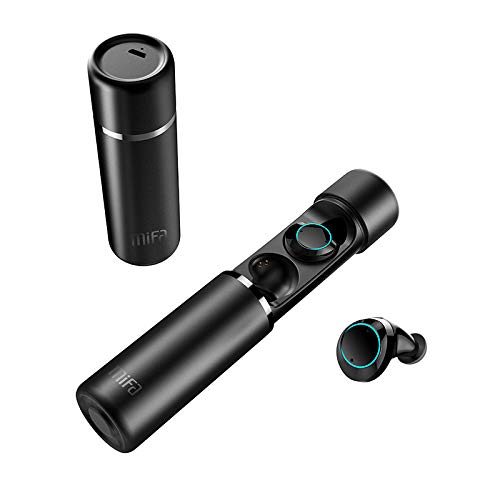
An image displaying the MIFA X1 True Wireless Earbuds. The cylindrical charging case is shown both closed and open, revealing the earbuds inside. One earbud is also shown outside the case.
Kontenut tal-Pakkett
- MIFA X1 True Wireless Earbuds
- Każ tal-Iċċarġjar li jinġarr
- Multi-sized Ear Gels (S, M, L)
- Cable tal-Iċċarġjar tal-USB
- Manwal għall-Utent (dan id-dokument)
Setup
1. Iċċarġjar Inizjali
Before first use, ensure both the earbuds and the charging case are fully charged. Remove any protective films from the earbud charging contacts if present.
- Poġġi l-earbuds fil-każ tal-iċċarġjar.
- Connect the charging case to a power source using a standard USB charging cable.
- Charging indicators on the case and/or earbuds will show charging status.
2. Tqabbil ma' Apparat
The MIFA X1 earbuds feature one-step pairing.
- Kun żgur li l-Bluetooth huwa attivat fuq l-ismartphone jew apparat ieħor tiegħek.
- Oħroġ iż-żewġ earbuds mill-kaxxa tal-iċċarġjar. Dawn jinxtegħlu awtomatikament u jidħlu fil-modalità ta' tqabbil.
- On your device, search for Bluetooth devices and select "MIFA X1" from the list.
- Ladarba jkun konness, se tinstema' twissija bil-vuċi biex tikkonferma li l-akkoppjar sar b'suċċess.
Note: If only one earbud connects, place both back into the case, then remove them again to re-initiate pairing.
Istruzzjonijiet Operattivi
Liebes il-Earbuds
- Choose the ear gels that provide the most comfortable and secure fit for optimal sound quality and stability.
- Gently insert the earbuds into your ears and rotate them slightly to ensure a snug fit.
Kontrolli Bażiċi (Kontroll tal-Mess)
| Funzjoni | Azzjoni |
|---|---|
| Qawwa Mixgħul | Take out of charging case (automatic) |
| Qawwa Mitfi | Place into charging case (automatic) |
| Ilgħab/Pawża Mużika | Tektek wieħed fuq kull earbud |
| Track li jmiss | Tektek darbtejn fuq il-widna tal-lemin |
| Track Preċedenti | Tektek darbtejn fuq il-earbud tax-xellug |
| Tweġiba/Tmiem Sejħa | Tektek wieħed fuq kull earbud |
| Irrifjuta Sejħa | Agħfas u żomm kwalunkwe earbud għal 2 sekondi |
| Attiva Voice Assistant (Siri, Google Assistant) | Tektek tliet darbiet fuq kull earbud |
Manutenzjoni
- Tindif: Naddaf il-earbuds u l-kaxxa tal-iċċarġjar regolarment b'ċarruta ratba, niexfa u mingħajr suf. Tużax kimiċi ħarxa jew materjali li joborxu.
- Kuntatti tal-Iċċarġjar: Kun żgur li l-kuntatti tal-iċċarġjar kemm fuq il-earbuds kif ukoll fuq il-kaxxa huma nodfa u ħielsa minn debris biex iżżomm iċċarġjar xieraq.
- Ħażna: Meta ma tkunx qed tużahom, aħżen il-earbuds fil-kaxxa tal-iċċarġjar tagħhom biex tipproteġihom u żżommhom iċċarġjati.
- Reżistenza għall-Ilma: The earbuds are sweatproof, but not fully waterproof. Avoid submerging them in water or exposing them to heavy rain.
Issolvi l-problemi
- Il-earbuds mhux qed jingħaqdu ma' xulxin: Place both earbuds back into the charging case, then remove them simultaneously. This should force them to re-sync.
- Il-earbuds mhux qed jikkonnettjaw mal-apparat:
- Kun żgur li l-Bluetooth huwa attivat fuq it-tagħmir tiegħek.
- Forget "MIFA X1" from your device's Bluetooth settings and attempt to pair again.
- Kun żgur li l-earbuds huma ċċarġjati.
- L-ebda ħoss minn earbud wieħed:
- Iċċekkja jekk iż-żewġ earbuds humiex iċċarġjati.
- Ipprova poġġi ż-żewġ earbuds lura fil-kaxxa u oħroġhom mill-ġdid.
- Perform a factory reset (if applicable, consult MIFA support for specific instructions if this manual doesn't detail it).
- Kwistjonijiet tal-iċċarġjar:
- Kun żgur li l-kejbil tal-iċċarġjar huwa konness sew kemm mal-kaxxa kif ukoll mas-sors tal-enerġija.
- Naddaf il-kuntatti tal-iċċarġjar fuq il-earbuds u ġewwa l-kaxxa.
- Try a different USB charging cable and power adapter.
Speċifikazzjonijiet
| Karatteristika | Dettall |
|---|---|
| Isem tal-Mudell | X1 |
| Teknoloġija tal-Konnettività | Bluetooth 5.0 |
| Teknoloġija tal-Komunikazzjoni mingħajr Fili | Bluetooth |
| Modalità tal-Ħruġ tal-Awdjo | Stereo |
| Format tal-Mikrofonu | Mibnija fil- |
| Metodu ta' Kontroll | Mess |
| Tqegħid tal-widnejn | Fil-widnejn |
| Ħajja tal-Batterija (Earbuds) | Sa 4 sigħat |
| Ħajja Totali tal-Batterija (bil-Kaxxa tal-Iċċarġjar) | Sa 12 sigħat |
| Materjal | Plastik |
| Karatteristiċi Speċjali | Mikrofonu Inkluż, Sweatproof |
| Manifattur | MIFA INNOVAZZJONIJIET LLC |
Informazzjoni dwar Garanzija
This product typically comes with a manufacturer's warranty. Please refer to the warranty card included in your product packaging or visit the official MIFA website for detailed warranty terms and conditions. A 30-day warranty is generally provided.
Appoġġ għall-Klijent
For further assistance, technical support, or inquiries regarding your MIFA X1 True Wireless Earbuds, please visit the official MIFA website or contact their customer service department. Contact information can usually be found on the product packaging or the official brand websit.


