1. Introduzzjoni
Grazzi tax-xiriasing the MIFA A30 Bluetooth Speaker. This manual provides essential information for setting up, operating, and maintaining your device. Please read it thoroughly before use to ensure optimal performance and longevity of your speaker.
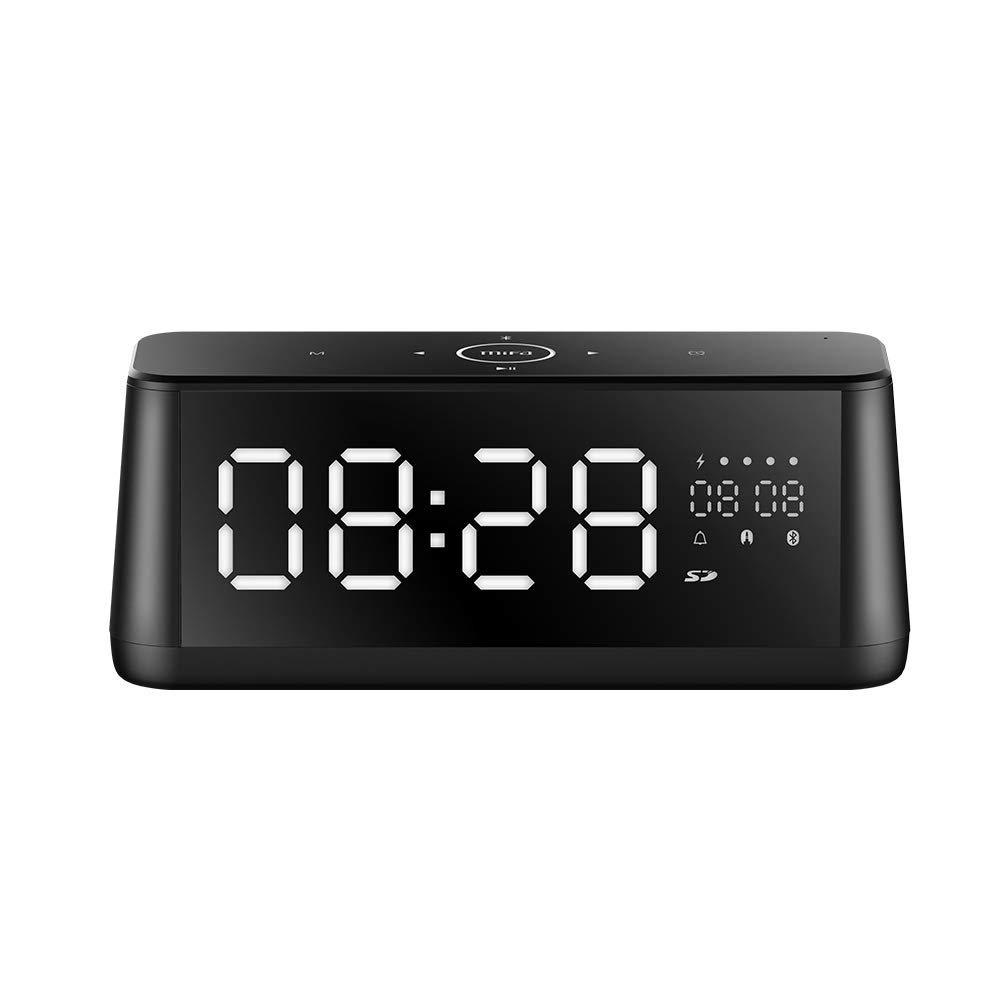
Stampa 1.1: Quddiem view of the MIFA A30 Bluetooth Speaker, displaying the time on its large LED screen.
2. Informazzjoni dwar is-Sigurtà
- Tesponix l-ispiker għal temperaturi estremi, dawl tax-xemx dirett, jew umdità għolja.
- Evita li twaqqa’ jew tissuġġetta lill-kelliem għal impatti qawwija.
- Do not disassemble, repair, or modify the device yourself. Contact authorized service personnel for any repairs.
- Keep the speaker away from water and other liquids, despite its waterproof rating, to prevent damage to ports when open.
- Uża biss il-kejbil u l-adapter tal-iċċarġjar speċifikati.
- Clean the speaker with a soft, dry cloth. Do not use abrasive cleaners.
3. Kontenut tal-Pakkett
Jekk jogħġbok iċċekkja l-pakkett għall-oġġetti li ġejjin:
- MIFA A30 Bluetooth Speaker
- Cable tal-Iċċarġjar tal-USB
- Cable Awdjo 3.5mm
- Manwal għall-Utent (dan id-dokument)
4. Prodott Aktarview
4.1. Komponenti
The MIFA A30 speaker features a robust design with advanced audio components for high-quality sound reproduction.

Immaġni 4.1: Splodiet view illustrating the internal components of the MIFA A30, including two 15-watt drivers and two low-frequency passive radiators.
4.2. Control Panel and Ports
The speaker's top panel features capacitive touch controls, and the rear panel houses various connectivity ports.
Immaġni 4.2: Minn fuq għal isfel view of the MIFA A30 control panel, indicating the functions of each touch button for mode, playback, volume, and clock adjustment.
- Buttuna M (Modalità): Short press to switch between Bluetooth, TF Card, and AUX modes.
- Kontroll Bluetooth: Long press to turn off Bluetooth, short press to turn on.
- Buttuna tat-Trekk ta 'Qabel: Agħfas qasir biex tmur għall-binarju preċedenti.
- Play/Pause/Hands-Free Button: Short press to play/pause music. Short press to answer/end calls. Long press to reject calls.
- Buttuna tat-Trekk li jmiss: Agħfas qasir biex tmur għall-binarju li jmiss.
- Buttuna tal-Arloġġ: Long press for clock adjustment.
- Volum 'il fuq: Dawwar lejn l-arloġġ biex iżżid il-volum.
- Volum 'l isfel: Dawwar kontra l-arloġġ biex tnaqqas il-volum.
- Mic: Mikrofonu inkorporat għal sejħiet mingħajr idejn.
- Wiri LED: Shows time, date, battery level, and current mode.
5. Setup
5.1. Iċċarġja l-Ispeaker
Before first use, fully charge the speaker. Connect the provided USB charging cable to the speaker's charging port and the other end to a USB power adapter (not included) or a computer's USB port. The LED display will indicate charging status.
5.2. Tixgħil / Mitfi
- Biex Tixgħel: Press and hold the Play/Pause button until the LED display lights up.
- Biex Tifi: Press and hold the Play/Pause button until the LED display turns off. The speaker will automatically screen out and power off to save battery after a period of inactivity.
6. Istruzzjonijiet Operattivi
6.1. Tqabbil tal-Bluetooth
- Ensure the speaker is powered on and in Bluetooth mode (indicated by the Bluetooth icon on the LED display). If not, short press the 'M' button to switch to Bluetooth mode.
- Fuq l-ismartphone jew it-tablet tiegħek, ippermetti l-Bluetooth u fittex it-tagħmir disponibbli.
- Select "MIFA A30" from the list of devices.
- Ladarba jkun imqabbad, l-ispiker se joħroġ ħoss ta’ konferma, u l-ikona tal-Bluetooth fuq id-displej se tieqaf teptip.
- The speaker will automatically re-connect to the last paired device when powered on, if the device is within range.
6.2. Daqq tal-Awdjo
- Play/Pawsa: Agħfas qasir il-buttuna Play/Pause.
- Track li jmiss: Short press the Next Track button.
- Track preċedenti: Short press the Previous Track button.
- Aġġustament tal-Volum: Dawwar il-kontroll tal-volum lejn l-arloġġ biex iżżid il-volum, kontra l-arloġġ biex tnaqqas il-volum.
6.3. Sejħiet mingħajr idejn
Meta tkun imqabbad permezz tal-Bluetooth ma' smartphone:
- Irrispondi Sejħa: Agħfas qasir il-buttuna Play/Pause.
- Tmiem Sejħa: Agħfas qasir il-buttuna Play/Pause waqt telefonata.
- Irrifjuta Sejħa: Long press the Play/Pause button when a call comes in.
6.4. Daqq tal-Karta TF
- Insert a Micro-SD (TF) card with supported audio files (FLAC/APE/MP3/WMA/WAV) into the TF card slot.
- Short press the 'M' button to switch to TF Card mode. The speaker will automatically begin playing music from the card.
6.5. Input AUX
- Connect one end of the 3.5mm audio cable to the speaker's AUX input port and the other end to the audio output of your device (e.g., MP3 player, computer).
- Short press the 'M' button to switch to AUX mode.
- L-awdjo issa se jindaqq permezz tal-ispiker mit-tagħmir konness tiegħek.
6.6. Clock and Display Settings
- Aġġustament tal-Arloġġ: Long press the Clock button to enter time setting mode. Use the Next/Previous buttons to adjust values and the Play/Pause button to confirm.
- Display Luminance: The LED display has 7 adjustable luminance levels. Refer to the full product documentation for specific adjustment steps, typically involving short presses of the Clock button or a combination with volume controls.
7. Manutenzjoni
- Tindif: Wipe the speaker's surface with a soft, dry, lint-free cloth. Do not use liquid or aerosol cleaners.
- Ħażna: Meta ma tkunx qed tużah għal perjodi twal, aħżen l-ispiker f'post frisk u niexef, 'il bogħod mix-xemx diretta u minn temperaturi estremi.
- Kura tal-batterija: Biex ittawwal il-ħajja tal-batterija, evita li tiċċarġja kompletament il-batterija ta’ spiss. Iċċarġja l-ispiker regolarment, anke jekk ma jkunx qed jintuża.
8 Issolvi l-problemi
| Problema | Kawża Possibbli | Soluzzjoni |
|---|---|---|
| L-ispiker ma jixgħelx. | Batterija baxxa. | Iċċarġja l-ispiker għal mill-inqas 2 sigħat. |
| L-ebda ħoss. | Volum baxx wisq; mod mhux korrett; apparat mhux imqabbad. | Increase speaker and device volume. Ensure correct mode (Bluetooth/AUX/TF Card). Re-pair Bluetooth device or check AUX cable connection. |
| Tqabbil Bluetooth ifalli. | L-ispiker mhux fil-modalità ta' tqabbil; l-apparat wisq 'il bogħod; interferenza. | Ensure speaker is in Bluetooth mode. Move device closer to speaker. Turn off other Bluetooth devices. Try forgetting "MIFA A30" on your device and re-pairing. |
| TF Card not playing. | Incorrect mode; unsupported file format; card error. | Switch to TF Card mode. Ensure files are FLAC/APE/MP3/WMA/WAV. Reinsert TF card or try a different card. |
9. Speċifikazzjonijiet
| Karatteristika | Dettall |
|---|---|
| Isem tal-Mudell | A30 |
| Tip ta' Kelliem | Librerija |
| Teknoloġija tal-Konnettività | Bluetooth 4.2, Auxiliary (3.5mm), Micro-SD (TF Card) |
| Modalità tal-Ħruġ tal-Awdjo | Stereo |
| Qawwa tal-Ħruġ Massimu tal-Ispeaker | 30 Watts (2 x 15W drivers) |
| Titjib tal-Bass | Two low-frequency boosters |
| Kapaċità tal-batterija | 4000 mAh |
| Ħin tal-logħob | Up to 10-12 hours (depending on volume and content) |
| Metodu ta' Kontroll | Touch Panel capacitiv |
| Wiri | 7.2" x 2.8" Mirror LED Screen with 106 LEDs, 7-level adjustable luminance |
| Formati Awdjo Appoġġjati | FLAC/APE/MP3/WMA/WAV |
| Mikrofonu inkorporat | Iva, għal telefonati mingħajr idejn |
| Waterproof | Yes (Note: Ensure ports are covered for water resistance) |
| Kulur | Iswed |
| Tip ta 'Immuntar | Immonta fuq il-mejda |
10. Garanzija u Appoġġ
The MIFA A30 Bluetooth Speaker typically comes with a 30-day warranty from the date of purchase, covering manufacturing defects. Please retain your proof of purchase for warranty claims.
For technical support, troubleshooting assistance beyond this manual, or warranty inquiries, please contact MIFA customer service through their official website or the retailer where the product was purchased. Provide your product model (A30) and purchase details when seeking support.


