1. Introduzzjoni
The Optex ORT 8930-HD is a digital terrestrial receiver designed to receive free-to-air digital programs broadcast in MPEG2/MPEG4 format, compatible with DVB-T2 and HEVC/H.265 standards. This device connects to your television via HDMI or SCART. It features a USB input for future software updates, multimedia file playback (photos, music, videos), and direct recording to an external USB storage device (not included).
This manual provides detailed instructions for the proper installation, operation, and maintenance of your Optex ORT 8930-HD receiver. Please read it thoroughly before use to ensure optimal performance and to prevent damage.
2. Informazzjoni dwar is-Sigurtà
- Żgura ventilazzjoni xierqa madwar l-apparat biex tevita sħana żejda.
- Do not expose the receiver to rain, moisture, or extreme temperatures.
- Evita li tpoġġi l-apparat ħdejn sorsi tas-sħana bħal radjaturi jew stufi.
- Uża biss l-adapter tal-enerġija fornut mal-unità.
- Tiftaħx is-casing; irreferi s-servizz kollu lil persunal kwalifikat.
- Disconnect the power plug from the wall outlet during lightning storms or when unused for long periods.
3. Kontenut tal-Pakkett
Ivverifika li l-oġġetti kollha huma preżenti fil-pakkett:
- 1 x Optex ORT 8930-HD Digital Receiver
- 1 x Kontroll mill-bogħod
- 1 x Manwal għall-Utent
4. Prodott Aktarview
4.1 Panel ta 'Quddiem

Stampa 1: Quddiem view of the Optex ORT 8930-HD receiver, showing the display, USB port, and control buttons.
The front panel includes a digital display for channel numbers, a USB 2.0 port for external storage, and basic control buttons (CH+, CH-, Power).
4.2 Panel ta 'wara
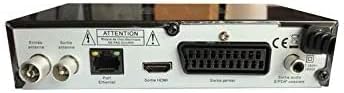
Stampa 2: Wara view of the Optex ORT 8930-HD receiver, displaying various connectivity ports.
The rear panel provides the following connections:
- Dħul/Ħruġ tal-Antenna: IEC 9.52 mm connectors for terrestrial antenna.
- Ħruġ HDMI: For connecting to an HD television.
- SCART Connector: For connecting to older televisions.
- S/PDIF Coaxial Audio: Output awdjo diġitali.
- Input ta' Enerġija: For the external power adapter.
4.3 Kontroll mill-Bogħod

Stampa 3: The remote control unit for the Optex ORT 8930-HD receiver.
The remote control allows full operation of the receiver, including power, channel selection, volume, menu navigation, recording functions, and multimedia playback controls.
5. Setup
5.1 Konnessjoni tal-antenna
- Connect your terrestrial antenna cable to the "Antenna In" port on the rear panel of the receiver.
- If you wish to loop the antenna signal to another device, connect a coaxial cable from the "Antenna Out" port to the input of the next device.
5.2 Konnessjoni mat-Televiżjoni Tiegħek
Agħżel wieħed mill-metodi ta 'konnessjoni li ġejjin:
- HDMI (Recommended for HD): Connect an HDMI cable from the "HDMI Output" port on the receiver to an available HDMI input on your television.
- SCART: Connect a SCART cable from the "SCART Connector" on the receiver to the SCART input on your television.
5.3 Konnessjoni tal-Enerġija
- Connect the power adapter to the power input port on the receiver.
- Ipplaggja l-adapter tal-enerġija f'sokit tal-ħajt adattat.
5.4 Initial Channel Scan
- Turn on your television and select the correct input source (HDMI or SCART) corresponding to your connection.
- Power on the Optex ORT 8930-HD receiver.
- The first-time setup wizard should appear. Follow the on-screen instructions to perform an automatic channel search. This will scan for all available digital terrestrial channels in your area.
- If the wizard does not appear, navigate to the "Menu" > "Installation" > "Automatic Search" using the remote control.
6. Istruzzjonijiet Operattivi
6.1 Operazzjoni Bażika
- Power On/Off: Agħfas il- QAWWA buttuna fuq il-kontroll mill-bogħod jew il-pannell ta ’quddiem.
- Għażla tal-Kanal: Uża l- CH+ / CH- buttuni jew daħħal in-numru tal-kanal direttament billi tuża t-tastiera numerika.
- Kontroll tal-Volum: Uża l- VOL+ / VOL- buttuni.
- Siekta: Agħfas il- MUTE buttuna biex issikket l-awdjo temporanjament.
6.2 Ġestjoni tal-Kanal
- Automatic/Manual Search: Aċċess permezz Menu > Installazzjoni to rescan for channels.
- Funzjoni LCN: The Logical Channel Numbering (LCN) function automatically sorts channels into a logical order. This can usually be enabled/disabled in the installation menu.
- Favorite List: Create personalized lists of your preferred channels for quick access. Refer to the on-screen menu for instructions on adding and managing favorite channels.
6.3 Reġistrazzjoni u Daqq
To use recording and multimedia playback features, connect a USB storage device (e.g., USB flash drive or external hard drive) to the USB port on the front panel.
- Reġistrazzjoni USB: Agħfas il- REC button on the remote control to start recording the current program. Press STOP biex tispiċċa r-reġistrazzjoni.
- Timeshift Function: This allows you to pause live TV and resume watching later. Activate Timeshift via the remote control (usually a dedicated button or through the menu).
- Daqq Multimedjali: Access the multimedia player via the Menu. You can browse and play music, photo, and video files stored on your connected USB device.
6.4 Gwida Elettronika tal-Programm (EPG)
Agħfas il- EPG buttuna fuq il-kontroll remot biex view the Electronic Program Guide, which displays program schedules for upcoming broadcasts.
6.5 Lock tal-Ġenituri
Set up a parental lock to restrict access to certain channels or programs. This feature is typically found in the Menu > Issettjar tas-Sistema > Kontroll tal-Ġenituri sezzjoni.
6.6 Funzjoni Timer
The timer function allows you to schedule the receiver to turn on/off or record a specific program at a set time. Access this feature through the Menu.
6.7 Software Update via USB
Iċċekkja perjodikament il-manifattur website for available software updates. Download the update file to a USB drive and follow the instructions in the Menu > Issettjar tas-Sistema > Aġġornament tas-Software section to install it.
7. Manutenzjoni
- Tindif: Use a soft, dry cloth to clean the exterior of the receiver. Do not use liquid or aerosol cleaners.
- Ventilazzjoni: Ensure that the ventilation slots on the device are not blocked to prevent overheating.
- Software: Keep the receiver's software updated to ensure optimal performance and access to the latest features.
8 Issolvi l-problemi
| Problema | Kawża Possibbli | Soluzzjoni |
|---|---|---|
| Ebda qawwa | Power cable disconnected; power outlet faulty. | Iċċekkja l-konnessjoni tal-kejbil tal-enerġija; ipprova sokit differenti. |
| No signal / No channels | Antenna not connected; incorrect input source on TV; no channel scan performed. | Check antenna connection; select correct TV input; perform an automatic channel scan. |
| Il-kontroll mill-bogħod ma jaħdimx | Batteries depleted; obstruction between remote and receiver. | Replace batteries; ensure clear line of sight to the receiver's IR sensor. |
| Ir-reġistrazzjoni tal-USB mhux qed taħdem | USB device not connected or formatted incorrectly; insufficient storage space. | Ensure USB device is properly connected; format USB device (FAT32/NTFS); check available space. |
| Device freezes or becomes unresponsive | Problema temporanju tas-softwer. | Disconnect power for a few seconds, then reconnect. If problem persists, check for software updates. |
9. Speċifikazzjonijiet
| Karatteristika | Dettall |
|---|---|
| Mudell | ORT 8930-HD |
| Brand | Optex |
| Tip ta' tuner | Terrestri (DVB-T2) |
| Dekodifikazzjoni tal-vidjo | HEVC/H.265, MPEG-2.5 |
| Konnettività | 1x HDMI, 1x SCART, 1x USB 2.0, 1x S/PDIF Coaxial Audio, Antenna In/Out |
| Kapaċità tal-Kanal | Over 1000 channels |
| Reġistrazzjoni | External USB media (PVR function) |
| Daqq Multimedia | Music, Photos, Videos |
| Karatteristiċi Speċjali | Timeshift, EPG, Parental Lock, Favorite List, Multi-language Menu, LCN, 5V Antenna Power, Timer Function, Dolby Digital+ compatible |
| Modalità tal-Ħruġ tal-Awdjo | [SOM] |
| Speaker Surround Sound Configuration | 5.1 |
| Output ta 'Qawwa | 5 Watts |
| Piż tal-Prodott | 600 g |
10. Garanzija u Appoġġ
Specific warranty information is not provided within this manual. Please refer to the warranty card included with your purchase, contact your retailer, or visit the official Optex websit għal termini u kundizzjonijiet dettaljati tal-garanzija.
For technical support or service inquiries, please contact your local Optex distributor or the customer service department as indicated on the product packaging or manufacturer's websit.


