Introduzzjoni
The TP-Link TL-PoE4824G is a passive Power over Ethernet (PoE) adapter designed to supply power and transmit data simultaneously to compatible passive PoE devices. This includes devices such as TP-Link's EAP245 3.0, EAP225 3.0, and CPE610. Its design incorporates convenient wall-mounting brackets for easy installation.
Karatteristiċi ewlenin:
- 48V passive PoE support for compatible devices.
- Automatic determination of necessary power requirements.
- Convenient wall-mounting design for flexible placement.
- Gigabit speed support for high-speed data transmission.
- Plug-and-Play functionality, requiring no complex configuration.
- Ethernet connectivity technology.
Kontenut tal-Pakkett
Ivverifika li l-pakkett tiegħek fih l-oġġetti li ġejjin:
- 48V 24W Passive PoE Adapter (TL-PoE4824G)
- Korda tal-Enerġija
- Kits tal-Immuntar tal-Ħajt
Prodott Overview
The TL-PoE4824G PoE Injector features a compact design with essential ports and indicators for easy operation.

Figura 1: Minn fuq għal isfel view of the TP-Link TL-PoE4824G Passive PoE Injector.
Portijiet u Indikaturi:
- Port PoE: Connects to the passive PoE device to deliver both power and data.
- Port tal-LAN: Connects to your network device (e.g., router, switch) for data input.
- Input ta' Enerġija: Connects to the provided power cord for electrical supply.
- Indikatur LED: Provides status information (e.g., power, connection activity).
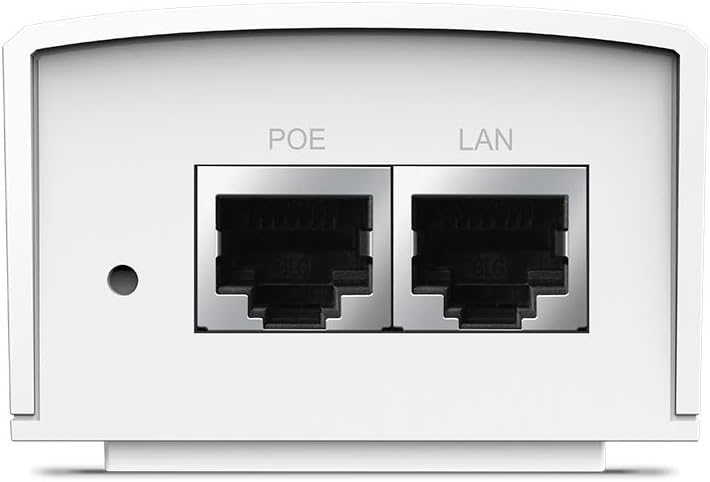
Figura 2: Close-up view of the PoE and LAN data ports.

Figura 3: Close-up view of the power input port.

Figura 4: Ġenb view showing the LED indicator for device status.
Setup
The TL-PoE4824G is designed for simple plug-and-play installation. Follow these steps to set up your PoE injector:
- Qabbad mal-Enerġija: Plug the provided power cord into the power input port of the TL-PoE4824G and then into a standard electrical outlet.
- Qabbad man-Netwerk: Connect an Ethernet cable from your network device (e.g., router, switch) to the LAN port on the TL-PoE4824G.
- Connect to PoE Device: Qabbad kejbil Ethernet ieħor mill- Poe port on the TL-PoE4824G to your passive PoE-compatible device (e.g., access point, IP camera).
- Ivverifika l-Konnessjoni: Check the LED indicator on the TL-PoE4824G. A solid light typically indicates a successful power and data connection.

Figure 5: Connection diagram for the TL-PoE4824G, illustrating data and power flow to a passive PoE device.
Immuntar tal-ħajt:
The TL-PoE4824G includes wall-mounting kits for secure installation. Refer to the diagram below for the mounting process:

Figure 6: Wall-mounting steps for the TL-PoE4824G using the provided brackets.
Operazzjoni
Once properly connected, the TL-PoE4824G operates automatically. It provides 48V DC passive PoE to the connected device, eliminating the need for a separate power adapter for the PoE device. Data transmission occurs at Gigabit speeds through the Ethernet connection.
The injector is designed to auto-determine the necessary power requirements for the connected passive PoE device, ensuring efficient and safe operation.
Manutenzjoni
- Tindif: Uża drapp artab u niexef biex tnaddaf l-apparat. Tużax prodotti tat-tindif likwidi jew aerosol.
- Pjazzament: Kun żgur li l-apparat jitqiegħed f'żona ventilata sew, 'il bogħod mix-xemx diretta, sorsi ta' sħana, u umdità.
- Ġestjoni tal-Kejbil: Keep all cables neatly organized to prevent damage and ensure proper airflow.
- Aġġornamenti tal-Firmware: Iċċekkja perjodikament l-uffiċjal tat-TP-Link website for any available firmware updates to ensure optimal performance and security.
Issolvi l-problemi
No Power/LED Indicator Off:
- Ensure the power cord is securely connected to both the injector and a working electrical outlet.
- Ittestja s-sokit elettriku b'apparat ieħor biex tikkonferma li qed jipprovdi l-enerġija.
No Data Connection:
- Verify that the Ethernet cables are securely connected to the LAN port (from your network) and the PoE port (to your device).
- Ensure the connected passive PoE device is functioning correctly and is compatible with 48V passive PoE.
- Check the status of your network device (router/switch) to ensure it is providing an active network connection.
- Try using different Ethernet cables to rule out cable defects.
Apparat Mhux Qed Jirċievi l-Enerġija:
- Confirm that your end device is a passive PoE device and supports 48V DC input. This injector is not compatible with 802.3af/at active PoE standards.
- Ensure the cable length does not exceed 100 meters (325 feet) for optimal power and data delivery.
Speċifikazzjonijiet
| Mudell | TL-PoE4824G |
| Brand | TP-Link |
| Standard PoE | 48V DC Passive PoE |
| Rata ta' Trasferiment tad-Data | 1000 Mbps (Gigabit Ethernet) |
| Teknoloġija tal-Konnettività | Ethernet |
| Portijiet | 1x LAN (Data In), 1x PoE (Data & Power Out) |
| Tul Max Cable | Sa 100 metri (325 pied) |
| Dimensjonijiet (LxWxH) | 4.33 x 2.24 x 1.41 pulzieri |
| Piż | 5.6 uqija |
Garanzija u Appoġġ
For warranty information, technical support, and product registration, please visit the official TP-Link webis-sit jew ikkuntattja s-servizz tal-konsumatur tagħhom. Żomm l-irċevuta tax-xiri tiegħek għal talbiet ta’ garanzija.
- Appoġġ TP-Link Websit: www.tp-link.com/us/support/
- Kuntatt: Refer to the TP-Link websit għal informazzjoni ta' kuntatt reġjonali.


