1. Introduzzjoni
This manual provides essential information for the safe and efficient operation of your NEC C861Q-AVT2 86-inch 4K UHD LED LCD Display. The C861Q-AVT2 is designed for commercial environments, offering clear, detailed imagery with a 4K UHD resolution, 350 cd/m² brightness, and an anti-glare surface for optimal readability in various lighting conditions. Its robust design includes a full metal chassis, real-time temperature sensors, and integrated cooling fans for reliable 24/7 operation.
Key features include multiple connectivity options such as HDMI 2.0 and DisplayPort 1.2, an integrated media player for USB or SD card playback, and a Raspberry Pi Compute Module slot for direct source integration.
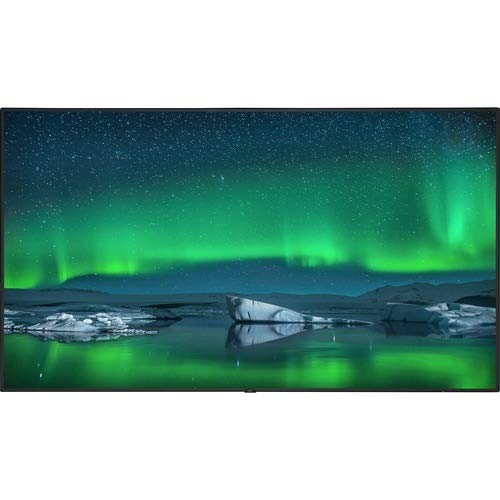
Quddiem view of the NEC C861Q-AVT2 86-inch 4K UHD LED LCD Display, showcasing its slim bezel and large screen.
2. Informazzjoni dwar is-Sigurtà
Please read all safety instructions carefully before using the display. Failure to follow these instructions may result in electric shock, fire, or damage to the product.
- Sors tal-Enerġija: Connect the display only to the type of power source indicated on the label. Ensure the power cord is securely plugged into a grounded outlet.
- Ventilazzjoni: Do not block ventilation openings. Ensure adequate space around the display for proper airflow to prevent overheating.
- Espożizzjoni għal Likwidu: Do not expose the display to rain, moisture, or spill liquids onto it. If liquid enters the display, disconnect power immediately and contact qualified service personnel.
- Tindif: Unplug the display from the power outlet before cleaning. Use a soft, dry cloth. Do not use liquid cleaners or aerosol cleaners.
- Immuntar: Ensure the display is mounted securely to a stable surface or wall using appropriate mounting hardware. If wall-mounting, use a compatible mount such as the WMK-3255S to meet ADA compliance requirements.
- Servizzi: Tippruvax isservi dan il-prodott int stess. Irreferi l-manutenzjoni kollha lil persunal tas-servizz kwalifikat.
3. X'hemm fil-Kaxxa
Iftaħ il-kaxxa bir-reqqa u kun żgur li l-oġġetti kollha huma preżenti:
- NEC C861Q-AVT2 86-inch 4K UHD LED LCD Display
- Stand (for table mounting)
- Korda tal-Enerġija
- Remote Control (not explicitly listed but standard for displays)
- Manwal għall-Utent (dan id-dokument)
4. Setup
4.1 Immuntar tad-Displej
The NEC C861Q-AVT2 can be used with the included stand for table mounting or with a compatible VESA wall mount (sold separately).
- Muntaġġ tal-Mejda: Attach the provided stand to the display following the instructions in the separate stand assembly guide. Place the display on a stable, level surface.
- Muntaġġ tal-ħajt: If wall-mounting, ensure the wall mount is rated for the display's weight (approximately 127.4 pounds or 57.8 kg). Follow the wall mount manufacturer's instructions carefully. For ADA compliance, consider using the WMK-3255S wall mount.
4.2 Konnessjoni ta' Apparati Esterni
The display offers various input ports:
- HDMI: Connect up to three HDMI devices (e.g., media players, computers) to the HDMI 2.0 ports.
- DisplayPort: Connect DisplayPort devices to the DisplayPort 1.2 inputs. Daisy chain functionality is also supported.
- USB: Use the USB ports for connecting storage devices for the integrated media player or for service purposes.
- Raspberry Pi Compute Module Slot: Insert a compatible Raspberry Pi Compute Module for integrated source functionality.
4.3 Konnessjoni tal-Enerġija
- Ensure all external devices are connected.
- Connect the power cord to the display's power input.
- Ipplaggja t-tarf l-ieħor tal-korda tad-dawl fi żbokk elettriku ertjat.
5. Istruzzjonijiet Operattivi
5.1 Tixgħel/Jitfi
Press the power button on the display or the remote control to turn the display on or off. The power indicator light will illuminate when the display is on.
5.2 Għażla tal-Input
Use the 'Input' or 'Source' button on the remote control to cycle through available input sources (HDMI 1, HDMI 2, HDMI 3, DisplayPort 1, DisplayPort 2, Internal Media Player, Raspberry Pi Module).
5.3 Settings tal-Istampa
Access the on-screen display (OSD) menu using the remote control to adjust picture settings such as:
- Luminożità
- Kuntrast
- Temperatura tal-Kulur
- Proporzjon ta' l-aspett
- Advanced settings via SpectraView Engine for color, intensity, gamma, or uniformity control.
5.4 Integrated Media Player
The display features an integrated media player. Insert a USB drive or SD card containing audio, video, or image files into the designated slot. Select the 'Internal Media Player' input source to access and play your content.
6. Manutenzjoni
6.1 Tindif tal-Display
- Skrin: Imsaħ l-iskrin bil-mod b'ċarruta ratba u mingħajr suf. Għal marki persistenti, nixxef bil-modampen the cloth with water or a non-abrasive, display-safe cleaning solution. Do not spray liquid directly onto the screen.
- Casing: Imsaħ iċ-ċasing with a soft, dry cloth. Avoid using harsh chemicals or abrasive materials.
6.2 Ventilazzjoni
Ensure that the ventilation openings on the display are not obstructed. Proper airflow is crucial for maintaining optimal operating temperature and extending the lifespan of the display, especially during 24/7 operation.
7 Issolvi l-problemi
Jekk tiltaqa' ma' problemi bid-displej tiegħek, irreferi għall-passi komuni li ġejjin għas-soluzzjoni tal-problemi:
- Ebda Qawwa:
- Check if the power cord is securely connected to both the display and the electrical outlet.
- Ivverifika li s-sokit tal-enerġija qed jaħdem billi tqabbad apparat ieħor.
- Ebda Sinjal:
- Ensure the correct input source is selected on the display.
- Check the connection cables (HDMI, DisplayPort) between the display and the source device. Try a different cable if possible.
- Ivverifika li l-apparat tas-sors huwa mixgħul u qed joħroġ sinjal.
- Kwalità Fqira tal-Istampa:
- Adjust picture settings (brightness, contrast, sharpness) via the OSD menu.
- Ensure the source device is outputting a resolution compatible with the display's native 4K UHD resolution.
- Check for any physical damage to the screen or cables.
- Display Overheating:
- Ensure adequate ventilation around the display. Clear any obstructions from the vents.
- Jekk il-kwistjoni tippersisti, ikkuntattja l-appoġġ tal-klijent.
8. Speċifikazzjonijiet
| Karatteristika | Speċifikazzjoni |
|---|---|
| Brand | NEC |
| Numru tal-Mudell | C861Q-AVT2 |
| Daqs tal-Iskrin | 86 Pulzier |
| Teknoloġija tal-Wiri | LED-LCD |
| Riżoluzzjoni | 4K UHD (3840 x 2160) |
| Luminożità | 350 cd/m² |
| Karatteristiċi Speċjali | Anti-Glare Screen, Integrated ATSC Tuner, Flat Panel, Full Metal Chassis, Integrated Media Player, Raspberry Pi Compute Module Slot |
| Riffriskar Rata | 60 Hz |
| Teknoloġija tal-Konnettività | USB, DisplayPort 1.2 (x2, daisy chain), HDMI 2.0 (x3) |
| Dimensjonijiet tal-Prodott | 2.9 x 75.9 x 43.3 pulzieri (7.37 x 192.79 x 109.98 ċm) |
| Piż tal-oġġett | 127.4 liri (57.8 kg) |
| Tip ta 'Immuntar | Immuntar fuq il-Mejda (kompatibbli mal-VESA għall-immuntar mal-ħajt) |
| Ħinijiet ta' Operazzjoni | 24/7 operation capable |
9. Garanzija u Appoġġ
9.1 Informazzjoni dwar Garanzija
This NEC C861Q-AVT2 display comes with a full 3-year commercial warranty. Please retain your proof of purchase for warranty claims.
9.2 Appoġġ għall-Klijent
For technical assistance, troubleshooting beyond this manual, or warranty service, please contact NEC customer support. Refer to the contact information provided with your purchase documentation or visit the official NEC websit għal dettalji ta 'appoġġ.


