Introduzzjoni
This manual provides detailed instructions for the proper use and maintenance of your Casio MX-12 Desk Calculator. Please read this manual thoroughly before using the calculator to ensure optimal performance and longevity.
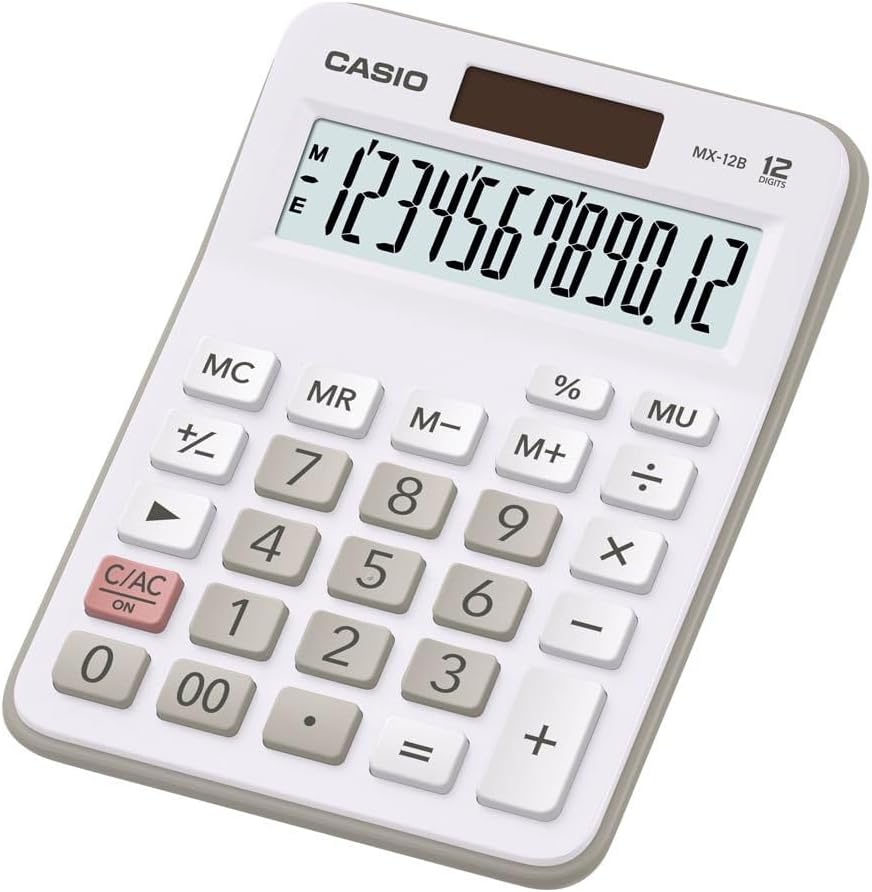
Image: The Casio MX-12 Desk Calculator, featuring a clear 12-digit display and a standard key layout for basic and advanced calculations.
Setup
Sors tal-Enerġija
The Casio MX-12 calculator is dual-powered, operating on both solar energy and a battery backup. For optimal performance, use the calculator in a well-lit environment. The solar panel, located above the display, will power the unit and charge the internal battery.
Installazzjoni/Sostituzzjoni tal-batterija
The calculator requires one AAA battery (included) for backup power. If the display becomes dim or unresponsive in low light conditions, the battery may need replacement.
- Dawwar il-kalkulatur ta' taħt fuq.
- Sib l-għatu tal-kompartiment tal-batterija.
- Remove the screw (if present) and slide the cover off.
- Insert a new AAA battery, ensuring the correct polarity (+/-).
- Ibdel l-għatu tal-kompartiment tal-batterija u waħħalha.
Istruzzjonijiet Operattivi
The Casio MX-12 features a large, clear 12-digit display and a user-friendly key layout for various calculations.
Basic Arithmetic Operations
- Żieda (+): Daħħal l-ewwel numru, agħfas +, daħħal it-tieni numru, imbagħad agħfas =.
- Tnaqqis (-): Daħħal l-ewwel numru, agħfas -, daħħal it-tieni numru, imbagħad agħfas =.
- Multiplikazzjoni (×): Daħħal l-ewwel numru, agħfas ×, daħħal it-tieni numru, imbagħad agħfas =.
- Diviżjoni (÷): Daħħal l-ewwel numru, agħfas ÷, daħħal it-tieni numru, imbagħad agħfas =.
Funzjonijiet Speċjali
- Clear/All Clear (C/AC): Agħfas Ċ/arja kondizzjonata once to clear the last entry. Press it twice to clear all entries and reset the calculator.
- Perċenswalitage (%): Biex tikkalkula perċentwaltage, enter the number, press ×, enter the percentage value, then press %. Per example, to find 15% of 200: 200 × 15 %.
- Bidla tas-Sinjal (+/-): Agħfas +/- to change the sign of the displayed number from positive to negative or vice versa.
- Mark-up (MU): Il- MU key is used for profit margin calculations. For example, to calculate the selling price with a 25% profit margin on a cost of 80: 80 ÷ 25 MU.
- Żero Doppju (00): Uża l- 00 key for quick entry of two zeros.
Funzjonijiet tal-Memorja
The calculator includes a 4-key memory function:
- Memorja Plus (M+): Iżżid il-valur muri mal-memorja.
- Memorja Minus (M-): Inaqqas il-valur muri mill-memorja.
- Tifkira tal-Memorja (MR): Ifakkar il-valur maħżun fil-memorja fuq id-displej.
- Ċar tal-Memorja (MC): Iħassar il-valur maħżun fil-memorja.
Manutenzjoni
Tindif
To clean the calculator, wipe it gently with a soft, dry cloth. Do not use abrasive cleaners, solvents, or excessive moisture, as these can damage the display or internal components.
Ħażna
Store the calculator in a cool, dry place away from direct sunlight and extreme temperatures. Prolonged exposure to direct sunlight can affect the solar panel's efficiency and the display's longevity.
Issolvi l-problemi
- Id-displej huwa vojt jew mudlam:
- Ensure the calculator is in a well-lit area for the solar panel to function.
- Check the AAA battery. Replace it if necessary (refer to "Battery Installation/Replacement" in the Setup section).
- Riżultati tal-kalkolu mhux korretti:
- Agħfas Ċ/arja kondizzjonata twice to clear all previous entries and memory.
- Re-enter the calculation carefully.
- Ensure you are using the correct function keys for your desired operation.
- Iċ-ċwievet ma jirrispondux:
- Clean the calculator surface and keys to remove any debris.
- Ensure the calculator is adequately powered (solar or battery).
Speċifikazzjonijiet
| Numru tal-Mudell | MX-12B-WE-W-EC |
| Wiri | 12 Digits, Large LCD |
| Sors tal-Enerġija | Dual Powered (Solar with Battery Backup) |
| Tip ta 'batterija | 1 x AAA (inklużi) |
| Dimensjonijiet (L x W x H) | 5.79 x 4.21 x 1.14 pulzieri (14.7 x 10.7 x 2.9 ċm) |
| Piż | 4.9 uqija (139 gramma) |
| Funzjonijiet | Basic Arithmetic, Percentage, Mark-up (MU), Change Sign, 4-Key Memory |
Garanzija u Appoġġ
Casio products are manufactured to high-quality standards. For information regarding warranty coverage, service, or technical support, please refer to the warranty card included with your product or visit the official Casio websit. Żomm l-irċevuta tax-xiri tiegħek bħala prova tax-xiri.
Għal aktar għajnuna, tista' żżur il- Ħanut Casio fuq Amazon or contact Casio customer service directly.


