1. Prodott Aktarview
The Road Angel Halo Pro is an advanced dual-channel dashcam system designed to provide comprehensive video surveillance for your vehicle. It records high-resolution footage from both the front and rear of your vehicle, offering peace of mind and crucial evidence in the event of an incident. Its compact design ensures minimal obstruction to your view.

Figure 1.1: Road Angel Halo Pro Dashcam Front and Rear Units.
Karatteristiċi ewlenin:
- Reġistrazzjoni b'Kamera Doppja: Captures 2K (1440p) footage from the front and 1080p from the rear simultaneously.
- Wiesgħa ViewAngoli: 140-degree front and 120-degree rear viewing angles for extensive coverage.
- GPS inkorporat: Records speed and location data for accurate incident reconstruction.
- G-Sensor: Automatically detects impacts and sudden movements, locking the current footage biex jipprevjenu kitba fuq.
- Modalità ta' Parkeġġ: Provides 24/7 surveillance when your vehicle is parked, protecting against bumps and vandalism.
- Konnettività Wi-Fi: Seamlessly connect to the dashcam via a smartphone app for live view, footage playback, and settings management.
- Reġistrazzjoni Loop: Jirrekordja kontinwament, u jikteb fuq l-eqdem ikeltage meta l-karta tal-memorja tkun mimlija.
- Viżjoni bil-lejl: Enhanced low-light performance for clear recordings in challenging conditions.

Figura 1.2: Aktarview of Halo Pro's main features including dual cameras, 2K quality, wide viewing angles, parking mode, and GPS/telematics.
2. Setup u Installazzjoni
Proper installation is crucial for optimal performance of your Road Angel Halo Pro Dashcam. Please follow these steps carefully.
2.1 Kontenut tal-Pakkett
Qabel tibda, kun żgur li l-komponenti kollha huma preżenti:
- Road Angel Halo Pro Front Camera Unit
- Road Angel Halo Pro Rear Camera Unit
- Kejbil ta 'Konnessjoni tal-Kamera ta' wara
- Power Cable (12V USB-C)
- Mounting Bracket with Adhesive Pad
- Manwal għall-Utent (dan id-dokument)
2.2 Daħħal il-Mikro SD Card
The Halo Pro supports Micro SD cards up to 128GB (sold separately). A high-speed Class 10 or U3 card is recommended for reliable recording.
- Locate the Micro SD card slot on the side of the front camera unit.
- Insert the Micro SD card with the gold contacts facing away from the screen until it clicks into place.
- Biex tneħħiha, imbotta l-karta bil-mod 'il ġewwa sakemm tikklikkja, imbagħad itlaqha biex toħroġha.
2.3 Immuntar tad-Dashcam
Choose a location that does not obstruct the driver's view or interfere with airbags. The recommended position is behind the rearview mera.
- Clean the windshield surface thoroughly where the dashcam will be mounted. Ensure it is dry and free of dust.
- Waħħal il-kuxxinett adeżiv mal-bracket tal-immuntar.
- Peel off the protective film from the adhesive pad and firmly press the bracket onto the chosen location on the windshield for at least 30 seconds.
- Slide the front camera unit onto the mounted bracket until it locks securely.
- For the rear camera, mount it on the rear windshield, ensuring a clear view. Connect it to the front unit using the provided rear camera cable. Route the cable neatly along the vehicle's interior trim.

Figure 2.1: Illustration of dual front and rear dashcam placement and their respective viewing angles (140° front, 120° rear).
2.4 Konnessjoni tal-Enerġija
Connect the power cable to the dashcam's USB-C port and route it to your vehicle's 12V power outlet (cigarette lighter socket) or a hardwire kit (sold separately) for parking mode functionality.
- Plug the small end of the power cable into the USB-C port on the dashcam.
- Plug the other end into your vehicle's 12V power outlet.
- Start your vehicle. The dashcam should power on automatically and begin recording.
3. Operating the Dashcam
The Road Angel Halo Pro is designed for simple operation, with most functions managed via the dedicated smartphone app.
3.1 Initial Power On and Recording
Once connected to power, the dashcam will automatically power on and begin loop recording when the vehicle's ignition is on. The front and rear cameras will record simultaneously.
3.2 Smartphone App Integration
The Road Angel app allows you to control settings, view foo ħajtage, and download recordings.
- Download the "Road Angel Halo" app from your smartphone's app store (available on iOS and Android).
- Ixgħel id-dashcam.
- On your smartphone, go to Wi-Fi settings and connect to the dashcam's Wi-Fi network (SSID and password can be found on the dashcam or in the manual).
- Open the Road Angel Halo app. You should now see the live view from the dashcam and be able to access its features.
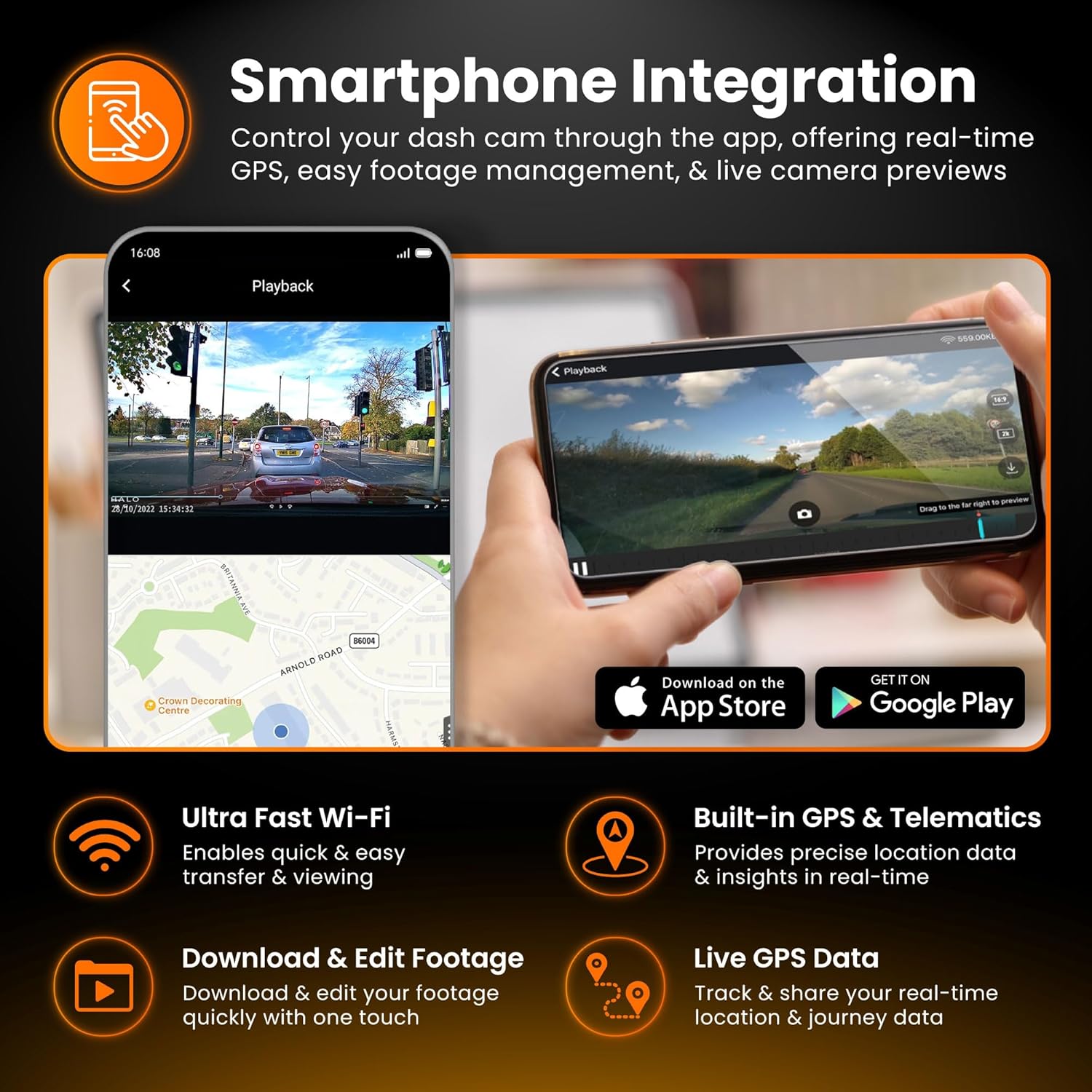
Figure 3.1: Smartphone integration showing live view, playback, and app download options for the Halo Pro.
3.3 G-Sensor u Reġistrazzjoni ta' Emerġenza
The built-in G-Sensor detects sudden impacts or rapid acceleration/deceleration. When triggered, it automatically locks the current video segment, preventing it from being overwritten by loop recording. These emergency fileIl-fajls huma maħżuna f'folder separat fuq il-kard SD.
3.4 Modalità ta' Parkeġġ
For 24/7 surveillance, the Parking Mode feature requires a continuous power supply (e.g., via a hardwire kit). In parking mode, the dashcam will monitor for impacts or motion and record accordingly, conserving power when idle.

Figure 3.2: Parking Mode feature, illustrating G-Sensor detection and continuous surveillance for your vehicle.
3.5 Accessing and Managing Footage
Footage can be accessed and managed in two primary ways:
- Via Smartphone App: Connect to the dashcam's Wi-Fi, open the app, and navigate to the playback or gallery section. You can view, download, and share video clips directly from your phone.
- Permezz ta' Karta Mikro SD: Remove the Micro SD card from the dashcam and insert it into a computer's card reader. Video files are typically organized into folders (e.g., Normal, Event, Parking).

Figure 3.3: Accessing and managing footage instantly on your smartphone via Wi-Fi, showing 2K front and 1080p rear capture.
4. Manutenzjoni
Regular maintenance ensures the longevity and optimal performance of your dashcam.
4.1 Ġestjoni tal-Kard Mikro SD
It is recommended to format the Micro SD card regularly (e.g., once a month) using the dashcam's app or settings menu. This helps prevent data corruption and ensures smooth recording. Replace the SD card if you experience frequent errors or degraded performance.
4.2 Tindif tal-Lentijiet
Periodically clean the front and rear camera lenses with a soft, lint-free cloth. Avoid abrasive materials or harsh chemicals that could scratch the lens or damage the coating.
4.3 Aġġornamenti tal-Firmware
Check the Road Angel website or app periodically for firmware updates. Keeping your dashcam's firmware up-to-date can improve performance, add new features, and resolve bugs.
5 Issolvi l-problemi
If you encounter issues with your Road Angel Halo Pro, refer to the following common problems and solutions.
5.1 Dashcam Not Powering On
- Iċċekkja l-Konnessjoni tal-Enerġija: Ensure the power cable is securely plugged into both the dashcam and the vehicle's 12V outlet.
- Qawwa tal-Vettura: Ivverifika li l-iżbokk ta' 12V tal-vettura qed jirċievi l-enerġija (eż. billi tittestja b'apparat ieħor).
- Fjus: Check the fuse in your vehicle's fuse box that corresponds to the 12V outlet.
5.2 "SD Card Error" Message
- Format SD Card: Format the Micro SD card using the dashcam's app or by inserting it into a computer and formatting it to FAT32.
- Check SD Card Compatibility: Ensure you are using a Class 10 or U3 Micro SD card from a reputable brand.
- Replace SD Card: If errors persist, the SD card may be faulty and require replacement.
5.3 Kwistjonijiet ta' Konnessjoni tal-Wi-Fi
- Dashcam On: Ensure the dashcam is powered on and Wi-Fi is enabled.
- Insejt in-Netwerk: On your phone, 'forget' the dashcam's Wi-Fi network and try reconnecting.
- Irristartja l-Apparati: Restart both your smartphone and the dashcam.
- Permessi tal-App: Ensure the Road Angel Halo app has necessary permissions (e.g., location, local network access) on your smartphone.
5.4 Kwalità tal-Vidjo Fqira
- Lentijiet Naddaf: Ensure both front and rear camera lenses are clean and free from smudges or dirt.
- Film Protettiv: Check if any protective film is still on the lenses.
- Settings tar-Riżoluzzjoni: Verify that the recording resolution is set to the highest available (2K front, 1080p rear) in the app settings.
6. Speċifikazzjonijiet
Detailed technical specifications for the Road Angel Halo Pro Dashcam.
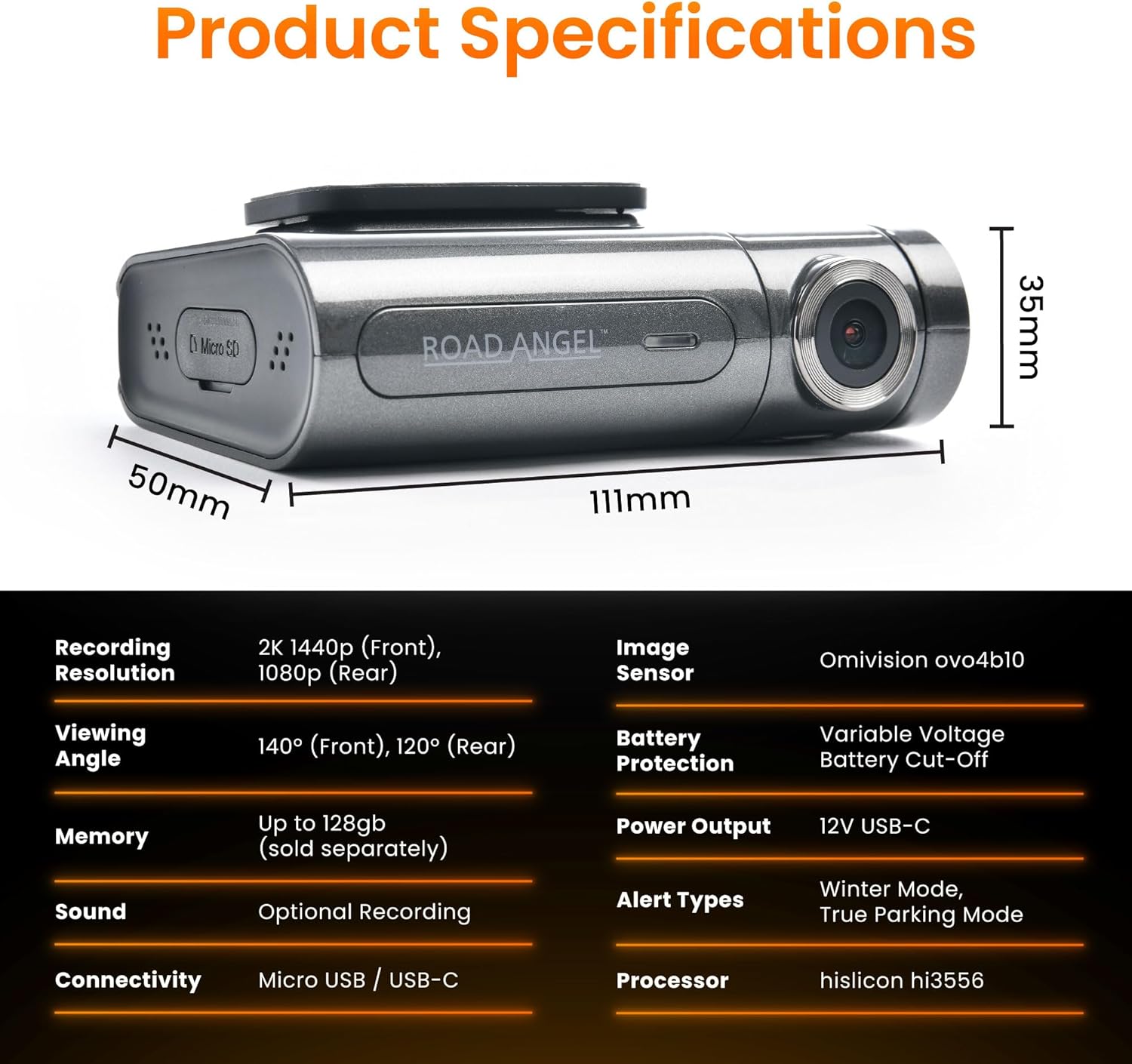
Figure 6.1: Detailed product specifications including dimensions and technical parameters.
| Karatteristika | Speċifikazzjoni |
|---|---|
| Numru tal-Mudell | Aura HD3 |
| Riżoluzzjoni ta' Reġistrazzjoni | Front: 2K (1440p), Rear: 1080p |
| ViewIng Angolu | Quddiem: 140°, Wara: 120° |
| Sensor tal-Immaġni | Omnivision ovo4b10 |
| Proċessur | Hisilicon hi3556 |
| Appoġġ tal-Memorja | Up to 128GB Micro SD (Class 10/U3 recommended) |
| Konnettività | Wi-Fi, Micro USB / USB-C |
| G-Sensor | Mibnija fil- |
| GPS | Mibnija fil- |
| Tip ta 'Wiri | LCD |
| Input tal-Enerġija | 12V USB-C |
| Product Dimensions (Front Unit) | 6.2 x 9.3 x 2.8 ċm |
| Piż tal-Prodott | 0.13 kg (130 g) |
| Temperatura operattiva | Refer to manufacturer's guidelines |
7. Garanzija u Appoġġ
For warranty information, technical support, and frequently asked questions, please visit the official Road Angel webis-sit jew ikkuntattja lis-servizz tal-konsumatur tagħhom direttament. Żomm il-prova tax-xiri tiegħek għal talbiet ta' garanzija.
Road Angel Official Websit: www.roadangelgroup.com


