Introduzzjoni
The Verve Electronic Timer is designed to automate your watering schedule, providing convenience and efficient water management for your garden or lawn. This manual provides detailed instructions for the setup, operation, maintenance, and troubleshooting of your electronic timer.
Setup
1. Installazzjoni tal-batterija
- Sib il-kompartiment tal-batterija fuq wara tat-tajmer.
- Iftaħ l-għatu tal-kompartiment.
- Daħħal żewġ (2) batteriji alkalini AA, waqt li tiżgura l-polarità korretta (+/-).
- Agħlaq l-għatu tal-kompartiment tal-batterija sew.
2. Konnessjoni tat-Tajmer
- Screw the timer's inlet (top connector) onto a standard outdoor faucet. Hand-tighten only to prevent damage.
- Connect your garden hose to the timer's outlet (bottom connector). Ensure a tight connection to prevent leaks.
3. Issettjar tal-Ħin Kurrenti
- Agħfas il- ĦIN button or navigate to the 'TIME' option using the arrow keys.
- Uża l- UP/ISĦU arrow keys to adjust the hour and minute.
- Agħfas il- OK button to confirm each setting and move to the next.

Immaġni: Quddiem view of the Verve Electronic Timer, showing the display and control buttons with menu labels such as TIME, START WATER, HOW LONG, WATER EVERY, PROGRAM, and MANUAL.
Istruzzjonijiet Operattivi
1. Nifhmu d-Displej
The LCD screen displays the current time, watering schedule settings, and battery status. Use the arrow keys to navigate through the menu options and the OK button to select or confirm.
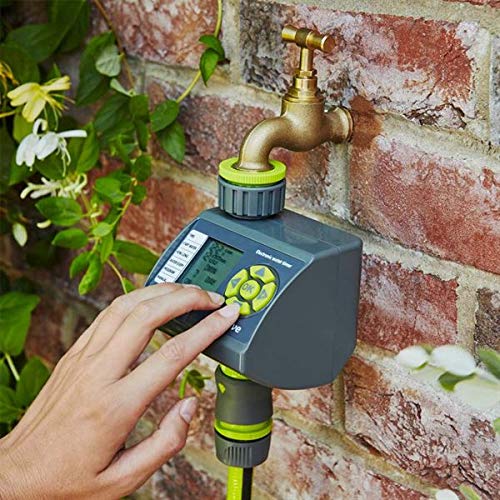
Image: Close-up of the Verve Electronic Timer's display, showing '12:03 AM' for current time, '0 MIN' for watering duration, '4 HRS' for frequency, and 'ON/OFF' status, along with a battery indicator.
2. Programming a Watering Schedule (6 Settings)
The timer allows for up to 6 different watering programs. Follow these steps to set a program:
- Innaviga lejn il- PROGRAMM option using the arrow keys and press OK.
- Select a program number (e.g., P1, P2) using the arrow keys and press OK.
- Issettja Ibda l-ILMA: Use arrow keys to set the desired start time for watering. Press OK.
- Issettja KEMM DWAR: Use arrow keys to set the duration of watering (e.g., 5 minutes, 1 hour). Press OK.
- Issettja WATER EVERY: Use arrow keys to set the frequency (e.g., every 12 hours, every 24 hours, every 2 days). Press OK.
- Ensure the program is set to ON.
3. Operazzjoni Manwali
To water manually outside of the programmed schedule:
- Innaviga lejn il- MANWAL għażla.
- Agħfas OK.
- Use the arrow keys to set the desired manual watering duration.
- Agħfas OK to start manual watering. The timer will automatically shut off after the set duration.
- To stop manual watering prematurely, navigate to MANWAL għal darb'oħra u agħżel OFF jew agħfas OK to cycle through options until it stops.
4. Indikatur tal-batterija
A battery icon on the display indicates the current battery level. When the icon shows low battery, replace the batteries promptly to ensure continuous operation.
Manutenzjoni
1. Tindif
- Imsaħ il-barra tat-tajmer b'artab, damp drapp.
- Tużax prodotti tat-tindif jew solventi li joborxu, għax dawn jistgħu jagħmlu ħsara lid-displej jew lill-apparat.asing.
2. Sostituzzjoni tal-batterija
Replace batteries when the low battery indicator appears on the display. Refer to the 'Battery Installation' section under Setup for detailed steps.
3. Ħażna fix-Xitwa
Before the first frost, disconnect the timer from the faucet and hose. Remove the batteries and store the timer indoors in a dry, frost-free location. This prevents damage from freezing water.
Issolvi l-problemi
- It-tajmer mhux qed jixgħel jew id-displej huwa vojt:
Check battery installation. Ensure batteries are inserted with correct polarity. Replace with fresh AA alkaline batteries. - Water not flowing or timer not activating:
Ensure the faucet is fully open. Check that the hose is securely connected to the timer. Verify that the program is set to 'ON' and the start time has passed. Check battery level. - Timer leaks from connections:
Ensure all connections (faucet to timer, timer to hose) are hand-tightened. Check for damaged washers and replace if necessary. - Incorrect watering schedule:
Review your programmed settings for START WATER, HOW LONG, and WATER EVERY. Ensure the current time is set correctly.
Speċifikazzjonijiet
| Brand | Verve |
| Numru tal-Mudell | B07HMQZ9D7 |
| Numru ta' Settings | 6 |
| Dimensjonijiet tal-Pakkett | 12.8 x 10.6 x 10 ċm |
| Piż tal-oġġett | 320 gramma |
| Manifattur | Koçtaş |
| L-Ewwel Data Disponibbli | 24 ta’ Settembru, 2018 |
Garanzija u Appoġġ
Għal informazzjoni dwar il-garanzija jew appoġġ tekniku, jekk jogħġbok irreferi għad-dokumentazzjoni pprovduta fil-ħin tax-xiri jew ikkuntattja lill-bejjiegħ tiegħek. Żomm il-prova tax-xiri tiegħek għal kwalunkwe talba ta' garanzija.


