1. Introduzzjoni
Welcome to the user manual for your Homematic IP HmIP-MP3P Combi-Signal Generator. This device is designed to integrate seamlessly into your Homematic IP smart home system, providing versatile acoustic and optical signaling capabilities. It can function as a doorbell, passage detector, or status indicator, enhancing your home automation experience.
This manual provides essential information on the assembly, setup, operation, and maintenance of your device. Please read it carefully before use to ensure proper functionality and safety.
2. Prodott Aktarview
The Homematic IP HmIP-MP3P Combi-Signal Generator combines acoustic and optical signaling in one compact unit. Key features include:
- Acoustic and optical signaling for diverse applications.
- Support for up to 250 custom MP3 files (CBR, VBR, ABR, up to 320 kbits/s) from a microSD card for personalized sounds, speech, or melodies.
- Optical display via RGB LEDs in a surrounding frame with an upward-flaring light effect, offering 7 selectable colors (including white).
- Flexible power options: mobile use with batteries or stationary operation with an external power supply.
- Integrated weekly program for time-controlled messages, usable independently of a central unit.
- High-quality speaker for excellent sound and clear speech intelligibility.


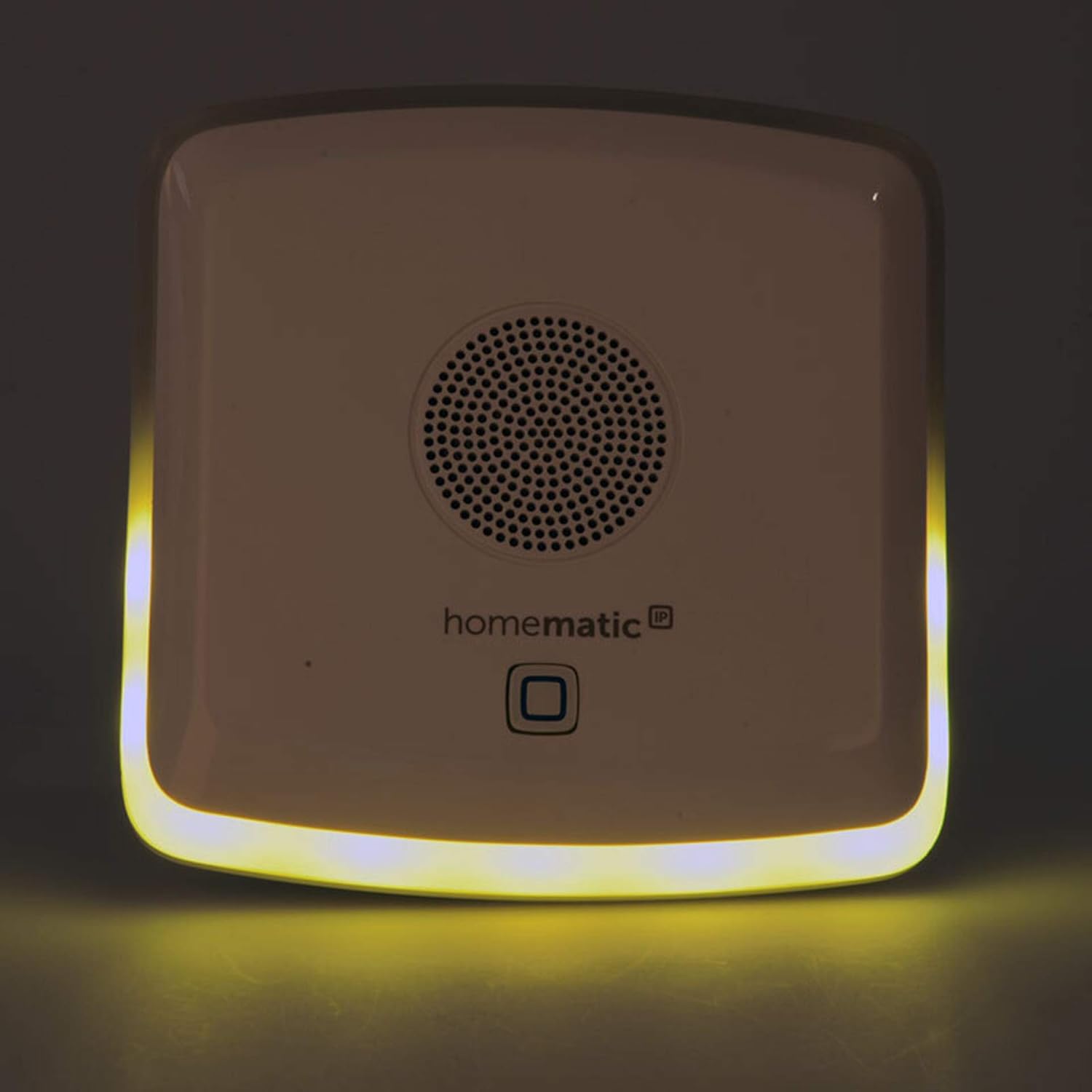
3. Setup
The Homematic IP HmIP-MP3P Combi-Signal Generator is supplied as a kit and requires assembly. The estimated assembly time is approximately 1 hour, with a difficulty level of 2 out of 3.
3.1. Assemblea
- Iftaħ il-komponenti kollha bir-reqqa u vverifika mal-lista tal-ippakkjar.
- Follow the detailed assembly instructions provided in the separate assembly guide included with your kit. This guide will illustrate step-by-step how to put the device together.
- Ensure all connections are secure and components are correctly seated before proceeding.
3.2. Provvista ta 'Enerġija
The device offers two power options:
- Operazzjoni tal-batterija: For mobile use, insert the required batteries into the designated compartment. Ensure correct polarity.
- Provvista ta' Enerġija Esterna: For stationary use, connect a compatible external power supply to the device's power input.
3.3. MicroSD Card Preparation
To utilize custom acoustic messages:
- Obtain a microSD card.
- Store your desired MP3 files (CBR, VBR, ABR, up to 320 kbits/s) onto the microSD card. The device supports up to 250 acoustic messages.
- Insert the prepared microSD card into the device's microSD card slot.
3.4. Integration with Homematic IP System
For full functionality, integrate the Combi-Signal Generator into your existing Homematic IP system. Refer to your Homematic IP central unit's manual for pairing instructions. The device can be controlled by various Homematic IP transmitters and sensors.
4. Operazzjoni
The HmIP-MP3P Combi-Signal Generator offers flexible operation for various signaling needs.
4.1. Acoustic Signaling
- Daqq MP3: Acoustic messages stored on the microSD card can be triggered by events within your Homematic IP system (e.g., a doorbell press, a window opening).
- Kontroll tal-Volum: Adjust the volume of the acoustic signals as needed through your Homematic IP central unit or associated device settings.
4.2. Optical Signaling
- Għażla tal-Kulur: The RGB LEDs in the device's frame can display 7 different colors, including white. These colors can be assigned to specific events or statuses.
- Effetti tad-Dawl: The upward-flaring light effect provides clear visual cues, even for individuals with limited hearing.
- Operazzjoni Indipendenti: Optical signals can be triggered independently of acoustic signals, allowing for flexible notification schemes.
4.3. Time-Controlled Messages
The integrated weekly program allows you to set up time-controlled messages. This feature enables the device to trigger specific acoustic or optical signals at predefined times, even without direct interaction from a central unit. Consult your Homematic IP central unit's manual or the device's advanced settings for configuring the weekly program.
5. Manutenzjoni
To ensure the longevity and optimal performance of your Homematic IP HmIP-MP3P Combi-Signal Generator, follow these maintenance guidelines:
- Tindif: Gently wipe the device with a soft, dry, lint-free cloth. Do not use abrasive cleaners, solvents, or strong chemicals, as these can damage the surface.
- Sostituzzjoni tal-batterija: If using battery operation, replace batteries promptly when the low battery indicator appears or performance degrades. Always use the recommended battery type.
- Aġġornamenti tas-Software: Periodically check for firmware updates for your Homematic IP system and connected devices, including the HmIP-MP3P, via your Homematic IP central unit. Updates can improve performance and add new features.
- Ħażna: If storing the device for an extended period, remove the batteries to prevent leakage and store it in a cool, dry place.
6 Issolvi l-problemi
If you encounter issues with your Homematic IP HmIP-MP3P Combi-Signal Generator, refer to the following common troubleshooting steps:
| Problema | Kawża Possibbli | Soluzzjoni |
|---|---|---|
| L-apparat ma jixgħelx. | No power supply; depleted batteries; incorrect battery insertion. | Check external power connection or replace batteries, ensuring correct polarity. |
| No acoustic signal. | No microSD card; corrupted MP3 files; volume too low; device not paired correctly. | Insert microSD card with valid MP3s; check volume settings; re-pair device with Homematic IP central unit. |
| No optical signal. | Optical signaling disabled; device not paired correctly. | Check settings for optical signals in your Homematic IP system; re-pair device. |
| Device not responding to triggers. | Not paired; out of range; interference; incorrect configuration. | Ensure device is paired and within range of the central unit/transmitter. Check system configuration. |
If the problem persists after attempting these solutions, please refer to the Homematic IP support resources or contact customer service.
7. Speċifikazzjonijiet
| Numru tal-Mudell: | HmIP-MP3P |
| Ditta: | IP Homematic |
| ASIN: | B07HF26KXT |
| L-Ewwel Disponibbli: | 15 ta’ Jannar, 2020 |
| Acoustic Messages: | Up to 250 MP3 files (CBR, VBR, ABR) from microSD card, up to 320 kbits/s. |
| Display ottiku: | RGB LEDs, 7 selectable colors (including white). |
| Provvista tal-Enerġija: | Battery operation or external power supply. |
| Diffikultà fl-immuntar: | 2/3 (Kit requiring assembly) |
| Ħin tal-Assemblea: | Appross. 1 siegħa |
| Guaranteed Software Updates Until: | Mhux magħruf |
8. Garanzija u Appoġġ
For information regarding the warranty period and terms for your Homematic IP HmIP-MP3P Combi-Signal Generator, please refer to the warranty card included with your purchase or visit the official Homematic IP websit.
For technical support, frequently asked questions, or further assistance, please visit the Homematic IP support portal or contact their customer service directly. Contact details can typically be found on the manufacturer's webis-sit jew fid-dokumentazzjoni tal-prodott tiegħek.


