Introduzzjoni
The Ottlite Executive Desk Lamp is designed to enhance your workspace with versatile lighting and convenient features. With an adjustable arm, 3 color temperatures, and 5 brightness settings, this lamp provides optimal illumination for any task. OttLite technology helps reduce glare and eyestrain, allowing for extended comfortable use. Additionally, a built-in 2.1A USB port offers a convenient charging solution for your devices, keeping them within easy reach.
Informazzjoni Importanti dwar is-Sigurtà
- Read all instructions before operating the lamp.
- Tħaddimx lamp b'korda jew plagg bil-ħsara.
- Żomm il-lamp bogħod mill-ilma jew likwidi oħra.
- Tippruvax tiżżarma jew isewwi l-lamp yourself. Refer all servicing to qualified service personnel.
- Uża biss l-adapter tal-enerġija li jiġi mal-lamp.
- Spluggja l-lamp mis-sokit tal-elettriku qabel it-tindif.
Kontenut tal-Pakkett
Jekk jogħġbok immarka l-kaxxa għall-oġġetti li ġejjin:
- Ottlite Executive Desk Lamp Unità
- Adapter tal-Enerġija
- Manwal għall-Utent (dan id-dokument)
Prodott Overview
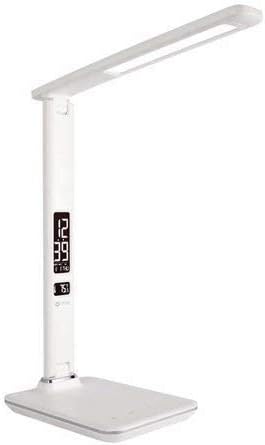
This image shows the Ottlite Executive Desk Lamp in white, featuring a sleek design with an adjustable arm and a rectangular LED light panel. The base includes a digital display showing time and temperature, along with touch controls.
The Ottlite Executive Desk Lamp features a sturdy base, an adjustable arm, and a rotatable lamp head. The base integrates a digital display for time, date, and temperature, along with touch-sensitive controls for light adjustments and other functions. A USB charging port is located on the side or back of the base.
Setup
- Neħħi b'attenzjoni l-lamp u l-komponenti kollha mill-imballaġġ.
- Poġġi l-lamp fuq wiċċ stabbli u ċatt.
- Connect the power adapter cable to the power input port on the back of the lamp bażi.
- Ipplaggja l-adapter tal-enerġija fi żbokk elettriku standard.
- The digital display should illuminate, and the lamp issa hija lesta għall-użu.
Istruzzjonijiet Operattivi
Qawwa mixgħul/mitfi
- Biex iddawwar il-lamp on or off, gently touch the Qawwa icon on the touch control panel located on the base.
L-aġġustament tal-luminożità
- Mal-lamp on, repeatedly touch the Luminożità icon (often represented by a sun or light bulb symbol) to cycle through the 5 available brightness levels.
Tibdil tat-Temperatura tal-Kulur
- To change the light's color temperature (e.g., warm white, natural daylight, cool white), touch the Modalità or Temperatura tal-Kulur icon. The lamp offers 3 distinct color temperature settings.
Using the 2.1A USB Charging Port
- Locate the USB charging port on the side or back of the lamp bażi.
- Plug your device's USB charging cable into this port.
- The 2.1A output provides fast charging for compatible smartphones, tablets, and other USB-powered devices.
Setting Time, Date, and Temperature Display
The digital display on the lamp base shows time, date, and ambient temperature. To set these:
- Agħfas u żomm il- MODALITÀ button (often labeled 'M') on the control panel until the time display starts flashing.
- Uża l- UP u 'L isfel buttons (often labeled '+' and '-') to adjust the hour.
- Agħfas MODALITÀ għal darb'oħra biex timxi għal minuti, imbagħad aġġusta b' UP/ISĦU.
- Kompli agħfas MODALITÀ biex tiċċirkola bejn is-settings tas-sena, ix-xahar, u l-jum, billi taġġusta kull wieħed bi UP/ISĦU.
- After setting the date, you may be able to switch between 12-hour and 24-hour format, and Celsius/Fahrenheit for temperature, using the UP/ISĦU buttons when the respective setting is flashing.
- Agħfas MODALITÀ one last time or wait a few seconds for the settings to save.
L-issettjar tal-allarm
Jekk tiegħek lamp model includes an alarm function:
- Agħfas il- MODALITÀ button repeatedly until the alarm icon (often a bell) appears on the display.
- Agħfas u żomm MODALITÀ sakemm il-ħin tal-allarm jibda jteptep.
- Użu UP/ISĦU to set the desired alarm hour and then minutes.
- Agħfas MODALITÀ biex tikkonferma.
- Biex tattiva jew tiddiżattiva l-allarm, agħfas il-buttuna UP button when the alarm time is displayed (not flashing). An alarm icon will appear/disappear to indicate status.
Manutenzjoni
- Tiżgura l-lamp huwa splaggjat qabel it-tindif.
- Imsaħ il-lamp l-uċuħ b'ċarruta ratba u niexfa.
- Tużax prodotti tat-tindif, xama', jew solventi li joborxu għax jistgħu jagħmlu ħsara lill-finitura.
- Is-sors tad-dawl LED huwa integrat u ma jistax jiġi sostitwit mill-utent.
Issolvi l-problemi
| Problema | Kawża Possibbli | Soluzzjoni |
|---|---|---|
| Lamp ma jixgħelx. | Power adapter not connected properly or no power from outlet. | Kun żgur li l-adapter tal-enerġija huwa mdaħħal sew fil-plakka tal-provvista tal-enerġija.amp u sokit elettriku li jaħdem. Ittestja s-sokit b'apparat ieħor. |
| Digital display is blank or flickering. | Power issue or internal malfunction. | Check power connection. Unplug and re-plug the lamp. If issue persists, contact customer support. |
| Il-port tal-iċċarġjar USB mhux qed jaħdem. | Device not compatible, cable faulty, or lamp mhux imħaddma. | Tiżgura l-lamp is powered on. Try a different USB cable and another device. Verify device requires 2.1A charging. |
| Cannot set time/date. | Sekwenza tal-buttuni mhux korretta. | Refer to the 'Setting Time, Date, and Temperature Display' section and follow the steps carefully. Ensure you are pressing and holding the MODE button correctly. |
Speċifikazzjonijiet
| Karatteristika | Dettall |
|---|---|
| Brand | OttLite |
| Numru tal-Mudell | 799366629696 |
| Lamp Tip | Desk Lamp |
| Tip ta' Sors tad-Dawl | LED |
| Settings tal-luminożità | 5 Livelli |
| Settings tat-Temperatura tal-Kulur | 3 Modi |
| Port tal-Iċċarġjar tal-USB | 2.1A Output |
| Metodu ta' Kontroll | Mess |
| Sors tal-Enerġija | Corded Elettriku |
| Materjal | Plastik, Metall |
| Piż tal-oġġett | 3.04 liri |
| Dimensjonijiet tal-Pakkett | 17.6 x 8.3 x 6.8 pulzieri |
Garanzija u Appoġġ
For warranty information and customer support, please refer to the warranty card included with your product or visit the official OttLite websit. Żomm l-irċevuta tax-xiri tiegħek bħala prova tax-xiri għal kwalunkwe talba ta' garanzija.


