1. Introduzzjoni
The Denver MRD-51 is a versatile multi-function music system designed to play various audio formats. It integrates a record player, DAB+ and FM/AM radio tuner, CD player, and cassette deck into a single unit. Additionally, it features a USB port for digitizing audio from CDs, records, or cassettes, and an AUX input for connecting external devices. The system includes two integrated stereo speakers for a complete audio experience.
2. Istruzzjonijiet tas-Sigurtà
- Aqra l-istruzzjonijiet kollha bir-reqqa qabel ma tħaddem l-apparat.
- Żomm dan il-manwal għal referenza futura.
- Tesponix l-unità għax-xita jew għall-umdità biex tevita nar jew xokk elettriku.
- Aċċerta ruħek li jkun hemm ventilazzjoni xierqa; timblokkax xi fetħiet tal-ventilazzjoni.
- Poġġi l-unità fuq wiċċ stabbli u ċatt.
- Disconnect the power plug from the wall outlet if the unit is not in use for a long period.
- Tippruvax tagħmel manutenzjoni fuq l-unità int stess. Irreferi għal kull manutenzjoni għand persunal tas-servizz kwalifikat.
3. Kontenut tal-Pakkett
Iċċekkja li l-oġġetti kollha huma preżenti meta tiftaħ il-pakkett:
- Denver MRD-51 Multi-Function Music System
- Kejbil tal-Enerġija
- Kontroll mill-bogħod
- Manwal għall-Utent
4. Prodott Aktarview

Figura 4.1: Denver MRD-51 Multi-Function Music System with turntable open. This image displays the Denver MRD-51 music system from a front-top perspective, with the turntable lid open and a vinyl record placed on the platter. The control panel, including the LCD display, knobs, and buttons, is visible below the turntable.

Figura 4.2: Denver MRD-51 Multi-Function Music System, front view. A front view of the Denver MRD-51 music system with the turntable lid closed. This image highlights the integrated stereo speakers on the sides and the central control panel, emphasizing its classic design.
4.1 Kontrolli ta' Front Panel
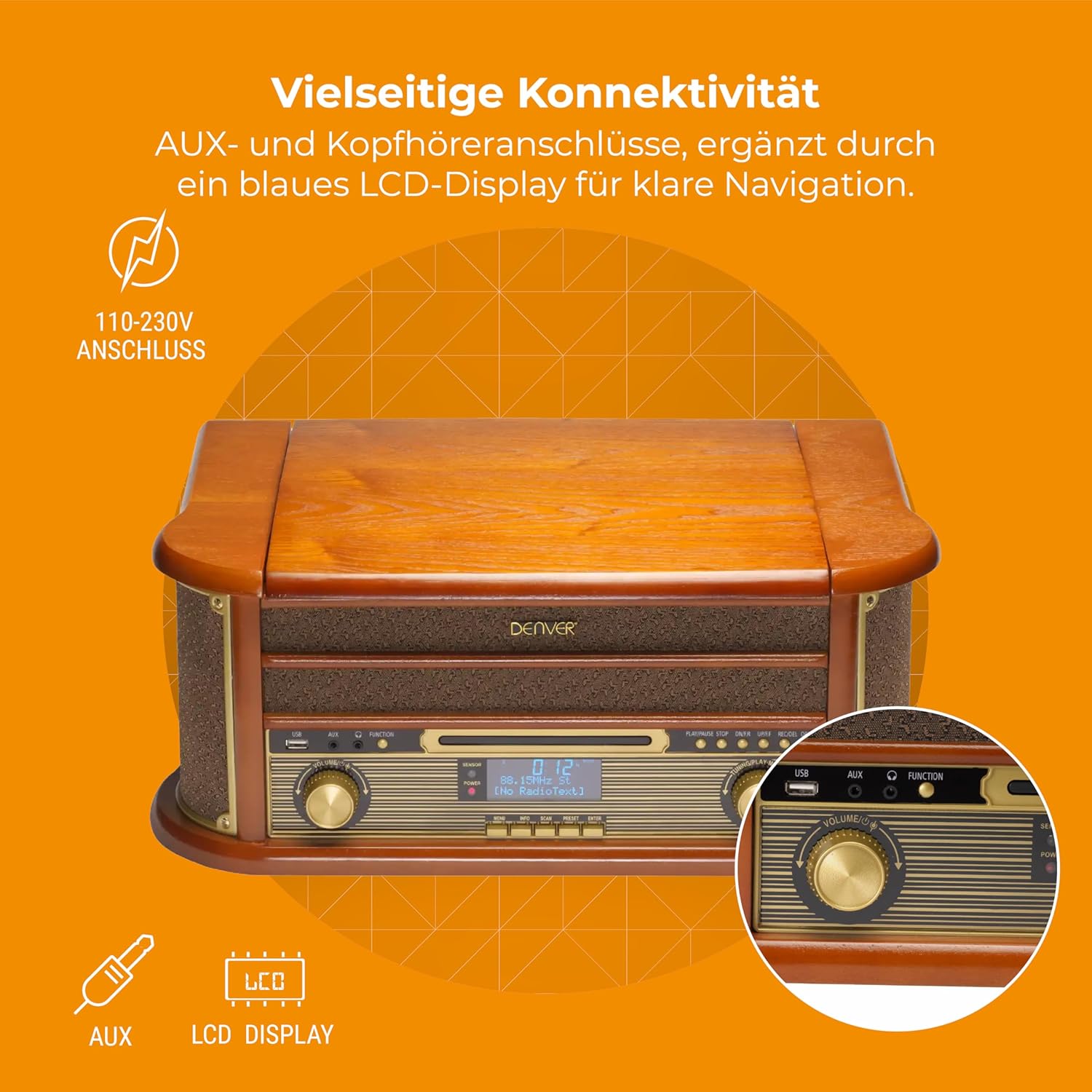
Figura 4.3: Denver MRD-51 front panel with USB, AUX, and LCD display. A close-up of the Denver MRD-51's front control panel, showcasing the USB port, AUX input, and the blue LCD display for clear navigation. This view details the various connectivity options available.
- Buttuna POWER: Ixgħel jew jitfi l-unità.
- Buttuna tal-FUNZJONI: Selects between Turntable, CD, Cassette, DAB+, FM, AM, AUX, and USB modes.
- Port USB: For connecting USB storage devices for playback or recording.
- Input AUX: Jack ta' 3.5mm għall-konnessjoni ta' sorsi awdjo esterni.
- Display LCD: Shows current mode, track information, radio frequency, and other system status.
- Buttuna PLAY/PAUSE: Starts or pauses playback for CD, Cassette, or USB.
- Buttuna STOP: Jieqaf daqq.
- SKIP Buttons (◀◀ / ▶▶): Jaqbeż it-traċċi jew jimxi 'l quddiem/lura malajr.
- Buttuna REKORD: Initiates recording to USB.
- Buttuna tal-VOLUM: Jaġġusta l-volum ġenerali tal-ħruġ.
- Buttuna tal-Irfinar: Adjusts radio frequency in FM/AM mode or navigates menus in DAB+ mode.
4.2 Turntable and Cassette Deck

Figura 4.4: Denver MRD-51 showing open turntable and cassette deck. This image illustrates the versatility of the Denver MRD-51, featuring the open turntable with a record and an arrow pointing to the cassette deck slot on the side, indicating its multi-format playback capabilities.
- Platt Turntable: For playing vinyl records.
- Tone Arm with Stylus: Reads the grooves of vinyl records.
- Selettur tal-veloċità: Allows selection of 33, 45, or 78 RPM.
- Cassette Deck Slot: For inserting audio cassettes.
4.3 CD Player

Figura 4.5: Denver MRD-51 with CD tray open and remote control. This image shows the Denver MRD-51 with its CD tray open, ready for disc insertion. A remote control is also pictured, indicating convenient operation of the system's functions.
- Trej tas-CD: For inserting compact discs.
- Buttuna MIFTUĦ/GĦELUQ: Jiftaħ u jagħlaq it-trej tas-CD.
5. Setup
5.1 Spakkjar u Tqegħid
- Neħħi bir-reqqa l-unità mill-ippakkjar tagħha.
- Place the unit on a flat, stable surface away from direct sunlight, heat sources, and excessive dust or moisture.
- Kun żgur li hemm biżżejjed spazju madwar l-unità għall-ventilazzjoni.
5.2 Konnessjoni tal-Enerġija
- Connect the power cable to the AC IN socket on the rear of the unit.
- Plug the other end of the power cable into a standard wall outlet (110-230V).
5.3 Konnessjoni tal-antenna
For optimal radio reception, extend the telescopic antenna fully for FM/DAB+ or adjust its position for AM.
6. Istruzzjonijiet Operattivi
6.1 Operazzjoni Ġenerali
- Agħfas il- QAWWA buttuna biex tixgħel l-unità.
- Agħfas il- FUNZJONI button repeatedly to cycle through available modes: Turntable, CD, Cassette, DAB+, FM, AM, AUX, USB.
- Aġġusta l- VOLUM il-pum sal-livell tas-smigħ mixtieq tiegħek.
6.2 Tħaddim tat-Turntable
- Select the 'Turntable' function.
- Iftaħ l-għatu tat-turntable.
- Poġġi rekord tal-vinil fuq il-platter.
- Set the speed selector to match the record's speed (33, 45, or 78 RPM). For 45 RPM records, use the included adapter if necessary.
- Erfa' bil-mod id-driegħ tat-ton u poġġi l-istilus fuq it-trakka mixtieqa fuq ir-rekord.
- Niżżel id-driegħ tat-ton bil-mod fuq ir-rekord. Id-daqq jibda.
- At the end of the record, the tone arm may automatically return to its rest, or you may need to manually lift and return it.
6.3 Tħaddim tas-CD Player
- Select the 'CD' function.
- Agħfas il- FTUĦ/MAGĦLUQ buttuna biex tiftaħ it-trej tas-CD.
- Place a CD (CD/CD-R/CD-RW compatible) with the label side facing up into the tray.
- Agħfas il- FTUĦ/MAGĦLUQ Agħfas il-buttuna mill-ġdid biex tagħlaq it-trej. L-unità se taqra d-diska.
- Agħfas DĦABBA/PAWŻA biex tibda daqq.
- Uża l- SKIP buttuni (◀◀ / ▶▶) biex tinnaviga bejn it-traċċi.
- Agħfas STOP biex itemm daqq.
6.4 Tħaddim tal-Plejer tal-Cassettes
- Select the 'Cassette' function.
- Insert an audio cassette into the cassette deck slot until it clicks into place.
- Agħfas il- PLAY button (often integrated with the cassette mechanism) to start playback.
- Uża l- STOP button to end playback. Fast forward and rewind functions are typically available via dedicated buttons on the cassette deck.
6.5 Radio Operation (DAB+/FM/AM)
- Select the desired radio function (DAB+, FM, or AM).
- For DAB+ Radio: The unit will typically perform an automatic scan for available stations upon first use. Use the IRTUNING pum jew SKIP buttons to navigate through the list of stations.
- For FM/AM Radio: Uża l- IRTUNING knob to manually tune to a station. The frequency will be displayed on the LCD.
6.6 Reġistrazzjoni USB
The MRD-51 allows you to digitize audio from your records, CDs, or cassettes directly to a USB storage device.
- Daħħal USB flash drive fil- Port USB.
- Select the source function you wish to record from (Turntable, CD, or Cassette).
- Start playback of the audio source (e.g., play a record, CD, or cassette).
- Agħfas il- REKORD button. The recording indicator on the display will illuminate, and recording will begin.
- Agħfas il- REKORD buttuna mill-ġdid jew STOP buttuna biex ittemm ir-reġistrazzjoni. Ir-reġistrazzjoni file se jiġi ffrankat fuq il-USB drive.
6.7 Input AUX
- Qabbad apparat awdjo estern (eż., smartphone, MP3 player) mal- Input AUX using a 3.5mm audio cable.
- Select the 'AUX' function.
- Start playback on your external device. The audio will be played through the MRD-51's speakers.
7. Manutenzjoni
7.1 Tindif tal-Unità
- Dejjem aqla 'l-unità mill-iżbokk tad-dawl qabel it-tindif.
- Uża drapp artab u niexef biex timsaħ l-uċuħ ta’ barra.
- Tużax prodotti tat-tindif li joborxu, xama', jew solventi.
7.2 Kura tal-Istilus tat-Turntable
- Naddaf l-istilus bil-mod regolarment b'pinzell artab, billi tfarfar minn wara għal quddiem.
- Evita li tmiss l-istilus b'subgħajk.
- Replace the stylus when sound quality deteriorates or if it is visibly damaged.
7.3 Kura tas-CD/Cassette Player
- Handle CDs and cassettes by their edges to avoid fingerprints and scratches.
- Keep the CD tray and cassette deck free of dust and debris.
8 Issolvi l-problemi
| Problema | Kawża Possibbli | Soluzzjoni |
|---|---|---|
| Ebda qawwa | Power cable not connected; Wall outlet not active | Ensure power cable is securely connected; Try a different outlet |
| L-ebda ħoss | Volume too low; Incorrect function selected; External device not playing | Increase volume; Select correct function; Ensure external device is playing and connected properly |
| Turntable not spinning or poor sound | Speed setting incorrect; Stylus dirty or damaged; Record dirty | Adjust speed selector; Clean or replace stylus; Clean record |
| Is-CD mhux qed idoqq | CD inserted incorrectly; CD scratched or dirty; CD format not supported | Reinsert CD correctly; Clean or replace CD; Ensure CD is CD/CD-R/CD-RW format |
| Riċeviment ħażin tar-radju | Antenna not extended/positioned correctly; Weak signal | Estendi u aġġusta l-antenna; Ipprova erġa' poġġi l-unità fil-pożizzjoni t-tajba |
| Ir-reġistrazzjoni tal-USB mhux qed taħdem | USB drive full or incompatible; Source not playing | Use a different USB drive or clear space; Ensure audio source is playing during recording |
9. Speċifikazzjonijiet
| Karatteristika | Speċifikazzjoni |
|---|---|
| Dimensjonijiet tal-Prodott | 20.08 x 13.39 x 8.46 pulzieri |
| Piż tal-oġġett | 15.18 libbra (6.9 Kilogrammi) |
| Numru tal-Mudell | MRD-51 (Internal: 111201210000) |
| Brand | Denver |
| Veloċità ta' Rotazzjoni Massima | 78 RPM (jappoġġja 33, 45, 78 RPM) |
| Komponenti Inklużi | MRD-51 unit |
| Karatteristiċi Speċjali | Adjustable Speed, Digital Recorder, Integrated Speakers |
| Materjal | Aluminum (internal components), Wood (housing) |
| Kulur | Injam |
| Apparati Kompatibbli | Personal Computer (for USB transfer) |
| Tuner tar-Radju | DAB+, FM, AM |
| CD Player | Supports CD/CD-R/CD-RW |
| Output Awdjo | Kelliema Stereo 2 x 2.5W |
10. Garanzija u Appoġġ
For warranty information and technical support, please refer to the documentation provided with your purchase or contact Denver customer service through their official websit. Żomm il-prova tax-xiri tiegħek għal kwalunkwe talba ta' garanzija.


