Introduzzjoni
Thank you for choosing the iTOMA CKS801 Alarm Clock. This device combines a digital alarm clock with convenient features such as wireless charging, a USB charging port, dual alarms, an adjustable night light, and an indoor temperature and humidity display. This manual will guide you through the setup, operation, and maintenance of your new alarm clock to ensure optimal performance and user experience.
Karatteristiċi tal-Prodott
- Funzjoni tal-Iċċarġjar mingħajr Fili: Compatible with most universal wireless charging enabled mobile phones.
- Port tal-Iċċarġjar tal-USB: Provides an additional port for charging other mobile devices.
- Dual Alarm with Snooze: Set two independent alarms with a 9-minute snooze function (up to 6 times).
- Dawl tal-Lejl Aġġustabbli: Features two night light modes for ambient lighting.
- 4-Level Display Dimmer: Adjust the brightness of the LED display.
- Indoor Temperature and Humidity Display: Shows ambient temperature (Celsius/Fahrenheit) and relative humidity.
- Format ta' Ħin ta' 12/24 Siegħa: Select your preferred time display format.
Layout tal-Apparat
Familiarize yourself with the buttons and display elements of your iTOMA CKS801 alarm clock.
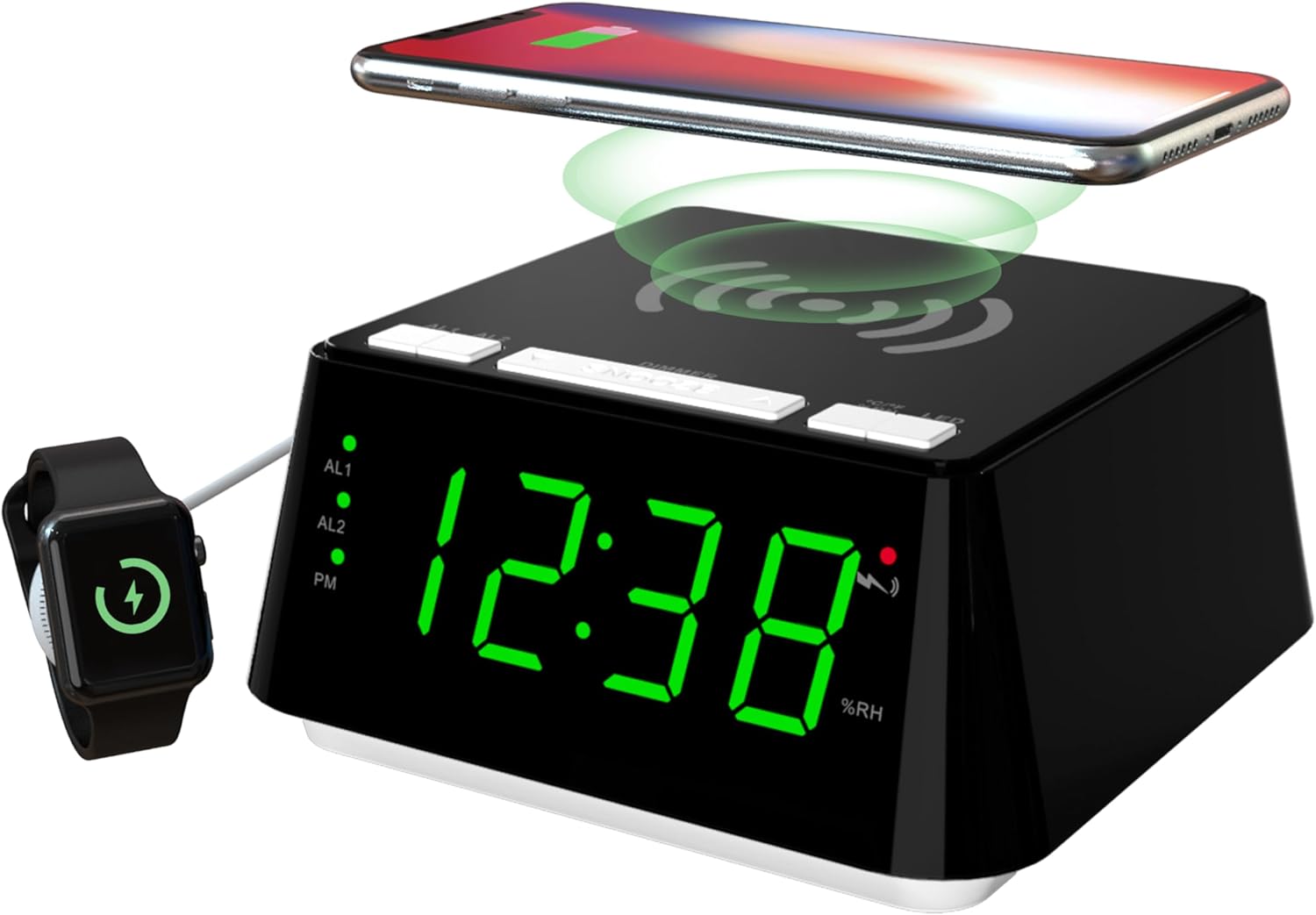
Stampa 1: Quddiem u fuq view of the iTOMA CKS801 alarm clock, showing the digital time display, alarm indicators (AL1, AL2), PM indicator, humidity percentage (%RH), and the wireless charging pad on top. A smartphone is shown wirelessly charging, and a smartwatch is connected to the USB port.
- Panel ta 'Fuq: Wireless charging pad, SNOOZE/DIMMER button, AL1/AL2 buttons, °C/°F/%RH button, LED (Night Light) button.
- Wiri ta' Quddiem: Large LED display showing time, AL1/AL2 indicators, PM indicator, temperature, and humidity.
- Panel ta 'wara: Power input, USB charging port.
Setup
- Konnessjoni tal-Enerġija: Connect the provided power adapter to the DC input port on the back of the alarm clock and then plug it into a standard wall outlet. The display will light up.
- Issettjar tal-Ħin Inizjali: Upon first power-up, the clock may display a default time. Refer to the "Time Setting" section under Operating Instructions to set the correct time.
Istruzzjonijiet Operattivi
1. Issettjar tal-Ħin
- Agħfas u żomm il- IL-ĦIN IPPOST button (if available, otherwise use a combination of buttons, e.g., SNOOZE/DIMMER for setting mode and AL1/AL2 for adjustment).
- Uża l- AL1 or AL2 buttons (or dedicated UP/DOWN buttons if present) to adjust the hour.
- Agħfas il- IL-ĦIN IPPOST button again to move to minute adjustment. Use AL1 or AL2 biex taġġusta l-minuti.
- Agħfas il- IL-ĦIN IPPOST Agħfas il-buttuna għal darb'oħra biex tikkonferma u toħroġ mill-modalità tal-issettjar tal-ħin.
- Biex taqleb bejn il-format ta' 12-il siegħa u ta' 24 siegħa, agħfas il-buttuna °C/°F/%RH button while the time is displayed. The PM indicator will appear for 12-hour format afternoon times.
2. Alarm Setting (AL1 & AL2)

Stampa 2: Close-up of the iTOMA CKS801 display and top buttons, illustrating the dual alarm indicators (AL1, AL2) and the three alarm modes: ALL-7-DAY, WEEKDAY, and WEEKEND.
- Setting Alarm 1 (AL1):
- Agħfas u żomm il- AL1 button. The hour display will flash.
- Uża l- SNOOZE / DIMMER button (or dedicated UP/DOWN) to adjust the alarm hour.
- Agħfas AL1 again to move to minute adjustment. Use SNOOZE / DIMMER biex taġġusta l-minuti.
- Agħfas AL1 again to select the alarm mode (ALL-7-DAY, WEEKDAY, WEEKEND). Use SNOOZE / DIMMER biex tiċċikla bejn il-modi.
- Agħfas AL1 once more to confirm and activate Alarm 1. The AL1 indicator will light up.
- Setting Alarm 2 (AL2): Follow the same steps as for AL1, using the AL2 buttuna.
- Attivazzjoni/Diżattivazzjoni tal-Allarmi: Agħfas fil-qosor il- AL1 or AL2 button to toggle the respective alarm on or off. The AL1/AL2 indicator will show its status.
- Funzjoni Snooze: Meta tinstema' allarm, agħfas il-buttuna l-kbira SNOOZE / DIMMER button on top to activate snooze. The alarm will pause for 9 minutes and sound again. This can be repeated up to 6 times.
- Twaqqif ta' Allarm: To stop an alarm completely, press any other button (e.g., AL1, AL2, LED) except the SNOOZE/DIMMER button. The alarm will reset for the next day.
3. Iċċarġjar bla fili

Stampa 3: A smartphone placed on the top surface of the iTOMA CKS801 alarm clock, indicating active wireless charging with a charging icon on the phone screen.
- Place your Qi-compatible smartphone directly on the wireless charging pad located on the top surface of the alarm clock.
- Ensure the phone is centered on the charging pad for optimal charging.
- A charging indicator (usually on your phone screen) will confirm that charging has begun.
- Remove any metal objects or thick cases from your phone that may interfere with wireless charging.
4. Port tal-Iċċarġjar tal-USB
- Locate the USB charging port on the rear of the alarm clock.
- Connect your device's USB charging cable to this port.
- This port provides a convenient way to charge non-wireless charging devices or additional accessories like smartwatches.
5. Tħaddim tad-Dawl bil-Lejl

Stampa 4: The iTOMA CKS801 alarm clock displaying the time, with its integrated night light illuminated, casting a soft glow around the base.
- Agħfas il- LED button on the top panel to turn the night light on.
- Agħfas il- LED button again to cycle through the available night light modes (e.g., different brightness levels or colors, if applicable, as the description mentions "two modes").
- Agħfas il- LED button repeatedly until the night light turns off.
6. Wiri tat-Temperatura u l-Umdità

Stampa 5: Two iTOMA CKS801 alarm clocks side-by-side, one displaying "23C" (Celsius) and the other "73F" (Fahrenheit), demonstrating the temperature display feature.

Stampa 6: The iTOMA CKS801 alarm clock displaying "55%RH", indicating the indoor humidity percentage.
- The alarm clock automatically displays the indoor temperature and humidity.
- To switch between Celsius (°C) and Fahrenheit (°F) for temperature, briefly press the °C/°F/%RH buttuna.
- The humidity is displayed as a percentage (%RH).
7. Kontroll tad-Dimmer tal-Wiri

Stampa 7: Erbgħa views of the iTOMA CKS801 alarm clock, demonstrating the four levels of display brightness: High (L-3), Medium (L-2), Low (L-1), and Off.
- Agħfas fil-qosor il- SNOOZE / DIMMER button to cycle through the 4 levels of display brightness: High (L-3), Medium (L-2), Low (L-1), and Off.
- Select the brightness level that is most comfortable for your environment.
Manutenzjoni
- Tindif: Imsaħ l-apparat b'ċarruta ratba u niexfa. Tużax prodotti tat-tindif jew solventi li joborxu.
- Pjazzament: Place the alarm clock on a stable, flat surface away from direct sunlight, heat sources, and moisture.
- Qawwa: Dejjem uża l-adapter tal-enerġija oriġinali pprovdut mat-tagħmir.
Issolvi l-problemi
| Problema | Kawża / Soluzzjoni Possibbli |
|---|---|
| L-arloġġ huwa mitfi jew qed jitteptep. |
|
| L-iċċarġjar mingħajr fili mhux qed jaħdem. |
|
| L-allarm ma jdoqqx. |
|
| Qari mhux korrett tat-temperatura/umdità. |
|
Speċifikazzjonijiet
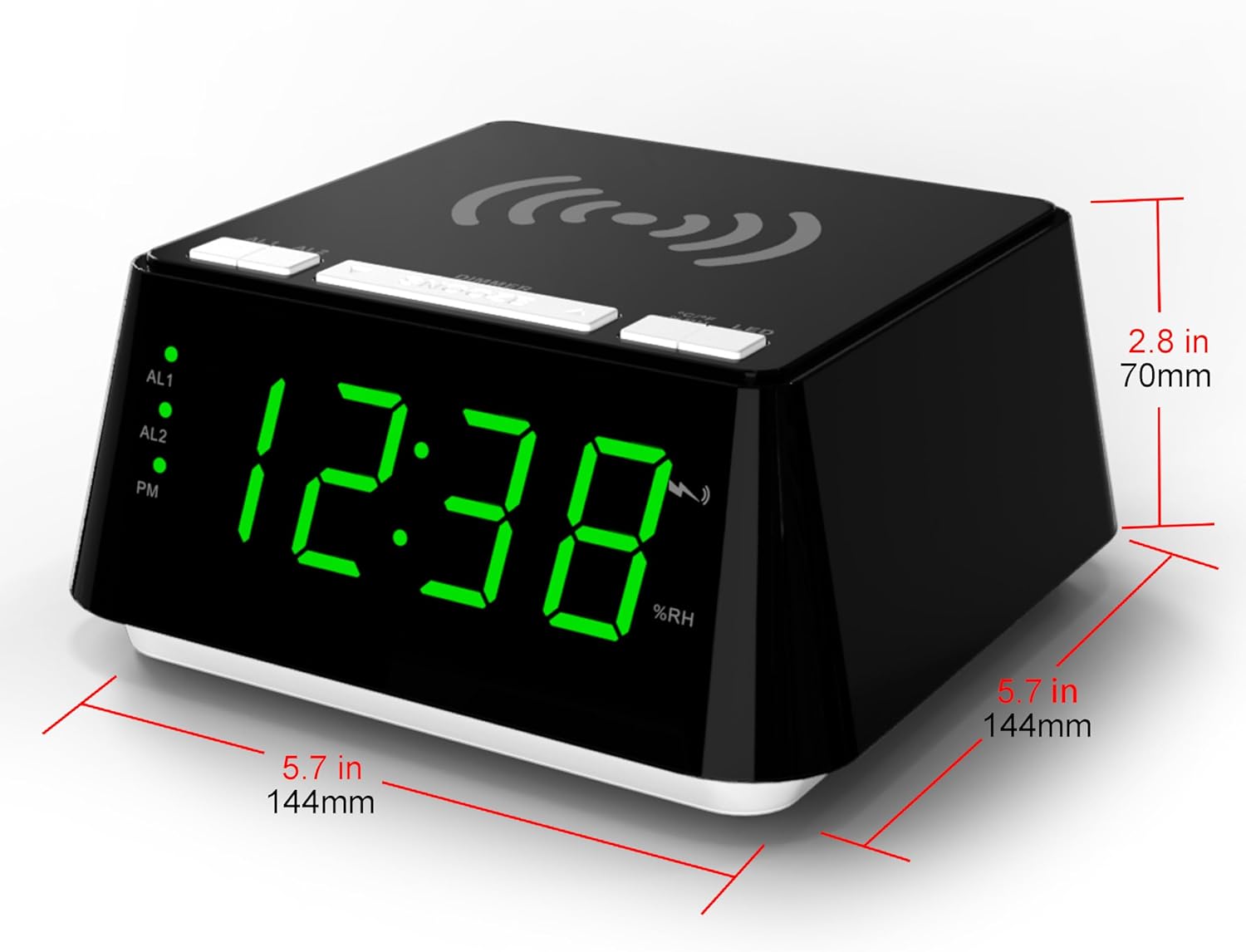
Stampa 8: Diagram showing the dimensions of the iTOMA CKS801 alarm clock: 5.7 inches (144mm) in width, 5.7 inches (144mm) in depth, and 2.8 inches (70mm) in height.
| Karatteristika | Dettall |
|---|---|
| Mudell | CKS801 |
| Dimensjonijiet (L x W x H) | 14.4 x 13 x 7.11 ċm (5.7 x 5.1 x 2.8 pulzieri) |
| Piż | 381.02 g (0.84 lbs) |
| Tip ta 'Wiri | LED diġitali |
| Kulur | Green (LED display color, product casing is black) |
| Sors tal-Enerġija | AC Power Adapter (Batteries not required for operation) |
| Karatteristiċi Speċjali | Alarm, Wireless Charging, USB Charging, Night Light, Temperature Display, Humidity Display |
Garanzija u Appoġġ
For warranty information or technical support, please refer to the documentation included with your purchase or visit the official iTOMA website. If you encounter any issues not covered in this manual, please contact iTOMA customer service for assistance.


