Introduzzjoni
Dan il-manwal jipprovdi struzzjonijiet komprensivi għas-setup, it-tħaddim, il-manutenzjoni, u s-soluzzjoni tal-problemi tal-Listen Technologies LR-5200-IR-P1 Advanced Intelligent DSP IR Receiver Package 1 tiegħek. Jekk jogħġbok aqra dan il-manwal bir-reqqa qabel ma tuża l-apparat biex tiżgura funzjonalità xierqa u biex timmassimizza l-prestazzjoni tiegħu.
Il-pakkett LR-5200-IR-P1 huwa ddisinjat biex jespandi jew jistabbilixxi sistema ta' smigħ assistiv bl-IR, li toffri riċeviment tas-sinjal ta' prestazzjoni għolja u ċarezza. Jinkludi r-riċevitur LR-5200-IR, linja/lanjard integrata għall-għonq, u speaker universali għall-widnejn.
Kontenut tal-Pakkett
Il-pakkett LR-5200-IR-P1 jinkludi l-komponenti li ġejjin:
- (1) Riċevitur IR DSP Intelliġenti Avvanzat LR-5200-IR
- (1) LA-430 Lanyard Intelliġenti għall-Earphone/Għonq
- (1) LA-401 Kelliem Universali għall-Widnejn
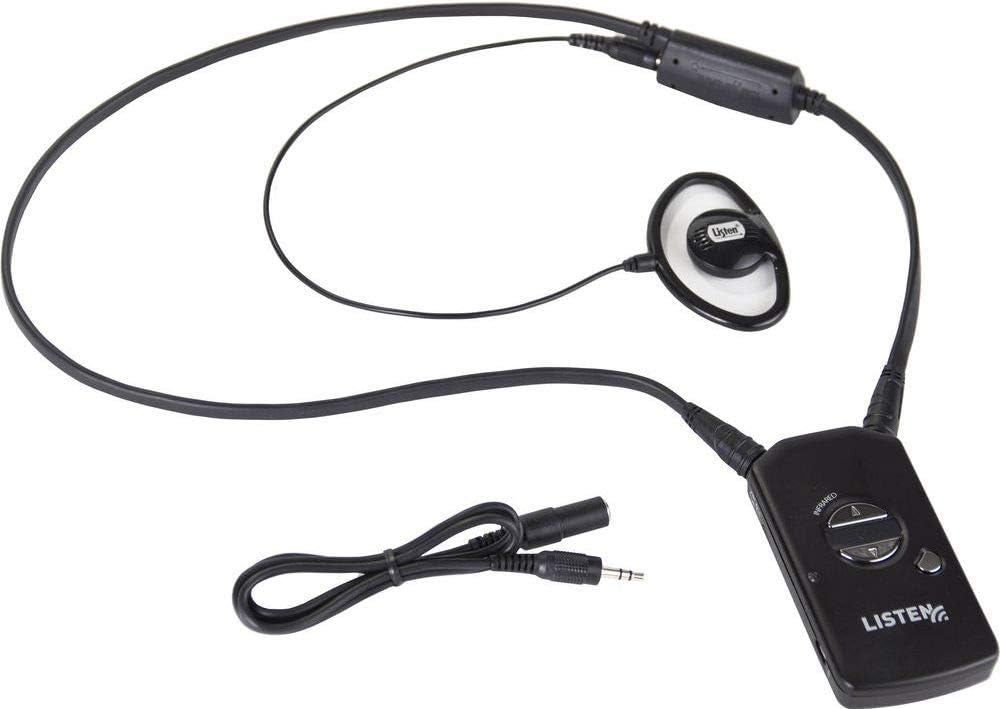
Figura 1: Komponenti tal-pakkett LR-5200-IR-P1. Muri r-riċevitur LR-5200-IR, il-linja/ħabel tal-għonq LA-430, u l-ispiker universali tal-widnejn LA-401, kollha konnessi u lesti għall-użu.
Setup
1. Iċċarġjar tar-Riċevitur
Ir-riċevitur LR-5200-IR juża teknoloġija avvanzata tal-batteriji ekoloġiċi. Qabel l-ewwel użu, kun żgur li r-riċevitur ikun iċċarġjat kompletament.
- Qabbad ir-riċevitur ma' stazzjon tal-iċċarġjar kompatibbli ta' Listen Technologies (jinbiegħ separatament) jew sors ta' enerġija USB billi tuża l-kejbil xieraq.
- Id-dawl indikatur tal-iċċarġjar fuq ir-riċevitur se jixgħel biex juri l-istatus tal-iċċarġjar.
- Ħalli biżżejjed ħin għal iċċarġjar sħiħ, tipikament diversi sigħat.
2. Aċċessorji tal-Konnessjoni
Il-pakkett jinkludi linja/lanjard integrata għall-għonq u speaker universali għall-widnejn.
- Kelliem tal-widna: Ipplaggja l-jack ta' 3.5mm tal-LA-401 Universal Ear Speaker fil-port tal-ħruġ tal-awdjo fuq ir-riċevitur LR-5200-IR.
- Ċirkwit/Lanyard tal-Għonq: Il-Lanyard Intelliġenti tal-Ear Phone/Neck Loop LA-430 jikkonnettja mar-riċevitur permezz tal-konnettur integrat tiegħu. Dan l-aċċessorju huwa ddisinjat għal utenti b'apparat tas-smigħ li jaħdem bit-T-coil.
3. L-Ilbies tar-Riċevitur
Ir-riċevitur LR-5200-IR huwa ddisinjat għal użu diskret u komdu.
- Ċirkwit/Lanyard tal-Għonq: Poġġi l-lanjard madwar għonqok. Ir-riċevitur ikun komdu u fil-livell tas-sider.
- Clip taċ-ċinturin: Alternattivament, ir-riċevitur jista' jitwaħħal ma' ċinturin jew faxxa tal-qadd bl-użu tal-klipp integrat taċ-ċinturin tiegħu għal għażla aktar diskreta.
Istruzzjonijiet Operattivi
1. Tixgħil / Mitfi
Biex tixgħel ir-riċevitur LR-5200-IR, agħfas u żomm il-buttuna tal-qawwa li tinsab fuq quddiem tal-apparat sakemm id-dawl indikatur jixgħel. Biex titfi, agħfas u żomm il-buttuna tal-qawwa mill-ġdid sakemm id-dawl jintefa.
2. Għażla tal-Kanal
Ir-riċevitur LR-5200-IR jappoġġja applikazzjonijiet b'ħafna kanali, li jippermetti lill-utenti jagħżlu l-kanal mixtieq tagħhom.
- Uża l-buttuni tal-kanal 'il fuq/'l isfel (tipikament immarkati bil-vleġeġ) fuq ir-riċevitur biex tiċċikla bejn il-kanali tal-IR disponibbli.
- In-numru tal-kanal attwali jista' jintwera fuq skrin żgħir jew jiġi indikat permezz ta' mudelli LED, skont id-disinn tar-riċevitur.
- Kun żgur li l-kanal magħżul jaqbel mal-kanal tax-xandir tat-trasmettitur IR fl-ambjent tas-smigħ tiegħek.
3. Aġġustament tal-Volum
Aġġusta l-volum tas-smigħ għal livell komdu billi tuża l-buttuni 'l fuq/'l isfel tal-volum fuq ir-riċevitur.
4. L-użu ma' apparati tas-smigħ T-Coil
Jekk qed tuża apparat tas-smigħ li jaħdem b'coil T, żgura li l-apparat tas-smigħ tiegħek huwa ssettjat għall-programm "T" jew "Telecoil". Il-linja/lanjard tal-għonq LA-430 se tittrażmetti s-sinjal awdjo direttament lill-coil T tal-apparat tas-smigħ tiegħek, u b'hekk tipprovdi esperjenza ta' smigħ ċara.
Manutenzjoni
1. Tindif
- Imsaħ ir-riċevitur u l-aċċessorji b'ċarruta ratba, niexfa u mingħajr suf.
- Tużax prodotti tat-tindif li joborxu, solventi, jew kimiċi qawwija, għax dawn jistgħu jagħmlu ħsara lill-apparat.
- Għall-ispikers tal-widnejn, uża msielaħ diżinfettant ħafif jekk meħtieġ, u żgura li l-ebda likwidu ma jidħol fil-gradilja tal-ispiker.
2. Kura tal-batterija
- Iċċarġja r-riċevitur regolarment biex iżżomm il-batterija f'kundizzjoni tajba.
- Evita li l-batterija tixxotta kompletament ta' spiss.
- Aħżen ir-riċevitur f'post frisk u niexef meta ma jkunx qed jintuża għal perjodi twal.
3. Ħażna
Meta ma tkunx qed tuża r-riċevitur LR-5200-IR u l-aċċessorji tiegħu f'kaxxa protettiva jew f'ambjent nadif u niexef biex tevita ħsara mit-trab, l-umdità, jew impatt fiżiku.
Issolvi l-problemi
| Problema | Kawża Possibbli | Soluzzjoni |
|---|---|---|
| L-ebda awdjo mir-riċevitur | Ir-riċevitur mhux mixgħul; Batterija baxxa; Kanal magħżul ħażin; L-ispiker tal-widna/linja tal-għonq mhux konnessi; Barra mill-firxa tat-trasmettitur tal-IR; Ostruzzjoni li timblokka s-sinjal tal-IR. | Kun żgur li r-riċevitur ikun mixgħul; Iċċarġja l-batterija; Ivverifika l-għażla korretta tal-kanal; Iċċekkja l-konnessjoni tal-ispiker tal-widna/linja tal-għonq; Ersaq eqreb lejn it-trasmettitur tal-IR; Neħħi kwalunkwe ostruzzjoni bejn ir-riċevitur u t-trasmettitur. |
| Awdjo distort jew mhux ċar | Sinjal IR dgħajjef; Interferenza; Volum għoli wisq; Speaker tal-widna/linja tal-għonq bil-ħsara. | Ersaq eqreb lejn it-trasmettitur tal-IR; Iċċekkja għal sorsi ta' interferenza; Aġġusta l-volum għal livell aktar baxx; Ittestja b'ear speaker/neck loop differenti jekk disponibbli. |
| Ir-riċevitur mhux qed jiċċarġja | Kejbil/stazzjon tal-iċċarġjar mhux imqabbad sew; Kejbil/stazzjon tal-iċċarġjar difettuż; Problema bil-batterija. | Kun żgur li tagħmel konnessjoni sigura; Ipprova kejbil jew stazzjon tal-iċċarġjar differenti; Ikkuntattja l-appoġġ jekk il-problemi tal-batterija jippersistu. |
Speċifikazzjonijiet
- Mudell: LR-5200-IR-P1
- Manifattur: Isma' Teknoloġiji
- Teknoloġija tal-Konnettività: Bil-wajer (għall-aċċessorji)
- Tip ta 'Kontrollur: Kontroll bl-idejn
- Karatteristika Speċjali: Disinn kompatt
- Apparati Kompatibbli: Speaker
- Tip ta' Konnettur: 3.5mm Jack
- Modalità tal-Ħruġ tal-Awdjo: Mono
- Numru ta' kanali: 5
- Piż tal-oġġett: 3.8 uqija
- Batteriji: Meħtieġa batterija waħda tal-jone tal-litju (integrata)
- L-Ewwel Data Disponibbli: 18 ta’ Awwissu, 2018
Garanzija u Appoġġ
Għal informazzjoni dwar il-garanzija u appoġġ tekniku, jekk jogħġbok irreferi għas-sit uffiċjali ta' Listen Technologies. webis-sit jew ikkuntattja lis-servizz tal-konsumatur tagħhom direttament. Żomm l-irċevuta tax-xiri tiegħek bħala prova tax-xiri għal talbiet ta' garanzija.
Informazzjoni ta' Kuntatt ta' Listen Technologies:
- Websit: www.listentech.com
- Servizz tal-Klijent: Irreferi għall- websit għal numri ta’ kuntatt jew formoli ta’ appoġġ.


