1. Introduzzjoni
This manual provides detailed instructions for the safe and effective operation of your MICTUNING 18 LED UV Black Light. Please read this manual thoroughly before use and retain it for future reference.
2. Prodott Aktarview
The MICTUNING 18 LED UV Black Light is designed to produce an iridescent violet light source, enhancing various environments. It features multiple lighting modes and can be controlled via a remote or manual panel.
2.1 Komponenti
- 18 UV LED Black Light Unit
- RF Remote Control (battery not included)
- Bracket tal-Immuntar Aġġustabbli
- Kejbil tal-Enerġija
- Manwal għall-Utent

Image: The MICTUNING 18 LED UV Black Light unit, its remote control, power cable, and mounting bracket.
2.2 Karatteristiċi ewlenin
- High-Quality UV LEDs: Equipped with 18 high-quality UV LEDs for efficient light output.
- Modi tad-Dawl Multipli: Includes Auto, Jump, Color Gradient, Flash, Pulse, and Sound-activated modes.
- Kontroll mill-bogħod: Convenient RF remote control for mode selection and speed adjustment.
- DMX-512 Control: Standard DMX-512 compatibility for professional setups.
- Kostruzzjoni robusta: Aluminum alloy housing with an integrated fan for heat dissipation.
- Angolu aġġustabbli: Features an adjustable mounting bracket for flexible positioning.
3. Istruzzjonijiet ta' Setup
- Ippakkja: Neħħi bir-reqqa l-komponenti kollha mill-imballaġġ.
- Immuntar:
- Attach the adjustable bracket to the light unit using the provided screws.
- The unit can be placed on a flat surface or mounted to a wall/ceiling using appropriate hardware (not included).
- Adjust the lighting angle as needed using the knobs on the side of the bracket.

Image: The adjustable bracket allows for 360-degree rotation to direct the light.
- Konnessjoni tal-Enerġija: Connect the power cable to the light unit and then plug it into a standard AC 100-240V power outlet.
- Batterija tal-Kontroll mill-bogħod: Insert the required battery into the RF remote control (battery not included).
- Konnessjoni DMX (Mhux obbligatorja): For DMX control, connect a DMX cable from your DMX controller to the "DMX IN" port on the light unit. If chaining multiple units, connect from "DMX OUT" of the first unit to "DMX IN" of the next.
4. Istruzzjonijiet Operattivi
The MICTUNING UV Black Light can be operated using the included RF remote control or the manual control panel on the back of the unit.
4.1 Manual Control Panel
The manual control panel features an LCD screen and buttons for mode selection and adjustment.

Image: The back panel of the light unit showing DMX IN/OUT, LCD display, and control buttons. The remote control layout is also shown.
- Use the buttons next to the LCD screen to navigate through modes and settings.
- The LCD screen will display the currently selected mode (e.g., "A 1.05" for Auto mode).
4.2 Operazzjoni tal-Kontroll mill-bogħod
The RF remote control provides convenient access to all lighting modes and adjustments.
- Power On/Off: Agħfas il- buttuna ħamra tal-qawwa biex tixgħel jew titfi l-unità.
- Għażla tal-Modalità:
- AUTO: Automatic mode cycling through various effects.
- ĦOSS: Light reacts to sound/music.
- STROBE: Effett li jteptep.
- KOLLHA FUQ: All LEDs are continuously lit.
- FADE: Gradual transition between effects.
- AQBEŻ: Abrupt changes between effects.
- IMPULS: Pulsating light effect.
- KULUR +/-: Adjusts color-related settings or selects specific effects within certain modes.
- VELOĊITÀ +/-: Adjusts the speed of effects in modes like Auto, Jump, Fade, and Pulse.
5. Manutenzjoni
Regular maintenance ensures optimal performance and longevity of your UV Black Light.
- Tindif: Periodically clean the lens and housing with a soft, dry cloth. Do not use abrasive cleaners or solvents.
- Ventilazzjoni: Ensure the integrated fan and ventilation openings are free from dust and obstructions to prevent overheating.
- Ħażna: Meta ma tkunx qed tużaha għal perjodi twal, aħżen l-unità f'post frisk u niexef, 'il bogħod mix-xemx diretta u minn temperaturi estremi.
- Skonnettjar tal-Enerġija: Always disconnect the power before cleaning or performing any maintenance.
6 Issolvi l-problemi
| Problema | Kawża Possibbli | Soluzzjoni |
|---|---|---|
| Id-dawl ma jixgħelx. | No power supply; faulty power cable; unit off. | Check power connection and outlet. Ensure power button is pressed. Try a different power cable if available. |
| Il-kontroll mill-bogħod ma jaħdimx. | Battery depleted or incorrectly inserted; remote out of range; obstruction. | Replace remote battery. Ensure battery is inserted correctly. Operate remote within close range and without obstructions. |
| Light effects are not changing. | Stuck in a single mode; DMX conflict. | Try selecting a different mode using the remote or manual panel. If using DMX, ensure DMX settings are correct and no conflicts exist. |
| L-unità tissaħħan iżżejjed. | Poor ventilation; fan obstruction. | Ensure adequate airflow around the unit. Clean any dust or debris from the fan and vents. |
7. Speċifikazzjonijiet
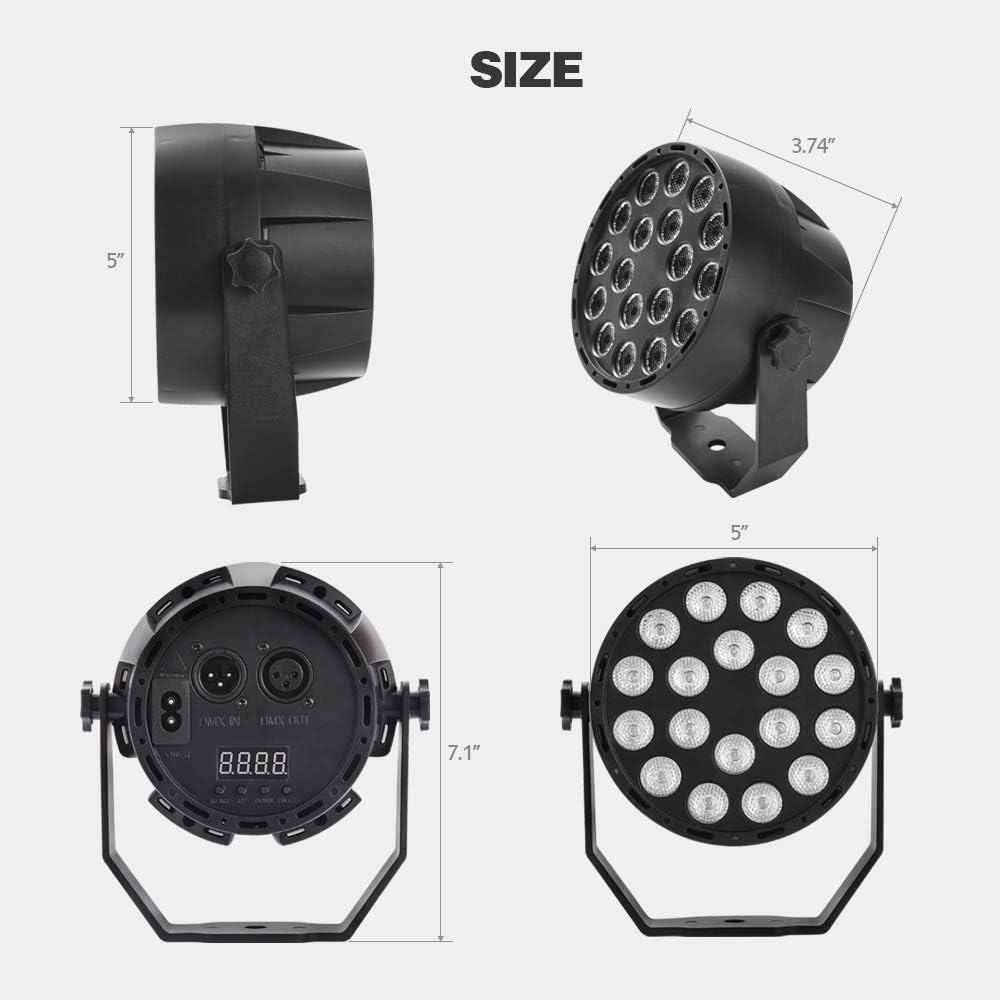
Image: Dimensions of the MICTUNING 18 LED UV Black Light.
| Karatteristika | Dettall |
|---|---|
| Brand | MICTUNING |
| Numru tal-Mudell | MIC-UBL-207D |
| Dimensjonijiet tal-Prodott (L x W x H) | 9.5 x 9.5 x 12.7 ċm (3.74 x 3.74 x 5 pulzieri) |
| Piż | 490 gramma (1.08 lbs) |
| Materjal | Liga tal-Aluminju |
| Qawwa | 18 Watts |
| Voltage | AC 100-240 Volt |
| Modi ta' Kontroll | Auto, Jump, Color Gradient, Flash, Pulse, Sound, DMX-512 |
| Kontroll mill-bogħod | RF Remote (battery not included) |
8. Informazzjoni dwar is-Sigurtà
- Do not look directly into the UV light source. Prolonged exposure can be harmful to eyes.
- Ensure the unit is securely mounted or placed on a stable surface to prevent falling.
- Żomm l-unità 'l bogħod mill-ilma jew minn likwidi oħra.
- Do not operate the unit if the power cable is damaged.
- Dan il-prodott huwa għal użu fuq ġewwa biss.
- Żomm fejn ma jintlaħaqx mit-tfal.
9. Garanzija u Appoġġ
For warranty information or technical support, please contact MICTUNING customer service. Details regarding spare parts availability are not provided in this manual.
Please refer to the product packaging or the official MICTUNING webis-sit għall-aktar informazzjoni ta' kuntatt għall-appoġġ aġġornata.


