1. Introduzzjoni
This manual provides essential information for setting up, operating, and maintaining your MSI PS42 8RB-059 laptop. Please read through this guide to ensure optimal performance and longevity of your device.
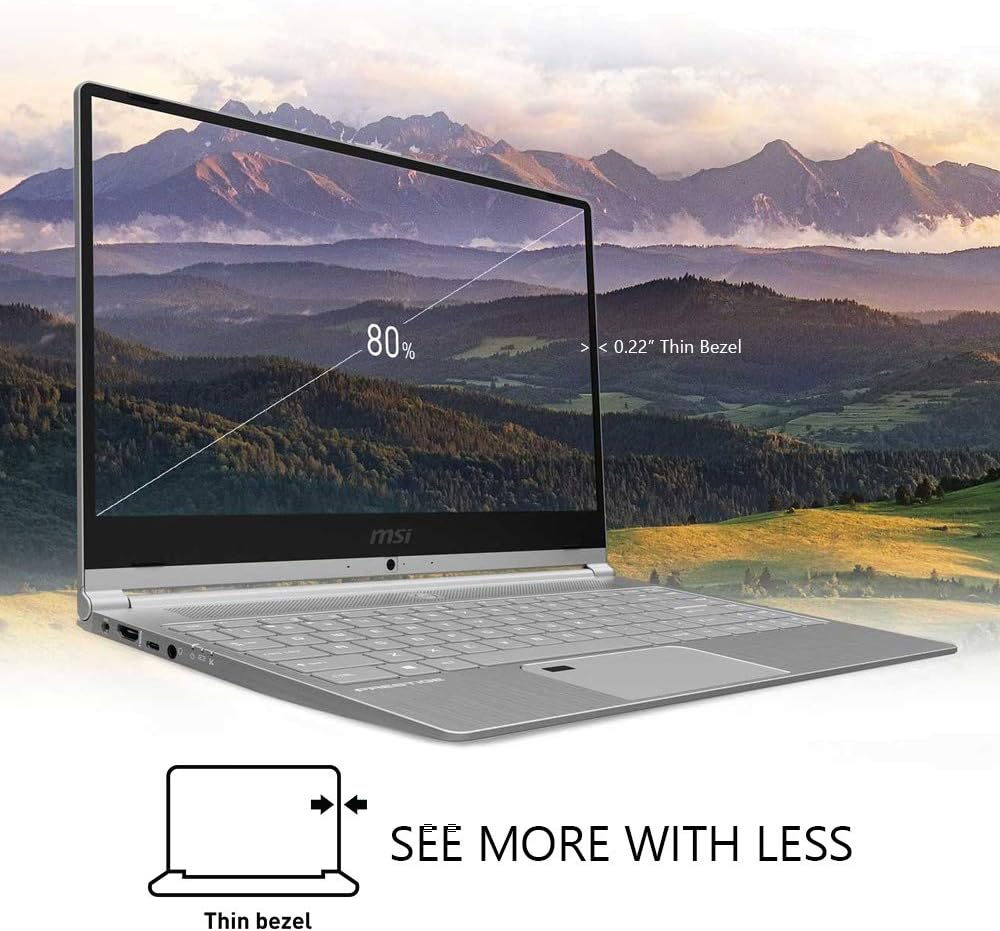
Figure 1.1: The MSI PS42 8RB-059 laptop showcasing its thin bezel display.
2. Setup
2.1 Unboxing Your Laptop
Malli tiftaħ il-pakkett, kun żgur li l-komponenti kollha huma preżenti:
- MSI PS42 8RB-059 Laptop
- Adapter tal-Enerġija
- Manwal għall-Utent (dan id-dokument)
2.2 Konnessjoni tal-Adapter tal-Enerġija
Connect the power adapter to the laptop's barrel charging port on the left side and then plug it into a power outlet. The laptop will begin charging. Note that the USB-C ports do not support power delivery.
2.3 L-Ewwel Tixgħil u s-Setup tal-Windows
Press the power button located in the center above the keyboard to turn on the laptop. Follow the on-screen instructions to complete the Windows 10 Pro setup process. This includes setting up your user account, network connection, and other preferences.

Figure 2.1: The integrated fingerprint sensor for secure one-touch access with Windows Hello.
3. It-Tħaddim tal-Laptop Tiegħek
3.1 Karatteristiċi tal-Wiri
Your laptop features a 14-inch Full HD IPS-Level display with a thin bezel design, offering an immersive visual experience. The True Color technology provides various display modes optimized for different tasks such as design, office work, movie watching, and gaming.

Figure 3.1: The display with True Color technology, offering optimized modes for various uses.
3.2 Tastiera u Touchpad
The laptop is equipped with a comfortable, backlit keyboard featuring large, silver keys. The precision touchpad supports multi-touch gestures for intuitive navigation. A fingerprint reader is integrated into the touchpad for secure login via Windows Hello.
3.3 Portijiet u Konnettività
The MSI PS42 offers a variety of ports for your connectivity needs:
- In-naħa tax-xellug: Power input (barrel jack), HDMI, 2x USB 3.1 Type-C (data only, no power delivery), Headphone/Microphone combo jack, LED indicators for power and charging.
- In-naħa tal-lemin: Kensington Lock slot, SD Card Reader, 2x USB 3.1 Type-A.

Figura 3.2: Ġenb view illustrating the available ports for external device connectivity.
3.4 Cooling System (Cooler Boost 3)
The laptop features Cooler Boost 3 technology with dedicated fans for the CPU and GPU, ensuring efficient heat dissipation even during intensive usage. This design helps maintain optimal performance and system stability.

Figure 3.3: Visual representation of Cooler Boost 3 technology in action, keeping the laptop cool.
3.5 Audio Enhancement (Nahimic 3)
Experience enhanced audio quality with Nahimic 3 technology, providing immersive 7.1 audio for movies, music, and games.
Video 3.1: Official MSI PS42 product overview, highlighting key features including Nahimic 3 audio. This video demonstrates the laptop's design, display, and audio capabilities.
4. Manutenzjoni
4.1 Tindif tal-Laptop Tiegħek
Regularly clean your laptop to prevent dust buildup and maintain performance. Use a soft, lint-free cloth for the screen and exterior. For the keyboard, use compressed air to remove debris. Ensure the laptop is powered off and unplugged before cleaning.
4.2 Aġġornamenti tas-Software
Keep your Windows 10 Pro operating system and drivers updated to ensure security, stability, and optimal performance. You can check for updates through the Windows Settings menu.
4.3 Storage and Memory Management
Your laptop comes with a 512GB M.2 SATA SSD and 16GB DDR4 RAM (expandable up to 32GB). Regularly manage your storage by deleting unnecessary files and applications. Monitor RAM usage to ensure smooth multitasking.
5 Issolvi l-problemi
5.1 Kwistjonijiet tal-Enerġija u l-Iċċarġjar
- Il-laptop mhux qed jixgħel: Ensure the power adapter is securely connected to both the laptop and a working power outlet. Check the LED indicators for charging status.
- Il-batterija mhix qed tiċċarġja: Verify the power adapter is functioning correctly. If issues persist, contact customer support.
5.2 Is-sħana żejda
If the laptop feels excessively hot, especially during heavy use, ensure the vents are not obstructed. The Cooler Boost 3 system is designed to manage heat, but proper airflow is crucial. Avoid using the laptop on soft surfaces that can block vents.
5.3 Problemi ta' Konnettività
- Wi-Fi issues: Check your router and network settings. Ensure Wi-Fi is enabled on your laptop.
- Apparati USB mhux rikonoxxuti: Try connecting the device to a different USB port. Ensure drivers for the external device are installed.
6. Speċifikazzjonijiet
| Karatteristika | Dettall |
|---|---|
| Brand | MSI |
| Isem tal-Mudell | PS42 8RB-059 |
| Daqs tal-Iskrin | 14 Pulzier |
| Kulur | Fidda |
| Mudell tas-CPU | Core i7-8550U (1.8 - 4.0GHz) |
| Koproċessur tal-Grafika | NVIDIA GeForce MX150 2G GDDR5 |
| Daqs tal-Memorja RAM Installata | 16 GB DDR4 2400MHz (Max 32GB) |
| Daqs tal-Hard Disk | 512 GB M.2 SATA SSD |
| Sistema Operattiva | Windows 10 Pro |
| Karatteristiċi Speċjali | Thin Bezel Display, Ultra Light (2.62 lbs), One-touch access, True Color, Extended Battery Life, Cooler Boost 3, Nahimic 3 7.1 Audio, USB 3.1 Type-C |
| Kontenut tal-Enerġija tal-Batterija | 65 Watt Sigħat |
| Teknoloġija tal-Konnettività | USB, 802.11ac Wireless, Bluetooth |
| Portijiet | HDMI, USB 3.1 Type-C (x2), USB 3.1 Type-A (x2), SD Card Reader, Headphone/Mic Combo |
| Piż tal-oġġett | 5.27 Liri |
7. Garanzija u Appoġġ
7.1 Garanzija tal-Prodott
Your MSI PS42 8RB-059 laptop comes with a 1-year Limited Warranty, which includes 1 Year Global coverage. Please refer to the warranty card included in your package for full terms and conditions.
7.2 Appoġġ għall-Klijent
For technical assistance, troubleshooting, or service inquiries, please contact MSI Computer customer support. You can find contact information on the MSI official website or in the documentation provided with your laptop.


