1. Introduzzjoni u Fuqview
The Optoma X343 is a professional XGA DLP projector designed for clear and vibrant presentations in various environments, including meeting rooms, classrooms, and home use. It features 3,600 lumens of brightness and a 22,000:1 contrast ratio, ensuring sharp text and graphics even in well-lit conditions. The projector includes an integrated 10-watt speaker for audio playback and offers a long lamp ħajja sa 15,000 siegħa.
Il-karatteristiċi ewlenin jinkludu:
- Kwalità tal-istampa: XGA resolution (1024x768) and 22,000:1 contrast ratio for vibrant and sharp images.
- Luminożità Għolja: 3,600 lumens for clear projection in various lighting conditions.
- Għażliet ta' Konnettività: Multiple input options including HDMI, VGA, and composite.
- Long Lamp Ħajja: Up to 15,000 hours, reducing maintenance needs.
- Installazzjoni faċli: Vertical keystone correction and 1.1x zoom for flexible placement.
- Kelliem Integrat: A 10-watt speaker provides room-filling audio.
- Daqs portabbli: Weighing less than 7 pounds, it is easy to transport.
- Distanza tat-Tmigħ: Projects a 120-inch image from approximately 18 feet away.
2. X'hemm fil-Kaxxa
Upon unpacking your Optoma X343 projector, please ensure all the following items are present:
- Projettur X343
- Korda tal-Enerġija
- Kontroll mill-bogħod
- Batteriji għall-Kontroll mill-bogħod
If any items are missing or damaged, please contact your retailer or Optoma customer support immediately.
3. Komponenti tal-Prodott

Figura 3.1: Quddiem view of the Optoma X343 Projector, showcasing the lens and ventilation grilles.

Figura 3.2: Fuq view of the Optoma X343 Projector, highlighting the focus and zoom rings, and the control panel buttons.

Figura 3.3: Ġenb view of the Optoma X343 Projector with dimensions (9.6 x 12.4 x 3.9 inches) indicated.
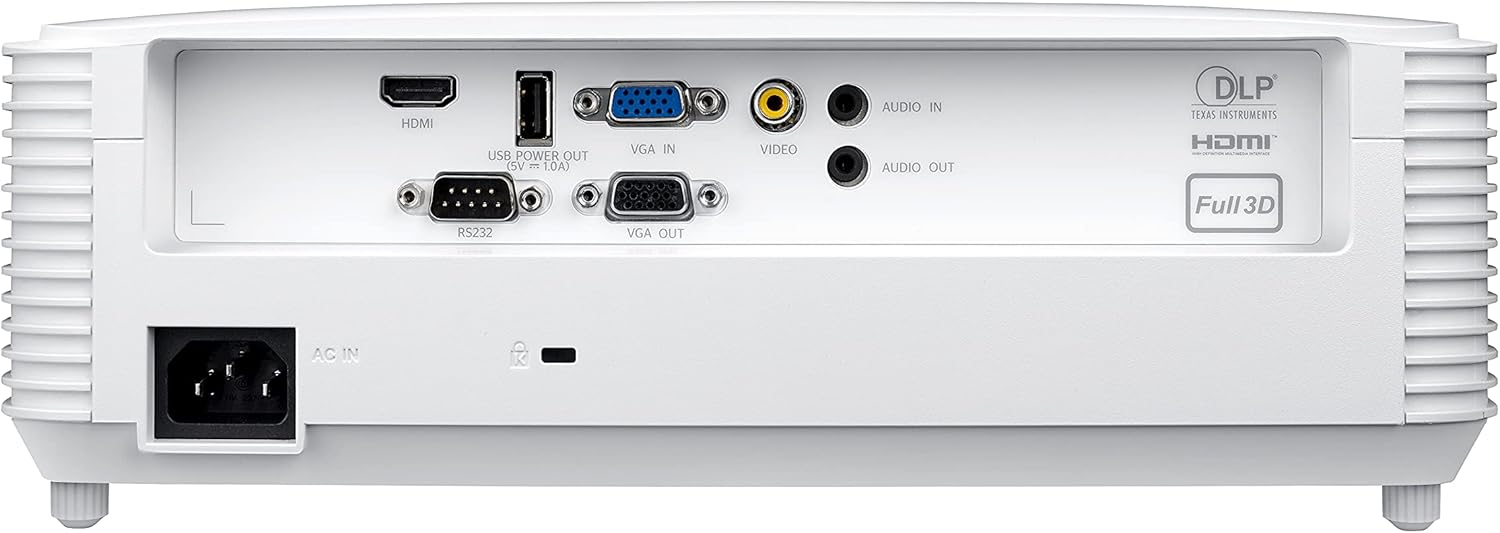
Figure 3.4: Rear panel of the Optoma X343 Projector, showing various input and output ports including HDMI, VGA, USB, and audio connections.
4. Gwida ta' Setup
4.1 Tqegħid
Position the projector on a stable, flat surface or mount it securely. Ensure adequate ventilation around the projector to prevent overheating. For a 120-inch image, the projector should be approximately 18 feet from the screen. The 1.1x zoom and vertical keystone correction features allow for minor adjustments to image size and shape.
4.2 Konnessjoni tal-Enerġija
- Connect the power cord to the 'AC IN' port on the rear of the projector.
- Ipplaggja t-tarf l-ieħor tal-korda tad-dawl fi żbokk elettriku ertjat.
4.3 Connecting to a Source Device
The X343 offers multiple connectivity options:
- HDMI: Għal vidjow u awdjo diġitali ta' definizzjoni għolja. Qabbad kejbil HDMI mit-tagħmir sors tiegħek (eż. laptop, Blu-ray player) mal-port HDMI fuq il-proġettazzjoni.
- VGA: For analog video. Connect a VGA cable from your computer to the 'VGA IN' port. If audio is required, connect a separate audio cable to the 'AUDIO IN' port.
- Vidjow kompost: For standard definition analog video. Connect a composite video cable (yellow RCA) to the 'VIDEO' port.
- USB Power Out (5V=1.0A): This port can be used to power external devices such as HDMI dongles.
5. Istruzzjonijiet Operattivi
5.1 Tixgħel/Jitfi
- Biex Tixgħel: Press the power button on the projector's control panel or the remote control. The power indicator light will turn blue.
- Biex Tifi: Press the power button again. A confirmation message may appear. Press the power button a second time to confirm shutdown. The power indicator light will turn red.
5.2 Aġġustament tal-Immaġni
- Fokus: Rotate the focus ring around the lens until the image is sharp and clear.
- Zoom: Rotate the zoom ring around the lens to adjust the image size.
- Korrezzjoni Keystone: Use the 'Keystone' function in the projector menu or dedicated buttons on the remote to correct trapezoidal image distortion.
5.3 Għażla tas-Sors
Press the 'Source' button on the remote control or projector panel to cycle through available input sources (HDMI, VGA, Video). Select the input corresponding to your connected device.
6. Manutenzjoni
6.1 Lamp Ħajja
The Optoma X343 lamp has a life expectancy of up to 15,000 hours. When the lamp approaches its end of life, a warning message may appear on the screen. Refer to the full user manual for lamp proċeduri ta’ sostituzzjoni.
6.2 Tindif
- Lenti: Use a soft, lint-free cloth specifically designed for optical lenses. Avoid abrasive cleaners.
- Casing: Imsaħ il-proġettazzjoni casing with a soft, dry cloth. Do not use harsh chemicals or solvents.
- Vents tal-arja: Ensure air vents are clear of dust and obstructions to maintain proper airflow and prevent overheating.
7 Issolvi l-problemi
This section addresses common issues you might encounter with your Optoma X343 projector.
7.1 L-ebda Immaġni fuq l-Iskrin
- Kun żgur li l-proġettazzjoni tkun mixgħula u li l-indikatur tal-enerġija jkun blu.
- Ivverifika li l-kejbil tal-vidjo (HDMI, VGA) huwa konness sew kemm mal-proġettazzjoni kif ukoll mal-apparat tas-sors.
- Iċċekkja li s-sors tad-dħul korrett huwa magħżul fuq il-proġettazzjoni.
- Ikkonferma li l-apparat tas-sors huwa mixgħul u qed joħroġ sinjal.
7.2 Ebda Ħoss
- If using HDMI, ensure the source device's audio output is set to HDMI.
- If using VGA or composite, ensure a separate audio cable is connected to the 'AUDIO IN' port.
- Iċċekkja s-settings tal-volum kemm fuq il-proġettazzjoni kif ukoll fuq l-apparat tas-sors.
7.3 Tisħin żejjed tal-Proġettur
- Kun żgur li l-gradilji tal-ventilazzjoni kollha huma ċari u mingħajr ostakli.
- Ħaddem il-proġettur f'żona ventilata sew.
- If the issue persists, power off the projector, allow it to cool, and then restart. If overheating continues, contact support.
8. Speċifikazzjonijiet
| Speċifikazzjoni | Valur |
|---|---|
| Numru tal-Mudell | X343 |
| Teknoloġija tal-Wiri | DLP |
| Riżoluzzjoni Nattiva | XGA (1024 x 768) |
| Luminożità | 3600 Lumens |
| Proporzjon ta' Kuntrast | 22,000:1 |
| Lamp Ħajja | Sa 15,000 sigħat |
| Tarmi Proporzjon | 1.94 – 2.15:1 |
| Zoom | 1.1x Manwal |
| Korrezzjoni Keystone | Vertikali |
| Kelliem Integrat | 10-watt |
| Konnettività | HDMI, VGA In, VGA Out, Composite Video, Audio In, Audio Out, RS232, USB Power (5V=1.0A) |
| Piż tal-oġġett | 6.7 liri |
| Dimensjonijiet tal-Prodott | 9.6 x 12.4 x 3.9 pulzieri |
9. Vidjo Uffiċjali tal-Prodott
Video 9.1: Optoma Home Projection Technology. This video provides an overview of Optoma's projection capabilities, showcasing various applications and features of their projectors, including home cinema, gaming, and sports viewing.
10. Garanzija u Appoġġ
For detailed warranty information, technical support, or service inquiries, please refer to the official Optoma website or contact Optoma customer service directly. Keep your purchase receipt and product serial number handy for any support requests.
Tista' ssib riżorsi addizzjonali u informazzjoni ta' kuntatt fuq Optoma Store on Amazon.


