1. Introduzzjoni
This user manual provides detailed instructions for the installation, operation, and maintenance of your CHORTAU Full HD 1080P WiFi Dashcam. Please read this manual thoroughly before using the device to ensure proper functionality and safety.
2. Kontenut tal-Pakkett
Ivverifika li l-oġġetti kollha huma preżenti fil-pakkett:
- CHORTAU Full HD 1080P WiFi Dashcam
- Ċarġer tal-Karozza
- Car Mount (with adhesive and suction cup options)
- Manwal għall-Utent
- USB Cable (for PC connection)
3. Prodott Aktarview
Familiarize yourself with the components of your dashcam.

Immaġni: Minn quddiem u mill-ġenb view of the CHORTAU Dashcam, showing the screen, control buttons, lens, USB port, and microSD card slot.
Karatteristiċi ewlenin:
- SONY IMX323 Sensor: Captures clear Full HD 1080P video with F2.0 large aperture and 170° wide-angle lens, suitable for day and night recording.
- Konnettività WiFi: Integrated WiFi module for connecting to the "RoadCam" app on smartphones or tablets. Allows real-time viewing, saving, and sharing of recorded files.
- Reżistenza għat-temperatura: Designed to operate in temperatures from -20°C to 70°C.
- G-Sensor: Automatically detects sudden shakes or collisions and locks the current video footage biex jipprevjenu kitba fuq.
- Sejbien tal-Moviment: Initiates recording when motion is detected in front of the vehicle.
- Monitoraġġ tal-Parkeġġ: Provides 24-hour surveillance for your parked vehicle.
- Skrin ta' 2 pulzieri: Compact display that does not obstruct the driver's view.
4. Installazzjoni
The dashcam can be easily installed on your windshield using the provided removable plate or suction cup mount.
- Agħżel Post tal-Immuntar: Select a location on your windshield that does not obstruct your view of the road. Typically, this is behind the rearview mera.
- Wiċċ Nadif: Ensure the windshield surface is clean and dry before attaching the mount.
- Waħħal Mount: Securely attach the chosen mount (adhesive or suction cup) to the windshield.
- Attach Dashcam: Slide the dashcam onto the mount until it clicks into place.
- Qabbad l-Enerġija: Connect the car charger to the dashcam and plug it into your vehicle's cigarette lighter socket. Route the cable neatly to avoid interference with driving.
- Daħħal il-Kard MicroSD: Insert a Class 10 or higher microSD card (up to 32GB, not included) into the designated slot. Ensure it is inserted correctly.

Image: The CHORTAU Dashcam mounted on a car's windshield, showing its compact size and placement.

Image: A visual guide demonstrating the easy installation process of the dashcam onto its removable plate.
5. Is-Setup Inizjali u l-Konnessjoni Wi-Fi
Before first use, format the microSD card and set up basic preferences.
5.1. L-ifformattjar tal-Kard MicroSD
- Ixgħel id-dashcam.
- Agħfas il- M buttuna biex tidħol fil-menu.
- Navigate to the "Format" option using the arrow buttons.
- Agħfas OK to confirm and format the card. This will erase all data on the card.
5.2. Konnessjoni Wi-Fi
Connect your dashcam to your smartphone or tablet via Wi-Fi using the "RoadCam" app.
- On the dashcam, press the M buttuna biex tidħol fil-menu.
- Navigate to the "Wi-Fi" option.
- Agħfas OK to turn Wi-Fi ON. The dashcam display will show the Wi-Fi network name (SSID) and password.
- On your smartphone/tablet, download and install the "RoadCam" app.
- Go to your device's Wi-Fi settings and connect to the dashcam's Wi-Fi network (SSID).
- Enter the default password (usually 12345678).
- Open the "RoadCam" app and select the dashcam to establish a connection. You can now view foo ħajtage, aċċess irreġistrat files, and adjust settings via the app.
Video: This video demonstrates how to connect the CHORTAU B-T007 dashcam's Wi-Fi to a smartphone, including navigating the dashcam menu, finding the Wi-Fi network, entering the password, and connecting via the RoadCam app.
6. Istruzzjonijiet Operattivi
6.1. Automatic Recording
The dashcam automatically starts recording when connected to power and the vehicle engine is started. It will stop recording and save the file meta l-magna tkun mitfija.
6.2. Loop Recording
The dashcam records video in continuous loops (e.g., 1, 3, or 5-minute segments). When the memory card is full, the oldest unlocked files will be overwritten by new recordings. You can adjust the loop recording duration in the settings menu.
6.3. G-Sensor (Emergency Lock)
The built-in G-Sensor detects sudden impacts or rapid acceleration/deceleration. When triggered, it automatically locks the current video segment, preventing it from being overwritten by loop recording. This ensures critical footage is preserved in case of an accident.

Image: Illustration of the G-Sensor function, which automatically locks video files during a collision to secure accident evidence.
6.4. Monitor tal-Parkeġġ
When enabled, the parking monitor function allows the dashcam to automatically start recording if it detects a collision or vibration while your vehicle is parked. This provides surveillance for your car 24 hours a day.
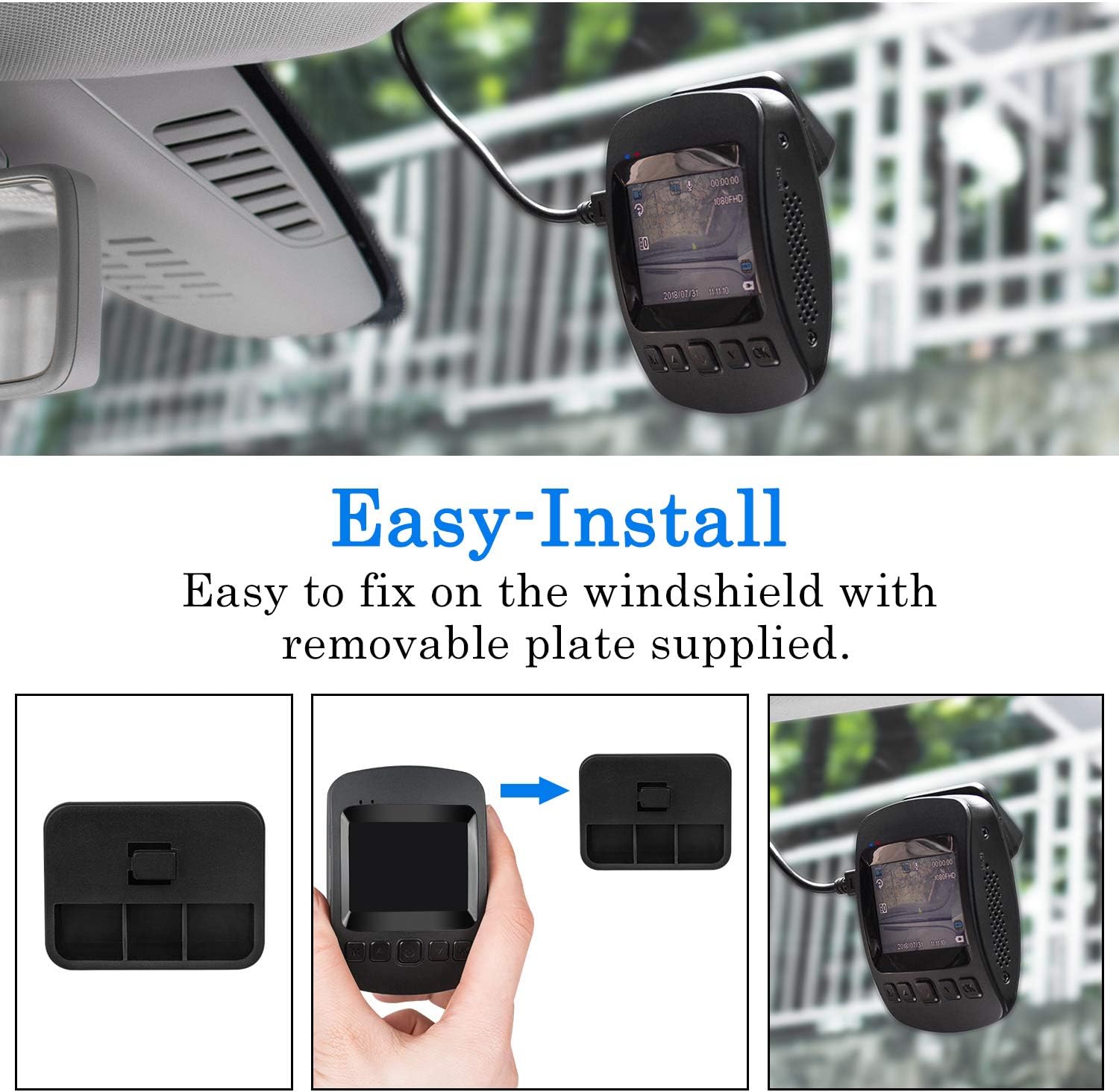
Image: The dashcam actively monitoring a parked car in a parking garage, demonstrating its 24-hour parking surveillance capability.
6.5. Sejbien ta 'Moviment
With motion detection enabled, the dashcam will begin recording automatically if it senses movement in its field of view while the vehicle is stationary. This is useful for capturing events around your parked car.
7. Viewing Playback
Tista' view recorded videos directly on the dashcam or through the "RoadCam" app on your smartphone/tablet.
7.1. On the Dashcam
- Stop recording by pressing the OK button if it's currently recording.
- Agħfas fit-tul il- M Agħfas il-buttuna darbtejn biex tidħol fil-modalità tal-plejbek.
- Use the arrow buttons to navigate through the recorded files.
- Agħfas OK biex tilgħab il-vidjo magħżul.
Video: This video demonstrates how to view irreġistrat footage directly on the CHORTAU B-T007 dashcam's screen, including stopping recording and navigating to playback mode.
7.2. Via RoadCam App
Once connected via Wi-Fi (as described in Section 5.2), open the "RoadCam" app. You can access live view, browse recorded videos, download them to your device, or share them.
8. Manutenzjoni
- Karta MicroSD: Regularly format the microSD card (at least once a month) to ensure optimal performance and prevent data corruption. Replace the card if it shows signs of wear or error.
- Tindif tal-Lenti: Keep the camera lens clean for clear recordings. Use a soft, lint-free cloth.
- Aġġornamenti tal-Firmware: Check the CHORTAU official websit jew app għal kwalunkwe aġġornamenti tal-firmware disponibbli biex tittejjeb il-prestazzjoni u jiżdiedu l-karatteristiċi.
- Temperatura: Avoid exposing the dashcam to extreme temperatures outside its operating range (-20°C to 70°C) for extended periods.
9 Issolvi l-problemi
| Problema | Kawża Possibbli | Soluzzjoni |
|---|---|---|
| Id-dashcam ma tixgħelx. | Ebda provvista tal-enerġija; ċarġer tal-karozza difettuż; konnessjoni maħlula. | Check car charger connection and vehicle's cigarette lighter socket. Ensure the car charger is functional. |
| Ir-reġistrazzjoni tieqaf ħesrem. | MicroSD card full; card error; low power. | Format the microSD card. Replace the card if errors persist. Ensure continuous power supply. |
| Video footage hija mċajpra. | Dirty lens; protective film still on lens; incorrect focus. | Clean the lens. Remove any protective film. Ensure the lens is not obstructed. |
| Problemi bil-konnessjoni tal-Wi-Fi. | Incorrect password; app not updated; interference. | Verify Wi-Fi password (default: 12345678). Update the "RoadCam" app. Try connecting in a different location. |
| G-Sensor too sensitive/not sensitive enough. | Issettjar tas-sensittività tas-Sensor-G. | Adjust G-Sensor sensitivity in the dashcam's settings menu. |
10. Speċifikazzjonijiet
| Ditta: | CHORTAU |
| Mudell: | B-T007 (also known as B-T006) |
| Dimensjonijiet: | 1.52 x 7.98 x 4.98 ċm |
| Piż: | 310 gramma |
| Daqs tal-Wiri: | 2 pulzieri |
| Riżoluzzjoni tal-vidjo: | Full HD ta '1080p |
| Sensor: | SONY IMX323 |
| Apertura tal-lenti: | F2.0 |
| ViewIng Angolu: | 170 grad |
| Konnettività: | USB, Wi-Fi |
| Ħażna: | MicroSD (up to 32GB, Class 10 recommended) |
| Batterija: | 1 batterija tal-polimer tal-litju (inkluża) |
| Temperatura operattiva: | -20°C sa 70°C |
| Karatteristiċi Speċjali: | G-Sensor, Motion Detection, Parking Monitor, Loop Recording |
11. Garanzija u Appoġġ
CHORTAU products typically come with a warranty. Please refer to the warranty information provided with your purchase or visit the official CHORTAU webis-sit għal dettalji dwar it-termini u l-kundizzjonijiet tal-garanzija.
For technical support or further assistance, please contact CHORTAU customer service. Contact information can usually be found on the product packaging or the official brand websit.
Tista 'żżur il- CHORTAU Store on Amazon għal aktar informazzjoni.


