Introduzzjoni
The DS18 RCS2IN1LP-BK is a combined reverse camera and backup buzzer system designed to enhance parking and reversing safety. This unit integrates a waterproof camera with LED night vision and a backup buzzer into a license plate frame, providing visual and audible assistance when maneuvering your vehicle in reverse. It features a CMOS color camera with a 120-degree lens angle and distance scale lanes for clear visibility and accurate parking guidance.
This manual provides detailed instructions for the proper installation, operation, and maintenance of your DS18 RCS2IN1LP-BK system.
Karatteristiċi tal-Prodott
- Integrated Reverse Camera and Backup Buzzer
- LED Night Vision for low-light conditions
- Waterproof Camera Housing for durability
- Parking Reverse Assistance with distance scale lanes
- CMOS Color Camera with 120-degree viewangolu tal-ing
- 0.5 LUX Low Light Lens
- Two Object Sensors with Proximity Alert
- 640x480 Capture Resolution
- External Audible Warning Buzzer
- Cast Steel Alloy construction
- RCA Video Output for monitor connection
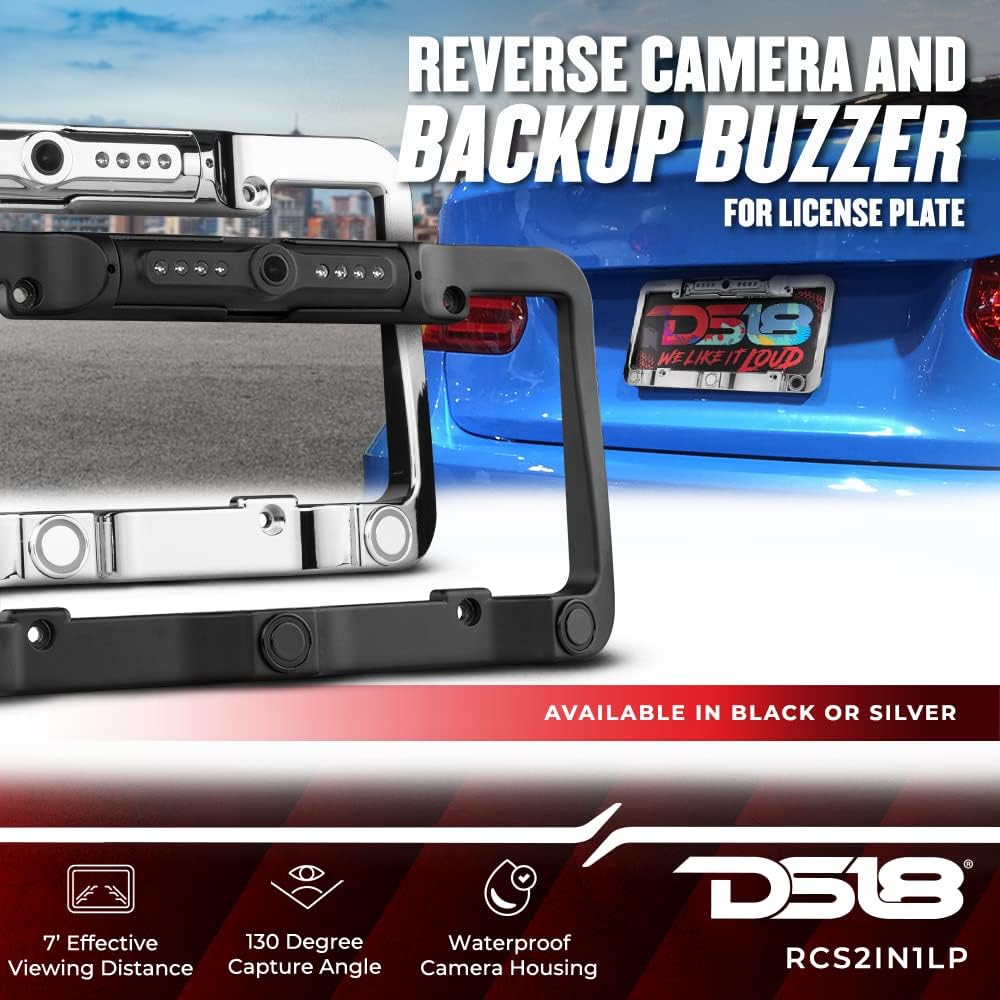
Image: The DS18 RCS2IN1LP-BK license plate frame with integrated reverse camera and backup sensors, shown in both black and silver finishes. This image highlights the 7' effective viewing distance, 130-degree capture angle, and waterproof camera housing.

Image: The DS18 RCS2IN1LP-BK license plate frame, emphasizing its waterproof design and LED night vision capabilities. An inset image shows the camera's view with parking assistance lines and a "stop" warning, demonstrating the 0.5 LUX low light lens, two object sensors with proximity alert, and 640x480 capture resolution.
X'hemm fil-Kaxxa
Upon unpacking your DS18 RCS2IN1LP-BK system, please verify that all components are present:
- License Plate Frame with Integrated Camera and Parking Sensors
- Modulu tal-Kontroll
- External Audible Warning Buzzer (Speaker)
- Kejbils tal-Enerġija
- Cable tal-Vidjo RCA
- Manwal tas-Sid (dan id-dokument)

Immaġni: Kompleta view of all components included with the DS18 RCS2IN1LP-BK system, including the license plate frame with camera and sensors, control module, external buzzer, and various wiring harnesses.
Speċifikazzjonijiet
| Speċifikazzjoni | Dettall |
|---|---|
| Numru tal-Mudell | RCS2IN1LP-BK |
| Dimensjonijiet tal-Prodott | 30.48 x 15.24 x 16.51 ċm |
| Piż tal-oġġett | 726 g |
| Karatteristiċi Speċjali | Waterproof |
| Teknoloġija tal-Wiri | LED (for night vision) |
| Karatteristiċi oħra tal-Wiri | Wireless (refers to general connectivity, not necessarily video signal) |
| Tip ta' Installazzjoni | Surface Mount (License Plate) |
| Teknoloġija tas-Sensor Ottiku | CMOS |
| Angolu reali ta View | 120 Grad |
| Qasam ta View | 120 Grad |
| UPC | 663593067654 |
Setup u Installazzjoni
Proper installation is crucial for the optimal performance of your DS18 RCS2IN1LP-BK system. It is recommended that installation be performed by a qualified professional if you are not familiar with automotive electrical systems.
Għodda u Materjali Meħtieġa:
- Basic hand tools (screwdrivers, wrenches)
- Strippers/crimpers tal-wajer
- Tejp elettriku jew tubi li jinxtorbu bis-sħana
- Multimeter (for testing power connections)
- Drill (if routing cables through vehicle body)
- Zip ties or cable clips for securing wires
Passi ta' Installazzjoni:
- Mount the License Plate Frame:
Remove your existing license plate. Position the DS18 RCS2IN1LP-BK license plate frame over the mounting holes. Secure the frame and your license plate using the original screws or provided hardware. Ensure the camera and sensors are unobstructed.

Immaġni: Faċċata dettaljata view of the DS18 RCS2IN1LP-BK license plate frame, showcasing the integrated camera at the top and the two parking sensors at the bottom. This illustrates how the unit mounts directly to the vehicle's license plate area.
- Kejbils tar-Rotot:
Carefully route the camera and sensor cables from the license plate frame into the vehicle's trunk or interior. Look for existing grommets or openings. If drilling is necessary, ensure you protect the cables from sharp edges and seal any drilled holes to prevent water entry.
- Connect to Control Module:
Connect the camera and sensor cables to the corresponding ports on the control module. Refer to the labels on the module for correct connections (e.g., "Sensor," "Camera").

Image: The DS18 RCS2IN1LP-BK control module with its various input/output ports labeled for sensor, speaker, monitor, and power connections. The external audible warning buzzer is also shown connected, illustrating the core components for system operation.
- Connect the Buzzer:
Connect the external audible warning buzzer (speaker) to the "Speaker" port on the control module. Mount the buzzer in a location where it can be clearly heard by the driver, typically in the trunk or under the dashboard.
- Konnessjoni tal-Enerġija:
Connect the control module's power cable. The red wire typically connects to a 12V switched power source that is active when the vehicle is in reverse (e.g., reverse light wire). The black wire connects to a chassis ground. Use a multimeter to identify the correct reverse light wire. Ensure all connections are secure and insulated.
- Konnessjoni tal-Output tal-Vidjo:
Connect the RCA video output cable from the control module to your vehicle's display monitor (e.g., aftermarket head unit, dedicated monitor). Ensure the monitor is capable of displaying a composite video signal.
- Ittestja s-Sistema:
Before reassembling the vehicle's interior, test the system. Turn on the vehicle and engage reverse gear. The camera image should appear on your monitor, and the backup buzzer should activate if an object is detected behind the vehicle. Adjust the camera angle if necessary.
Istruzzjonijiet Operattivi
The DS18 RCS2IN1LP-BK system operates automatically when the vehicle is placed into reverse gear.
- Engaging Reverse:
When you shift your vehicle into reverse, the system will automatically power on. The camera feed will be displayed on your connected monitor, and the backup sensors will become active.
- Gwida Viżwali:
The camera display will show a real-time view of the area behind your vehicle. Distance scale lines (typically green, yellow, and red) will overlay the image to help you judge the distance to objects. The LED night vision will activate automatically in low-light conditions to provide clear visibility.
- Twissijiet li jinstemgħu:
The integrated parking sensors will detect objects within their range. As you approach an object, the external audible buzzer will emit a series of beeps. The frequency of the beeps will increase as you get closer to the object, becoming a continuous tone when you are very close.
- Disengaging Reverse:
When you shift out of reverse gear, the system will automatically power off, and the camera feed will disappear from the monitor.

Immaġni: Wara view of a vehicle with the DS18 RCS2IN1LP-BK license plate camera and backup buzzer system visibly installed. This demonstrates the discreet integration of the unit into the vehicle's rear, ready for operation.
Manutenzjoni
To ensure the longevity and optimal performance of your DS18 RCS2IN1LP-BK system, follow these simple maintenance guidelines:
- Clean the Camera Lens and Sensors: Regularly clean the camera lens and parking sensors with a soft, damp cloth to remove dirt, dust, and debris. Avoid using abrasive cleaners or harsh chemicals that could damage the lens or housing.
- Spezzjona l-Wiring: Periodically check all visible wiring connections for any signs of wear, fraying, or corrosion. Ensure all connections remain secure.
- Iċċekkja l-Immuntar: Verify that the license plate frame is securely mounted and not loose. Tighten any screws if necessary.
- Evita l-Ħasil bi Pressjoni Għolja: While the unit is waterproof, avoid directing high-pressure water streams directly at the camera or sensors during car washes, as this could potentially force water past seals.
Issolvi l-problemi
If you encounter issues with your DS18 RCS2IN1LP-BK system, refer to the following troubleshooting guide:
| Problema | Kawża Possibbli | Soluzzjoni |
|---|---|---|
| No image on monitor when in reverse. |
|
|
| Backup buzzer not sounding. |
|
|
| L-immaġni hija mċajpra jew distorta. |
|
|
Garanzija u Appoġġ
For warranty information or technical support regarding your DS18 RCS2IN1LP-BK Reverse Camera and Backup Buzzer, please contact DS18 customer service directly. Refer to the contact information provided with your product packaging or visit the official DS18 websit għall-għajnuna.
Nota: Żomm l-irċevuta tax-xiri tiegħek bħala prova tax-xiri għal kwalunkwe talba ta' garanzija.


