Introduzzjoni
This manual provides detailed instructions for the safe and proper installation, operation, and maintenance of your WALI GSDM002 Dual Monitor Gas Spring Desk Mount. Please read this manual thoroughly before installation and retain it for future reference. If you have any questions or require assistance, please contact WALI customer support.
Informazzjoni dwar is-Sigurtà
TWISSIJA: Failure to read and follow all instructions may result in personal injury or damage to the product. Always ensure the mounting surface can safely support the combined weight of the mount and monitors. Do not exceed the maximum weight capacity. Use safety gear and proper tools during installation.
- Verify VESA compatibility and monitor weight before installation.
- Tissikkax iżżejjed il-viti biex tevita l-ħsara.
- Żgura li l-konnessjonijiet kollha huma siguri qabel l-użu.
- Żomm lit-tfal 'il bogħod minn partijiet li jiċċaqalqu.
Kontenut tal-Pakkett
Jekk jogħġbok iċċekkja li l-komponenti kollha huma preżenti u mhux imħassra:
- 1 x WALI Dual Monitor Gas Spring Stand
- Kit tal-Ħardwer tal-Immuntar
- Manwal għall-Utent
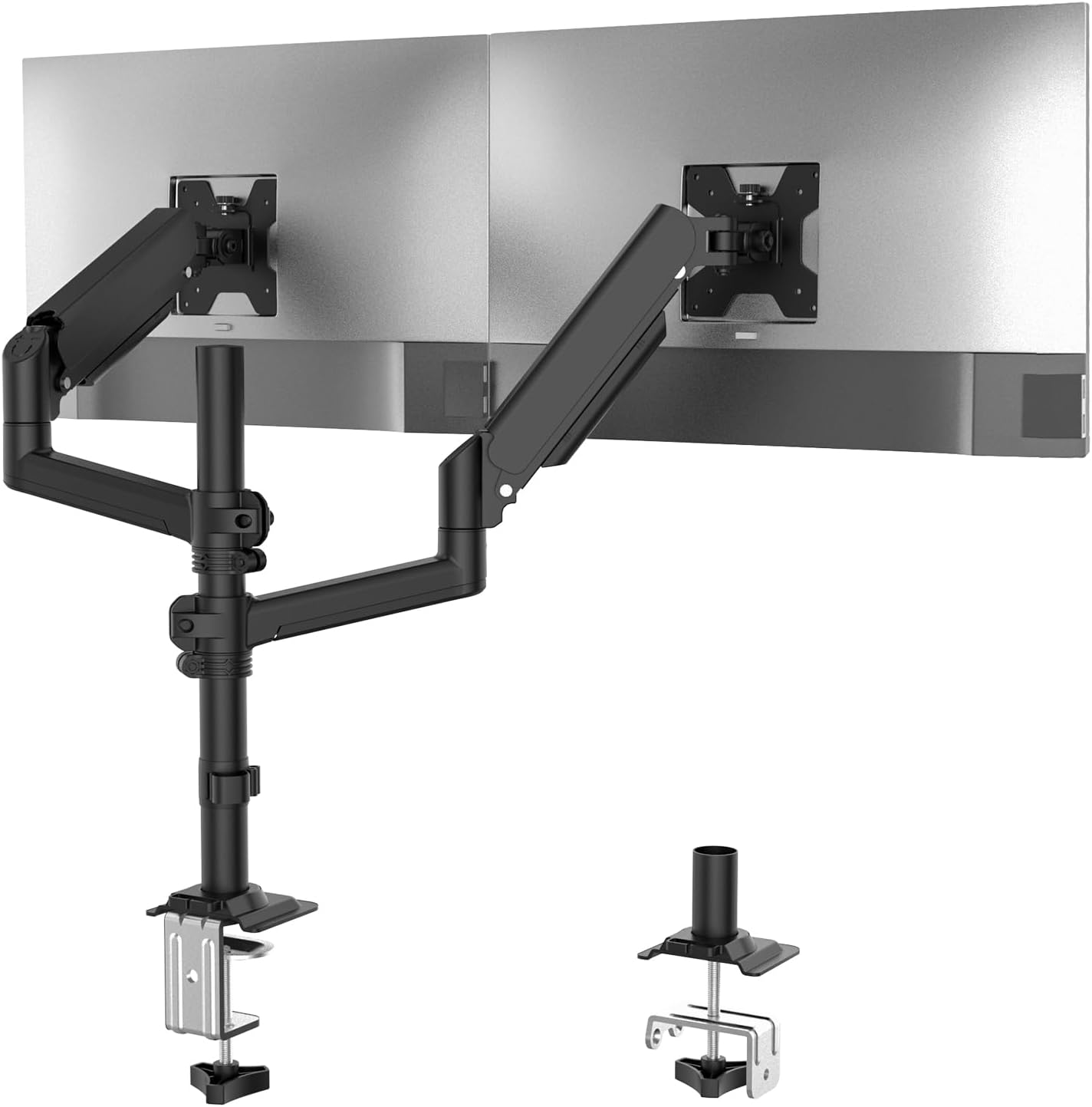
Image: The WALI GSDM002 Dual Monitor Gas Spring Desk Mount, showcasing its two monitor arms attached to a central pole, with both C-clamp and grommet mounting options visible.
Speċifikazzjonijiet
| Karatteristika | Dettall |
|---|---|
| Numru tal-Mudell | GSDM002 |
| Daqs tal-Iskrin Kompatibbli | 13" sa 32" |
| Kapaċità massima tal-piż | 19.8 lbs per arm |
| Kompatibilità VESA | 75x75mm, 100x100mm |
| Għażliet ta 'Immuntar | C-Clamp, Grommet Base |
| C-Clamp Firxa tal-ħxuna | 0.39" - 2.76" |
| Grommet Base Thickness Range | 0.39" - 1.97" |
| Medda Mejjel | +70° / -45° |
| Medda li ddur | +/-180° |
| Rotazzjoni | 360° |
| Għoli Max | 26.6" |
| Estensjoni Max | 20.3" |
| Materjal | Azzar Liga |
Setup u Installazzjoni
Step 1: Choose Your Mounting Option
The WALI GSDM002 offers two installation methods: C-clamp or Grommet Base. Select the option that best suits your desk.

Image: A visual comparison of the C-clamp mounting method, which secures to the edge of a desk, and the grommet base method, which uses an existing hole in the desk.
C-Clamp Installazzjoni:
- Waħħal is-C-clamp to the bottom of the main pole.
- Pożizzjona s-C-clamp on the edge of your desk and tighten the knob until secure. Ensure the desk thickness is between 0.39" and 2.76".
Installazzjoni tal-Bażi tal-Gromet:
- If your desk has a grommet hole, insert the grommet base through the hole.
- Secure the base from underneath the desk using the provided hardware. Ensure the desk thickness is between 0.39" and 1.97".
Step 2: Attach Monitor Arms to Pole
Slide the monitor arms onto the central pole at your desired height. Use the provided Allen key to tighten the set screws on the arms to secure them in place.
Step 3: Attach Monitors to VESA Plates
- Carefully attach your monitors to the VESA plates on each arm using the appropriate screws from the hardware kit. Ensure your monitors have VESA mounting holes (75x75mm or 100x100mm).
- Confirm that each monitor weighs no more than 19.8 lbs.

Image: Two monitors are shown mounted on the WALI GSDM002, demonstrating its compatibility with large screens and flexible orientation, with one monitor in portrait mode and the other in landscape mode.
Operazzjoni u Aġġustamenti
Monitor Pożizzjonament
The gas spring arms allow for flexible positioning of your monitors. You can adjust the height, tilt, swivel, and rotation to achieve an ergonomic viewangolu tal-ing.
- Aġġustament Għoli: Imbotta jew iġbed il-monitor bil-mod 'il fuq jew 'l isfel.
- Mejjel: Tilt the monitor screen +70° upwards or -45° downwards.
- Dawwar: Swivel the monitor +/-180° horizontally.
- Rotazzjoni: Rotate the monitor 360° for portrait or landscape orientation.
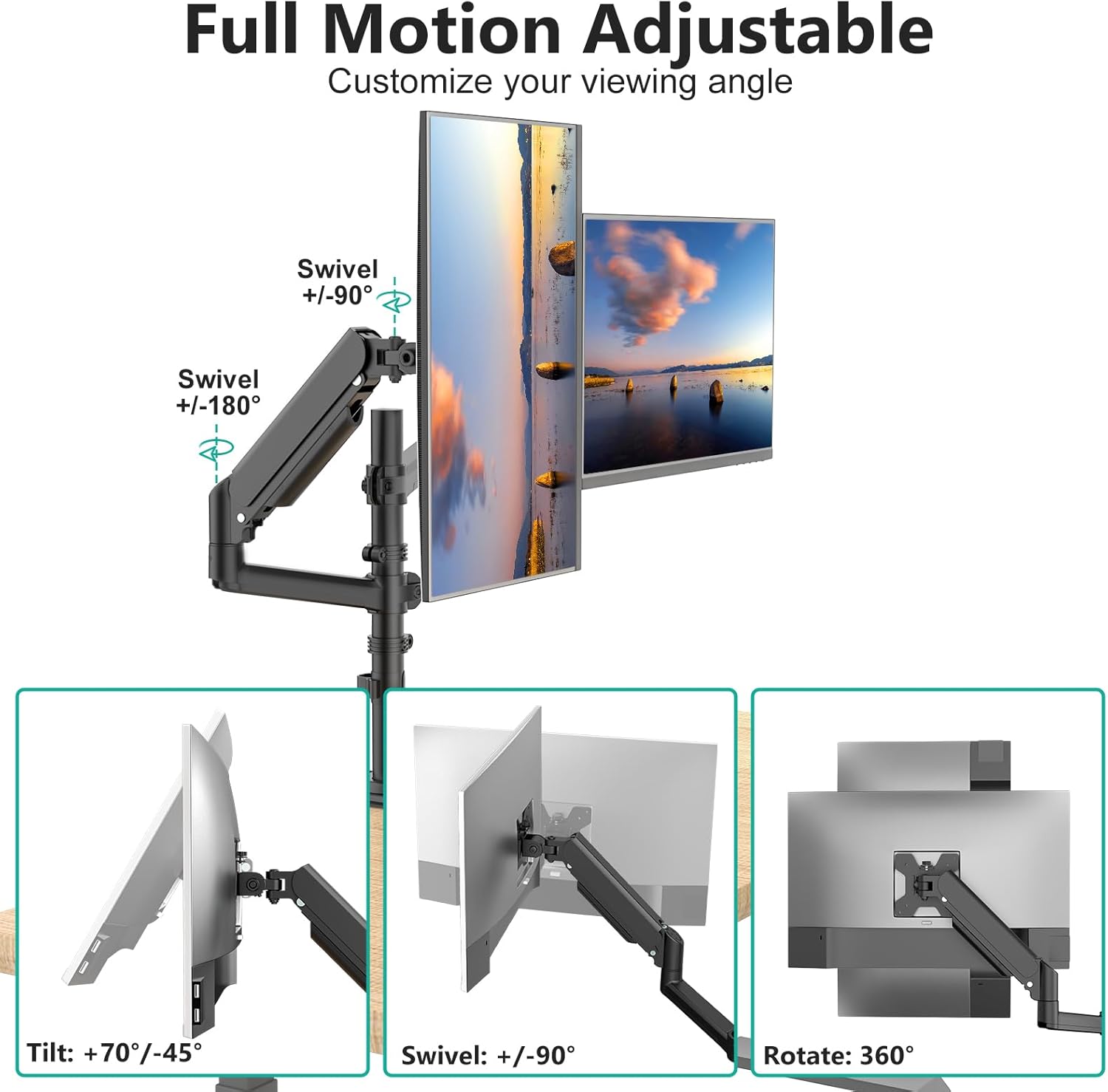
Image: A diagram illustrating the full range of motion for the monitor arm, including tilt (+70°/-45°), swivel (+/-180°), and 360° rotation, with monitors shown in various positions.
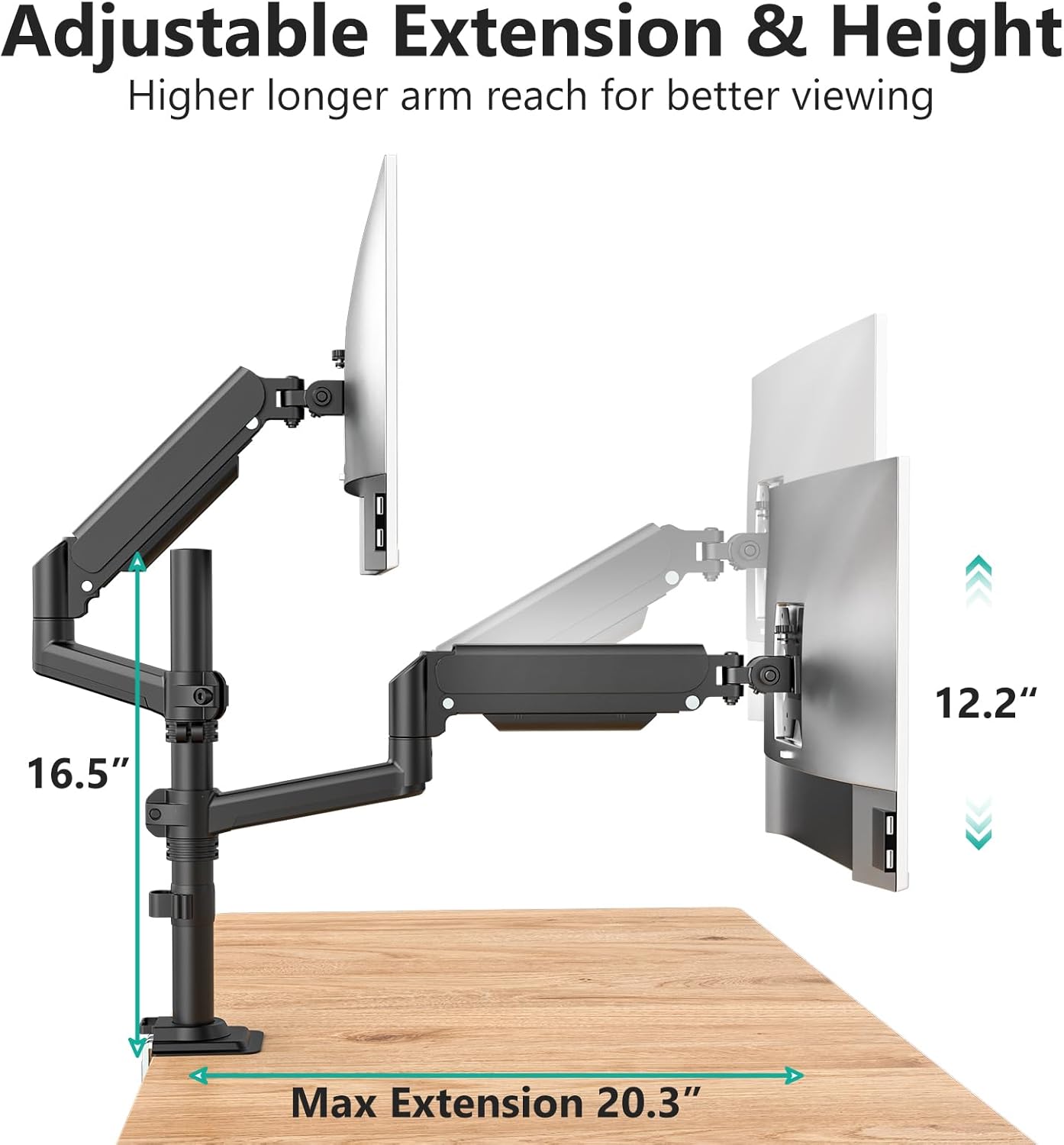
Image: A diagram highlighting the adjustable extension (up to 20.3 inches) and height (up to 16.5 inches) of the monitor arm, demonstrating its reach and vertical range.
Aġġustament tat-Tensjoni tar-Rebbiegħa tal-Gass
The gas spring tension may need adjustment based on your monitor's weight to ensure it holds its position. An Allen key is provided for this purpose.
- For lighter monitors: Turn the adjustment screw clockwise to decrease tension.
- For heavier monitors: Turn the adjustment screw counter-clockwise to increase tension.

Immaġni: Close-up view of the gas spring tension adjustment point on the monitor arm, showing an Allen key being used to turn the screw for calibration.
Ġestjoni tal-Cable
Integrated cable management clips are provided along the arms and on the central pole to keep your cables tidy and organized. Route your monitor and power cables through these clips to maintain a clean workspace.
Manutenzjoni
To ensure the longevity and proper function of your WALI monitor mount, follow these maintenance guidelines:
- Iċċekkja regolarment il-viti u l-konnessjonijiet kollha biex tiżgura li jibqgħu ssikkati.
- Naddaf il-muntatura b'ċarruta ratba, damp drapp. Evita cleaners li joborxu.
- Do not apply lubricants to the gas spring mechanism unless specifically instructed by WALI support.
Issolvi l-problemi
| Problema | Kawża Possibbli | Soluzzjoni |
|---|---|---|
| Monitor sags or does not stay in position. | It-tensjoni tal-molla tal-gass hija baxxa wisq għall-piż tal-monitor. | Increase gas spring tension by turning the adjustment screw counter-clockwise. |
| Monitor is difficult to move. | It-tensjoni tal-molla tal-gass hija għolja wisq għall-piż tal-monitor. | Decrease gas spring tension by turning the adjustment screw clockwise. |
| Il-muntatura tħossha instabbli. | C-clamp or grommet base is not securely tightened. | Re-tighten the C-clamp or grommet base. Ensure desk thickness is within specified limits. |
| Il-moniters mhumiex livellati. | Minor adjustment needed at the VESA plate. | Adjust the leveling screws on the VESA plate or slightly rotate the monitor. |
Garanzija u Appoġġ
WALI products are designed for durability and performance. This product comes with a standard limited warranty. For specific warranty details, please refer to the warranty card included with your purchase or visit the official WALI websit.
For technical assistance, missing parts, or any other inquiries, please contact our experienced and friendly US-based customer support team. Support is available 7 days a week.
Informazzjoni ta' Kuntatt: Please refer to the contact details provided on the WALI webis-sit jew l-imballaġġ tal-prodott tiegħek.


