Introduzzjoni
The uxcell AD16 Series LED Indicator Lights are designed for clear visual indication of operational status in various electrical and mechanical systems. Utilizing high-bright LED chips, these indicators offer long service life and low energy consumption. They are ideal for monitoring equipment status, indicating power, or showing specific operating conditions in industrial, commercial, and DIY applications.
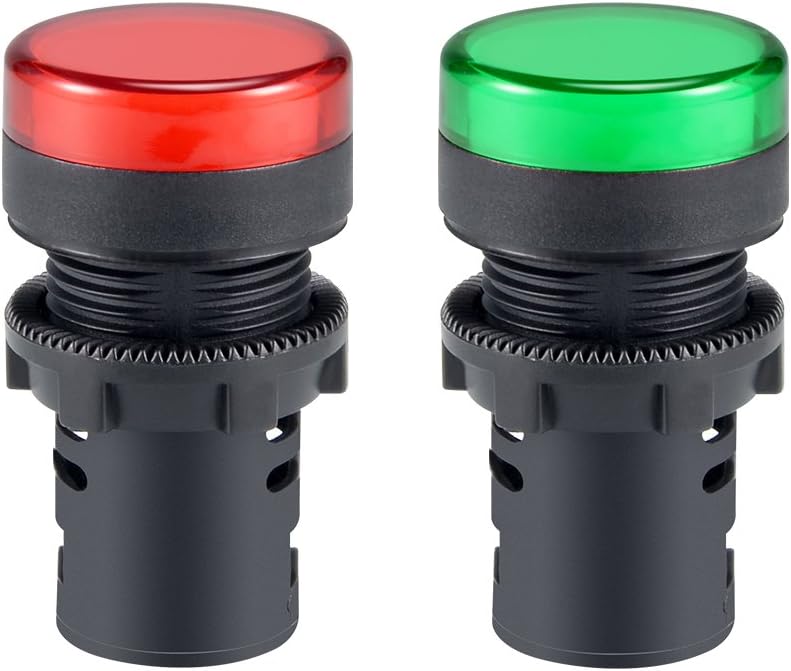
Figura 1: Aktarview of the uxcell Red and Green Indicator Lights.
Karatteristiċi tal-Prodott
- Voltage: AC/DC 110V operation.
- Dijametru tal-Immuntar: Industrial standard 22mm (7/8") mounting diameter.
- Disinn kompatt: Low behind-panel depth (37mm) with a panel locking nut, fitting panel thickness up to 6mm.
- Konnessjoni: Secure screw-clamp connection for reliable operation.
- Durabilità: Tested for over 20,000 hours of use, ensuring steady performance.
- Applikazzjoni versatili: Suitable for ships, machine tools, industrial equipment, switch cabinets, power distribution cabinets, HVAC panels, electrical panels, and DIY projects like PLC training.

Figure 2: Key features highlighted for the indicator lights.
Speċifikazzjonijiet
| Attribut | Valur |
|---|---|
| Numru tal-Mudell | a18033000ux0429 |
| Voltage | AC/DC 110V |
| Dijametru tal-Immuntar | 22mm (7/8") |
| Behind Panel Depth | 37mm |
| Max Panel Thickness | 6mm |
| Tip ta' Sors tad-Dawl | Dajowd li Jarmi d-Dawl (LED) |
| Kulur | Aħmar, Aħdar |
| Materjal | Metall |
| Ampetà | 20 Milliamps |
| Piż tal-oġġett | 1.44 uqija (għal kull par) |
| Dimensjonijiet tal-Pakkett | 3.58 x 2.36 x 1.14 pulzieri |

Figure 3: Dimensional drawing of the indicator light.
Setup u Installazzjoni
Proper installation is crucial for the safe and reliable operation of your indicator lights. Please follow these steps carefully:
- Is-Sigurtà l-Ewwel: Before beginning any electrical work, ensure that the power supply to the circuit you are working on is completely disconnected and locked out. Verify with a voltagtester.
- Ipprepara t-Toqba tal-Immuntar: Drill a 22mm (7/8 inch) diameter hole in your control panel or equipment enclosure. Ensure the panel thickness does not exceed 6mm for proper fitment of the locking nut.
- Insert Indicator: Insert the indicator light through the prepared hole from the front of the panel.
- Secure with Locking Nut: From the back of the panel, thread and tighten the provided panel locking nut onto the indicator light's body until it is securely fastened. Do not overtighten.
- Konnessjonijiet tal-Wajer: Connect the AC/DC 110V power supply wires to the screw-clamp terminals on the back of the indicator light. Ensure connections are firm and secure to prevent loose contacts. Observe proper polarity if applicable, though these AC/DC lights are generally non-polar.
- Install Dust Cap (Optional): If desired, attach the dust cap to the rear of the indicator light to protect the terminals from dust and debris.

Figure 4: Illustration of the dust cap component.
Istruzzjonijiet Operattivi
The uxcell indicator lights are designed for straightforward operation once properly installed and connected to a power source.
- Qawwa Mixgħul: After installation, restore power to the circuit.
- Indikazzjoni: The indicator light will illuminate when the connected circuit or equipment is in the specified operational state (e.g., power on, system active, alarm condition).
- Kodifikazzjoni tal-Kulur: Use the red and green lights to signify different states (e.g., Red for 'Stop' or 'Fault', Green for 'Run' or 'Ready').
Manutenzjoni
These LED indicator lights are designed for long-term, maintenance-free operation. However, occasional checks can ensure continued performance:
- Tindif: If the lens becomes dirty, gently wipe it with a soft, damp drapp. Evita prodotti tat-tindif jew solventi li joborxu.
- Kontroll tal-Konnessjoni: Periodically inspect the screw-clamp connections to ensure they remain tight and free from corrosion. Always disconnect power before checking connections.
- Kap tat-Trab: Ensure the dust cap (if installed) remains securely in place to protect internal components.
Issolvi l-problemi
If your indicator light is not functioning as expected, consider the following:
| Problema | Kawża Possibbli | Soluzzjoni |
|---|---|---|
| Id-dawl ma jixgħelx | L-ebda enerġija fiċ-ċirkwit. Wajers maħlula jew mhux korretti. Vol mhux korretttage applikat. Dawl indikatur bil-ħsara. | Ivverifika l-provvista tal-enerġija għaċ-ċirkwit. Check all wire connections for tightness and correct polarity (if applicable). Ensure the voltage is AC/DC 110V. Replace the indicator light if damaged. |
| Id-dawl teptip jew huwa dgħajjef | Provvista tal-enerġija instabbli. Konnessjoni maħlula. Indicator light nearing end of life (unlikely due to long lifespan). | Iċċekkja l-istabbiltà tal-provvista tal-enerġija. Inspect and tighten wire connections. If issues persist, consider replacing the unit. |
If troubleshooting steps do not resolve the issue, contact uxcell customer support for further assistance.
Informazzjoni dwar is-Sigurtà
Please read and understand all safety warnings before installing or operating this product. Failure to do so may result in electric shock, fire, or serious injury.
- Periklu Elettriku: This product operates on AC/DC 110V. Always disconnect and lock out power before installation, maintenance, or troubleshooting.
- Persunal kwalifikat: Installation and wiring should only be performed by qualified electricians or individuals with proper electrical knowledge.
- Vol korretttage: Tiżgura l-provvista voltage matches the indicator light's rated voltage (110V). Applying incorrect voltage can damage the device and pose a safety risk.
- Kundizzjonijiet Ambjentali: Do not expose the product to excessive moisture, extreme temperatures, or corrosive environments unless specifically rated for such conditions.
- Propożizzjoni 65 Twissija: Dan il-prodott jista' jkun fih kimiċi magħrufa mill-Istat ta' California li jikkawżaw kanċer u difetti fit-twelid jew ħsara riproduttiva oħra. Għal aktar informazzjoni, żur www.P65Warnings.ca.gov.
