1. Introduzzjoni
Thank you for choosing the TechniSat VIOLA 2 Portable DAB/FM Radio. This compact and versatile radio allows you to enjoy high-quality digital DAB+ and traditional FM radio broadcasts wherever you are. This manual provides essential information for setting up, operating, and maintaining your device to ensure optimal performance and longevity.

Image 1.1: The TechniSat VIOLA 2 radio positioned on a wooden table in an outdoor setting, highlighting its portability.
2. Informazzjoni dwar is-Sigurtà
Jekk jogħġbok aqra dawn l-istruzzjonijiet tas-sigurtà bir-reqqa qabel ma tuża l-apparat u żommhom għal referenza futura.
- Provvista tal-Enerġija: Uża biss l-adapter tal-enerġija pprovdut. Kun żgur li l-volumtage jaqbel mar-rekwiżiti tar-reġjun tiegħek.
- Batteriji: Use 4 x AA-LR6 batteries. Do not mix old and new batteries, or different types of batteries. Remove batteries if the device will not be used for an extended period.
- Ilma u Umdità: Tesponix l-apparat għax-xita, umdità, jew likwidi li jqattru/jittajru. Tpoġġix oġġetti mimlija b'likwidi, bħal vażuni, fuq l-apparat.
- Sħana: Żomm l-apparat 'il bogħod minn sorsi ta' sħana bħal radjaturi, reġistri tas-sħana, stufi, jew apparat ieħor (inkluż amplifiers) li jipproduċu sħana.
- Ventilazzjoni: Aċċerta ruħek li jkun hemm ventilazzjoni adegwata. Timblokkax xi fetħiet tal-ventilazzjoni.
- Tindif: Skonnettja l-provvista tal-enerġija qabel it-tindif. Uża drapp artab u niexef. Tużax prodotti tat-tindif likwidi jew prodotti tat-tindif bl-ajrusol.
- Servizzi: Tippruvax isservi dan il-prodott int stess. Irreferi l-manutenzjoni kollha lil persunal tas-servizz kwalifikat.
3. Kontenut tal-Pakkett
Carefully unpack the box and ensure all items are present and in good condition:
- TechniSat VIOLA 2 Portable DAB/FM Radio
- Adapter tal-Enerġija (6V DC)
- Manwal għall-Utent (dan id-dokument)
Note: 4 x AA-LR6 batteries are required for portable use and are not included in the package.
4. Prodott Aktarview
Familiarize yourself with the various parts and controls of your VIOLA 2 radio.

Stampa 4.1: Quddiem view of the TechniSat VIOLA 2, displaying the speaker grille, LCD screen, and control buttons.
4.1 Kontrolli ta' Front Panel
- Kelliem: Kelliem integrat għall-ħruġ tal-awdjo.
- Display LCD: Two-line display showing station information, time, and menu options.
- Buttuna mixgħul/mitfi: Jixgħel jew jitfi l-apparat.
- Volume/Enter Knob: Dawwar biex taġġusta l-volum, agħfas biex tikkonferma l-għażliet.
- Tune +/- Buttons: Used for manual tuning or navigating menus.
- Buttuna DAB/FM: Switches between DAB+ and FM radio modes.
- Buttuna Info/Menu: Displays additional information or accesses the menu settings.

Immaġni 4.2: Stampa dettaljata view of the control buttons and rotary knob on the TechniSat VIOLA 2, illustrating its simple operation.
4.2 Konnessjonijiet tal-Panew ta' wara

Image 4.3: The rear panel of the radio, showing the headphone output and the DC 6V power input.
- Jack tal-headphone (3.5mm): Għal smigħ privat.
- Input DC 6V: Qabbad l-adapter tal-enerġija pprovdut hawn.
- Kompartiment tal-batterija: Located on the rear, for 4 x AA batteries.
- Antenna teleskopika: Extend for optimal radio reception.
5. Setup
5.1 It-Tħaddim tal-Apparat
The VIOLA 2 can be powered by the included mains adapter or by batteries for portable use.
5.1.1 Enerġija tal-Mejns
- Insert the small plug of the power adapter into the DC 6V input on the rear of the radio.
- Ipplaggja l-adapter tal-enerġija fi żbokk tal-ħajt standard.
5.1.2 Qawwa tal-Batterija
- Open the battery compartment cover on the rear of the radio.
- Insert 4 x AA-LR6 batteries, ensuring correct polarity (+/-).
- Agħlaq l-għatu tal-kompartiment tal-batterija sew.
5.2 Aġġustament tal-Antenna
For optimal reception, fully extend the telescopic antenna. Adjust its position and angle to achieve the best signal quality, especially in FM mode or areas with weaker DAB+ signals.
6. Istruzzjonijiet Operattivi
6.1 Tixgħel/Jitfi
Agħfas il- Mixgħul/Mitfi buttuna biex tixgħel jew titfi r-radju.
6.2 Għażla tal-Modalità (DAB/FM)
Agħfas il- DAB / FM button to switch between DAB+ digital radio mode and FM analog radio mode.
6.3 Skennjar għal Stazzjonijiet
6.3.1 DAB+ Auto Scan
When you first turn on the radio in DAB+ mode, it will automatically perform a full scan for available stations. If you move to a new location or wish to refresh the station list:
- Kun żgur li r-radju jinsab fil-modalità DAB+.
- Agħfas u żomm il- Info/Menu buttuna biex tidħol fil-menu.
- Dawwar il- Volume/Enter knob to select "Full Scan" and press the knob to confirm.
- The radio will scan and update the station list.
6.3.2 FM Auto Scan
Fil-modalità FM:
- Kun żgur li r-radju jinsab fil-modalità FM.
- Agħfas u żomm il- Sintonizzazzjoni +/- buttons. The radio will scan for the next available station.
6.4 Kontroll tal-Volum
Dawwar il- Volume/Enter pum biex taġġusta l-volum tas-smigħ.
6.5 Użu tal-Headphones
Qabbad headphones standard ta' 3.5mm mal-jack tal-headphones fuq wara tar-radju għal smigħ privat. L-ispiker intern jitfi l-ħoss awtomatikament meta l-headphones ikunu konnessi.
6.6 Wiri Informazzjoni

Image 6.1: A close-up of the radio's two-line LCD display, showing current station and program information.
The two-line LCD display provides various information depending on the mode:
- DAB+ Mode: Station name, program type, scrolling text (DLS), signal strength, time, date.
- Modalità FM: Frequency, station name (if RDS available), program type (if RDS available), time, date.
Agħfas il- Info/Menu button repeatedly to cycle through available display information.
7. Manutenzjoni
7.1 Tindif
Wipe the radio with a soft, dry, lint-free cloth. Do not use abrasive cleaners, waxes, or solvents as they may damage the finish.
7.2 Sostituzzjoni tal-batterija
When the battery indicator on the display shows low power, replace all four AA batteries with new ones. Ensure the radio is turned off or connected to mains power before replacing batteries.
8 Issolvi l-problemi
| Problema | Kawża Possibbli | Soluzzjoni |
|---|---|---|
| Ebda qawwa | L-adapter tal-enerġija mhux imqabbad; Il-batteriji m'għadhomx jintużaw jew imdaħħla sew. | Iċċekkja l-konnessjoni tal-adapter tal-enerġija; Ibdel il-batteriji jew kun żgur li l-polarità hija korretta. |
| L-ebda ħoss | Volume too low; Headphones connected; Mute activated. | Increase volume; Disconnect headphones; Check for mute function (if applicable). |
| Poor reception (DAB+/FM) | Antenna mhux estiża jew pożizzjonata ħażin; Żona b'sinjal dgħajjef. | Fully extend and adjust the telescopic antenna; Try moving the radio to a different location. Perform a full scan in DAB+ mode. |
| DAB+ stations missing | Not all stations scanned; Moved to a new area. | Perform a full scan (see Section 6.3.1). |
| Il-wiri ma jaħdimx | Device off; Faulty unit. | Ensure device is on; If problem persists, contact customer support. |
9. Speċifikazzjonijiet
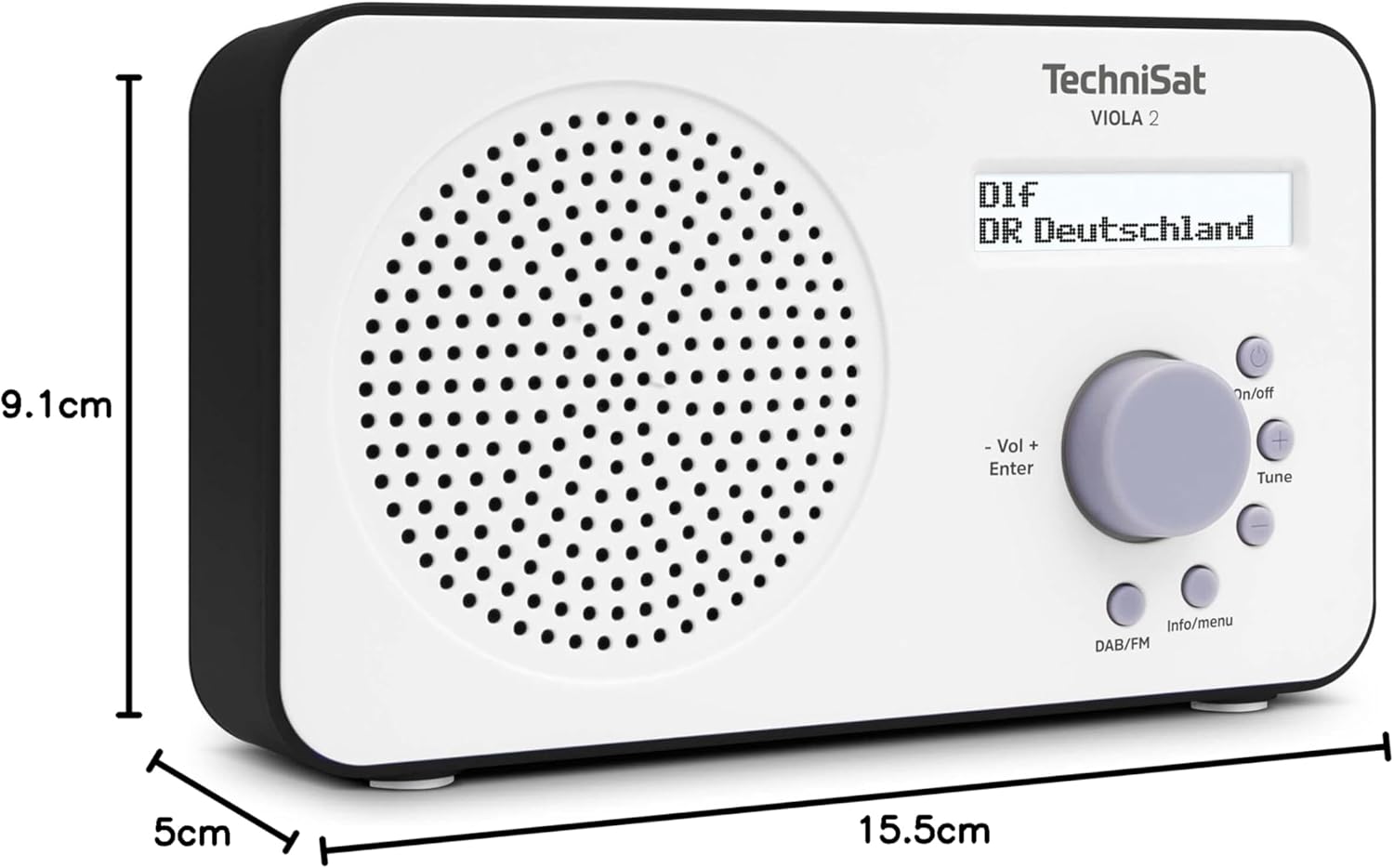
Image 9.1: The TechniSat VIOLA 2 radio with its physical dimensions indicated.
- Mudell: VIOLA 2
- Manifattur: TechniSat
- Numru tal-Mudell: 0000/3906
- Dimensjonijiet tal-Prodott (W x D x H): 15.5 x 5 x 9.1 ċm
- Piż: 338 g
- Baned tar-Radju Appoġġjati: DAB+, FM (with RDS and PLL)
- Teknoloġija tuner: DAB / FM
- Riżultat tal-Kelliem: 1 Watt RMS
- Wiri: Two-line LCD with backlight
- Konnettività: 3.5mm Headphone Jack (AUX)
- Sors tal-Enerġija: Corded Electric (6V DC adapter) and Battery Powered
- Batteriji: 4 x AA-LR6 (not included)
- Karatteristiċi Speċjali: Automatic station search, electronic volume control
- Pajjiż ta' Oriġini: Iċ-Ċina
10. Garanzija u Appoġġ
TechniSat products are designed for reliability and performance. For warranty information, please refer to the warranty card included with your purchase or visit the official TechniSat website. If you encounter any issues not covered in this manual, please contact TechniSat customer support for assistance.
You can find contact details and further support resources on the official TechniSat websit: www.technisat.com


