Introduzzjoni
Dan il-manwal jipprovdi informazzjoni essenzjali għas-setup, it-tħaddim, u l-manutenzjoni tar-Riċevitur DirecTV H25-100 HD tiegħek. Jekk jogħġbok aqrah bir-reqqa qabel ma tuża l-apparat biex tiżgura l-funzjonalità xierqa u biex timmassimizza l-użu tiegħek. viewing esperjenza.
Karatteristiċi Ewlenin
- Iddisinjat għal netwerks SWiM (Single Wire Multiswitch) biss.
- Ħruġ tal-vidjow b'Definizzjoni Għolja (HD).
- Disinn kompatt.
- Dħul ta' enerġija DC ta' 12V, adattat għal diversi setups ta' enerġija.
- Għażliet multipli ta' ħruġ: 2x HDMI, 1x Kompost, 1x Komponent, 1x Awdjo Ottiku.
- L-ebda kapaċità tad-DVR.
X'hemm fil-Kaxxa
- Riċevitur HD tad-DirectTV H25-100
- Adapter tal-Qawwa AC

Immaġni: Fuq view tar-Riċevitur HD DirecTV H25-100, wirjaasing id-disinn iswed kompatt tiegħu.
Setup
Spakkjar
Neħħi r-riċevitur u l-aċċessorji kollha mill-imballaġġ bir-reqqa. Żomm l-imballaġġ għal trasport jew ħażna fil-futur.
Konnessjonijiet
Ir-riċevitur H25-100 joffri diversi portijiet biex tikkonnettja mat-televiżjoni u mad-dixx tas-satellita tiegħek. Kun żgur li l-konnessjonijiet kollha huma siguri qabel ma tixgħel l-apparat.
- Input tas-Satellita: Qabbad il-kejbil koassjali mid-dixx tas-satellita tiegħek li jaħdem bl-SWiM mal-port 'SAT IN' fuq wara tar-riċevitur.
- Outputs HDMI: Uża kejbil HDMI biex tqabbad wieħed mill-portijiet 'HDMI' fuq ir-riċevitur ma' input HDMI fuq it-televiżjoni tiegħek għal vidjow u awdjo b'definizzjoni għolja.
- Output Kompost: Għal vidjow b'definizzjoni standard, qabbad il-kejbils RCA sofor (vidjow), bojod (awdjo tax-xellug), u ħomor (awdjo tal-lemin) mill-portijiet 'VIDEO OUT' u 'AUDIO OUT' tar-riċevitur mal-inputs korrispondenti fuq it-televiżjoni tiegħek.
- Output tal-Komponent: Għal vidjow analogu ta' definizzjoni għolja, qabbad il-kejbils tal-vidjow komponent aħdar (Y), blu (Pb), u aħmar (Pr) mill-portijiet 'COMPONENT OUT' tar-riċevitur mat-televiżjoni tiegħek. Qabbad il-kejbils RCA abjad u aħmar għall-awdjo.
- Output Awdjo Ottiku: Għal awdjo diġitali, qabbad kejbil awdjo ottiku mill-port 'OPTICAL AUDIO' ma' riċevitur awdjo jew sistema tal-ħoss kompatibbli.
- Qawwa: Qabbad l-adapter tal-enerġija AC inkluż mal-port 'POWER IN 12V' fuq ir-riċevitur, imbagħad daħħal l-adapter f'sokit tal-ħajt.

Immaġni: Quddiem u wara views tar-Riċevitur DirecTV H25-100 HD, li jenfasizzaw il-portijiet kollha tad-dħul u tal-ħruġ għall-konnessjoni.
Qawwa Inizjali Mixgħula
Wara li jsiru l-konnessjonijiet kollha, agħfas il-buttuna 'POWER' fuq quddiem tar-riċevitur jew fuq il-kontroll remot tad-DirecTV tiegħek. Segwi kwalunkwe struzzjonijiet fuq l-iskrin għas-setup inizjali, bħall-għażla tal-lingwa u l-akkwist tas-sinjal tas-satellita.
Istruzzjonijiet Operattivi
Kontrolli tal-Panew ta' Quddiem
Il-pannell ta' quddiem tar-riċevitur H25-100 jipprovdi kontrolli bażiċi għall-operazzjoni:
- QAWWA: Ixgħel jew jitfi r-riċevitur.
- MENU: Jaċċessa l-menù prinċipali għas-settings u l-għażliet.
- AGĦŻEL: Jikkonferma l-għażliet fil-menus.
- GWIDA: Juri l-gwida tal-programm.
- RES (Riżoluzzjoni): Jiċċikla bejn ir-riżoluzzjonijiet tal-vidjo disponibbli.
- Vleġeġ tan-Navigazzjoni ('il fuq/'l isfel/'il fuq/'il fuq/'il fuq): Użat biex tinnaviga fil-menus u tibdel il-kanali.
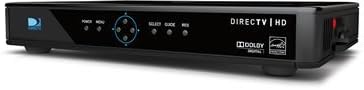
Immaġni: Ġenb view tar-Riċevitur HD DirecTV H25-100, li juri b'mod ċar il-buttuni tal-pannell ta' quddiem għall-qawwa, il-menu, l-għażla, il-gwida, u r-riżoluzzjoni.
Operazzjoni Bażika
Ladarba tkun mixgħula u kkonfigurata, tista' tuża l-kontroll remot tad-DirecTV tiegħek (mhux inkluż ma' dan ir-riċevitur) biex tinnaviga l-kanali, taċċessa l-gwida tal-programmi, taġġusta s-settings, u tgawdi s-servizz tad-DirecTV tiegħek.
- Nibdlu l-Kanali: Uża l-buttuni CH+/CH- jew daħħal in-numri tal-kanali direttament fuq ir-remote tiegħek.
- Gwida għall-Aċċess: Agħfas il-buttuna 'GUIDE' biex view listi tal-programmi.
- Navigazzjoni fil-menu: Uża l-buttuna 'MENU' biex taċċessa s-settings tas-sistema, il-kontrolli tal-ġenituri, u karatteristiċi oħra.
Manutenzjoni
Tindif
Biex iżżomm id-dehra u l-prestazzjoni tar-riċevitur tiegħek, naddaf il-barra tiegħu perjodikament. Uża drapp artab u niexef biex timsaħ it-trab. Għal marki persistenti, neħħi ftit.ampLaħlaħ id-drapp bl-ilma. Tużax kimiċi ħarxa, prodotti tat-tindif li joborxu, jew solventi, għax dawn jistgħu jagħmlu ħsara lill-finitura.
Aġġornamenti tas-Software
Ir-riċevitur DirecTV H25-100 jista' jirċievi aġġornamenti awtomatiċi tas-softwer permezz tas-satellita. Kun żgur li r-riċevitur jibqa' konness mal-provvista tal-enerġija u mad-dixx tas-satellita biex dawn l-aġġornamenti jkunu jistgħu jsiru, u dan jista' jtejjeb il-prestazzjoni u jżid karatteristiċi ġodda.
Issolvi l-problemi
Jekk tiltaqa' ma' problemi bir-riċevitur DirecTV H25-100 tiegħek, irreferi għat-tabella hawn taħt għal problemi komuni u s-soluzzjonijiet tagħhom.
| Problema | Kawża Possibbli | Soluzzjoni |
|---|---|---|
| Ebda Qawwa | Kejbil tal-enerġija maħlul jew skonnettjat; is-sokit tal-enerġija mhux qed jaħdem. | Iċċekkja l-konnessjoni tal-kejbil tal-enerġija; ipprova sokit differenti; kun żgur li l-adapter tal-enerġija qed jaħdem. |
| Ebda Sinjal / Qed Tiftix għal Satellita | Kejbil tas-satellita maħlul jew skonnettjat; problema fl-allinjament tad-dixx; temp ħażin. | Iċċekkja l-konnessjoni tal-kejbil 'SAT IN'; kun żgur li l-linja tal-vista hija ċara lejn l-antenna; stenna li t-temp jitjieb. |
| Ebda Stampa / Skrin Iswed | Input tat-TV mhux korrett magħżul; kejbil tal-vidjo maħlul jew difettuż; riċevitur mhux mixgħul. | Agħżel l-input HDMI/AV korrett fuq it-TV; iċċekkja l-konnessjonijiet tal-kejbil tal-vidjo; itfi u erġa' ħaddem ir-riċevitur. |
| Nru Awdjo | Kejbil tal-awdjo maħlul jew difettuż; sistema tat-TV/awdjo siekta jew volum baxx; setting tal-ħruġ tal-awdjo mhux korrett. | Iċċekkja l-konnessjonijiet tal-kejbil tal-awdjo; neħħi l-mute tat-TV/sistema tal-awdjo u żid il-volum; ivverifika s-settings tal-awdjo fuq ir-riċevitur. |
Speċifikazzjonijiet
Speċifikazzjonijiet tekniċi dettaljati għar-Riċevitur DirecTV H25-100 HD:
| Karatteristika | Deskrizzjoni |
|---|---|
| Mudell | H25-100 |
| Brand | DIRECTV |
| Kulur | Iswed |
| Teknoloġija tal-Konnettività | HDMI, Kompost, Komponent, Awdjo Ottiku |
| Input tas-Satellita | 1 (Sistema SWM Biss) |
| Produzzjonijiet HDMI | 2 |
| Output tal-Vidjo Kompost | 1 |
| Output tal-Komponent tal-Vidjo | 1 |
| Output Awdjo Ottiku | 1 |
| Input tal-Enerġija | 12V DC |
| ASIN | B07DB2YP79 |
| Data L-Ewwel Disponibbli | 7 ta’ Awwissu, 2018 |
Garanzija u Appoġġ
Għal informazzjoni dwar il-garanzija tal-prodott, l-appoġġ tekniku, jew is-servizz, jekk jogħġbok irreferi għad-dokumentazzjoni pprovduta minn DirecTV fil-ħin tax-xiri jew żur is-sit uffiċjali tal-appoġġ ta' DirecTV. websit. Żomm l-irċevuta tax-xiri tiegħek bħala prova tax-xiri għal talbiet ta' garanzija.