1. Introduzzjoni
Grazzi tax-xiriasing the CAIWEI A8AB-NEW Video Projector. This manual provides essential information for the safe and efficient operation of your device. Please read it thoroughly before use and retain it for future reference.
2. Istruzzjonijiet tas-Sigurtà
- Tħarisx direttament fil-lenti tal-proġettazzjoni meta tkun qed taħdem.amp hija mixgħula.
- Żgura ventilazzjoni xierqa madwar il-proġekter biex tevita sħana żejda.
- Tesponix il-proġettazzjoni għax-xita jew għall-umdità.
- Uża biss l-adapter tal-enerġija pprovdut mal-proġettazzjoni.
- Keep the projector away from flammable materials.
- Skonnettja l-proġettur waqt maltempati bis-sajjetti jew meta ma jintużax għal perjodi twal.
- Tippruvax issewwi l-proġettur int stess. Irreferi għal kull manutenzjoni f'idejn persunal kwalifikat.
3. Kontenut tal-Pakkett
Jekk jogħġbok iċċekkja li l-oġġetti kollha huma preżenti meta tiftaħ il-pakkett:
- CAIWEI A8AB-NEW Video Projector
- Kejbil tal-Enerġija
- Kontroll mill-bogħod
- Cable HDMI
- Kejbil VGA
- AV Cable
- Manwal għall-Utent
4. Prodott Aktarview
Familiarize yourself with the projector's components:
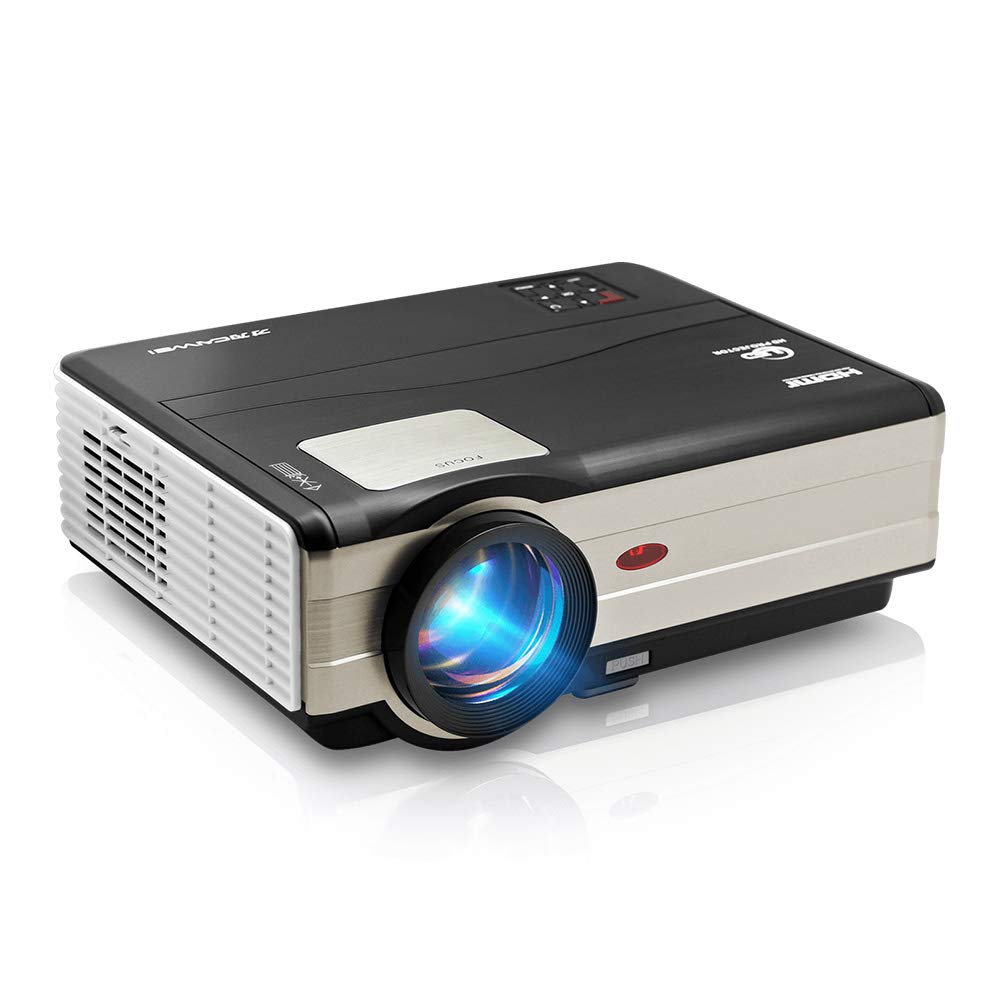
Figura 1: Quddiem view of the CAIWEI A8AB-NEW Video Projector, showing the lens and ventilation.
Front Panel
- Lenti tal-Projezzjoni: Joħroġ l-immaġni.
- Ċirku tal-Fokus: Aġġusta ċ-ċarezza tal-immaġni.
- Korrezzjoni Keystone: Corrects trapezoidal image distortion.
Panel ta' wara
- Port tal-Enerġija: Jikkonnettja mal-kejbil tal-enerġija.
- Portijiet HDMI (x2): Connects to HDMI-enabled devices (e.g., Blu-ray player, game console).
- Portijiet USB (x2): Connects to USB storage devices or other USB peripherals.
- Port VGA: Connects to computers or laptops with VGA output.
- Port AV: Connects to older devices using composite video and stereo audio.
- Ħruġ tal-Awdjo (3.5mm): Jikkonnettja ma' kelliema esterni jew headphones.
5. Setup
5.1 Tqegħid
Place the projector on a stable, flat surface or mount it to a ceiling. Ensure the projector is perpendicular to the projection screen or wall. The optimal projection distance varies, but generally, a larger distance yields a larger image.
5.2 Konnessjoni tal-Enerġija
- Connect the power cable to the projector's power port.
- Ipplaggja t-tarf l-ieħor tal-kejbil tad-dawl fi żbokk tad-dawl.
- Id-dawl tal-indikatur tal-qawwa se jixgħel.
5.3 Konnessjoni ta' Apparati ta' Input
Il-proġettazzjoni tappoġġja diversi sorsi ta' input:
- HDMI: Connect an HDMI cable from your device (e.g., laptop, game console, streaming stick) to one of the projector's HDMI ports.
- USB: Daħħal flash drive USB f'port USB biex tilgħab il-midja files direttament.
- VGA: Qabbad kejbil VGA mill-kompjuter tiegħek mal-port VGA tal-proġettazzjoni.
- TA’: Use the provided AV cable to connect to devices with composite video output.
- Wireless (WiFi): For screen mirroring from smartphones or tablets, navigate to the 'Wireless Display' or 'Screen Mirroring' option in the projector's menu and follow the on-screen instructions. Ensure your device and the projector are on the same Wi-Fi network.
- Bluetooth: To connect external Bluetooth speakers, go to the Bluetooth settings in the projector's menu, enable Bluetooth, and pair with your desired audio device.
5.4 Aġġustament tal-Fokus u l-Keystone
- Ixgħel il-proġekter u uri immaġni.
- Dawwar il- Iffoka Ring on the lens until the image appears sharp and clear.
- If the image is trapezoidal (wider at the top or bottom), adjust the Korrezzjoni Keystone dial or setting until the image is rectangular.
6. Istruzzjonijiet Operattivi
6.1 Power On/Off
- Qawwa Mixgħul: Agħfas il-buttuna tal-qawwa fuq il-proġekter jew il-kontroll mill-bogħod.
- Itfi: Agħfas il-buttuna tal-qawwa mill-ġdid. Ikkonferma t-tmiem tal-programm jekk tintalab.
6.2 Navigazzjoni tal-Menu
Use the navigation buttons (Up, Down, Left, Right, OK) on the projector or remote control to browse the on-screen menu. The 'Menu' button typically opens the main settings, and 'Exit' or 'Back' closes sub-menus.
6.3 Għażla tas-Sors tal-Input
Press the 'Source' or 'Input' button on the remote control or projector. A list of available input sources (HDMI1, HDMI2, USB1, USB2, VGA, AV, Wireless Display) will appear. Select the desired source using the navigation buttons and press 'OK'.
6.4 Settings tal-awdjo
Access the audio settings through the main menu to adjust volume, select audio output (internal speaker, external via 3.5mm jack, or Bluetooth), and modify sound modes.
6.5 Wireless/Bluetooth Connection
Refer to section 5.3 for detailed instructions on connecting via Wi-Fi for screen mirroring or Bluetooth for audio output.
7. Manutenzjoni
7.1 Tindif tal-Lenti
Use a soft, lint-free cloth specifically designed for optical lenses. Gently wipe the lens surface. Avoid using abrasive cleaners or excessive force, which can scratch the lens.
7.2 Cleaning the Air Filter/Vents
Regularly check the air intake and exhaust vents for dust accumulation. Use a soft brush or a can of compressed air to gently clean the vents. This helps maintain proper airflow and prevents overheating.
7.3 Ħażna
When not in use, store the projector in a cool, dry, and dust-free environment. Use the original packaging or a protective case to prevent damage.
8 Issolvi l-problemi
| Problema | Kawża Possibbli | Soluzzjoni |
|---|---|---|
| L-ebda immaġni fuq l-iskrin | Power not connected; Incorrect input source; Device not powered on. | Check power cable; Select correct input source; Ensure connected device is on. |
| L-immaġni hija mċajpra | Fokus mhux aġġustat; Il-proġettazzjoni hija wisq 'il bogħod/qrib. | Adjust the focus ring; Reposition the projector. |
| L-immaġni hija trapezojdali | Il-ġebla tax-xewka mhux aġġustata. | Aġġusta l-korrezzjoni keystone. |
| L-ebda ħoss | Volume too low; Muted; Incorrect audio output; Cable issue. | Increase volume; Unmute; Check audio settings; Verify cable connections. |
| Il-kontroll mill-bogħod ma jaħdimx | Batteries dead; Obstruction; Out of range. | Ibdel il-batteriji; Neħħi l-ostakli; Kun żgur li l-vista tinsab mar-riċevitur tal-IR. |
| Twissija ta' sħana żejda | Blocked vents; Poor ventilation. | Clear vents; Ensure adequate space around projector. |
9. Speċifikazzjonijiet
- Mudell: A8AB-NEW
- Ditta: CAIWEI
- Riżoluzzjoni tal-wiri: 1280 x 800
- Teknoloġija tal-Konnettività: Bluetooth, HDMI, USB, VGA, Wireless
- Karatteristiċi Speċjali: Built-In Wi-Fi, Portable, Wireless
- Użi Rakkomandati: Gaming, Home Theater
- Piż tal-oġġett: 6.1 liri
- Dimensjonijiet tal-Prodott: 11.2 x 14.7 x 5 pulzieri
10. Garanzija u Appoġġ
CAIWEI products are designed for reliability and performance. For specific warranty details, please refer to the warranty card included with your purchase or contact CAIWEI customer support. If you encounter any issues not covered in this manual, please reach out to our support team for assistance.
Appoġġ għall-Klijent: Please visit the official CAIWEI website or contact your retailer for support information.


