Prodott Overview
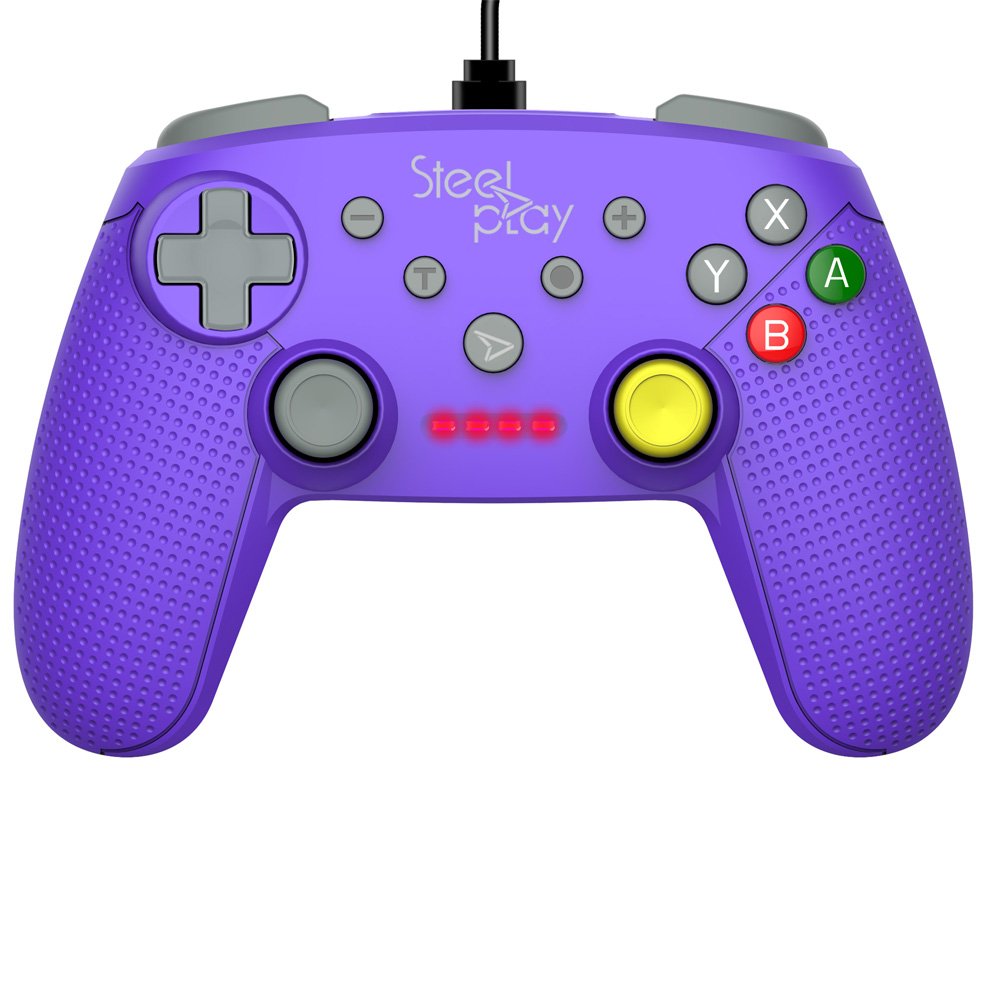
The Steelplay Wired Controller GCUBE (model ECO0622) is designed for use with the Nintendo Switch console, providing a reliable wired connection for uninterrupted gameplay. This controller features a comfortable ergonomic grip, a 2.5-meter USB cable, and includes advanced functionalities such as a gyro sensor, dual vibration feedback, and a turbo function button.
Setup Istruzzjonijiet
- Qabbad il-Kontrollur: Insert the USB connector of the Steelplay Wired Controller GCUBE into an available USB port on your Nintendo Switch dock.
- Ixgħel il-Console: Ensure your Nintendo Switch console is powered on and connected to your TV or in handheld mode with the dock.
- Rikonoxximent Awtomatiku: The console should automatically detect the controller. The player indicator lights on the controller will illuminate to show its assigned player number.
- Begin Gameplay: You can now use your Steelplay Wired Controller GCUBE for gaming.
It-tħaddim tal-Kontrollur
The Steelplay Wired Controller GCUBE features a standard layout for intuitive gameplay.
Funzjonijiet tal-buttuna:
- Sticks Analogiċi tax-Xellug/Lemin: Għall-moviment u l-kontroll tal-kamera.
- D-Pad (Pad Direzzjonali): Għal input direzzjonali preċiż.
- Buttuni A/B/X/Y: Buttuni ta' azzjoni, tipikament użati għall-qbiż, l-attakk, l-interazzjoni, eċċ.
- L/R Buttons (Shoulder Buttons): Often used for quick actions or menu navigation.
- ZL/ZR Buttons (Trigger Buttons): Analog or digital triggers for specific in-game actions.
- Buttuna Minus (-): Typically opens in-game menus or performs specific actions.
- Buttuna Plus (+): Typically pauses the game or opens system menus.
- Buttuna tad-dar: Returns to the Nintendo Switch HOME Menu.
- Buttuna Qbid: Takes screenshots of your gameplay.
Karatteristiċi Speċjali:
- Gyro Function: The controller includes a built-in gyro sensor for motion control in compatible games. This allows for intuitive aiming or steering by tilting the controller.
- Dual Vibration Feedback: Experience enhanced immersion with haptic feedback that responds to in-game events.
- Funzjoni Turbo: The turbo function allows for rapid, repeated input of a button press. To activate, press and hold the Turbo button, then press the desired action button (e.g., A, B, X, Y, L, R, ZL, ZR). To deactivate, repeat the process.
Manutenzjoni
Proper care ensures the longevity and optimal performance of your controller.
- Tindif: Uża drapp artab u niexef biex timsaħ il-kontrollur. Għal ħmieġ iebes, nixxef ftit.ampLaħlaħ id-drapp bl-ilma. Evita li tuża kimiċi ħarxa, solventi, jew prodotti tat-tindif li joborxu.
- Ħażna: Aħżen il-kontrollur f'post frisk u niexef 'il bogħod mix-xemx diretta u minn temperaturi estremi.
- Kura tal-Cable: Avoid bending or twisting the USB cable excessively. Do not pull the cable to disconnect the controller; always grasp the plug.
- Evita Likwidi: Keep the controller away from liquids to prevent internal damage.
Issolvi l-problemi
- Il-Kontrollur Mhux Jirrispondi:
- Ensure the USB cable is securely connected to both the controller and the Nintendo Switch dock.
- Try connecting the controller to a different USB port on the dock.
- Erġa' ibda l-console Nintendo Switch tiegħek.
- Buttons or Joysticks Not Working Correctly:
- Check for any physical obstructions or debris around the buttons or joysticks.
- Ensure the controller's firmware is up to date. Firmware updates may be necessary and typically require connection to a PC. Refer to the Steelplay official website for specific instructions and update tools.
- Il-Vibrazzjoni Ma Taħdimx:
- Verify that vibration is enabled in your Nintendo Switch system settings and within the game you are playing.
- Ensure the controller is securely connected.
Speċifikazzjonijiet
| Karatteristika | Dettall |
|---|---|
| Numru tal-Mudell | ECO0622 |
| Kompatibilità | Nintendo Switch |
| Konnettività | Bil-fili (USB) |
| Tul tal-Cable | 2.5-il metru |
| Dimensjonijiet | 17.2 x 7 x 20.3 ċm |
| Piż | 360 g |
| Karatteristiċi Speċjali | Gyro Function, Dual Vibration Feedback, Turbo Function Button, Rubberized Grip Surface, Ergonomic Grip |
Informazzjoni dwar Garanzija
For detailed warranty information regarding your Steelplay Wired Controller GCUBE, please refer to the warranty card included with your product or visit the official Steelplay websit. It-termini u l-kundizzjonijiet tal-garanzija jistgħu jvarjaw skont ir-reġjun u l-bejjiegħ bl-imnut.
Appoġġ għall-Klijent
If you encounter any issues or have questions not covered in this manual, please contact Steelplay customer support. Contact information can typically be found on the official Steelplay webis-sit jew fuq l-imballaġġ tal-prodott.


