1. Introduzzjoni
The COMICA CVM-WS50(H) is a UHF wireless microphone system designed for use with smartphones. It provides clear audio for various applications such as interviews, video recording, vlogging, and live streaming. This manual provides detailed instructions for the proper setup, operation, and maintenance of your device.

Figure 1: COMICA CVM-WS50(H) Wireless Microphone System components.
2. X'hemm fil-Kaxxa
- Riċevitur (RX)
- Hand-held Transmitter (HTX)
- Mini Tripod
- TRS-TRRS Audio Output Cable
- Mikro USB Iċċarġjar Cable
- Manwal għall-Utent
- Kawża portabbli
- Card

Figure 2: Included components in the COMICA CVM-WS50(H) package.
3. Karatteristiċi tal-prodott
- Skrin LCD: Displays channels, audio status, and power consumption for real-time monitoring.
- 6 Optional Channels: Flexible channel matching to prevent interference.
- Real-time Audio Monitor: Built-in monitoring function allows listening during recording.
- Distanza tax-Xogħol: Up to 197ft (60m) in open areas, and 98ft (30m) with obstacles.
- Adjustable Phone Clamp: High-quality metal clamp with adjustable width (2.5 to 3.5 inches).
- Cardioid Handheld Transmitter: Equipped with a handle grip for stable video recording.
- Stepless Volume Adjustment: Allows precise control over audio levels.
- Rikarikabbli: Built-in rechargeable lithium battery with USB interface.

Figure 3: Receiver with LCD screen and controls.

Figure 4: Handheld Transmitter with LED display and controls.
4. Setup
4.1 Assemblaġġ tal-Komponenti
- Attach the receiver to the mini tripod using the screw mount.
- Secure your smartphone into the adjustable phone clamp fuq ir-riċevitur.
- Ensure the handheld transmitter has charged batteries (AA batteries not included).
4.2 Konnessjoni ma' Smartphone
Use the provided TRS-TRRS audio output cable to connect the receiver to your smartphone.
- Plug the 3.5mm TRS (black end) into the microphone OUTPUT interface of the Receiver.
- Plug the 3.5mm TRRS (grey end) into your smartphone's audio interface.
- Nota: For iPhones 7 or above, you need to use the original Lightning adapter cable (not included). For Android phones with USB-C, you may need a 3.5mm to USB-C adapter (not included).
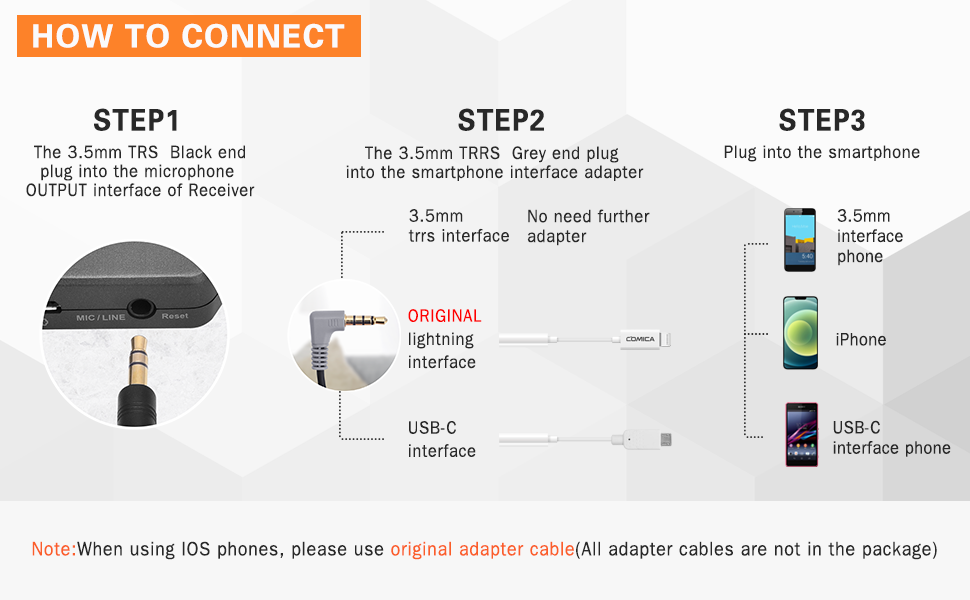
Figure 5: Connection guide for smartphones.
4.3 Ixgħel u Tqabbil
- Press and hold the power button on both the Hand-held Transmitter (HTX) and the Receiver (RX) until their LCD screens light up.
- The devices should automatically pair. The indicator light on the Receiver will turn solid green when successfully paired.
- If pairing fails, ensure both devices are within range and try restarting them.
5. Joperaw
5.1 Għażla tal-Kanal
The CVM-WS50(H) offers 6 channels. To change the channel on the Hand-held Transmitter (HTX), press the 'Power/CH Setting Button' repeatedly until you reach the desired channel (00-05). The Receiver will automatically synchronize to the selected channel.
5.2 Monitoraġġ tal-Awdjo
Connect headphones to the 3.5mm headphone jack on the Receiver to monitor audio in real-time during recording. This allows you to verify audio quality and levels.
5.3 Aġġustament tal-Volum
Use the stepless volume adjustment knob on the side of the Receiver to control the output audio level. Adjust as needed for optimal recording.
5.4 Xenarji ta' Użu
The system is versatile for various applications:
- Interviews: Use the handheld microphone for clear voice capture.
- Podcasts & Vlogs: Record high-quality audio for your content.
- Live Streaming: Enhance audio for Facebook, YouTube, TikTok, etc.
- Online Teaching/Meetings: Ensure clear communication.

Figure 6: Real-time audio monitoring feature.
Vidjo 1: Wirja ta' dimostrazzjoni tal-prodottasinkaratteristiċi g u xenarji ta' użu.
6. Manutenzjoni
To ensure the longevity and optimal performance of your COMICA CVM-WS50(H) system, follow these maintenance guidelines:
- Keep the devices dry and away from moisture.
- Clean the surfaces with a soft, dry cloth. Avoid using harsh chemicals or abrasive materials.
- Store the system in its portable case when not in use to protect it from dust and physical damage.
- Evita temperaturi estremi.
7 Issolvi l-problemi
- Interferenza tas-Sinjal: If you experience signal interference, try switching to a different channel on the Hand-held Transmitter. Ensure the operating environment is open and free from other UHF transmitters or radio stations. Setting your smartphone to flight mode during use can also help prevent interference.
- Smartphone Compatibility (Video Mode): For Android smartphones, the microphone works well in audio mode but may not be compatible with some devices in video mode. If this occurs, try using a third-party app such as Filmic Pro or Proshot.
- Ebda Awdjo/Awdjo Baxx: Check all cable connections, ensure the microphone and receiver are powered on and paired (solid green indicator on receiver). Verify the volume levels on both the receiver and your smartphone.
- iPhone/Samsung Adapter: Newer iPhone models (7 and above) require an original Lightning to 3.5mm adapter cable. Samsung phones with USB-C ports may require a 3.5mm to USB-C adapter. These adapters are not included in the package.
8. Speċifikazzjonijiet
| Karatteristika | Valur |
|---|---|
| Dimensjonijiet tal-oġġett L x W x H | 2.75 x 9.84 x 8.26 pulzieri |
| Sors tal-Enerġija | Mħaddma bil-batterija |
| Numru ta' Batteriji | 1 Batteriji tal-Lithium Polymer meħtieġa. (inkluż) |
| Materjal | Metall, plastik |
| Sinjal-mal-ħoss Ratio | 80 dB |
| Pjattaforma tal-Ħardwer | Smartphone |
| Numru ta 'Kanali | 6 |
| Teknoloġija tal-Konnettività | UHF |
| Tip ta' Konnettur | 3.5 mm Jack |
| Mudell Polari | Omnidirezzjonali |
| Piż tal-oġġett | 2.08 uqija |
| Fattur tal-Forma tal-Mikrofonu | Mikrofonu li jinżamm fl-idejn |
9. Garanzija u Appoġġ
For warranty information or technical support, please refer to the contact details provided in the product packaging or visit the official COMICA websit. Żomm l-irċevuta tax-xiri tiegħek għal pretensjonijiet ta' garanzija.


