Prodott Overview
The JENSEN JCR-315 Digital AM/FM Dual Alarm Clock Radio is designed for convenience and functionality. It features a classic wooden exterior with a blue backlit digital LCD display. Key features include dual alarms, selectable wake-up options (radio or alarm), calendar display, sleep/snooze functions, and a built-in 1-amp USB charging port. The unit also offers a 3-setting dimmer switch for display brightness adjustment and a digital tuner with 10 AM and 10 FM station presets. An auxiliary input jack allows connection of external audio devices.

Immaġni: Quddiem view of the Jensen JCR-315 Digital AM/FM Dual Alarm Clock Radio, showcasing its wooden finish, fabric speaker grille, blue LCD display, and control buttons.
Setup u Użu Inizjali
Konnessjoni tal-Enerġija
Connect the AC power cord to a standard 120-volt AC wall outlet. The unit is designed to operate on AC power.
Installazzjoni tal-Backup tal-Batterija
For battery backup, install 2 AAA batteries (not included) into the battery compartment located on the bottom of the unit. This ensures that your time and alarm settings are retained during a power outage.
Setup tal-Antenna
Extend the telescopic antenna fully for optimal FM radio reception. For AM reception, the unit has a built-in antenna; try rotating the unit for better signal.
L-issettjar tal-Ħin
- Agħfas u żomm il- SET Agħfas il-buttuna sakemm il-wiri tal-ħin jteptep.
- Uża l- UP or 'L isfel buttuni biex taġġusta s-siegħa. Agħfas SET biex tikkonferma.
- Uża l- UP or 'L isfel buttuni biex taġġusta l-minuta. Agħfas SET biex tikkonferma.
- Kompli agħfas SET to cycle through and set the year, month, and date using the UP or 'L isfel buttuni.
- Agħfas SET again to exit time/date setting mode.

Immaġni: Quddiem view of the Jensen JCR-315 showing the digital display with the time set to 1:04, indicating the clarity of the blue backlit LCD.
Istruzzjonijiet Operattivi
Tixgħel/Jitfi u Kontroll tal-Volum
- Agħfas il- ON/OFF buttuna biex tixgħel jew titfi l-unità.
- Dawwar il- VOLUM knob to adjust the sound level.
Tħaddim tar-Radju (AM/FM)
- Agħfas il- AM/FM buttuna biex taqleb bejn il-frekwenzi AM u FM.
- Uża l- INTONA + or MELONIJA - buttuni biex tirranġa manwalment il-frekwenza mixtieqa.
- To auto-scan for the next available station, press and hold INTONA + or MELONIJA -.
Issettjar Presets tar-Radju
- Intuna l-istazzjon mixtieq.
- Agħfas u żomm il- M+ Agħfas il-buttuna sakemm in-numru tal-preset jteptep.
- Uża l- UP or 'L isfel buttons to select the desired preset number (1-10 for AM, 1-10 for FM).
- Agħfas M+ għal darb'oħra biex issalva l-istazzjon fil-preset magħżul.
- Biex tirrevoka stazzjon issettjat minn qabel, agħfas qasir il-buttuna M+ buttuna biex tiċċaqlaq bejn l-istazzjonijiet salvati.
Setting Dual Alarms
- Agħfas il- ALLARM button once for Alarm 1, or twice for Alarm 2. The alarm time will flash.
- Uża l- UP or 'L isfel buttons to set the alarm hour, then press ALLARM biex tikkonferma.
- Uża l- UP or 'L isfel buttons to set the alarm minute, then press ALLARM biex tikkonferma.
- Select wake mode (Radio or Alarm Tone) using UP or 'L isfel, imbagħad agħfas ALLARM to confirm and activate the alarm. An alarm icon will appear on the display.
Snooze and Sleep Functions
- Meta l-allarm jinstema ', agħfas il-buttuna SLEEP / SNOOZE / DIMMER button to activate snooze, which will silence the alarm for approximately 9 minutes.
- Biex tissettja t-timer tal-irqad, agħfas il- SLEEP / SNOOZE / DIMMER button repeatedly while the radio is playing to cycle through sleep times (e.g., 90, 60, 30, 15 minutes, OFF). The radio will turn off automatically after the selected time.
Display Dimmer
- Agħfas il- SLEEP / SNOOZE / DIMMER button (when the unit is off or not in snooze/sleep mode) to cycle through the display brightness settings: Hi, Mid, Low.
Port tal-Iċċarġjar tal-USB
Connect your smartphone or other USB-powered device to the built-in 1-amp USB charging port on the back of the unit to charge it while you sleep or use the radio.

Immaġni: Ġenb view of the Jensen JCR-315 showing a smartphone connected to its USB charging port, illustrating the charging capability.
Input Awżiljarju
Connect an external audio device (e.g., MP3 player, smartphone) to the AUX IN jack on the back of the unit using a 3.5mm audio cable (not included). The unit will automatically switch to AUX mode when a cable is inserted. Control playback from your connected device.
Manutenzjoni
Tindif tal-Unità
Imsaħ il-barra tal-unità b'artab, damp drapp. Tużax prodotti tat-tindif jew solventi li joborxu. Kun żgur li l-unità tkun skonnettjata qabel ma tnaddafha.
Sostituzzjoni tal-batterija
If the unit experiences frequent power interruptions or if the time/alarm settings are not retained during power outages, replace the 2 AAA backup batteries. Ensure correct polarity when inserting new batteries.
Issolvi l-problemi
| Problema | Kawża Possibbli | Soluzzjoni |
|---|---|---|
| L-unità ma tixgħel. | Il-korda tal-enerġija mhux imqabbda sew. | Ensure AC power cord is securely plugged into a working outlet. |
| Id-displej huwa mudlam jew diffiċli biex jinqara. | Is-setting tad-dimmer huwa baxx wisq. | Agħfas il- SLEEP / SNOOZE / DIMMER button repeatedly to adjust brightness (Hi/Mid/Low). |
| Riċeviment ħażin tar-radju. | Antenna not extended or unit position. | Fully extend the telescopic antenna for FM. For AM, rotate the unit for better signal. |
| L-allarm ma jdoqqx. | L-allarm mhux issettjat jew il-volum huwa baxx wisq. | Verify alarm is set and activated (alarm icon visible). Ensure volume is not at minimum if waking to radio. |
| Ħin/settings mitlufa wara li tintefa' l-elettrikutage. | Backup batteries are dead or missing. | Install or replace 2 AAA backup batteries. |
Speċifikazzjonijiet
| Karatteristika | Dettall |
|---|---|
| Numru tal-Mudell | JCR-315 |
| Sors tal-Enerġija | 120V AC, 60Hz |
| Backup tal-batterija | 2 x 'AAA' size batteries (not included) |
| Baned tar-Radju Appoġġjati | AM, FM |
| Teknoloġija Tuner | PLL diġitali |
| Stazzjonijiet issettjati minn qabel | 10 AM, 10 FM |
| Konnettività | Auxiliary Input, USB Charging Port (1 Amp) |
| Dimensjonijiet tal-Prodott (L x W x H) | 7.68" x 4.53" x 4.53" (19.5 ċm x 11.5 ċm x 11.5 ċm) |
| Piż tal-oġġett | 2.1 Lira (0.95 kg) |
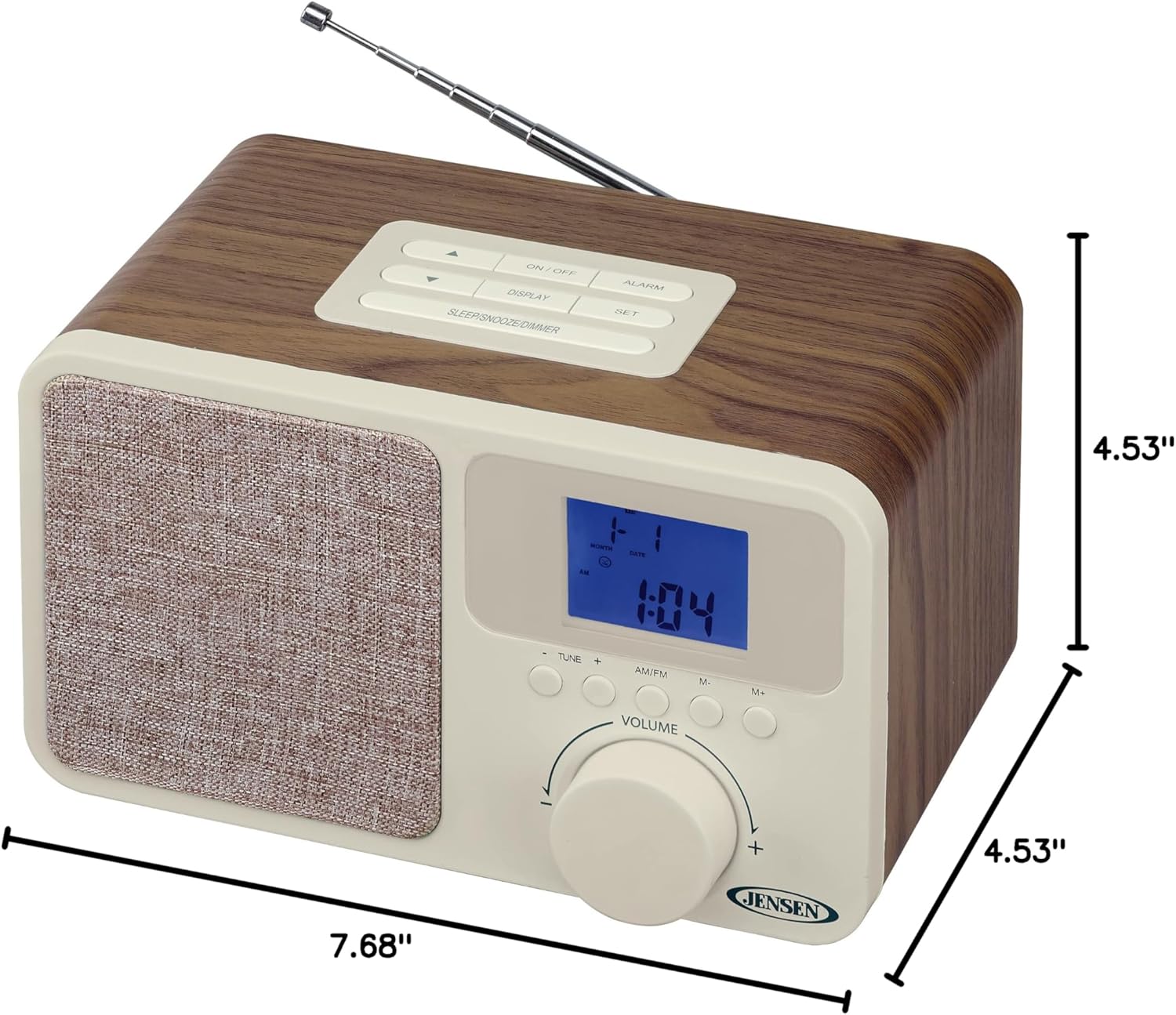
Image: The Jensen JCR-315 shown with its length (7.68"), width (4.53"), and height (4.53") dimensions clearly indicated.
Garanzija u Appoġġ
For warranty information, technical support, or service inquiries regarding your Jensen JCR-315 Digital AM/FM Dual Alarm Clock Radio, please refer to the warranty card included with your product or visit the official Jensen website. You may also find additional support resources by visiting the Jensen Store on Amazon.
Jekk jogħġbok żomm l-irċevuta tax-xiri tiegħek bħala prova tax-xiri għal kwalunkwe talba ta' garanzija.


